wechaty--wechaty
 wehub-resource-sync
38647a9340
wehub-resource-sync
38647a9340
Docker / Build (push) Has been cancelled
Coverage / build (push) Has been cancelled
Node.js CI / build (16, macos-latest) (push) Has been cancelled
Node.js CI / build (16, ubuntu-latest) (push) Has been cancelled
Node.js CI / build (16, windows-latest) (push) Has been cancelled
NPM / Build (22) (push) Has been cancelled
Docker / Publish (push) Has been cancelled
NPM / Pack (push) Has been cancelled
NPM / Publish (push) Has been cancelled
576 行
38 KiB
Markdown
576 行
38 KiB
Markdown
<!-- WEHUB_ZH_README -->
|
||
> [!NOTE]
|
||
> 本文档由 WeHub 基于上游 README 翻译整理,属于社区翻译,非官方中文文档。
|
||
> [English](./README.en.md) · [原始项目](https://github.com/wechaty/wechaty) · [上游 README](https://github.com/wechaty/wechaty/blob/HEAD/README.md)
|
||
> 原作者、版权与许可证归属以原始项目及本仓库 LICENSE 文件为准。
|
||
|
||
# Wechaty [](https://discord.gg/7q8NBZbQzt) [](https://www.npmjs.com/package/wechaty) [](https://github.com/wechaty/wechaty/actions?query=workflow%3ANPM) [](https://github.com/wechaty/wechaty/actions?query=workflow%3ADocker)
|
||
|
||
[](https://wechaty.js.org)
|
||
|
||
[Ship.Fail](https://ship.fail) [PreAngel](https://PreAngel.AI)
|
||
[](https://www.npmjs.com/package/wechaty)
|
||
[](https://github.com/wechaty/wechaty)
|
||
[](https://hub.docker.com/r/wechaty/wechaty/)
|
||
[](https://github.com/Chatie/tsconfig/issues/16)
|
||
|
||
[](https://wechaty.js.org/docs/polyglot/typescript/)
|
||
[](https://wechaty.js.org/docs/polyglot/typescript/)
|
||
[](https://wechaty.js.org/docs/polyglot/python/)
|
||
[](https://wechaty.js.org/docs/polyglot/go/)
|
||
[](https://wechaty.js.org/docs/polyglot/java/)
|
||
[](https://wechaty.js.org/docs/polyglot/dotnet/)
|
||
[](https://wechaty.js.org/docs/polyglot/php/)
|
||
[](https://wechaty.js.org/docs/polyglot/rust/)
|
||
[](https://wechaty.js.org/docs/polyglot/scala/)
|
||
|
||
[](https://wechaty.js.org/docs/puppet-providers/wechat)
|
||
[](https://wechaty.js.org/docs/puppet-providers/whatsapp)
|
||
|
||
<!--
|
||
[](https://wechaty.js.org/docs/puppet-providers/tiktok)
|
||
[](https://wechaty.js.org/docs/puppet-providers/line)
|
||
[](https://wechaty.js.org/docs/puppet-providers/telegram)
|
||
[](https://gitter.im/wechaty/wechaty?utm_source=badge&utm_medium=badge&utm_campaign=pr-badge)
|
||
[](https://gitter.im/wechaty/wechaty?utm_source=badge&utm_medium=badge&utm_campaign=pr-badge)
|
||
[](https://t.me/wechaty)
|
||
-->
|
||
|
||
## 电梯演讲
|
||
|
||
Wechaty 是一款对话式 RPA(Robotic Process Automation,机器人流程自动化)SDK,可简化聊天机器人(chatbot)的构建流程。它就像聊天机器人开发中的瑞士军刀,为 WhatsApp、WeChat 等众多消息平台提供统一接口。使用 Wechaty,你只需编写一次机器人代码,即可在任意受支持平台上运行。这意味着你可以专注于打造引人入胜的对话体验,而无需操心各平台 API 的底层复杂性。它是开源的、易于使用的,并有活跃社区支持,随时帮助你把聊天机器人想法变为现实。
|
||
|
||
## 连接聊天机器人
|
||
|
||
Wechaty 是一款面向 Chatbot 开发者的 RPA(Robotic Process Automation)SDK,可帮助你用 6 行 [JavaScript](https://GitHub.com/Wechaty/wechaty), [Python](https://GitHub.com/Wechaty/python-wechaty/), [Go](https://GitHub.com/Wechaty/go-wechaty/), 和 [Java](https://GitHub.com/Wechaty/java-wechaty/), 编写机器人,并支持跨平台运行,包括 [Linux、Windows、MacOS](https://github.com/wechaty/wechaty/actions?query=workflow%3ANPM), 和 [Docker](https://github.com/wechaty/wechaty/actions?query=workflow%3ADocker).
|
||
|
||
:spider_web: <https://wechaty.js.org>
|
||
:octocat: <https://github.com/Wechaty/wechaty>
|
||
:beetle: <https://github.com/Wechaty/wechaty/issues>
|
||
:book: <https://github.com/Wechaty/wechaty-getting-started>
|
||
:whale: <https://hub.docker.com/r/wechaty/wechaty>
|
||
|
||
## 突发新闻
|
||
|
||
- [重磅:绕过登录限制,wechaty免费版web协议重放荣光, @gengchen528, Apr 13, 2021](https://wechaty.js.org/2021/04/13/wechaty-uos-web/)
|
||
|
||
## 开发者之声
|
||
|
||
> "Wechaty 是一个很棒的解决方案;我相信会有更多用户认可它。" [link](https://github.com/Wechaty/wechaty/pull/310#issuecomment-285574472)
|
||
> — <cite>@Gcaufy,腾讯工程师,[WePY](https://github.com/Tencent/wepy) 作者</cite>
|
||
>
|
||
> "太好用,好用的想哭"
|
||
> — <cite>@xinbenlv,Google 工程师,HaoShiYou.org 创始人</cite>
|
||
>
|
||
> ”好用到哭“——你们对得起这个评价! [link](https://github.com/bigbrother666sh/shezhangbujianle#%E8%87%B4%E6%95%AC)
|
||
> — <cite>[@bigbrother666sh](https://github.com/bigbrother666sh), 《社长不见了》剧本杀 NPC DM 创作者</cite>
|
||
>
|
||
> "最好的微信开发库" [link](http://weibo.com/3296245513/Ec4iNp9Ld?type=comment)
|
||
> — <cite>@Jarvis,百度工程师</cite>
|
||
>
|
||
> "Wechaty 让运营人员有更多时间思考如何进行活动策划、留存用户和商业变现" [link](http://mp.weixin.qq.com/s/dWHAj8XtiKG-1fIS5Og79g)
|
||
> — <cite>@lijiarui,Juzi.BOT 创始人兼 CEO。</cite>
|
||
>
|
||
> "如果你会 js……那就试试 Wechaty。它很容易上手。"
|
||
> — <cite>@Urinx Uri Lee,[WeixinBot(Python)](https://github.com/Urinx/WeixinBot) 作者</cite>
|
||
>
|
||
> "Wechaty 是一个好项目;我希望它能继续下去!因此,我成为了 open collective 的贡献者。"
|
||
> — <cite>[@Simple](https://github.com/mrwhh)</cite>
|
||
|
||
更多内容见 [Wiki:Voice Of Developer](https://github.com/Wechaty/wechaty/wiki/Voice%20Of%20Developer)
|
||
|
||
### 在 Discord 加入我们
|
||
|
||
[](https://discord.gg/7q8NBZbQzt)
|
||
[](https://discord.gg/7q8NBZbQzt)
|
||
|
||
Wechaty 已被数千名开发者用于众多 ChatBot 项目。要与其他开发者交流,请扫描下方二维码,加入我们的 **Wechaty 开发者社区**。
|
||
|
||

|
||
|
||
立即扫码,因为其他 Wechaty 开发者也想和你交流!
|
||
|
||
### 资源
|
||
|
||
过去几年,Wechaty 已举办大量分享并收获诸多博客文章;以下是全部 Wechaty 资源:
|
||
|
||
- :video_camera: [Youtube Playlist:观看所有与 Wechaty 相关的演讲视频](https://www.youtube.com/playlist?list=PL8hd9KDTdarDXf_Rxtr8meKhxtgcXMInh)
|
||
- :page_with_curl: [完整文档](https://wechaty.js.org/)
|
||
- :bulb: [博客:看看开发者如何用 wechaty 打造精彩项目!](https://wechaty.github.io/)
|
||
- :beginner: [Wechaty-Getting-Started:开箱即用的 Wechaty 入门项目模板](https://github.com/wechaty/wechaty-getting-started)
|
||
- :tada: [Wechaty 贡献者名单:感谢他们的贡献!](https://github.com/wechaty/wechaty/wiki/Contributors)
|
||
- :gift: [Juzibot Support Wechaty:了解关于 Wechaty 的一切](https://github.com/juzibot/Welcome/wiki/Everything-about-Wechaty)
|
||
|
||
## :rocket: 全球最短的 ChatBot 代码:6 行 JavaScript
|
||
|
||
```javascript
|
||
|
||
import { WechatyBuilder } from 'wechaty'
|
||
|
||
const wechaty = WechatyBuilder.build() // get a Wechaty instance
|
||
wechaty
|
||
.on('scan', (qrcode, status) => console.log(`Scan QR Code to login: ${status}\nhttps://wechaty.js.org/qrcode/${encodeURIComponent(qrcode)}`))
|
||
.on('login', user => console.log(`User ${user} logged in`))
|
||
.on('message', message => console.log(`Message: ${message}`))
|
||
wechaty.start()
|
||
```
|
||
|
||
> **注意:Wechaty 需要 Node.js 版本 >= 16**
|
||
|
||
扫码登录后,该机器人可将所有消息记录到控制台。
|
||
|
||
你可以在 [examples/ding-dong-bot.ts](examples/ding-dong-bot.ts) 找到 Wechaty 官方示例,更多示例见我们的 [示例目录](https://github.com/Wechaty/wechaty-getting-started/blob/main/examples/).
|
||
|
||
## :checkered_flag: 环境要求
|
||
|
||
1. Node.js 版本 16+
|
||
1. NPM 版本 7+
|
||
1. TypeScript 版本 4.4+
|
||
|
||
## 快速入门
|
||
|
||
[](https://nodejs.org/)
|
||
|
||
- Wechaty 入门仓库(Starter Repository)- <https://github.com/wechaty/wechaty-getting-started>
|
||
|
||
我们为初学者提供了一个配置最简单的 Wechaty 入门仓库。在你完成 `clone` & `npm install` & `npm start` 后,它将**开箱即用(work)**。
|
||
|
||
如果你是 Wechaty 新手并想首次尝试,我们强烈建议你从这个仓库开始,并将其作为你项目的入门模板。
|
||
|
||
否则,请先将上述 _世界上最短的聊天机器人代码:6 行 JavaScript_ 示例保存到名为 `bot.js` 的文件中,然后才能使用 NPM 或 Docker 运行。
|
||
|
||
### 1. Npm
|
||
|
||
[](https://www.npmjs.com/package/wechaty)
|
||
[](https://www.npmjs.com/package/wechaty?activeTab=versions)
|
||
|
||
[](https://www.npmjs.com/package/wechaty)
|
||
[](https://packagephobia.now.sh/result?p=wechaty)
|
||
|
||
```shell
|
||
npm init
|
||
npm install wechaty
|
||
|
||
# create your first bot.js file, you can copy/paste from the above "The World's Shortest ChatBot Code: 6 lines of JavaScript"
|
||
# then:
|
||
node bot.js
|
||
```
|
||
|
||
### 2. Docker
|
||
|
||
[](https://hub.docker.com/r/wechaty/wechaty/)
|
||
[](https://microbadger.com/#/images/wechaty/wechaty)
|
||
|
||
- Wechaty Docker 入门仓库 - <https://github.com/wechaty/docker-wechaty-getting-started>
|
||
|
||
> Wechaty Docker 同时支持 JavaScript 和 TypeScript。要使用 TypeScript,只需用 TypeScript 编写并以扩展名 `.ts` 保存,无需编译,因为我们使用 `ts-node` 来运行。
|
||
|
||
2.1. 运行 JavaScript
|
||
|
||
```shell
|
||
# for JavaScript
|
||
docker run -ti --rm --volume="$(pwd)":/bot wechaty/wechaty bot.js
|
||
```
|
||
|
||
2.2. 运行 TypeScript
|
||
|
||
```shell
|
||
# for TypeScript
|
||
docker run -ti --rm --volume="$(pwd)":/bot wechaty/wechaty bot.ts
|
||
```
|
||
|
||
> 在 [Wiki:Docker](https://github.com/Wechaty/wechaty/wiki/Docker). 了解更多 Wechaty Docker 信息
|
||
|
||
### 3. 切换协议(Puppet)
|
||
|
||
Wechaty 功能强大,可在不同协议上运行。你可以通过将环境变量 `WECHATY_PUPPET` 设置为不同的 puppet 提供商(puppet provider)来指定协议。
|
||
|
||
如果你无法使用 Web 协议,可以按照此处的说明申请其他协议:<https://github.com/wechaty/wechaty/wiki/Support-Developers> 我们提供免费 token,以支持开发者构建有价值的微信聊天机器人。
|
||
|
||
目前我们支持以下 [puppet 提供商](https://wechaty.js.org/docs/puppet-services/) :
|
||
|
||
| 协议 | Puppet 提供商 | 环境变量 |
|
||
| --- | --- | --- |
|
||
| Web | [PuppetPuppeteer](https://github.com/wechaty/wechaty-puppet-puppeteer) | `export WECHATY_PUPPET=wechaty-puppet-puppeteer` |
|
||
| Windows | [PuppetWorkPro](https://github.com/RPAChat/workpro-getting-started) | `export WECHATY_PUPPET=wechaty-puppet-service` |
|
||
| Mock | [PuppetMock](https://github.com/wechaty/wechaty-puppet-mock) | `export WECHATY_PUPPET=wechaty-puppet-mock` |
|
||
| Web | [PuppetWechat4u](https://github.com/wechaty/wechaty-puppet-wechat4u) | `export WECHATY_PUPPET=wechaty-puppet-wechat4u` |
|
||
| iPad | [PuppetRock](https://github.com/wechaty/puppet-service-providers) | `export WECHATY_PUPPET=wechaty-puppet-service` |
|
||
| iPad | [PuppetPadLocal](https://github.com/wechaty/puppet-service-providers) | `export WECHATY_PUPPET=wechaty-puppet-service` |
|
||
| Windows | [PuppetDonut](https://github.com/wechaty/puppet-service-providers) | `export WECHATY_PUPPET=wechaty-puppet-service` |
|
||
| iPad | ~~PuppetPadpro~~ **DEPRECATED** | `export WECHATY_PUPPET=wechaty-puppet-padpro` |
|
||
| iPad | ~~PuppetPadchat~~ **DEPRECATED** | `export WECHATY_PUPPET=wechaty-puppet-padchat` |
|
||
| iPad | ~~PuppetPadplus~~ **DEPRECATED** | `export WECHATY_PUPPET=wechaty-puppet-padplus` |
|
||
| Mac | ~~PuppetMacpro~~ **DEPRECATED** | `export WECHATY_PUPPET=wechaty-puppet-macpro` |
|
||
| Windows | ~~PuppetWxwork~~ **DEPRECATED** | `export WECHATY_PUPPET=wechaty-puppet-service` |
|
||
|
||
在 Puppet Wiki 中了解更多 Wechaty Puppet 信息:
|
||
|
||
1. Puppet 目录:<https://github.com/Wechaty/wechaty-puppet/wiki/Directory>
|
||
1. Puppet 兼容性:<https://github.com/Wechaty/wechaty-puppet/wiki/Compatibility>
|
||
|
||
## :guitar: API
|
||
|
||
阅读完整文档:[Wechaty 官方 API 参考](https://wechaty.github.io/wechaty/)
|
||
|
||
### 1 Class `Wechaty`
|
||
|
||
主机器人类。
|
||
|
||
`Bot` 是一个 Wechaty 实例,用于控制特定的 [wechaty-puppet](https://wechaty.js.org/docs/specifications/puppet/).
|
||
|
||
- `new Wechaty(options?: WechatyOptions)`
|
||
1. `options.name?: string` 该机器人的名称(可选)
|
||
2. `options.puppet?: string` 选择要使用的 puppet 提供商,必须是以下之一:
|
||
1. [wechaty-puppet-wechat](https://github.com/Wechaty/wechaty-puppet-wechat) - Web 微信的 Angular Hook
|
||
2. [wechaty-puppet-wechat4u](https://github.com/Wechaty/wechaty-puppet-wechat4u) - Web 微信的 HTTP API
|
||
3. [wechaty-puppet-padpro](https://github.com/botorange/wechaty-puppet-padpro) - iPad 应用协议
|
||
4. [wechaty-puppet-ioscat](https://github.com/linyimin-bupt/wechaty-puppet-ioscat) - iPhone 应用 Hook
|
||
5. [wechaty-puppet-mock](https://github.com/Wechaty/wechaty-puppet-mock) - 用于测试的 Mock
|
||
3. `options.puppetOptions?: PuppetOptions` puppet 提供商的选项。
|
||
|
||
| Wechaty | API | 说明 |
|
||
| :--- | :--- | :--- |
|
||
| event | [`login`](https://wechaty.github.io/wechaty/#Wechaty+on) | 机器人完全登录成功后触发 |
|
||
| event | [`logout`](https://wechaty.github.io/wechaty/#Wechaty+on) | 机器人登出后触发 |
|
||
| event | [`friendship`](https://wechaty.github.io/wechaty/#Wechaty+on) | 有人向机器人发送好友请求时触发|
|
||
| event | [`message`](https://wechaty.github.io/wechaty/#Wechaty+on) | 有新消息时触发 |
|
||
| event | [`room-join`](https://wechaty.github.io/wechaty/#Wechaty+on) | 有人加入任何群聊时触发 |
|
||
| event | [`room-topic`](https://wechaty.github.io/wechaty/#Wechaty+on) | 有人修改群聊主题时触发 |
|
||
| event | [`room-leave`](https://wechaty.github.io/wechaty/#Wechaty+on) | 有人离开群聊时触发 |
|
||
| event | [`room-invite`](https://wechaty.github.io/wechaty/#Wechaty+on) | 收到群聊邀请时触发 |
|
||
| event | [`scan`](https://wechaty.github.io/wechaty/#Wechaty+on) | 机器人需要显示供扫描的二维码时触发 |
|
||
| method | [`start(): Promise<void>`](https://wechaty.github.io/wechaty/#Wechaty+start) | 启动机器人 |
|
||
| method | [`stop(): Promise<void>`](https://wechaty.github.io/wechaty/#Wechaty+stop) | 停止机器人 |
|
||
| method | [`logonoff(): boolean`](https://wechaty.github.io/wechaty/#Wechaty+logonoff) | 机器人登录状态 |
|
||
| method | [`logout(): Promise<void>`](https://wechaty.github.io/wechaty/#Wechaty+logout) | 登出机器人 |
|
||
| method | [`currentUser(): ContactSelf`](https://wechaty.github.io/wechaty/#Wechaty+currentUser) | 获取已登录的机器人联系人 |
|
||
| method | [`say(text: string): Promise<void>`](https://wechaty.github.io/wechaty/#Wechaty+say) | 让机器人向自己发送 `text` |
|
||
|
||
### 2 Class `Contact`
|
||
|
||
所有微信联系人(好友/非好友)都将封装为 Contact。
|
||
|
||
| Contact | API | 说明 |
|
||
| :--- | :--- | :--- |
|
||
| static | [`find(query: string): Promise<null \| Contact>`](https://wechaty.github.io/wechaty/#Contact.find) | 按名称或备注查找联系人,若结果多于一个则返回第一个。 |
|
||
| static | [`findAll(query: string): Promise<Contact[]>`](https://wechaty.github.io/wechaty/#Contact.findAll) | 通过 `name` 或 `alias` 查找联系人 |
|
||
| static | [`load(query: string): Contact`](https://wechaty.github.io/wechaty/#Contact.load) | 通过 id 获取联系人 |
|
||
| property | `id: readonly string` | 获取联系人 id |
|
||
| method | [`sync(): Promise<void>`](https://wechaty.github.io/wechaty/#Contact+sync) | 强制重新加载联系人数据,再次从底层 API 同步数据|
|
||
| method | [`say(text: string): Promise<void \| Message>`](https://wechaty.github.io/wechaty/#Contact+say) | 向联系人发送文本、Contact 或文件,返回机器人发送的消息(仅支持 `puppet-padplus`)。 |
|
||
| method | [`self(): boolean`](https://wechaty.github.io/wechaty/#Contact+self) | 检查联系人是否为自身 |
|
||
| method | [`name(): string`](https://wechaty.github.io/wechaty/#Contact+name) | 获取联系人姓名 |
|
||
| method | [`alias(): Promise<string>`](https://wechaty.github.io/wechaty/#Contact+alias) | 获取联系人备注 |
|
||
| method | [`alias(newAlias: string): Promise<void>`](https://wechaty.github.io/wechaty/#Contact+alias) | 设置或删除联系人备注 |
|
||
| method | [`friend(): boolean`](https://wechaty.github.io/wechaty/#Contact+friend) | 检查联系人是否为好友 |
|
||
| method | [`type(): ContactType`](https://wechaty.github.io/wechaty/#Contact+type) | 返回 Contact 的类型 |
|
||
| method | [`province(): string`](https://wechaty.github.io/wechaty/#Contact+province) | 从联系人获取地区「省份」 |
|
||
| method | [`city(): string`](https://wechaty.github.io/wechaty/#Contact+city) | 从联系人获取地区「城市」 |
|
||
| method | [`avatar(): Promise<FileBox>`](https://wechaty.github.io/wechaty/#Contact+avatar) | 获取头像图片文件流 |
|
||
| method | [`gender(): ContactGender`](https://wechaty.github.io/wechaty/#Contact+gender) | 获取联系人性别 |
|
||
|
||
#### 2.1 类 `ContactSelf`
|
||
|
||
类 `ContactSelf` 继承自 `Contact`。
|
||
|
||
| ContactSelf | API | 描述 |
|
||
| :--- | :--- | :--- |
|
||
| method | [`avatar(file: FileBox): Promise<void>`](https://wechaty.github.io/wechaty/#ContactSelf+avatar) | 为机器人设置头像 |
|
||
| method | [`qrcode(): Promise<string>`](https://wechaty.github.io/wechaty/#ContactSelf+qrcode) | 获取机器人的二维码 |
|
||
| method | [`signature(text: string): Promise<void>`](https://wechaty.github.io/wechaty/#ContactSelf+signature) | 为机器人设置个性签名 |
|
||
|
||
#### 2.2 类 `Friendship`
|
||
|
||
发送、接收好友请求及好友确认相关事件。
|
||
|
||
| Friendship | API | 描述 |
|
||
| :--- | :--- | :--- |
|
||
| static | [`add(contact: Contact, hello?: string): Promise<void>`](https://wechaty.github.io/wechaty/#Friendship.add) | 向联系人发送好友邀请 |
|
||
| method | [`accept(): Promise<void>`](https://wechaty.github.io/wechaty/#Friendship+accept) | 接受好友请求 |
|
||
| method | [`hello(): string`](https://wechaty.github.io/wechaty/#Friendship+hello) | 从好友邀请中获取问候语字符串 |
|
||
| method | [`contact(): Contact`](https://wechaty.github.io/wechaty/#Friendship+contact) | 从好友关系中获取联系人 |
|
||
| method | [`type(): FriendshipType`](https://wechaty.github.io/wechaty/#Friendship+type) | 返回好友类型(unknown、confirm、receive、verify) |
|
||
|
||
### 3 类 `Message`
|
||
|
||
所有微信消息都将封装为 Message。
|
||
|
||
| Message | API | 描述 |
|
||
| :--- | :--- | :--- |
|
||
| static | [`find(query: string): Promise<null \| Message>`](https://wechaty.github.io/wechaty/#Message.find) | 在缓存中查找消息并返回第一条 |
|
||
| static | [`findAll(query: string): Promise<Message[]>`](https://wechaty.github.io/wechaty/#Message.findAll) | 在缓存中查找消息,返回消息列表 |
|
||
| method | [`from(): Contact`](https://wechaty.github.io/wechaty/#Message+from) | 从消息中获取发送者 |
|
||
| method | [`to(): Contact`](https://wechaty.github.io/wechaty/#Message+to) | 获取消息的目标对象 |
|
||
| method | [`room(): null \| Room`](https://wechaty.github.io/wechaty/#Message+room) | 从消息中获取群聊。(如果消息不在群聊中,则返回 `null`) |
|
||
| method | [`text(): string`](https://wechaty.github.io/wechaty/#Message+text) | 获取消息的文本内容 |
|
||
| method | [`say(text: string): Promise<void \| Message>`](https://wechaty.github.io/wechaty/#Message+say) | 向发送者回复文本、媒体文件或联系人消息,返回机器人发送的消息(仅支持 `puppet-padplus`)。 |
|
||
| method | [`type(): MessageType`](https://wechaty.github.io/wechaty/#Message+type) | 从消息中获取类型 |
|
||
| method | [`self(): boolean`](https://wechaty.github.io/wechaty/#Message+self) | 检查消息是否由自己发送 |
|
||
| method | [`mention(): Contact[]`](https://wechaty.github.io/wechaty/#Message+mention) | 获取消息中 @ 提及的联系人列表。 |
|
||
| method | [`mentionSelf(): boolean`](https://wechaty.github.io/wechaty/#Message+mentionSelf) | 检查消息是否 @ 提及自己 |
|
||
| method | [`forward(to: Contact): Promise<void>`](https://wechaty.github.io/wechaty/#Message+forward) | 转发收到的消息 |
|
||
| method | [`age(): number`](https://wechaty.github.io/wechaty/#Message+age) | 自创建以来经过的秒数 |
|
||
| method | [`date(): Date`](https://wechaty.github.io/wechaty/#Message+date) | 创建时间 |
|
||
| method | [`toFileBox(): Promise<FileBox>`](https://wechaty.github.io/wechaty/#Message+toFileBox) | 从 Message 中提取媒体文件,并放入 FileBox。 |
|
||
| method | [`toContact(): Promise<Contact>`](https://wechaty.github.io/wechaty/#Message+toContact) | 获取消息的分享卡片 |
|
||
|
||
### 4 类 `Room`
|
||
|
||
所有微信群聊(群组)都将封装为 Room。
|
||
|
||
| Room | API | 描述 |
|
||
| :--- | :--- | :--- |
|
||
| static | [`create(contactList: Contact[], topic?: string): Promise<Room>`](https://wechaty.github.io/wechaty/#Room.create) | 创建新群聊 |
|
||
| static | [`find(query: string): Promise<null \| Room>`](https://wechaty.github.io/wechaty/#Room.find) | 尝试通过筛选条件查找群聊。若找到多个,则返回第一个。 |
|
||
| static | [`findAll(query: string): Promise<Room[]>`](https://wechaty.github.io/wechaty/#Room.findAll) | 查找群聊中的所有联系人 |
|
||
| static | [`load(query: string): Room`](https://wechaty.github.io/wechaty/#Room.load) | 通过群聊 ID 加载群聊 |
|
||
| property | `id: readonly string` | |
|
||
| event | [`join`](https://wechaty.github.io/wechaty/#Room+on) | 当有人加入任意群聊时触发 |
|
||
| event | [`topic`](https://wechaty.github.io/wechaty/#Room+on) | 当有人修改群聊名称时触发 |
|
||
| event | [`leave`](https://wechaty.github.io/wechaty/#Room+on) | 当有人离开群聊时触发 |
|
||
| event | [`invite`](https://wechaty.github.io/wechaty/#Room+on) | 当收到群聊邀请时触发 |
|
||
| method | [`sync(): <Promise<void>`](https://wechaty.github.io/wechaty/#Room+sync) | 强制重新加载群聊数据,再次从底层 API 同步数据。 |
|
||
| method | [`say(text: string): Promise<void \| Message>`](https://wechaty.github.io/wechaty/#Room+say) | 在 Room 内发送文本、媒体文件、联系人名片,或带 @ 提及联系人的文本,返回机器人发送的消息(仅支持 `puppet-padplus`)。 |
|
||
| method | [`add(contact: Contact): Promise<void>`](https://wechaty.github.io/wechaty/#Room+add) | 向群聊中添加联系人 |
|
||
| method | [`del(contact: Contact): Promise<void>`](https://wechaty.github.io/wechaty/#Room+del) | 从群聊中删除联系人 |
|
||
| method | [`quit(): Promise<void>`](https://wechaty.github.io/wechaty/#Room+quit) | 机器人自行退出群聊 |
|
||
| method | [`topic(): Promise<string>`](https://wechaty.github.io/wechaty/#Room+topic) | 从群聊获取群名称 |
|
||
| method | [`topic(newTopic: string): Promise<void>`](https://wechaty.github.io/wechaty/#Room+topic) | 设置群聊的群名称 |
|
||
| method | [`announce(text: string): Promise<void>`](https://wechaty.github.io/wechaty/#Room+announce) | 设置/获取群聊公告 |
|
||
| method | [`qrcode(): Promise<string>`](https://wechaty.github.io/wechaty/#Room+qrcode) | 从群聊获取群二维码,可用于扫码加入群聊。 |
|
||
| method | [`alias(contact: Contact): Promise<string>`](https://wechaty.github.io/wechaty/#Room+alias) | 返回联系人在群聊中的群昵称(roomAlias) |
|
||
| method | [`roomAlias(contact: Contact): Promise<string \| null>`](https://wechaty.github.io/wechaty/#Room+roomAlias) | 与 alias 函数相同 |
|
||
| method | [`has(contact: Contact): Promise<boolean>`](https://wechaty.github.io/wechaty/#Room+has) | 检查群聊是否包含成员 `contact` |
|
||
| method | [`memberAll(query?: string): Promise<Contact[]>`](https://wechaty.github.io/wechaty/#Room+memberAll) | 查找群聊中的所有联系人,或按特定名称查找 |
|
||
| method | [`member(query: string): Promise<null \| Contact>`](https://wechaty.github.io/wechaty/#Room+member) | 查找群聊中的联系人,若找到多个,则返回第一个。 |
|
||
| method | [`memberList():Promise<Contact[]>`](https://wechaty.github.io/wechaty/#Room+memberList) | 从群聊获取所有群成员 |
|
||
| method | [`owner(): null \| Contact`](https://wechaty.github.io/wechaty/#Room+owner) | 从群聊获取群主。 |
|
||
|
||
#### 4.1 类 `RoomInvitation`
|
||
|
||
接受群聊邀请
|
||
|
||
| RoomInvitation | API | 描述 |
|
||
| :--- | :--- | :--- |
|
||
| method | [`accept(): Promise<void>`](https://wechaty.github.io/wechaty/#RoomInvitation+accept) | 接受群聊邀请 |
|
||
| method | [`inviter(): Contact`](https://wechaty.github.io/wechaty/#RoomInvitation+inviter) | 从群聊邀请中获取邀请人 |
|
||
| method | [`roomTopic(): Promise<string>`](https://wechaty.github.io/wechaty/#RoomInvitation+inviter) | 从群聊邀请中获取群名称 |
|
||
| method | [`date(): Promise<Date>`](https://wechaty.github.io/wechaty/#RoomInvitation+date) | 创建时间 |
|
||
| method | [`age(): Promise<number>`](https://wechaty.github.io/wechaty/#RoomInvitation+age) | 自创建以来经过的秒数 |
|
||
|
||
## TEST
|
||
|
||
[](https://github.com/wechaty/wechaty/actions?query=workflow%3ANPM)
|
||
[](https://github.com/wechaty/wechaty/actions?query=workflow%3ADocker)
|
||
[](https://coveralls.io/github/wechaty/wechaty?branch=main)
|
||
|
||
[](https://snyk.io/test/github/Wechaty/wechaty)
|
||
|
||
Wechaty 通过单元测试和集成测试实现了全自动测试,并借助 Travis、Shippable、Appveyor 等 CI 提供持续集成与持续交付(Continuous Integration & Continuous Delivery,CI/CD)支持。
|
||
|
||
要测试 Wechaty,请运行:
|
||
|
||
```shell
|
||
npm test
|
||
```
|
||
|
||
更多测试信息请参阅 [Wiki:Tests](https://github.com/Wechaty/wechaty/wiki/Tests)
|
||
|
||
## 创建 WECHATY 插件
|
||
|
||
创建并发布 Wechaty 插件(Plugin)非常简单。只需将模块导出为一个接受 1 个参数 wechaty 的函数。当你的插件被 Wechaty 导入时,它会将自身作为参数传入,因此你可以自由添加 Wechaty 支持的任何配置。
|
||
|
||
```ts
|
||
import { WechatyPlugin } from 'wechaty'
|
||
|
||
export default const MyPlugin: WechatyPlugin = (wechaty: Wechaty) => {
|
||
// ...
|
||
}
|
||
```
|
||
|
||
`config` 的存在是为了让用户可以向你的插件传入自定义配置。在编写 Wechaty 插件文档时,你应为用户列出所支持的配置项。
|
||
|
||
参见:
|
||
|
||
1. [Wechaty Plugin Support with KickOut Example #1939](https://github.com/wechaty/wechaty/issues/1939)
|
||
1. [Wechaty Plugins Contrib](https://github.com/wechaty/wechaty-plugin-contrib)
|
||
|
||
## :pencil: 发布说明
|
||
|
||
- [Latest Release](https://github.com/Wechaty/wechaty/releases/latest)(All 的版本发布见[此处](https://github.com/Wechaty/wechaty/releases))
|
||
- [Changelog](https://github.com/Wechaty/wechaty/blob/main/CHANGELOG.md)
|
||
|
||
### :saxophone: 自 2019 年 2 月 15 日起的访问量
|
||
|
||
[](http://hits.dwyl.io/wechaty/wechaty)
|
||
|
||
## :sparkling_heart: POWERED BY WECHATY
|
||
|
||
[](https://wechaty.js.org)
|
||
|
||
### :sparkles: Wechaty 徽章
|
||
|
||
```markdown
|
||
[](https://wechaty.js.org)
|
||
```
|
||
|
||
更多嵌入用的 HTML/Markdown 代码请参阅 [Wiki:Badge](https://github.com/wechaty/wechaty/wiki/Badge)
|
||
|
||
### :star2: 使用 Wechaty 的项目
|
||
|
||
1. [一个用CNN深度神经网络给图片评分的wechaty项目](https://github.com/huyingxi/wechaty_selfie)
|
||
2. [Telegram 与 WeChat 之间的消息中转](https://github.com/Firaenix/TeleChatRelay)
|
||
3. [管理 haoshiyou.org 志愿者运营的 HaoShiYou 微信群的聊天机器人](https://github.com/xinbenlv/haoshiyou-bot)
|
||
4. [用于管理 TODO 列表的交互式聊天机器人](https://github.com/coderbunker/candobot)
|
||
5. [将微信消息转发到 Telegram](https://github.com/luosheng/Wegram)
|
||
6. [koa与wechaty实现的微信小助手,可定时提醒与发消息设定定时任务](https://github.com/gengchen528/wechat-assistant)
|
||
7. [Wechaty Pay - 让线上没有难做的生意](https://github.com/coderwhocode/wechaty-pay)
|
||
8. [开源社的微信机器人项目](https://github.com/kaiyuanshe/wechat-robot)
|
||
|
||
欢迎提交 Pull Request 添加你的项目!
|
||
|
||
了解更多使用 Wechaty 的项目,请参阅 [Wiki:Projects Using Wechaty](https://github.com/wechaty/wechaty/wiki/Projects-Using-Wechaty)
|
||
|
||
## :innocent: 选择合适的服务器
|
||
|
||
运行 Wechaty Docker/NPM 的最佳实践是使用中国境外的 VPS(Virtual Private Server,虚拟专用服务器),这能为你节省大量时间,因为 `npm install` 和 `docker pull` 可以顺利运行,不会遇到任何问题。
|
||
|
||
以下 VPS 提供商已被 Wechaty 团队使用,并在生产环境中表现完美。你可以通过以下链接在几分钟内完成购买。此外,通过我们的推荐链接购买也能支持 Wechaty 项目。
|
||
|
||
| 地区 | 价格 | 内存 | 支付方式 | 提供商 |
|
||
| --- | --- | --- | --- | --- |
|
||
| Singapore | $5 | 512MB | Paypal | [DigitalOcean](https://m.do.co/c/01a54778df5c) |
|
||
| Japan | $5 | 1GB | Paypal | [Linode](https://www.linode.com/?r=5fd2b713d711746bb5451111df0f2b6d863e9f63) |
|
||
| Korea | $10 | 1GB | Alipay, Paypal | [Netdedi](https://www.netdedi.com/?affid=35) |
|
||
| Singapore | $3.5 | 512MB | Alipay, Wechat | [Vultr](https://www.vultr.com/?ref=6986613) |
|
||
|
||
## :notes: 另请参阅
|
||
|
||
- [RelatedProject](https://github.com/Wechaty/wechaty/wiki/RelatedProject)
|
||
|
||
## :poop: 起源故事
|
||
|
||
2017 年……
|
||
|
||
Huan 的日常生活/工作极度依赖微信聊天。
|
||
|
||
- 2014 年 5 月,微信好友接近 14,000 人——当时微信尚未将好友总数限制为 5,000。
|
||
- 近 400 个微信群,其中大多数成员超过 400 人。
|
||
|
||
你能想象吗?他快撑不住了……
|
||
|
||
因此,迫切需要一台在微信上 24x7 为我工作的不知疲倦的机器人,用于监控/筛选最重要的消息。例如,它会高亮包含他想跟进的关键词(KEYWORDS)的讨论(尤其在嘈杂的群里)。;-)
|
||
|
||
最终,它是为 Huan 个人学习「自动化测试」(Automatically Testing)的目的而构建的。
|
||
|
||
## 随时间变化的 Star 数
|
||
|
||
[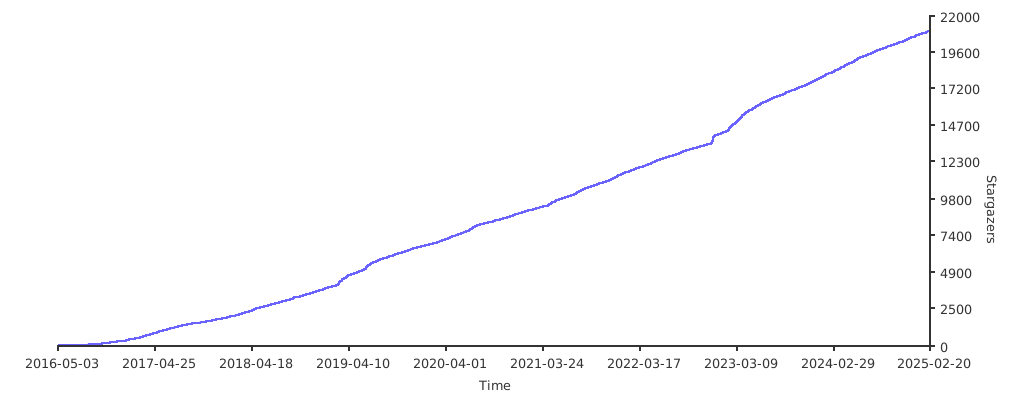](https://starchart.cc/wechaty/wechaty)
|
||
|
||
## :two_hearts: 贡献者
|
||
|
||
[](https://github.com/Wechaty/wechaty/issues)
|
||
[](https://github.com/Wechaty/wechaty/pulls)
|
||
[](https://opencollective.com/wechaty/)
|
||
[](https://opencollective.com/wechaty/)
|
||
|
||
[](https://sourcerer.io/fame/huan/wechaty/wechaty/links/0)
|
||
[](https://sourcerer.io/fame/huan/wechaty/wechaty/links/1)
|
||
[](https://sourcerer.io/fame/huan/wechaty/wechaty/links/2)
|
||
[](https://sourcerer.io/fame/huan/wechaty/wechaty/links/3)
|
||
[](https://sourcerer.io/fame/huan/wechaty/wechaty/links/4)
|
||
[](https://sourcerer.io/fame/huan/wechaty/wechaty/links/5)
|
||
[](https://sourcerer.io/fame/huan/wechaty/wechaty/links/6)
|
||
[](https://sourcerer.io/fame/huan/wechaty/wechaty/links/7)
|
||
|
||
本项目的存在离不开所有贡献者的付出。[[参与贡献](CONTRIBUTING.md)]。
|
||
|
||
-----
|
||
|
||
[](https://github.com/Wechaty/wechaty/graphs/contributors)
|
||
|
||
## :sunglasses: 支持者
|
||
|
||
[](#sunglasses-backers)
|
||
|
||
感谢所有支持者!🙏 [[成为支持者](https://opencollective.com/wechaty#backer)]
|
||
|
||
[](https://opencollective.com/wechaty#backers)
|
||
|
||
## :smirk: 赞助者
|
||
|
||
[](#smirk-sponsors)
|
||
|
||
成为赞助者以支持本项目。你的 Logo 将显示在此处,并附带指向你网站的链接。[[成为赞助者](https://opencollective.com/wechaty#sponsor)]
|
||
|
||
[](https://opencollective.com/wechaty/#sponsor)
|
||
|
||
## 多语言 Wechaty
|
||
|
||
[](https://github.com/wechaty/python-wechaty)
|
||
[](https://github.com/wechaty/go-wechaty)
|
||
[](https://github.com/wechaty/java-wechaty)
|
||
[](https://github.com/wechaty/scala-wechaty)
|
||
[](https://github.com/wechaty/php-wechaty)
|
||
[](https://github.com/wechaty/dotnet-wechaty)
|
||
|
||
- [Wechaty](https://github.com/wechaty/wechaty) - 面向 Chatbot 开发者的 RPA SDK(TypeScript)
|
||
- [Python Wechaty](https://github.com/wechaty/python-wechaty) - 使用 Python 编写的面向 Chatbot 开发者的 RPA SDK
|
||
- [Go Wechaty](https://github.com/wechaty/go-wechaty) - 使用 Go 编写的面向 Chatbot 开发者的 RPA SDK
|
||
- [Java Wechaty](https://github.com/wechaty/java-wechaty) - 使用 Java(Kotlin) 编写的面向 Chatbot 开发者的 RPA SDK
|
||
- [Scala Wechaty](https://github.com/wechaty/scala-wechaty) - 使用 Scala 编写的面向 Chatbot 开发者的 RPA SDK
|
||
- [PHP Wechaty](https://github.com/wechaty/php-wechaty) - 使用 PHP 编写的面向 Chatbot 开发者的 RPA SDK
|
||
- [.Net(C#) Wechaty](https://github.com/wechaty/dotnet-wechaty) - 使用 .NET(C#) 编写的面向 Chatbot 开发者的 RPA SDK
|
||
|
||
## 历史
|
||
|
||
### main v1.11(2021 年 11 月 22 日)
|
||
|
||
正在对 Wechaty 生态系统进行 reduxify,以应用 CQRS 模式。
|
||
|
||
### v1.10(2021 年 11 月 21 日)
|
||
|
||
Wechaty 的第二次 beta 发布,生态系统中所有 npm 模块均为 v1.10 版本(wechaty-puppet、wechaty-puppet-service 等)
|
||
|
||
### v1.0(2021 年 9 月)
|
||
|
||
- Wechaty v1.0 发布是 Wechaty 的首次 beta 发布。
|
||
|
||
### v0.69
|
||
|
||
1. v0.69:支持 ES Modules(同时兼容 CJS)([#2232](https://github.com/wechaty/wechaty/issues/2232))
|
||
|
||
### v0.68(2021 年 8 月 27 日)
|
||
|
||
1. 支持 TLS ([#2231](https://github.com/wechaty/wechaty/issues/2231))
|
||
1. 最新的 CommonJS 版本
|
||
|
||
## 创建者
|
||
|
||
1. [Huan](https://github.com/huan) [(LinkedIn)](http://linkedin.com/in/huan42), 🐧 腾讯 Chatbot TVP・🤖 Chatie 架构师・⭐️ GitHub Star・🚀 YC W19・🌐 Microsoft RD & AI MVP・🦾 Google ML GDE・🤠 连续创业者・🔥 Burner
|
||
1. [Rui(李佳芮)](https://pre-angel.com/peoples/jiarui-li/), Microsoft AI MVP & RD,[Juzi.BOT](https://www.juzibot.com/) 联合创始人兼 CEO(YC W19 校友)
|
||
|
||
[](https://stackoverflow.com/users/1123955/huan)
|
||
|
||
## 引用 Wechaty
|
||
|
||
在出版物中引用本项目:
|
||
|
||
```bibtex
|
||
@misc{Wechaty,
|
||
author = {Huan Li, Rui Li},
|
||
title = {Wechaty: Conversational SDK for Chatbot Makers},
|
||
year = {2016},
|
||
publisher = {GitHub},
|
||
journal = {GitHub Repository},
|
||
howpublished = {\url{https://github.com/wechaty/wechaty}},
|
||
}
|
||
```
|
||
|
||
## 版权与许可证
|
||
|
||
- 代码与文档 © 2016-至今 Huan、Rui 及 Wechaty 社区贡献者
|
||
- 代码基于 Apache-2.0 License 发布
|
||
- 文档基于 Creative Commons 发布
|