项目文件夹
 wehub-resource-sync
Note
本文档由 WeHub 基于上游 README 翻译整理,属于社区翻译,非官方中文文档。
English · 原始项目 · 上游 README
原作者、版权与许可证归属以原始项目及本仓库 LICENSE 文件为准。




 文本是多么容易生成,
↬ᔐᖜ↬ 而实际上要解析并使用它却又多么困难?
import nlp from 'compromise'

let doc = nlp('she sells seashells by the seashore.')
doc.verbs().toPastTense()
doc.text()
// 'she sold seashells by the seashore.'
if (doc.has('simon says #Verb')) {
  return true
}
let doc = nlp(entireNovel)
doc.match('the #Adjective of times').text()
// "the blurst of times?"

并获取数据:
import plg from 'compromise-speech'
nlp.extend(plg)

let doc = nlp('Milwaukee has certainly had its share of visitors..')
doc.compute('syllables')
doc.places().json()
/*
[{
  "text": "Milwaukee",
  "terms": [{
    "normal": "milwaukee",
    "syllables": ["mil", "wau", "kee"]
  }]
}]
*/
避免脆弱解析器带来的问题:
let doc = nlp("we're not gonna take it..")

doc.has('gonna') // true
doc.has('going to') // true (implicit)

// transform
doc.contractions().expand()
doc.text()
// 'we are not going to take it..'
并像操作数据一样随意摆弄内容:
let doc = nlp('ninety five thousand and fifty two')
doc.numbers().add(20)
doc.text()
// 'ninety five thousand and seventy two'
——因为它实际上就是数据——
let doc = nlp('the purple dinosaur')
doc.nouns().toPlural()
doc.text()
// 'the purple dinosaurs'
在客户端使用:
<script src="https://unpkg.com/compromise"></script>
<script>
  var doc = nlp('two bottles of beer')
  doc.numbers().minus(1)
  document.body.innerHTML = doc.text()
  // 'one bottle of beer'
</script>
或者同样地:
import nlp from 'compromise'

var doc = nlp('London is calling')
doc.verbs().toNegative()
// 'London is not calling'
compromise 约为 ~250kb(minified):

它相当快,可在按键时运行:

它主要通过为基础词表做全部词形变化(conjugating all forms)来实现。
最终词库约为 ~14,000 words:
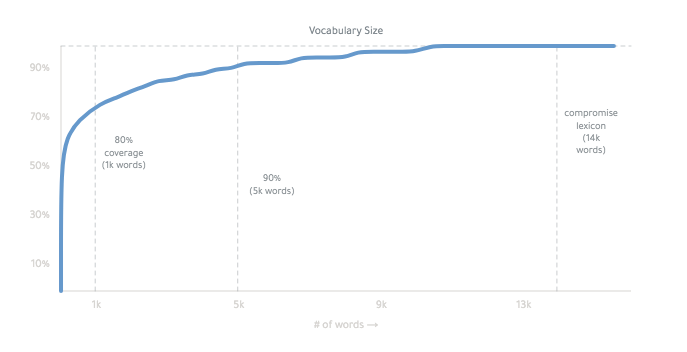
你可以在这里. 了解更多工作原理——挺奇怪的。
好吧 —
compromise/one
对单词、句子和标点进行 tokenizer(分词器)。
import nlp from 'compromise/one'

let doc = nlp("Wayne's World, party time")
let data = doc.json()
/* [{
  normal:"wayne's world party time",
    terms:[{ text: "Wayne's", normal: "wayne" },
      ...
      ]
  }]
*/
compromise/one 会把文本拆分,并封装为便捷的 API,
-
除此之外不做其他事 —
/one 很快——大多数句子只需十分之一毫秒。
它每秒可处理 ~1mb 文本——相当于 10 个 Wikipedia 页面。
Infinite jest 需要 3 秒。
compromise/two
part-of-speech(词性)标注器与语法解释器。
import nlp from 'compromise/two'

let doc = nlp("Wayne's World, party time")
let str = doc.match('#Possessive #Noun').text()
// "Wayne's World"
这有时比人们意识到的更有用。
轻量语法有助于你编写更清晰的模板,并更接近信息本身。
compromise 拥有 83 tags,排列在 一张美观的图谱中。
#FirstName → #Person → #ProperNoun → #Noun
运行 doc.debug() 即可查看每个词的语法
使用 nlp.verbose('tagger') 可查看每个标签的推理过程。
如果你更喜欢 Penn tags,可以这样派生:
let doc = nlp('welcome thrillho')
doc.compute('penn')
doc.json()
compromise/three
Phrase 与句子工具集。
import nlp from 'compromise/three'

let doc = nlp("Wayne's World, party time")
let str = doc.people().normalize().text()
// "wayne"
compromise/three 是一套用于聚焦文本片段并进行操作的工具。
例如,.numbers() 会抓取文档中的所有数字,并通过 .subtract() 等方法进行扩展。
当你有一个短语或词组时,可用 .json() 查看其附加元数据
let doc = nlp('four out of five dentists')
console.log(doc.fractions().json())
/*[{
    text: 'four out of five',
    terms: [ [Object], [Object], [Object], [Object] ],
    fraction: { numerator: 4, denominator: 5, decimal: 0.8 }
  }
]*/
let doc = nlp('$4.09CAD')
doc.money().json()
/*[{
    text: '$4.09CAD',
    terms: [ [Object] ],
    number: { prefix: '$', num: 4.09, suffix: 'cad'}
  }
]*/
API
Compromise/one
输出
- .text() - 以文本形式返回文档
- .json() - 以数据形式返回文档
- .debug() - 漂亮打印已解析的文档
- .out() - 具名或自定义输出
- .html({}) - 为匹配项输出自定义 HTML 标签
- .wrap({}) - 为文档匹配项生成自定义输出
工具
- .found [getter] - 该文档是否为空?
- .docs [getter] 以 json 形式获取 term 对象
- .length [getter] - 统计文档中的字符数(字符串长度)
- .isView [getter] - 识别 compromise 对象
- .compute() - 对文档运行具名分析
- .clone() - 深拷贝文档,使不留任何引用
- .termList() - 返回匹配中所有 Term 对象的扁平列表
- .cache({}) - 冻结文档当前状态,以提升速度
- .uncache() - 解冻文档当前状态,以便可继续变换
- .freeze({}) - 阻止这些 term 上的任何标签被移除
- .unfreeze({}) - 恢复默认,允许标签再次变更
访问器(Accessors)
- .all() - 返回完整原始文档('zoom out')
- .terms() - 按每个单独词项拆分结果
- .first(n) - 仅使用第一个(前几个)结果
- .last(n) - 仅使用最后一个(后几个)结果
- .slice(n,n) - 获取结果的子集
- .eq(n) - 仅使用第 n 个结果
- .firstTerms() - 获取每个匹配中的第一个词
- .lastTerms() - 获取每个匹配中的最后一个词
- .fullSentences() - 获取每个匹配所在的完整句子
- .groups() - 从匹配中提取所有命名捕获组(named capture-groups)
- .wordCount() - 统计文档中的词项数量
- .confidence() - 词性标注(POS tag)解释的平均置信度分数
匹配(Match)
(匹配方法使用 match-syntax.)
- .match('') - 返回一个新的 Doc,并以当前文档作为父文档
- .not('') - 返回除此匹配外的所有结果
- .matchOne('') - 仅返回第一个匹配
- .if('') - 仅当当前短语包含此匹配时才返回该短语('only')
- .ifNo('') - 过滤掉包含此匹配的所有当前短语('notIf')
- .has('') - 若存在此匹配则返回布尔值
- .before('') - 返回每个短语中匹配之前的所有词项
- .after('') - 返回每个短语中匹配之后的所有词项
- .union() - 返回合并后的匹配,不含重复项
- .intersection() - 仅返回重复的匹配
- .complement() - 获取不在另一匹配中的所有内容
- .settle() - 从匹配中移除重叠部分
- .growRight('') - 在每个匹配之后立即添加任何匹配的词项
- .growLeft('') - 在每个匹配之前立即添加任何匹配的词项
- .grow('') - 在每个匹配之前或之后添加任何匹配的词项
- .sweep(net) - 将一系列匹配对象应用于文档
- .splitOn('') - 为每个匹配返回包含三部分的 Document('splitOn')
- .splitBefore('') - 在每个匹配片段之前分割短语
- .splitAfter('') - 在每个匹配片段之后分割短语
- .join() - 合并每个匹配中所有相邻的词项
- .joinIf(leftMatch, rightMatch) - 在给定条件下合并相邻词项
- .lookup([]) - 快速查找字符串匹配数组
- .autoFill() - 在文档上创建自动补全(type-ahead)假设
标注(Tag)
- .tag('') - 为所有词项赋予给定标签
- .tagSafe('') - 仅当与当前标签一致时才将标签应用于词项
- .unTag('') - 从给定词项中移除此词项
- .canBe('') - 仅返回可以具有此标签的词项
大小写(Case)
- .toLowerCase() - 将每个词项的每个字母转为小写
- .toUpperCase() - 将每个词项的每个字母转为大写
- .toTitleCase() - 将每个词项的首字母大写
- .toCamelCase() - 移除空白并将每个词项转为标题大小写(title-case)
空白(Whitespace)
- .pre('') - 在每个匹配之前添加此标点或空白
- .post('') - 在每个匹配之后添加此标点或空白
- .trim() - 移除首尾空白
- .hyphenate() - 用连字符连接单词并移除空白
- .dehyphenate() - 移除单词之间的连字符并设置空白
- .toQuotations() - 在这些匹配周围添加引号
- .toParentheses() - 在这些匹配周围添加括号
循环(Loops)
- .map(fn) - 对每个短语运行函数并创建新文档
- .forEach(fn) - 将每个短语作为独立文档对其运行函数
- .filter(fn) - 仅返回结果为 true 的短语
- .find(fn) - 返回仅包含第一个匹配短语的文档
- .some(fn) - 若存在一个匹配短语则返回 true 或 false
- .random(fn) - 对结果子集进行抽样
插入(Insert)
- .replace(match, replace) - 搜索并用新内容替换匹配
- .replaceWith(replace) - 替换为新文本
- .remove() - 从文档中完全移除这些词项
- .insertBefore(str) - 将这些新词项添加到每个匹配的前面(prepend)
- .insertAfter(str) - 将这些新词项添加到每个匹配的末尾(append)
- .concat() - 将这些新内容添加到末尾
- .swap(fromLemma, toLemma) - 智能替换词根,并使用正确的词形变化
Transform
- .sort('method') - 原地重新排列匹配项的顺序
- .reverse() - 反转匹配项的顺序,但不反转词语
- .unique() - 移除所有重复的匹配项
Lib
(这些方法位于主 nlp 对象上)
-
nlp.tokenize(str) - 解析文本,但不进行词性标注(POS-tagging)
-
nlp.lazy(str, match) - 以最小分析量扫描文本
-
nlp.plugin({}) - 混入 compromise-plugin
-
nlp.parseMatch(str) - 预先将匹配语句解析为 json
-
nlp.world() - 获取或修改库内部结构
-
nlp.model() - 获取所有当前语言数据
-
nlp.methods() - 获取或修改内部方法
-
nlp.hooks() - 查看哪些计算方法会自动运行
-
nlp.verbose(mode) - 记录决策过程以便调试
-
nlp.version - 库的当前 semver 版本
-
nlp.addWords(obj, isFrozen?) - 向词表添加新词
-
nlp.addTags(obj) - 向 tagSet 添加新标签
-
nlp.typeahead(arr) - 向自动填充词典添加词语
-
nlp.buildTrie(arr) - 将词列表编译为快速查找形式
-
nlp.buildNet(arr) - 将匹配列表编译为快速匹配形式
compromise/two:
Contractions
- .contractions() - 如 "didn't" 这类缩略形式
- .contractions().expand() - 如 "didn't" 这类缩略形式
- .contract() - 如 "didn't" 这类缩略形式
compromise/three:
- .normalize({}) - 以各种方式清理文本
Nouns
- .nouns() - 返回后续被标注为 Noun 的词语
- .nouns().json() - 附带名词元数据的增强输出
- .nouns().parse() - 获取分词后的名词短语
- .nouns().isPlural() - 仅返回复数名词
- .nouns().isSingular() - 仅返回单数名词
- .nouns().toPlural() -
'football captain' → 'football captains' - .nouns().toSingular() -
'turnovers' → 'turnover' - .nouns().adjectives() - 获取描述该名词的形容词
Verbs
- .verbs() - 返回后续被标注为 Verb 的词语
- .verbs().json() - 附带动词元数据的增强输出
- .verbs().parse() - 获取分词后的动词短语
- .verbs().subjects() - 执行该动词动作的主体
- .verbs().adverbs() - 返回描述该动词的副词
- .verbs().isSingular() - 返回单数动词,如 'spencer walks'
- .verbs().isPlural() - 返回复数动词,如 'we walk'
- .verbs().isImperative() - 仅返回祈使动词,如 'eat it!'
- .verbs().toPastTense() -
'will go' → 'went' - .verbs().toPresentTense() -
'walked' → 'walks' - .verbs().toFutureTense() -
'walked' → 'will walk' - .verbs().toInfinitive() -
'walks' → 'walk' - .verbs().toGerund() -
'walks' → 'walking' - .verbs().toPastParticiple() -
'drive' → 'had driven' - .verbs().conjugate() - 返回这些动词的所有变位形式
- .verbs().isNegative() - 返回含 'not'、'never' 或 'no' 的动词
- .verbs().isPositive() - 仅返回不含 'not'、'never' 或 'no' 的动词
- .verbs().toNegative() -
'went' → 'did not go' - .verbs().toPositive() -
"didn't study" → 'studied'
Numbers
- .numbers() - 获取所有文字形式和数值形式的数字
- .numbers().parse() - 获取分词后的数字短语
- .numbers().get() - 获取简单的 JavaScript 数字
- .numbers().json() - 附带数字元数据的增强输出
- .numbers().toNumber() - 将 'five' 转换为
5 - .numbers().toLocaleString() - 为数字添加逗号或更美观的格式
- .numbers().toText() - 将 '5' 转换为
five - .numbers().toOrdinal() - 将 'five' 转换为
fifth或5th - .numbers().toCardinal() - 将 'fifth' 转换为
five或5 - .numbers().isOrdinal() - 仅返回序数
- .numbers().isCardinal() - 仅返回基数
- .numbers().isEqual(n) - 返回等于该值的数字
- .numbers().greaterThan(min) - 返回大于 n 的数字
- .numbers().lessThan(max) - 返回小于 n 的数字
- .numbers().between(min, max) - 返回 min 与 max 之间的数字
- .numbers().isUnit(unit) - 仅返回指定单位的数字,如 'km'
- .numbers().set(n) - 将数字设为 n
- .numbers().add(n) - 将数字增加 n
- .numbers().subtract(n) - 将数字减少 n
- .numbers().increment() - 将数字加 1
- .numbers().decrement() - 将数字减 1
- .money() - 如
'$2.50'这类金额- .money().get() - 获取解析后的金额
- .money().json() - 货币与数字信息
- .money().currency() - 金额所使用的货币
- .fractions() - 如 '2/3rds' 或 'one out of five'
- .fractions().parse() - 获取分词后的分数
- .fractions().get() - 简单的分子、分母数据
- .fractions().json() - 附带分数数据的增强 json 输出
- .fractions().toDecimal() - '2/3' -> '0.66'
- .fractions().normalize() - 'four out of 10' -> '4/10'
- .fractions().toText() - '4/10' -> 'four tenths'
- .fractions().toPercentage() - '4/10' -> '40%'
- .percentages() - 如 '2.5%'
- .percentages().get() - 返回百分比数值除以 100
- .percentages().json() - 附带百分比信息的增强 json 输出
- .percentages().toFraction() - '80%' -> '8/10'
句子
- .sentences() - 返回带有附加方法的句子类
- .sentences().json() - 附带句子元数据的增强输出
- .sentences().toPastTense() -
he walks->he walked - .sentences().toPresentTense() -
he walked->he walks - .sentences().toFutureTense() --
he walks->he will walk - .sentences().toInfinitive() -- verb root-form
he walks->he walk - .sentences().toNegative() - -
he walks->he didn't walk - .sentences().isQuestion() - 返回带
?的疑问句 - .sentences().isExclamation() - 返回带
!的感叹句 - .sentences().isStatement() - 返回不含
?或!的陈述句
形容词
- .adjectives() - 诸如
'quick'之类的词- .adjectives().json() - 获取形容词元数据
- .adjectives().conjugate() - 返回这些形容词的所有词形变化
- .adjectives().adverbs() - 获取描述该形容词的副词
- .adjectives().toComparative() - 'quick' -> 'quicker'
- .adjectives().toSuperlative() - 'quick' -> 'quickest'
- .adjectives().toAdverb() - 'quick' -> 'quickly'
- .adjectives().toNoun() - 'quick' -> 'quickness'
其他选择项
- .clauses() - 将句子拆分为多词短语
- .chunks() - 将句子拆分为名词短语和动词短语
- .hyphenated() - 所有以连字符或破折号连接的词项,例如
'wash-out' - .phoneNumbers() - 诸如
'(939) 555-0113'之类的内容 - .hashTags() - 诸如
'#nlp'之类的内容 - .emails() - 诸如
'hi@compromise.cool'之类的内容 - .emoticons() - 诸如
:)之类的内容 - .emojis() - 诸如
💋之类的内容 - .atMentions() - 诸如
'@nlp_compromise'之类的内容 - .urls() - 诸如
'compromise.cool'之类的内容 - .pronouns() - 诸如
'he'之类的内容 - .conjunctions() - 诸如
'but'之类的内容 - .prepositions() - 诸如
'of'之类的内容 - .abbreviations() - 诸如
'Mrs.'之类的内容 - .people() - 诸如 'John F. Kennedy' 之类的姓名
- .people().json() - 获取人名元数据
- .people().parse() - 获取人名解析结果
- .places() - 例如 'Paris, France'
- .organizations() - 例如 'Google, Inc'
- .topics() -
people()+places()+organizations() - .adverbs() - 诸如
'quickly'之类的词- .adverbs().json() - 获取副词元数据
- .acronyms() - 诸如
'FBI'之类的内容- .acronyms().strip() - 移除缩写词中的句点
- .acronyms().addPeriods() - 为缩写词添加句点
- .parentheses() - 返回括号内的任何内容
- .parentheses().strip() - 移除括号
- .possessives() - 诸如
"Spencer's"之类的内容- .possessives().strip() - "Spencer's" -> "Spencer"
- .quotations() - 返回成对引号内的任何词项
- .quotations().strip() - 移除引号
- .slashes() - 返回以斜杠分组的任何词项
- .slashes().split() - 将 'love/hate' 转换为 'love hate'
.extend():
本库内置了一套体贴且符合常识的英语语法基线。
你可以随意修改,甚至彻底推翻任何设置——这其实也是乐趣所在。
最简单的做法是为任意给定词语建议标签:
let myWords = {
  kermit: 'FirstName',
  fozzie: 'FirstName',
}
let doc = nlp(muppetText, myWords)
或者通过 compromise-plugin. 进行更大幅度的修改
import nlp from 'compromise'
nlp.extend({
  // add new tags
  tags: {
    Character: {
      isA: 'Person',
      notA: 'Adjective',
    },
  },
  // add or change words in the lexicon
  words: {
    kermit: 'Character',
    gonzo: 'Character',
  },
  // change inflections
  irregulars: {
    get: {
      pastTense: 'gotten',
      gerund: 'gettin',
    },
  },
  // add new methods to compromise
  api: View => {
    View.prototype.kermitVoice = function () {
      this.sentences().prepend('well,')
      this.match('i [(am|was)]').prepend('um,')
      return this
    }
  },
})

文档:
入门导读:
文档:
演讲:
- 语言即界面 (Language as an Interface) - 作者 Spencer Kelly
- 编写聊天机器人 (Coding Chat Bots) - 作者 KahWee Teng
- 关于打字与数据 (On Typing and data) - 作者 Spencer Kelly
文章:
- 使用 NLP 与 JavaScript 对社交对话进行地理编码 - 作者 Microsoft
- 微服务配方 (Microservice Recipe) - 作者 Eventn
- 使用 Compromise 解析冒险游戏句子
- 构建基于文本的游戏 (Building Text-Based Games) - 作者 Matt Eland
- BigQuery 中的 JavaScript 乐趣 - 作者 Felipe Hoffa
- 自然语言处理……在浏览器中? - 作者 Charles Landau
一些有趣的应用:
- 自动化 Bechdel 测试 (Automated Bechdel Test) - 作者 The Guardian
- 故事生成框架 (Story generation framework) - 作者 Jose Phrocca
- 列表 Tumblr 博客 (Tumbler blog of lists) - 类似 horse-ebooks 的列表 - 作者 Michael Paulukonis
- 基于转录文本的视频编辑 (Video Editing from Transcription) - 作者 New Theory
- 浏览器扩展事实核查 (Browser extension Fact-checking) - 作者 Alexander Kidd
- Siri 快捷指令 (Siri shortcut) - 作者 Michael Byrns
- Amazon Skill - 作者 Tajddin Maghni
- 任务型 Slack 机器人 (Tasking Slack-bot) - 作者 Kevin Suh [查看更多]
对比

插件:
以下是一些实用的扩展:
日期
npm install compromise-dates
- .dates() - 查找诸如
June 8th或03/03/18的日期- .dates().get() - 返回简单的起止 JSON 结果
- .dates().json() - 带日期元数据的富输出
- .dates().format('') - 将日期转换为指定格式
- .dates().toShortForm() - 将 'Wednesday' 转为 'Wed' 等
- .dates().toLongForm() - 将 'Feb' 转为 'February' 等
- .durations() -
2 weeks或5mins- .durations().get() - 返回时长的简单 JSON
- .durations().json() - 带时长元数据的富输出
- .times() -
4:30pm或half past five- .times().get() - 返回时间的简单 JSON
- .times().json() - 带时间元数据的富输出
统计
npm install compromise-stats
-
.tfidf({}) - 按词频与独特性对词语排序
-
.ngrams({}) - 按词数列出所有重复的子短语
-
.unigrams() - 一词 n-gram
-
.bigrams() - 两词 n-gram
-
.trigrams() - 三词 n-gram
-
.startgrams() - 包含短语首词的 n-gram
-
.endgrams() - 包含短语末词的 n-gram
-
.edgegrams() - 包含短语首词或末词的 n-gram
语音
npm install compromise-syllables
- .syllables() - 按典型发音拆分每个词
- .soundsLike() - 生成估计的发音
Wikipedia
npm install compromise-wikipedia
- .wikipedia() - 压缩版文章对齐
Typescript
我们致力于支持 TypeScript/Deno,主库与官方插件均提供支持:
import nlp from 'compromise'
import stats from 'compromise-stats'

const nlpEx = nlp.extend(stats)

nlpEx('This is type safe!').ngrams({ min: 1 })
局限性:
-
slash-support: 我们目前会像处理连字符一样,将斜杠拆成不同的词,因此像下面这样的情况无法正常工作:
nlp('the koala eats/shoots/leaves').has('koala leaves') //false -
inter-sentence match: 默认情况下,句子是顶层抽象单元。 若无 插件,则不支持跨句或多句匹配:
nlp("that's it. Back to Winnipeg!").has('it back')//false -
nested match syntax: 正则表达式的
危险之美在于可以无限递归。 我们的匹配语法要弱得多。像下面这样的情况尚(尚未)支持:doc.match('(modern (major|minor))? general')复杂匹配必须通过连续的 .match() 调用来实现。 -
dependency parsing: 正确的句子变换需要理解句子的 syntax tree,我们目前尚未实现。 我们应当支持!欢迎在此方面提供帮助。
常见问题
☂️ JavaScript 是不是太……
💃 能在我的 Arduino 手表上运行吗?
-
除非它防水!
请阅读 快速入门,了解如何在 Worker、移动应用等各种有趣环境中运行 compromise。
✨ 部分构建?
-
我们确实提供 仅分词 构建,其中 POS 标注器已被移除。
但除此之外,compromise 不易进行 tree-shaking。
标注方法彼此竞争且呈贪婪式,因此不建议剥离部分功能。
请注意,若没有完整的 POS 标注,缩略形式解析器将无法完美工作。((spencer's cool) 与 (spencer's house))
建议完整运行该库。
另请参阅:
-
en-pos - 非常精巧的 JavaScript POS 标注器 by Alex Corvi
-
naturalNode - JavaScript 中更精致的统计 NLP
-
winkJS - JavaScript 中的 POS 标注器、分词器与机器学习
-
dariusk/pos-js - JavaScript 版 fastTag 分支
-
compendium-js - JavaScript 中的 POS 与情感分析
-
nodeBox linguistics - JavaScript 中的词形变化与屈折
-
reText - JavaScript 中令人印象深刻的 text utilities
-
superScript - JavaScript 对话引擎
-
jsPos - 久经考验的 Brill 标注器的 JavaScript 构建版
-
spaCy - C/Python 实现的快速多语言标注器(tagger)
-
Prose - Joseph Kato 用 Go 编写的快速标注器
-
TextBlob - Python 标注器
MIT