sirmalloc--ccstatusline
 Matthew Breedlove
458a45ac91
Matthew Breedlove
458a45ac91
CI / Lint & Type Check (push) Has been cancelled
CI / Test (push) Has been cancelled
CI / Build (push) Has been cancelled
244 行
15 KiB
Markdown
244 行
15 KiB
Markdown
# Usage
|
||
|
||
Usage documentation for `ccstatusline`.
|
||
|
||
If you want the main project overview, return to [README.md](../README.md).
|
||
|
||
Once configured, `ccstatusline` automatically formats your Claude Code status line. The status line appears at the bottom of your terminal during Claude Code sessions.
|
||
|
||
## Runtime Modes
|
||
|
||
- **Interactive mode (TUI)**: Launches when there is no stdin input
|
||
- **Piped mode (renderer)**: Parses Claude Code status JSON from stdin and prints one or more formatted lines
|
||
|
||
```bash
|
||
# Interactive TUI
|
||
bun run start
|
||
|
||
# Piped mode with example payload
|
||
bun run example
|
||
```
|
||
|
||
## Available Widgets
|
||
|
||
### Claude & Session
|
||
|
||
- **Model** / **Output Style** / **Version** - Show the active Claude model, output style, and Claude Code CLI version. Model names omit trailing context suffixes like `(1M context)`; use **Context Window** when you want the total window size shown.
|
||
- **Claude Session ID** / **Session Name** / **Claude Account Email** - Show session identifiers plus the currently signed-in Claude account email.
|
||
- **Thinking Effort** / **Vim Mode** / **Skills** - Show Claude thinking effort, the current vim editing mode, and skill activity from hook data. Thinking Effort reads live status JSON first, then `/model` or `/effort` transcript output, then settings fallback; it supports `low`, `medium`, `high`, `xhigh`, and `max`, shows `default` when no effort is set, and marks unknown future values with `?`.
|
||
- **Session Clock** / **Session Cost** - Show elapsed session time and the current session cost in USD.
|
||
|
||
### Activity
|
||
|
||
- **All Activity** - Show a compact running-first summary across tools, agents, and todos, with completion counters.
|
||
- **Tools Activity** - Show currently running and recently completed tool operations.
|
||
- **Agents Activity** - Show running and recently completed Claude subagent tasks.
|
||
- **Todo Progress** - Show in-progress todo focus and completion ratio from transcript tasks.
|
||
|
||
### Git
|
||
|
||
- **Git Branch** / **Git Root Dir** / **Git PR** - Show the current branch, repository root directory, and PR/MR details for the current branch with optional links. Works with GitHub (`gh`) and GitLab (`glab`); for self-hosted hosts whose name contains neither token, whichever CLI is authenticated against that host (`gh auth status --hostname <h>` / `glab auth status --hostname <h>`) is used.
|
||
- **Git Changes** / **Git Insertions** / **Git Deletions** - Show aggregate file-change counts and dedicated insertion/deletion counts.
|
||
- **Git Status** / **Git Staged** / **Git Unstaged** / **Git Untracked** / **Git Ahead/Behind** / **Git Conflicts** / **Git SHA** - Show compact repo-state indicators, upstream divergence, merge-conflict count, and the current short commit SHA.
|
||
- **Git Staged Files** / **Git Unstaged Files** / **Git Untracked Files** / **Git Clean Status** - Show file-level status counts and clean/dirty state.
|
||
- **Git Origin Owner** / **Git Origin Repo** / **Git Origin Owner/Repo** - Show parsed `origin` remote metadata.
|
||
- **Git Upstream Owner** / **Git Upstream Repo** / **Git Upstream Owner/Repo** / **Git Is Fork** - Show upstream remote metadata and whether the current repo is a fork.
|
||
- **Git Worktree** / **Git Worktree Mode** / **Git Worktree Name** / **Git Worktree Branch** / **Git Worktree Original Branch** - Show worktree status plus the active worktree's name and branch metadata.
|
||
|
||
### Tokens, Usage & Context
|
||
|
||
- **Tokens Input** / **Tokens Output** / **Tokens Cached** / **Tokens Total** - Show current-session token counts.
|
||
- **Input Speed** / **Output Speed** / **Total Speed** - Show session-average token throughput with an optional per-widget rolling window (`0-120` seconds; `0` = full-session average).
|
||
- **Context Length** / **Context Window** / **Context %** / **Context % (usable)** / **Context Bar** - Show current context length, total context window size, usage percentage, usable-window percentage, or a progress bar.
|
||
- **Compaction Counter** - Show how many context compactions have been detected in the current session. It can render as icon plus number, text plus number, or number-only, and can hide while the count is zero.
|
||
- **Session Usage** / **Weekly Usage** / **Block Timer** / **Block Reset Timer** / **Weekly Reset Timer** - Show usage percentages plus current block/reset timing. Reset timers can show remaining time, progress, or exact reset date/time with timezone and locale controls.
|
||
|
||
### Environment, Layout & Custom
|
||
|
||
- **Current Working Dir** / **Terminal Width** / **Memory Usage** - Show the current working directory, detected terminal width, and system memory usage.
|
||
- **Custom Text** / **Custom Symbol** / **Custom Command** / **Link** - Add user-defined text, a single symbol or emoji, custom command output, or a clickable OSC 8 hyperlink.
|
||
- **Separator** / **Flex Separator** - Add a manual divider or a width-filling flexible spacer (available when Powerline mode is off).
|
||
|
||
## Terminal Width Options
|
||
|
||
These settings affect where long lines are truncated, and where right-alignment occurs when using flex separators:
|
||
- **Full width always** - Uses full terminal width (may wrap if auto-compact message appears or IDE integration adds text)
|
||
- **Full width minus 40** - Reserves 40 characters for auto-compact message to prevent wrapping (default)
|
||
- **Full width until compact** - Dynamically switches between full width and minus 40 based on context percentage threshold (configurable, default 60%)
|
||
|
||
## Global Options
|
||
|
||
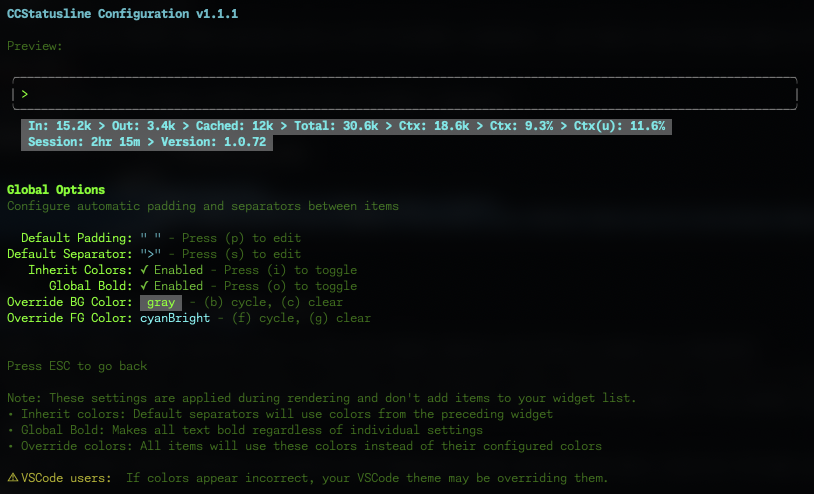
Configure global formatting preferences that apply to all widgets:
|
||
|
||
|
||
|
||
### Default Padding & Separators
|
||
|
||
- **Default Padding** - Add consistent padding to the left and right of each widget
|
||
- **Default Separator** - Automatically insert a separator between all widgets
|
||
- Press **(p)** to edit padding
|
||
- Press **(s)** to edit separator
|
||
- Manual separators collapse around widgets that render empty, so hide-when-empty widgets do not leave dangling dividers.
|
||
|
||
<details>
|
||
<summary><b>Global Formatting Options</b></summary>
|
||
|
||
- **Inherit Colors** - Default separators inherit foreground and background colors from the preceding widget
|
||
- Press **(i)** to toggle
|
||
- **Global Bold** - Apply bold formatting to all text regardless of individual widget settings
|
||
- Press **(o)** to toggle
|
||
- **Minimalist Mode** - Force widgets into raw-value rendering globally for a cleaner, label-free status line
|
||
- Press **(m)** to toggle
|
||
- **Override Foreground Color** - Force all widgets to use the same text color
|
||
- Press **(f)** to cycle through colors
|
||
- Press **(g)** to clear override
|
||
- **Override Background Color** - Force all widgets to use the same background color
|
||
- Press **(b)** to cycle through colors
|
||
- Press **(c)** to clear override
|
||
|
||
</details>
|
||
|
||
> 💡 **Note:** These settings are applied during rendering and don't add widgets to your widget list. They provide a consistent look across your entire status line without modifying individual widget configurations.
|
||
|
||
> ⚠️ **VSCode Users:** If colors appear incorrect in the VSCode integrated terminal, the "Terminal › Integrated: Minimum Contrast Ratio" (`terminal.integrated.minimumContrastRatio`) setting is forcing a minimum contrast between foreground and background colors. You can adjust this setting to 1 to disable the contrast enforcement, or use a standalone terminal for accurate colors.
|
||
|
||
## Claude Code Status Line Settings
|
||
|
||
When ccstatusline is installed in Claude Code, the main menu includes **Configure Status Line**. Claude Code versions >=2.1.97 support `statusLine.refreshInterval`; ccstatusline can set it to `1-60` seconds, defaults fresh supported installs to `10` seconds, and removes the setting when the input is left empty.
|
||
|
||
## Block Timer Widget
|
||
|
||
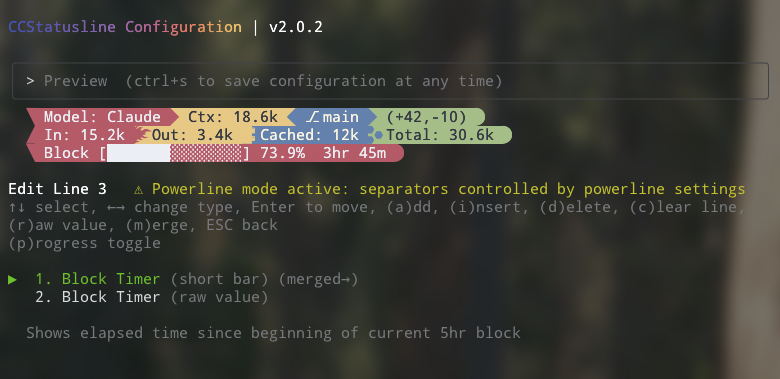
The Block Timer widget helps you track your progress through Claude Code's 5-hour conversation blocks:
|
||
|
||
|
||
|
||
**Display Modes:**
|
||
- **Time Display** - Shows elapsed time as "3hr 45m" (default)
|
||
- **Progress Bar** - Full width 32-character progress bar with percentage
|
||
- **Progress Bar (Short)** - Compact 16-character progress bar with percentage
|
||
|
||
**Features:**
|
||
- Automatically detects block boundaries from transcript timestamps
|
||
- Floors block start time to the hour for consistent tracking
|
||
- Shows "Block: 3hr 45m" in normal mode or just "3hr 45m" in raw value mode
|
||
- Progress bars show completion percentage (e.g., "[████████████████████████░░░░░░░░] 73.9%")
|
||
- Use **(p)** to cycle time/full bar/short bar, **(s)** for compact time mode, and **(v)** to invert fill in progress mode
|
||
|
||
## Raw Value Mode
|
||
|
||
Some widgets support "raw value" mode which displays just the value without a label:
|
||
- Normal: `Model: Claude 3.5 Sonnet` → Raw: `Claude 3.5 Sonnet`
|
||
- Normal: `Session: 2hr 15m` → Raw: `2hr 15m`
|
||
- Normal: `Block: 3hr 45m` → Raw: `3hr 45m`
|
||
- Normal: `Ctx: 18.6k` → Raw: `18.6k`
|
||
|
||
## Widget Editor Keybinds
|
||
|
||
Common controls in the line editor:
|
||
- `↑/↓` select widget
|
||
- `←/→` open the type picker for the selected widget
|
||
- navigation wraps at list boundaries, including move/reorder mode
|
||
- `a` add widget via the picker
|
||
- `i` insert widget via the picker
|
||
- `k` clone the selected widget
|
||
- `Enter` enter/exit move mode
|
||
- `d` delete selected widget
|
||
- `c` clear the current line
|
||
- `Space` cycle a manual separator character
|
||
- `r` toggle raw value (supported widgets)
|
||
- `m` cycle merge mode (`off` → `merge` → `merge no padding`)
|
||
- `Esc` go back
|
||
|
||
Widget picker:
|
||
- type to search categories and widgets
|
||
- supports substring, initialism, and fuzzy matching
|
||
- `↑/↓` change selection, `Enter` continue/apply, `Esc` clear search/back/cancel
|
||
|
||
The keybind footer in the TUI only shows shortcuts that apply to the currently selected widget.
|
||
|
||
Widget-specific shortcuts:
|
||
- **Git widgets with empty-state toggles**: `h` hide `no git` / empty output where supported
|
||
- **Git Branch**: `l` toggle clickable branch links (GitHub, GitLab, self-hosted)
|
||
- **Git Root Dir**: `l` cycle IDE links (`off` → `VS Code` → `Cursor`)
|
||
- **Git PR**: `h` hide empty/no-PR/MR output, `s` toggle review status, `t` toggle title (renders "MR" for GitLab origins)
|
||
- **Git remote widgets** (`Git Origin*` / `Git Upstream*`): `h` hide when no remote, `l` toggle clickable repo links
|
||
- **Git Origin Owner/Repo**: `o` show only the owner when the repo is a fork
|
||
- **Git Is Fork**: `h` hide when the repo is not a fork
|
||
- **Context % widgets**: `u` toggle used vs remaining display, `p` cycle percentage/short bar/short bar only
|
||
- **Session Usage / Weekly Usage**: `p` cycle percentage/full bar/medium bar/short bar/short bar only, `v` invert fill in progress mode
|
||
- **Block Timer**: `p` cycle time/full bar/short bar, `s` toggle compact time, `v` invert fill in progress mode
|
||
- **Block Reset Timer**: `p` cycle time/full bar/short bar, `s` toggle compact time/date, `t` toggle exact reset date/time, `h` toggle 12/24-hour display in date mode, `z` edit timezone in date mode, `l` edit locale in date mode, `v` invert fill in progress mode
|
||
- **Weekly Reset Timer**: `p` cycle time/full bar/short bar, `s` toggle compact time/date, `t` toggle exact reset date/time, `h` toggle hours-only in time mode or 12/24-hour display in date mode, `z` edit timezone in date mode, `l` edit locale in date mode, `v` invert fill in progress mode
|
||
- **Context Bar**: `p` cycle medium/full/short/short-only progress bar
|
||
- **Compaction Counter**: `f` cycle format, `n` toggle Nerd Font icon in icon mode, `h` hide when zero
|
||
- **Current Working Dir**: `h` home abbreviation, `s` segment editor, `f` fish-style path
|
||
- **Skills**: `v` cycle view mode, `h` hide when empty, `l` edit list limit in list mode
|
||
- **Input Speed / Output Speed / Total Speed**: `w` edit the rolling window in seconds
|
||
- **All Activity / Tools Activity / Agents Activity / Todo Progress**: `w` edit max width (set `0` or blank to disable truncation)
|
||
- **Custom Text / Custom Symbol**: `e` edit text or symbol
|
||
- **Custom Command**: `e` command, `w` max width, `t` timeout, `p` preserve ANSI colors
|
||
- **Link**: `u` URL, `e` link text
|
||
- **Vim Mode**: `f` cycle format, `n` toggle Nerd Font icons
|
||
|
||
## Custom Widgets
|
||
|
||
### Custom Text Widget
|
||
|
||
Add static text to your status line. Perfect for:
|
||
- Project identifiers
|
||
- Environment indicators (dev/prod)
|
||
- Personal labels or reminders
|
||
|
||
### Custom Symbol Widget
|
||
|
||
Add a single symbol or emoji to your status line when you want a compact visual marker:
|
||
- Nerd Font or Powerline-friendly glyphs
|
||
- Status markers like `●`, `✓`, or `⚠`
|
||
- Emoji shorthand for environments, workflows, or attention cues
|
||
|
||
### Custom Command Widget
|
||
|
||
Execute shell commands and display their output dynamically:
|
||
- Refreshes whenever the statusline is updated by Claude Code
|
||
- Receives the full Claude Code JSON data via stdin (model info, session ID, transcript path, etc.)
|
||
- Displays command output inline in your status line
|
||
- Configurable timeout (default: 1000ms)
|
||
- Optional max-width truncation
|
||
- Optional ANSI color preservation (`preserve colors`)
|
||
- Examples:
|
||
- `pwd | xargs basename` - Show current directory name
|
||
- `node -v` - Display Node.js version
|
||
- `git rev-parse --short HEAD` - Show current commit hash
|
||
- `date +%H:%M` - Display current time
|
||
- `curl -s wttr.in?format="%t"` - Show current temperature
|
||
- `npx -y ccusage@latest statusline` - Display Claude usage metrics (set timeout: 5000ms)
|
||
|
||
> ⚠️ **Important:** Commands should complete quickly to avoid delays. Long-running commands will be killed after the configured timeout. If you're not seeing output from your custom command, try increasing the timeout value (press 't' in the editor).
|
||
|
||
> 💡 **Tip:** Custom commands can be other Claude Code compatible status line formatters. They receive the same JSON via stdin that `ccstatusline` receives from Claude Code, allowing you to chain or combine multiple status line tools.
|
||
|
||
### Link Widget
|
||
|
||
Create clickable links in terminals that support OSC 8 hyperlinks:
|
||
- `metadata.url` - target URL (http/https)
|
||
- `metadata.text` - optional display text (defaults to URL)
|
||
- Falls back to plain text when URL is missing or unsupported
|
||
|
||
## Integration Example: ccusage
|
||
|
||
[ccusage](https://github.com/ryoppippi/ccusage) is a tool that tracks and displays Claude Code usage metrics. You can integrate it directly into your status line:
|
||
|
||
1. Add a Custom Command widget
|
||
2. Set command: `npx -y ccusage@latest statusline`
|
||
3. Set timeout: `5000` (5 seconds for initial download)
|
||
4. Enable "preserve colors" to keep ccusage's color formatting
|
||
|
||

|
||
|
||
> 📄 **How it works:** The command receives Claude Code's JSON data via stdin, allowing ccusage to access session information, model details, and transcript data for accurate usage tracking.
|
||
|
||
## Smart Truncation
|
||
|
||
When terminal width is detected, status lines automatically truncate with ellipsis (`...`) if they exceed the available width, preventing line wrapping.
|
||
Truncation is ANSI/OSC-aware, so preserved color output and OSC 8 hyperlinks remain well-formed.
|