langbot-app--langbot
 Junyan Chin
e9dd584792
Junyan Chin
e9dd584792
* feat(api): support global API key from config.yaml (api.global_api_key)

Accept a config-defined global API key anywhere a web-UI key is accepted
(X-API-Key / Bearer), with no login session and no DB record. Useful for
automated deployments and AI agents (HTTP API + MCP). Defaults to empty
(disabled); does not require the lbk_ prefix.

- templates/config.yaml: add api.global_api_key with security notes
- service/apikey.py: verify_api_key checks global key first (constant-time)
- docs/API_KEY_AUTH.md: document the global key + security guidance
- tests: cover global-key match, prefix-free, fallback-to-db, disabled

* feat(mcp): expose LangBot management as an MCP server at /mcp

Add an MCP (Model Context Protocol) server so external AI agents can manage a
LangBot instance. Reuses the same API-key auth as the HTTP API (including the
config.yaml global API key).

- pkg/api/mcp/server.py: FastMCP server wrapping the service layer; 21 curated
  tools across system/bots/pipelines/models/knowledge/mcp-servers/skills
- pkg/api/mcp/mount.py: ASGI dispatcher fronting Quart; authenticates /mcp
  requests with an API key, runs the streamable-HTTP session manager lifespan
- controller/main.py: serve the wrapped ASGI app via hypercorn (was run_task)
- web: new 'MCP' tab in the API integration dialog showing endpoint, auth, and
  client config; i18n for 8 locales
- tests/manual/mcp_smoke.py: e2e check (401 unauth, list tools, call tools)

Tool surface is intentionally curated (not all ~25 route groups) to keep the
agent surface small, safe, and maintainable. Extend deliberately.

* feat(skills): add in-repo skills/ as the single source of truth

Migrate the agent skills + QA/e2e test harness from the (now archived)
langbot-app/langbot-skills repo into LangBot/skills/, and add four new skills.

Migrated:
- langbot-plugin-dev, langbot-testing (e2e), langbot-env-setup,
  langbot-skills-maintenance, langbot-eba-adapter-dev
- the bin/lbs CLI (src/, test/, scripts/, schemas/, qa-agent-docs/)

New:
- langbot-dev      core backend + web development
- langbot-deploy   Docker/K8s deployment + config.yaml + global API key
- langbot-mcp-ops  operating the LangBot MCP server (/mcp)
- langbot-space-ops operating the Space marketplace MCP server

- src/cli.ts repoRoot(): recognize the skills assets root (skills.index.json +
  bin/lbs) so the CLI works when nested inside the LangBot repo
- README.md: unified skill catalog; skills.index.json regenerated

Parity with source verified: bin/lbs validate + node test suite match the
source repo (only the uncommitted .lbpkg build-artifact fixture differs).

* docs(agents): document agent-facing surfaces + API/MCP/skills sync rule

* docs(readme): add 'Built for AI Agents' section across all locales

Highlight MCP server, in-repo skills (single source of truth), AGENTS.md
sync rule, and llms.txt. Cross-link LangBot Space MCP marketplace.

* style(mcp): fix ruff format + prettier lint in MCP server and API panel

* style(web): prettier format MCP i18n locale entries

* docs(skills): note MCP instance control in dev/testing skills

All development-guidance skills now point to the LangBot instance MCP
server (/mcp) and the Space marketplace MCP server, reusing API keys.
192 行
12 KiB
Markdown
192 行
12 KiB
Markdown
<p align="center">
|
||
<a href="https://langbot.app">
|
||
<img width="130" src="res/logo-blue.png" alt="LangBot"/>
|
||
</a>
|
||
|
||
<div align="center">
|
||
|
||
<a href="https://www.producthunt.com/products/langbot?utm_source=badge-follow&utm_medium=badge&utm_source=badge-langbot" target="_blank"><img src="https://api.producthunt.com/widgets/embed-image/v1/follow.svg?product_id=1077185&theme=light" alt="LangBot - Production-grade IM bot made easy. | Product Hunt" style="width: 250px; height: 54px;" width="250" height="54" /></a>
|
||
|
||
<h3>AIエージェント搭載IMボットを構築するための本番グレードプラットフォーム。</h3>
|
||
<h4>Slack、Discord、Telegram、WeChat などに AI ボットを素早く構築、デバッグ、デプロイ。</h4>
|
||
|
||
[English](README.md) / [简体中文](README_CN.md) / [繁體中文](README_TW.md) / 日本語 / [Español](README_ES.md) / [Français](README_FR.md) / [한국어](README_KO.md) / [Русский](README_RU.md) / [Tiếng Việt](README_VI.md)
|
||
|
||
[](https://discord.gg/wdNEHETs87)
|
||
[](https://deepwiki.com/langbot-app/LangBot)
|
||
[](https://github.com/langbot-app/LangBot/releases/latest)
|
||
<img src="https://img.shields.io/badge/python-3.10 ~ 3.13 -blue.svg" alt="python">
|
||
[](https://github.com/langbot-app/LangBot/stargazers)
|
||
|
||
<a href="https://langbot.app">ホーム</a> |
|
||
<a href="https://link.langbot.app/ja/docs/features">機能</a> |
|
||
<a href="https://link.langbot.app/ja/docs/guide">ドキュメント</a> |
|
||
<a href="https://link.langbot.app/ja/docs/api">API</a> |
|
||
<a href="https://space.langbot.app">プラグインマーケット</a> |
|
||
<a href="https://langbot.featurebase.app/roadmap">ロードマップ</a>
|
||
|
||
</div>
|
||
|
||
</p>
|
||
|
||
---
|
||
|
||
## LangBot とは?
|
||
|
||
LangBot は、AI搭載のインスタントメッセージングボットを構築するための**オープンソースの本番グレードプラットフォーム**です。大規模言語モデル(LLM)をあらゆるチャットプラットフォームに接続し、会話、タスク実行、既存のワークフローとの統合が可能なインテリジェントエージェントを作成できます。
|
||
|
||
<p align="center">
|
||
<img src="res/dashboard-overview.png" alt="LangBot Web 管理パネルのダッシュボード — メッセージ量、モデル呼び出し、成功率、アクティブセッションをリアルタイム監視" width="720"/>
|
||
</p>
|
||
|
||
### 主な機能
|
||
|
||
- **AI対話とエージェント** — マルチターン対話、ツール呼び出し、マルチモーダル対応、ストリーミング出力。RAG(ナレッジベース)を内蔵し、[Dify](https://dify.ai)、[Coze](https://coze.com)、[n8n](https://n8n.io)、[Langflow](https://langflow.org)、[Deerflow](https://deerflow.tech)、[Weknora](https://weknora.weixin.qq.com) と深く統合。
|
||
- **ユニバーサルIMプラットフォーム対応** — 単一のコードベースで Discord、Telegram、Slack、LINE、QQ、WeChat、WeCom、Lark、DingTalk、KOOK に対応。
|
||
- **本番環境対応** — アクセス制御、レート制限、センシティブワードフィルタリング、包括的な監視、例外処理を搭載。エンタープライズの信頼に応える品質。
|
||
- **プラグインエコシステム** — 数百のプラグイン、イベント駆動アーキテクチャ、コンポーネント拡張、[MCPプロトコル](https://modelcontextprotocol.io/)対応。
|
||
- **Web管理パネル** — 直感的なブラウザインターフェースからボットの設定、管理、監視が可能。YAML編集は不要。
|
||
- **マルチパイプラインアーキテクチャ** — 異なるシナリオに異なるボットを配置し、包括的な監視と例外処理を実現。
|
||
|
||
[→ すべての機能について詳しく見る](https://link.langbot.app/ja/docs/features)
|
||
|
||
📍 実践ガイド: [5分でマルチプラットフォームAIボットをデプロイ](https://blog.langbot.app/en/blog/deploy-ai-bot-in-5-minutes/)、[DeepSeekをWeChat・Discord・Telegramに接続](https://blog.langbot.app/en/blog/connect-deepseek-to-wechat/)、[Dify AgentをDiscord・Telegram・Slackで動かす](https://blog.langbot.app/en/blog/dify-agent-discord-telegram-slack/)、[n8n連携チャットボットを構築](https://blog.langbot.app/en/blog/n8n-multi-platform-ai-chatbot/)。
|
||
|
||
---
|
||
|
||
## クイックスタート
|
||
|
||
### ☁️ LangBot Cloud(推奨)
|
||
|
||
**[LangBot Cloud](https://space.langbot.app/cloud)** — デプロイ不要、すぐに使えます。
|
||
|
||
### ワンライン起動
|
||
|
||
```bash
|
||
uvx langbot
|
||
```
|
||
|
||
> [uv](https://docs.astral.sh/uv/getting-started/installation/) が必要です。http://localhost:5300 にアクセスして完了。
|
||
|
||
### Docker Compose
|
||
|
||
```bash
|
||
git clone https://github.com/langbot-app/LangBot
|
||
cd LangBot/docker
|
||
docker compose up -d
|
||
```
|
||
|
||
### ワンクリッククラウドデプロイ
|
||
|
||
[](https://zeabur.com/en-US/templates/ZKTBDH)
|
||
[](https://railway.app/template/yRrAyL?referralCode=vogKPF)
|
||
|
||
**その他:** [Docker](https://link.langbot.app/en/docs/docker) · [手動デプロイ](https://link.langbot.app/en/docs/manual-deploy) · [BTPanel](https://link.langbot.app/en/docs/bt-panel) · [Kubernetes](https://docs.langbot.app/en/deploy/langbot/kubernetes)
|
||
|
||
---
|
||
|
||
## 対応プラットフォーム
|
||
|
||
| プラットフォーム | ステータス | 備考 |
|
||
|----------|--------|-------|
|
||
| Discord | ✅ | 公式 |
|
||
| Telegram | ✅ | 公式 |
|
||
| Slack | ✅ | 公式 |
|
||
| LINE | ✅ | 公式 |
|
||
| QQ | ✅ | 個人・公式API(チャンネル・DM・グループ) |
|
||
| WeCom | ✅ | 企業WeChat、外部CS、AIボット |
|
||
| WeChat | ✅ | 個人・公式アカウント |
|
||
| Lark | ✅ | 公式 |
|
||
| DingTalk | ✅ | 公式 |
|
||
| KOOK | ✅ | 公式 |
|
||
| Satori | ✅ | |
|
||
| Email | ✅ | Matrix、Satori |
|
||
| Matrix | ✅ | Signal、WhatsApp、Messenger、iMessage、Mattermost、Google Chat、IRC、XMPP、Zulip など複数のブリッジ先プラットフォームに対応 |
|
||
|
||
---
|
||
|
||
## 対応LLMと統合
|
||
|
||
| プロバイダー | タイプ | ステータス |
|
||
|----------|------|--------|
|
||
| [OpenAI](https://platform.openai.com/) | LLM | ✅ |
|
||
| [Anthropic](https://www.anthropic.com/) | LLM | ✅ |
|
||
| [DeepSeek](https://www.deepseek.com/) | LLM | ✅ |
|
||
| [Google Gemini](https://aistudio.google.com/prompts/new_chat) | LLM | ✅ |
|
||
| [xAI](https://x.ai/) | LLM | ✅ |
|
||
| [Moonshot](https://www.moonshot.cn/) | LLM | ✅ |
|
||
| [Zhipu AI](https://open.bigmodel.cn/) | LLM | ✅ |
|
||
| [Ollama](https://ollama.com/) | ローカルLLM | ✅ |
|
||
| [LM Studio](https://lmstudio.ai/) | ローカルLLM | ✅ |
|
||
| [Dify](https://dify.ai) | LLMOps | ✅ |
|
||
| [MCP](https://modelcontextprotocol.io/) | プロトコル | ✅ |
|
||
| [SiliconFlow](https://siliconflow.cn/) | ゲートウェイ | ✅ |
|
||
| [Aliyun Bailian](https://bailian.console.aliyun.com/) | ゲートウェイ | ✅ |
|
||
| [Volc Engine Ark](https://console.volcengine.com/ark/region:ark+cn-beijing/model?vendor=Bytedance&view=LIST_VIEW) | ゲートウェイ | ✅ |
|
||
| [ModelScope](https://modelscope.cn/docs/model-service/API-Inference/intro) | ゲートウェイ | ✅ |
|
||
| [GiteeAI](https://ai.gitee.com/) | ゲートウェイ | ✅ |
|
||
| [CompShare](https://www.compshare.cn/?ytag=GPU_YY-gh_langbot) | GPUプラットフォーム | ✅ |
|
||
| [PPIO](https://ppinfra.com/user/register?invited_by=QJKFYD&utm_source=github_langbot) | GPUプラットフォーム | ✅ |
|
||
| [ShengSuanYun](https://www.shengsuanyun.com/?from=CH_KYIPP758) | GPUプラットフォーム | ✅ |
|
||
| [接口 AI](https://jiekou.ai/) | ゲートウェイ | ✅ |
|
||
| [302.AI](https://share.302.ai/SuTG99) | ゲートウェイ | ✅ |
|
||
| [Qiniu](https://www.qiniu.com/ai/agent) | ゲートウェイ | ✅ |
|
||
|
||
[→ すべての統合を表示](https://link.langbot.app/en/docs/features)
|
||
|
||
---
|
||
|
||
## なぜ LangBot?
|
||
|
||
| ユースケース | LangBot の活用方法 |
|
||
|----------|-------------------|
|
||
| **カスタマーサポート** | ナレッジベースを活用して質問に回答するAIエージェントをSlack/Discord/Telegramにデプロイ |
|
||
| **社内ツール** | n8n/Difyのワークフローを WeCom/DingTalk に接続し、業務プロセスを自動化 |
|
||
| **コミュニティ管理** | AI搭載のコンテンツフィルタリングとインタラクションでQQ/Discordグループをモデレーション |
|
||
| **マルチプラットフォーム展開** | 1つのボットで全プラットフォームに対応。単一のダッシュボードから管理 |
|
||
|
||
---
|
||
|
||
## ライブデモ
|
||
|
||
**今すぐ試す:** https://demo.langbot.dev/
|
||
- メール: `demo@langbot.app`
|
||
- パスワード: `langbot123456`
|
||
|
||
*注意: 公開デモ環境です。機密情報を入力しないでください。*
|
||
|
||
## AI エージェントのために 🤖
|
||
|
||
LangBot は **設計段階からエージェントフレンドリー** です。お使いのコーディングエージェント(Claude Code、Codex、Copilot、Cursor など)が、ファーストクラスのサポートで LangBot を操作・拡張・デプロイできます:
|
||
|
||
- **MCP サーバー** —— LangBot は組み込みの [Model Context Protocol](https://modelcontextprotocol.io/) エンドポイント `/mcp` を公開し、HTTP API とミラーリングされているため、エージェントがボット・パイプライン・プラグイン・モデルをプログラム的に管理できます。同じ API キーで認証(`config.yaml` でグローバルキーを設定、またはユーザーキーを使用)—— ログインフロー不要。Web パネルの **API & MCP** タブで設定します。
|
||
- **リポジトリ内 Skills** —— [`skills/`](skills/) ディレクトリは LangBot を扱うための**唯一の信頼できる情報源**です:プラグイン開発、コア開発、E2E テスト、デプロイ、LangBot / LangBot Space MCP サーバーの操作。エージェントをこのディレクトリに向ければ、構築方法を理解します。
|
||
- **AGENTS.md** —— すべてのリポジトリに [`AGENTS.md`](AGENTS.md)(`CLAUDE.md` へのシンボリックリンク)があり、アーキテクチャ・規約、そして「API 変更時は MCP サーバーと skills を同期する」というルールを記述しています。
|
||
- **`llms.txt`** —— LLM 向けの機械可読なプロジェクトコンテキストを公式サイトで公開しています。
|
||
|
||
> **クラウド / マーケット:** [LangBot Space](https://space.langbot.app) も MCP サーバーを公開しており、エージェントが Personal Access Token で認証してプラグイン / MCP / Skill マーケットを検索・確認できます。
|
||
|
||
---
|
||
|
||
## コミュニティ
|
||
|
||
[](https://discord.gg/wdNEHETs87)
|
||
|
||
- [Discord コミュニティ](https://discord.gg/wdNEHETs87)
|
||
|
||
---
|
||
|
||
## Star 推移
|
||
|
||
[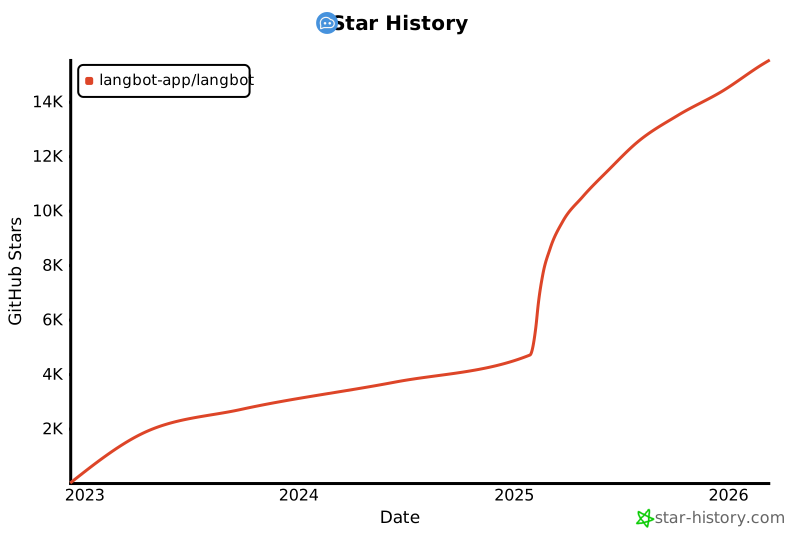](https://star-history.com/#langbot-app/LangBot&Date)
|
||
|
||
---
|
||
|
||
## コントリビューター
|
||
|
||
LangBot をより良くするために貢献してくださったすべての[コントリビューター](https://github.com/langbot-app/LangBot/graphs/contributors)に感謝します:
|
||
|
||
<a href="https://github.com/langbot-app/LangBot/graphs/contributors">
|
||
<img src="https://contrib.rocks/image?repo=langbot-app/LangBot" />
|
||
</a>
|