langbot-app--langbot
 Junyan Chin
e9dd584792
Junyan Chin
e9dd584792
* feat(api): support global API key from config.yaml (api.global_api_key)

Accept a config-defined global API key anywhere a web-UI key is accepted
(X-API-Key / Bearer), with no login session and no DB record. Useful for
automated deployments and AI agents (HTTP API + MCP). Defaults to empty
(disabled); does not require the lbk_ prefix.

- templates/config.yaml: add api.global_api_key with security notes
- service/apikey.py: verify_api_key checks global key first (constant-time)
- docs/API_KEY_AUTH.md: document the global key + security guidance
- tests: cover global-key match, prefix-free, fallback-to-db, disabled

* feat(mcp): expose LangBot management as an MCP server at /mcp

Add an MCP (Model Context Protocol) server so external AI agents can manage a
LangBot instance. Reuses the same API-key auth as the HTTP API (including the
config.yaml global API key).

- pkg/api/mcp/server.py: FastMCP server wrapping the service layer; 21 curated
  tools across system/bots/pipelines/models/knowledge/mcp-servers/skills
- pkg/api/mcp/mount.py: ASGI dispatcher fronting Quart; authenticates /mcp
  requests with an API key, runs the streamable-HTTP session manager lifespan
- controller/main.py: serve the wrapped ASGI app via hypercorn (was run_task)
- web: new 'MCP' tab in the API integration dialog showing endpoint, auth, and
  client config; i18n for 8 locales
- tests/manual/mcp_smoke.py: e2e check (401 unauth, list tools, call tools)

Tool surface is intentionally curated (not all ~25 route groups) to keep the
agent surface small, safe, and maintainable. Extend deliberately.

* feat(skills): add in-repo skills/ as the single source of truth

Migrate the agent skills + QA/e2e test harness from the (now archived)
langbot-app/langbot-skills repo into LangBot/skills/, and add four new skills.

Migrated:
- langbot-plugin-dev, langbot-testing (e2e), langbot-env-setup,
  langbot-skills-maintenance, langbot-eba-adapter-dev
- the bin/lbs CLI (src/, test/, scripts/, schemas/, qa-agent-docs/)

New:
- langbot-dev      core backend + web development
- langbot-deploy   Docker/K8s deployment + config.yaml + global API key
- langbot-mcp-ops  operating the LangBot MCP server (/mcp)
- langbot-space-ops operating the Space marketplace MCP server

- src/cli.ts repoRoot(): recognize the skills assets root (skills.index.json +
  bin/lbs) so the CLI works when nested inside the LangBot repo
- README.md: unified skill catalog; skills.index.json regenerated

Parity with source verified: bin/lbs validate + node test suite match the
source repo (only the uncommitted .lbpkg build-artifact fixture differs).

* docs(agents): document agent-facing surfaces + API/MCP/skills sync rule

* docs(readme): add 'Built for AI Agents' section across all locales

Highlight MCP server, in-repo skills (single source of truth), AGENTS.md
sync rule, and llms.txt. Cross-link LangBot Space MCP marketplace.

* style(mcp): fix ruff format + prettier lint in MCP server and API panel

* style(web): prettier format MCP i18n locale entries

* docs(skills): note MCP instance control in dev/testing skills

All development-guidance skills now point to the LangBot instance MCP
server (/mcp) and the Space marketplace MCP server, reusing API keys.
192 行
11 KiB
Markdown
192 行
11 KiB
Markdown
<p align="center">
|
||
<a href="https://langbot.app">
|
||
<img width="130" src="res/logo-blue.png" alt="LangBot"/>
|
||
</a>
|
||
|
||
<div align="center">
|
||
|
||
<a href="https://www.producthunt.com/products/langbot?utm_source=badge-follow&utm_medium=badge&utm_source=badge-langbot" target="_blank"><img src="https://api.producthunt.com/widgets/embed-image/v1/follow.svg?product_id=1077185&theme=light" alt="LangBot - Production-grade IM bot made easy. | Product Hunt" style="width: 250px; height: 54px;" width="250" height="54" /></a>
|
||
|
||
<h3>Plateforme de niveau production pour construire des bots de messagerie instantanée avec agents IA.</h3>
|
||
<h4>Créez, déboguez et déployez rapidement des bots IA sur Slack, Discord, Telegram, WeChat et plus.</h4>
|
||
|
||
[English](README.md) / [简体中文](README_CN.md) / [繁體中文](README_TW.md) / [日本語](README_JP.md) / [Español](README_ES.md) / Français / [한국어](README_KO.md) / [Русский](README_RU.md) / [Tiếng Việt](README_VI.md)
|
||
|
||
[](https://discord.gg/wdNEHETs87)
|
||
[](https://deepwiki.com/langbot-app/LangBot)
|
||
[](https://github.com/langbot-app/LangBot/releases/latest)
|
||
<img src="https://img.shields.io/badge/python-3.10 ~ 3.13 -blue.svg" alt="python">
|
||
[](https://github.com/langbot-app/LangBot/stargazers)
|
||
|
||
<a href="https://langbot.app">Accueil</a> |
|
||
<a href="https://link.langbot.app/en/docs/features">Fonctionnalités</a> |
|
||
<a href="https://link.langbot.app/en/docs/guide">Documentation</a> |
|
||
<a href="https://link.langbot.app/en/docs/api">API</a> |
|
||
<a href="https://space.langbot.app">Marché des Plugins</a> |
|
||
<a href="https://langbot.featurebase.app/roadmap">Feuille de Route</a>
|
||
|
||
</div>
|
||
|
||
</p>
|
||
|
||
---
|
||
|
||
## Qu'est-ce que LangBot ?
|
||
|
||
LangBot est une **plateforme open-source de niveau production** pour créer des bots de messagerie instantanée alimentés par l'IA. Elle connecte les grands modèles de langage (LLMs) à n'importe quelle plateforme de chat, vous permettant de créer des agents intelligents capables de converser, d'exécuter des tâches et de s'intégrer à vos workflows existants.
|
||
|
||
<p align="center">
|
||
<img src="res/dashboard-overview.png" alt="Tableau de bord de gestion web LangBot — surveillance en temps réel du volume de messages, des appels de modèles, du taux de réussite et des sessions actives" width="720"/>
|
||
</p>
|
||
|
||
### Capacités Clés
|
||
|
||
- **Conversations IA & Agents** — Dialogues multi-tours, appels d'outils, support multimodal, sortie en streaming. RAG (base de connaissances) intégré avec intégration profonde de [Dify](https://dify.ai), [Coze](https://coze.com), [n8n](https://n8n.io), [Langflow](https://langflow.org), [Deerflow](https://deerflow.tech), [Weknora](https://weknora.weixin.qq.com).
|
||
- **Support Universel des Plateformes de MI** — Un seul code pour Discord, Telegram, Slack, LINE, QQ, WeChat, WeCom, Lark, DingTalk, KOOK.
|
||
- **Prêt pour la Production** — Contrôle d'accès, limitation de débit, filtrage de mots sensibles, surveillance complète et gestion des exceptions. Approuvé par les entreprises.
|
||
- **Écosystème de Plugins** — Des centaines de plugins, architecture événementielle, extensions de composants, et support du [protocole MCP](https://modelcontextprotocol.io/).
|
||
- **Panneau de Gestion Web** — Configurez, gérez et surveillez vos bots via une interface navigateur intuitive. Aucune édition de YAML requise.
|
||
- **Architecture Multi-Pipeline** — Différents bots pour différents scénarios, avec surveillance complète et gestion des exceptions.
|
||
|
||
[→ En savoir plus sur toutes les fonctionnalités](https://link.langbot.app/en/docs/features)
|
||
|
||
📍 Guides pratiques : [déployer un bot IA multiplateforme en 5 minutes](https://blog.langbot.app/en/blog/deploy-ai-bot-in-5-minutes/), [connecter DeepSeek à WeChat, Discord et Telegram](https://blog.langbot.app/en/blog/connect-deepseek-to-wechat/), [exécuter un Dify Agent dans Discord, Telegram et Slack](https://blog.langbot.app/en/blog/dify-agent-discord-telegram-slack/) et [créer un chatbot avec n8n](https://blog.langbot.app/en/blog/n8n-multi-platform-ai-chatbot/).
|
||
|
||
---
|
||
|
||
## Démarrage Rapide
|
||
|
||
### ☁️ LangBot Cloud (Recommandé)
|
||
|
||
**[LangBot Cloud](https://space.langbot.app/cloud)** — Sans déploiement, prêt à utiliser.
|
||
|
||
### Lancement en une ligne
|
||
|
||
```bash
|
||
uvx langbot
|
||
```
|
||
|
||
> Nécessite [uv](https://docs.astral.sh/uv/getting-started/installation/). Visitez http://localhost:5300 — c'est prêt.
|
||
|
||
### Docker Compose
|
||
|
||
```bash
|
||
git clone https://github.com/langbot-app/LangBot
|
||
cd LangBot/docker
|
||
docker compose up -d
|
||
```
|
||
|
||
### Déploiement Cloud en un Clic
|
||
|
||
[](https://zeabur.com/en-US/templates/ZKTBDH)
|
||
[](https://railway.app/template/yRrAyL?referralCode=vogKPF)
|
||
|
||
**Plus d'options :** [Docker](https://link.langbot.app/en/docs/docker) · [Manuel](https://link.langbot.app/en/docs/manual-deploy) · [BTPanel](https://link.langbot.app/en/docs/bt-panel) · [Kubernetes](https://docs.langbot.app/en/deploy/langbot/kubernetes)
|
||
|
||
---
|
||
|
||
## Plateformes Supportées
|
||
|
||
| Plateforme | Statut | Notes |
|
||
|----------|--------|-------|
|
||
| Discord | ✅ | Officiel |
|
||
| Telegram | ✅ | Officiel |
|
||
| Slack | ✅ | Officiel |
|
||
| LINE | ✅ | Officiel |
|
||
| QQ | ✅ | Personnel & API Officielle (Canal, DM, Groupe) |
|
||
| WeCom | ✅ | WeChat Entreprise, CS Externe, AI Bot |
|
||
| WeChat | ✅ | Personnel & Compte Officiel |
|
||
| Lark | ✅ | Officiel |
|
||
| DingTalk | ✅ | Officiel |
|
||
| KOOK | ✅ | Officiel |
|
||
| Satori | ✅ | |
|
||
| Email | ✅ | Matrix, Satori |
|
||
| Matrix | ✅ | Prend en charge plusieurs plateformes via ponts, comme Signal, WhatsApp, Messenger, iMessage, Mattermost, Google Chat, IRC, XMPP, Zulip, etc. |
|
||
|
||
---
|
||
|
||
## LLMs et Intégrations Supportés
|
||
|
||
| Fournisseur | Type | Statut |
|
||
|----------|------|--------|
|
||
| [OpenAI](https://platform.openai.com/) | LLM | ✅ |
|
||
| [Anthropic](https://www.anthropic.com/) | LLM | ✅ |
|
||
| [DeepSeek](https://www.deepseek.com/) | LLM | ✅ |
|
||
| [Google Gemini](https://aistudio.google.com/prompts/new_chat) | LLM | ✅ |
|
||
| [xAI](https://x.ai/) | LLM | ✅ |
|
||
| [Moonshot](https://www.moonshot.cn/) | LLM | ✅ |
|
||
| [Zhipu AI](https://open.bigmodel.cn/) | LLM | ✅ |
|
||
| [Ollama](https://ollama.com/) | LLM Local | ✅ |
|
||
| [LM Studio](https://lmstudio.ai/) | LLM Local | ✅ |
|
||
| [Dify](https://dify.ai) | LLMOps | ✅ |
|
||
| [MCP](https://modelcontextprotocol.io/) | Protocole | ✅ |
|
||
| [SiliconFlow](https://siliconflow.cn/) | Passerelle | ✅ |
|
||
| [Aliyun Bailian](https://bailian.console.aliyun.com/) | Passerelle | ✅ |
|
||
| [Volc Engine Ark](https://console.volcengine.com/ark/region:ark+cn-beijing/model?vendor=Bytedance&view=LIST_VIEW) | Passerelle | ✅ |
|
||
| [ModelScope](https://modelscope.cn/docs/model-service/API-Inference/intro) | Passerelle | ✅ |
|
||
| [GiteeAI](https://ai.gitee.com/) | Passerelle | ✅ |
|
||
| [接口 AI](https://jiekou.ai/) | Passerelle | ✅ |
|
||
| [302.AI](https://share.302.ai/SuTG99) | Passerelle | ✅ |
|
||
| [CompShare](https://www.compshare.cn/?ytag=GPU_YY-gh_langbot) | Plateforme GPU | ✅ |
|
||
| [PPIO](https://ppinfra.com/user/register?invited_by=QJKFYD&utm_source=github_langbot) | Plateforme GPU | ✅ |
|
||
| [ShengSuanYun](https://www.shengsuanyun.com/?from=CH_KYIPP758) | Plateforme GPU | ✅ |
|
||
| [Qiniu](https://www.qiniu.com/ai/agent) | Passerelle | ✅ |
|
||
|
||
[→ Voir toutes les intégrations](https://link.langbot.app/en/docs/features)
|
||
|
||
---
|
||
|
||
## Pourquoi LangBot ?
|
||
|
||
| Cas d'Usage | Comment LangBot Aide |
|
||
|----------|-------------------|
|
||
| **Support Client** | Déployez des agents IA sur Slack/Discord/Telegram qui répondent aux questions en utilisant votre base de connaissances |
|
||
| **Outils Internes** | Connectez les workflows n8n/Dify à WeCom/DingTalk pour automatiser vos processus métier |
|
||
| **Gestion de Communauté** | Modérez les groupes QQ/Discord avec un filtrage de contenu et des interactions alimentés par l'IA |
|
||
| **Présence Multi-plateforme** | Un seul bot, toutes les plateformes. Gérez tout depuis un tableau de bord unique |
|
||
|
||
---
|
||
|
||
## Démo en Ligne
|
||
|
||
**Essayez maintenant :** https://demo.langbot.dev/
|
||
- Email : `demo@langbot.app`
|
||
- Mot de passe : `langbot123456`
|
||
|
||
*Note : Environnement de démonstration public. Ne saisissez pas d'informations sensibles.*
|
||
|
||
## Conçu pour les agents IA 🤖
|
||
|
||
LangBot est **agent-friendly par conception** —— vos agents de codage (Claude Code, Codex, Copilot, Cursor, …) peuvent exploiter, étendre et déployer LangBot avec un support de premier ordre :
|
||
|
||
- **Serveur MCP** —— LangBot expose un endpoint [Model Context Protocol](https://modelcontextprotocol.io/) intégré sur `/mcp`, reflétant l'API HTTP pour qu'un agent gère bots, pipelines, plugins et modèles de façon programmatique. Authentifiez-vous avec la même clé API (définissez une clé globale dans `config.yaml` ou utilisez une clé par utilisateur) —— sans flux de connexion. Configurez-le dans l'onglet **API & MCP** du panneau web.
|
||
- **Skills dans le dépôt** —— Le répertoire [`skills/`](skills/) est la **source unique de vérité** pour travailler avec LangBot : développement de plugins, développement du cœur, tests de bout en bout, déploiement et exploitation des serveurs MCP de LangBot / LangBot Space. Pointez votre agent vers ce répertoire et il saura construire.
|
||
- **AGENTS.md** —— Chaque dépôt fournit un [`AGENTS.md`](AGENTS.md) (lien symbolique vers `CLAUDE.md`) décrivant l'architecture, les conventions et la règle selon laquelle les changements d'API doivent garder le serveur MCP et les skills synchronisés.
|
||
- **`llms.txt`** —— Le contexte projet lisible par machine pour les LLM est publié sur le site web.
|
||
|
||
> **Cloud / Marketplace :** [LangBot Space](https://space.langbot.app) expose également un serveur MCP pour que les agents recherchent et inspectent le marketplace de plugins / MCP / skills, authentifiés avec un Personal Access Token.
|
||
|
||
---
|
||
|
||
## Communauté
|
||
|
||
[](https://discord.gg/wdNEHETs87)
|
||
|
||
- [Communauté Discord](https://discord.gg/wdNEHETs87)
|
||
|
||
---
|
||
|
||
## Historique des Stars
|
||
|
||
[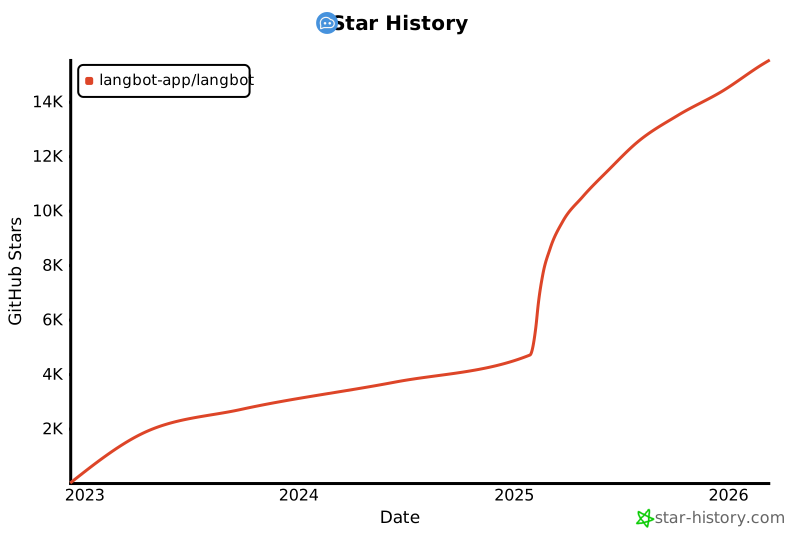](https://star-history.com/#langbot-app/LangBot&Date)
|
||
|
||
---
|
||
|
||
## Contributeurs
|
||
|
||
Merci à tous les [contributeurs](https://github.com/langbot-app/LangBot/graphs/contributors) qui ont aidé à améliorer LangBot :
|
||
|
||
<a href="https://github.com/langbot-app/LangBot/graphs/contributors">
|
||
<img src="https://contrib.rocks/image?repo=langbot-app/LangBot" />
|
||
</a>
|