langbot-app--langbot
 Junyan Qin
171 行
8.1 KiB
Markdown
171 行
8.1 KiB
Markdown
|
||
<p align="center">
|
||
<a href="https://langbot.app">
|
||
<img src="https://docs.langbot.app/social_zh.png" alt="LangBot"/>
|
||
</a>
|
||
|
||
<div align="center">
|
||
|
||
<a href="https://hellogithub.com/repository/langbot-app/LangBot" target="_blank"><img src="https://abroad.hellogithub.com/v1/widgets/recommend.svg?rid=5ce8ae2aa4f74316bf393b57b952433c&claim_uid=gtmc6YWjMZkT21R" alt="Featured|HelloGitHub" style="width: 250px; height: 54px;" width="250" height="54" /></a>
|
||
|
||
[English](README_EN.md) / 简体中文 / [繁體中文](README_TW.md) / [日本語](README_JP.md) / [Español](README_ES.md) / [Français](README_FR.md) / [한국어](README_KO.md) / [Русский](README_RU.md) / [Tiếng Việt](README_VI.md)
|
||
|
||
[](https://discord.gg/wdNEHETs87)
|
||
[](https://qm.qq.com/q/JLi38whHum)
|
||
[](https://deepwiki.com/langbot-app/LangBot)
|
||
[](https://github.com/langbot-app/LangBot/releases/latest)
|
||
<img src="https://img.shields.io/badge/python-3.10 ~ 3.13 -blue.svg" alt="python">
|
||
[](https://gitcode.com/RockChinQ/LangBot)
|
||
|
||
<a href="https://langbot.app">项目主页</a> |
|
||
<a href="https://docs.langbot.app/zh/insight/guide.html">部署文档</a> |
|
||
<a href="https://docs.langbot.app/zh/plugin/plugin-intro.html">插件介绍</a> |
|
||
<a href="https://github.com/langbot-app/LangBot/issues/new?assignees=&labels=%E7%8B%AC%E7%AB%8B%E6%8F%92%E4%BB%B6&projects=&template=submit-plugin.yml&title=%5BPlugin%5D%3A+%E8%AF%B7%E6%B1%82%E7%99%BB%E8%AE%B0%E6%96%B0%E6%8F%92%E4%BB%B6">提交插件</a>
|
||
|
||
|
||
</div>
|
||
|
||
</p>
|
||
|
||
LangBot 是一个开源的大语言模型原生即时通信机器人开发平台,旨在提供开箱即用的 IM 机器人开发体验,具有 Agent、RAG、MCP 等多种 LLM 应用功能,适配全球主流即时通信平台,并提供丰富的 API 接口,支持自定义开发。
|
||
|
||
## 📦 开始使用
|
||
|
||
#### 快速部署
|
||
|
||
使用 `uvx` 一键启动(需要先安装 [uv](https://docs.astral.sh/uv/getting-started/installation/)):
|
||
|
||
```bash
|
||
uvx langbot
|
||
```
|
||
|
||
访问 http://localhost:5300 即可开始使用。
|
||
|
||
#### Docker Compose 部署
|
||
|
||
```bash
|
||
git clone https://github.com/langbot-app/LangBot
|
||
cd LangBot/docker
|
||
docker compose up -d
|
||
```
|
||
|
||
访问 http://localhost:5300 即可开始使用。
|
||
|
||
详细文档[Docker 部署](https://docs.langbot.app/zh/deploy/langbot/docker.html)。
|
||
|
||
#### 宝塔面板部署
|
||
|
||
已上架宝塔面板,若您已安装宝塔面板,可以根据[文档](https://docs.langbot.app/zh/deploy/langbot/one-click/bt.html)使用。
|
||
|
||
#### Zeabur 云部署
|
||
|
||
社区贡献的 Zeabur 模板。
|
||
|
||
[](https://zeabur.com/zh-CN/templates/ZKTBDH)
|
||
|
||
#### Railway 云部署
|
||
|
||
[](https://railway.app/template/yRrAyL?referralCode=vogKPF)
|
||
|
||
#### 手动部署
|
||
|
||
直接使用发行版运行,查看文档[手动部署](https://docs.langbot.app/zh/deploy/langbot/manual.html)。
|
||
|
||
#### Kubernetes 部署
|
||
|
||
参考 [Kubernetes 部署](./docker/README_K8S.md) 文档。
|
||
|
||
## 😎 保持更新
|
||
|
||
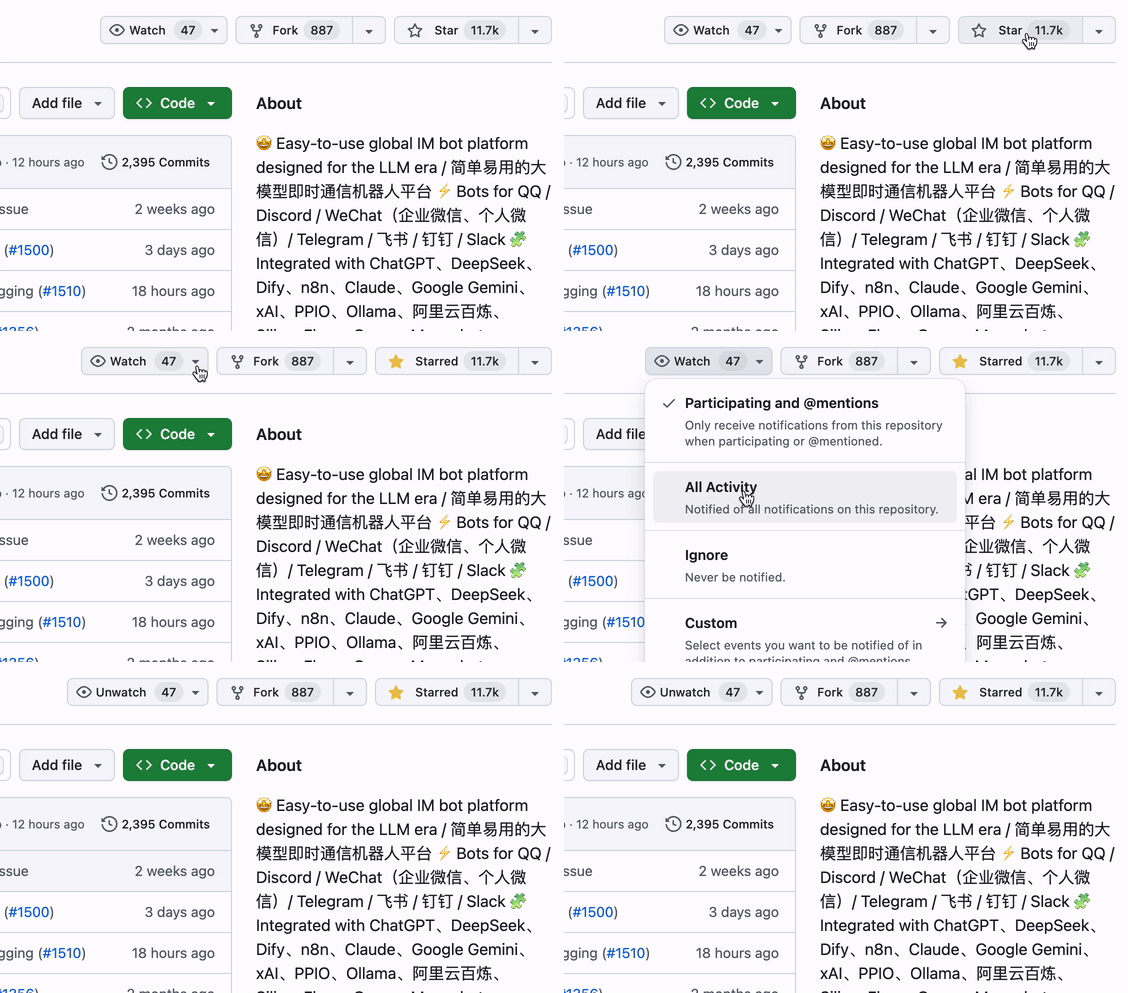
点击仓库右上角 Star 和 Watch 按钮,获取最新动态。
|
||
|
||
|
||
|
||
## ✨ 特性
|
||
|
||
- 💬 大模型对话、Agent:支持多种大模型,适配群聊和私聊;具有多轮对话、工具调用、多模态、流式输出能力,自带 RAG(知识库)实现,并深度适配 [Dify](https://dify.ai)、[Coze](https://coze.com)、[n8n](https://n8n.io)等 LLMOps 平台。
|
||
- 🤖 多平台支持:目前支持 QQ、QQ频道、企业微信、个人微信、飞书、Discord、Telegram 等平台。
|
||
- 🛠️ 高稳定性、功能完备:原生支持访问控制、限速、敏感词过滤等机制;配置简单,支持多种部署方式。支持多流水线配置,不同机器人用于不同应用场景。
|
||
- 🧩 插件扩展、活跃社区:高稳定性、高安全性的生产级插件系统,支持事件驱动、组件扩展等插件机制;适配 Anthropic [MCP 协议](https://modelcontextprotocol.io/);目前已有数百个插件。
|
||
- 😻 Web 管理面板:支持通过浏览器管理 LangBot 实例,不再需要手动编写配置文件。
|
||
|
||
详细规格特性请访问[文档](https://docs.langbot.app/zh/insight/features.html)。
|
||
|
||
或访问 demo 环境:https://demo.langbot.dev/
|
||
- 登录信息:邮箱:`demo@langbot.app` 密码:`langbot123456`
|
||
- 注意:仅展示 WebUI 效果,公开环境,请不要在其中填入您的任何敏感信息。
|
||
|
||
### 消息平台
|
||
|
||
| 平台 | 状态 | 备注 |
|
||
| --- | --- | --- |
|
||
| QQ 个人号 | ✅ | QQ 个人号私聊、群聊 |
|
||
| QQ 官方机器人 | ✅ | QQ 官方机器人,支持频道、私聊、群聊 |
|
||
| 企业微信 | ✅ | |
|
||
| 企微对外客服 | ✅ | |
|
||
| 企微智能机器人 | ✅ | |
|
||
| 个人微信 | ✅ | |
|
||
| 微信公众号 | ✅ | |
|
||
| 飞书 | ✅ | |
|
||
| 钉钉 | ✅ | |
|
||
| Discord | ✅ | |
|
||
| Telegram | ✅ | |
|
||
| Slack | ✅ | |
|
||
| LINE | ✅ | |
|
||
|
||
### 大模型能力
|
||
|
||
| 模型 | 状态 | 备注 |
|
||
| --- | --- | --- |
|
||
| [OpenAI](https://platform.openai.com/) | ✅ | 可接入任何 OpenAI 接口格式模型 |
|
||
| [DeepSeek](https://www.deepseek.com/) | ✅ | |
|
||
| [Moonshot](https://www.moonshot.cn/) | ✅ | |
|
||
| [Anthropic](https://www.anthropic.com/) | ✅ | |
|
||
| [xAI](https://x.ai/) | ✅ | |
|
||
| [智谱AI](https://open.bigmodel.cn/) | ✅ | |
|
||
| [胜算云](https://www.shengsuanyun.com/?from=CH_KYIPP758) | ✅ | 全球大模型都可调用(友情推荐) |
|
||
| [优云智算](https://www.compshare.cn/?ytag=GPU_YY-gh_langbot) | ✅ | 大模型和 GPU 资源平台 |
|
||
| [PPIO](https://ppinfra.com/user/register?invited_by=QJKFYD&utm_source=github_langbot) | ✅ | 大模型和 GPU 资源平台 |
|
||
| [接口 AI](https://jiekou.ai/) | ✅ | 大模型聚合平台,专注全球大模型接入 |
|
||
| [302.AI](https://share.302.ai/SuTG99) | ✅ | 大模型聚合平台 |
|
||
| [Google Gemini](https://aistudio.google.com/prompts/new_chat) | ✅ | |
|
||
| [Dify](https://dify.ai) | ✅ | LLMOps 平台 |
|
||
| [Ollama](https://ollama.com/) | ✅ | 本地大模型运行平台 |
|
||
| [LMStudio](https://lmstudio.ai/) | ✅ | 本地大模型运行平台 |
|
||
| [GiteeAI](https://ai.gitee.com/) | ✅ | 大模型接口聚合平台 |
|
||
| [SiliconFlow](https://siliconflow.cn/) | ✅ | 大模型聚合平台 |
|
||
| [小马算力](https://www.tokenpony.cn/453z1) | ✅ | 大模型聚合平台 |
|
||
| [阿里云百炼](https://bailian.console.aliyun.com/) | ✅ | 大模型聚合平台, LLMOps 平台 |
|
||
| [火山方舟](https://console.volcengine.com/ark/region:ark+cn-beijing/model?vendor=Bytedance&view=LIST_VIEW) | ✅ | 大模型聚合平台, LLMOps 平台 |
|
||
| [ModelScope](https://modelscope.cn/docs/model-service/API-Inference/intro) | ✅ | 大模型聚合平台 |
|
||
| [MCP](https://modelcontextprotocol.io/) | ✅ | 支持通过 MCP 协议获取工具 |
|
||
| [百宝箱Tbox](https://www.tbox.cn/open) | ✅ | 蚂蚁百宝箱智能体平台,每月免费10亿大模型Token |
|
||
|
||
### TTS
|
||
|
||
| 平台/模型 | 备注 |
|
||
| --- | --- |
|
||
| [FishAudio](https://fish.audio/zh-CN/discovery/) | [插件](https://github.com/the-lazy-me/NewChatVoice) |
|
||
| [海豚 AI](https://www.ttson.cn/?source=thelazy) | [插件](https://github.com/the-lazy-me/NewChatVoice) |
|
||
| [AzureTTS](https://portal.azure.com/) | [插件](https://github.com/Ingnaryk/LangBot_AzureTTS) |
|
||
|
||
### 文生图
|
||
|
||
| 平台/模型 | 备注 |
|
||
| --- | --- |
|
||
| 阿里云百炼 | [插件](https://github.com/Thetail001/LangBot_BailianTextToImagePlugin)
|
||
|
||
## 😘 社区贡献
|
||
|
||
感谢以下[代码贡献者](https://github.com/langbot-app/LangBot/graphs/contributors)和社区里其他成员对 LangBot 的贡献:
|
||
|
||
<a href="https://github.com/langbot-app/LangBot/graphs/contributors">
|
||
<img src="https://contrib.rocks/image?repo=langbot-app/LangBot" />
|
||
</a>
|
||
|
||
<!--
|
||
## For Code Agents
|
||
|
||
If you're a code agent based on LLM, you should read [AGENTS.md](AGENTS.md) to understand the project structure and development process before you start any development.
|
||
-->
|