jcodesmore--ai-website-cloner-template
 wehub-resource-sync
177 行
8.3 KiB
Markdown
177 行
8.3 KiB
Markdown
<!-- WEHUB_ZH_README -->
|
||
> [!NOTE]
|
||
> 本文档由 WeHub 基于上游 README 翻译整理,属于社区翻译,非官方中文文档。
|
||
> [English](./README.en.md) · [原始项目](https://github.com/JCodesMore/ai-website-cloner-template) · [上游 README](https://github.com/JCodesMore/ai-website-cloner-template/blob/HEAD/README.md)
|
||
> 原作者、版权与许可证归属以原始项目及本仓库 LICENSE 文件为准。
|
||
|
||
# AI 网站克隆模板
|
||
|
||
<a href="https://github.com/JCodesMore/ai-website-cloner-template/blob/master/LICENSE"><img src="https://img.shields.io/badge/license-MIT-blue" alt="MIT License" /></a> <a href="https://github.com/JCodesMore/ai-website-cloner-template/stargazers"><img src="https://img.shields.io/github/stars/JCodesMore/ai-website-cloner-template?style=flat" alt="Stars" /></a> <a href="https://discord.gg/hrTSX5yTpB"><img src="https://img.shields.io/discord/1400896964597383279?label=discord" alt="Discord" /></a>
|
||
|
||
一套可复用的模板,借助 AI 编程智能体(AI coding agents)将任意网站逆向工程为干净、现代的 Next.js 代码库。
|
||
|
||
**推荐:使用 [Claude Code](https://docs.anthropic.com/en/docs/claude-code) 搭配 Opus 4.8 可获得最佳效果** — 但也兼容多种 AI 编程智能体。
|
||
|
||
指向目标 URL,运行 `/clone-website`,你的 AI 智能体将检查站点、提取设计令牌(design tokens)与资源、编写组件规格,并调度并行构建器重建每个区块。
|
||
|
||
## 演示
|
||
|
||
[](https://youtu.be/O669pVZ_qr0)
|
||
|
||
> 点击上方图片可在 YouTube 上观看完整演示。
|
||
|
||
## 快速开始
|
||
|
||
> **重要:** 请先通过 GitHub 的 **Use this template** 按钮创建你自己的副本。不要直接克隆本模板仓库来作为你的网站项目,也不要在此仓库提交包含你生成网站的 pull request。
|
||
|
||
1. **从此模板创建你自己的仓库**
|
||
|
||
在本项目的 GitHub 页面上,点击 **Use this template**,然后点击 **Create a new repository**。
|
||
|
||
为新仓库命名,选择公开或私有,然后点击 **Create repository**。如果 GitHub 显示 **Include all branches** 选项,可以保持关闭。
|
||
|
||
这样你就有了独立的项目工作空间,网站相关改动会保留在你的账户中,而不会回流到主模板。
|
||
|
||
2. **在本地打开你的新仓库**
|
||
|
||
GitHub 创建副本后,打开该新仓库。点击 **Code**,用你偏好的编码工具打开或克隆新仓库。
|
||
|
||
若使用终端,命令大致如下:
|
||
|
||
```bash
|
||
git clone https://github.com/YOUR-USERNAME/YOUR-NEW-REPOSITORY.git
|
||
cd YOUR-NEW-REPOSITORY
|
||
```
|
||
|
||
3. **安装依赖**
|
||
```bash
|
||
npm install
|
||
```
|
||
4. **启动你的 AI 智能体** — 推荐 Claude Code:
|
||
```bash
|
||
claude --chrome
|
||
```
|
||
5. **运行 skill**:
|
||
```
|
||
/clone-website <target-url1> [<target-url2> ...]
|
||
```
|
||
6. **自定义**(可选)— 基础克隆构建完成后,按需修改
|
||
|
||
> 使用其他智能体?打开 `AGENTS.md` 查看项目说明 — 大多数智能体会自动读取。
|
||
|
||
## 支持的平台
|
||
|
||
| 智能体 | 状态 |
|
||
| ------------------------------------------------------------- | -------------------------- |
|
||
| [Claude Code](https://docs.anthropic.com/en/docs/claude-code) | **推荐** — Opus 4.8 |
|
||
| [Codex CLI](https://github.com/openai/codex) | 支持 |
|
||
| [OpenCode](https://opencode.ai/) | 支持 |
|
||
| [GitHub Copilot](https://github.com/features/copilot) | 支持 |
|
||
| [Cursor](https://cursor.com/) | 支持 |
|
||
| [Windsurf](https://codeium.com/windsurf) | 支持 |
|
||
| [Gemini CLI](https://github.com/google-gemini/gemini-cli) | 支持 |
|
||
| [Cline](https://github.com/cline/cline) | 支持 |
|
||
| [Roo Code](https://github.com/RooCodeInc/Roo-Code) | 支持 |
|
||
| [Continue](https://continue.dev/) | 支持 |
|
||
| [Amazon Q](https://aws.amazon.com/q/developer/) | 支持 |
|
||
| [Augment Code](https://www.augmentcode.com/) | 支持 |
|
||
| [Aider](https://aider.chat/) | 支持 |
|
||
|
||
## 前置条件
|
||
|
||
- [Node.js](https://nodejs.org/) 24+
|
||
- 一个 AI 编程智能体(见 [支持的平台](#supported-platforms))
|
||
|
||
## 技术栈
|
||
|
||
- **Next.js 16** — App Router、React 19、TypeScript strict
|
||
- **shadcn/ui** — Radix primitives + Tailwind CSS v4
|
||
- **Tailwind CSS v4** — oklch 设计令牌
|
||
- **Lucide React** — 默认图标(克隆过程中会被提取的 SVG 替换)
|
||
|
||
## 工作原理
|
||
|
||
`/clone-website` skill 会运行一个多阶段流水线:
|
||
|
||
1. **侦察(Reconnaissance)** — 截图、设计令牌提取、交互扫描(滚动、点击、悬停、响应式)
|
||
2. **基础(Foundation)** — 更新字体、颜色、全局样式,下载全部资源
|
||
3. **组件规格(Component Specs)** — 编写详细规格文件(`docs/research/components/`),包含精确的计算后 CSS 值、状态、行为与内容
|
||
4. **并行构建(Parallel Build)** — 在 git worktree 中调度构建智能体,每个区块/组件一个
|
||
5. **组装与质量保证(Assembly & QA)** — 合并 worktree、接线页面,并相对原站运行视觉 diff
|
||
|
||
每个构建智能体都会内联收到完整的组件规格 — 精确的 `getComputedStyle()` 值、交互模型、多状态内容、响应式断点与资源路径。无需猜测。
|
||
|
||
## 适用场景
|
||
|
||
- **平台迁移** — 将你拥有的站点从 WordPress/Webflow/Squarespace 重建为现代 Next.js 代码库
|
||
- **源码丢失** — 站点仍在线,但仓库已丢失、开发者已离开,或技术栈过时。以现代格式找回代码
|
||
- **学习** — 通过真实代码拆解生产站点如何实现特定布局、动画与响应式行为
|
||
|
||
## 不适用于
|
||
|
||
- **钓鱼或冒充** — 本项目不得用于欺骗、冒充或任何违法活动。
|
||
- **将他人设计据为己有** — 标志、品牌资产与原创文案归其所有者所有。
|
||
- **违反服务条款** — 部分站点明确禁止抓取或复制。请先确认。
|
||
|
||
## 项目结构
|
||
|
||
```
|
||
src/
|
||
app/ # Next.js routes
|
||
components/ # React components
|
||
ui/ # shadcn/ui primitives
|
||
icons.tsx # Extracted SVG icons
|
||
lib/utils.ts # cn() utility
|
||
types/ # TypeScript interfaces
|
||
hooks/ # Custom React hooks
|
||
public/
|
||
images/ # Downloaded images from target
|
||
videos/ # Downloaded videos from target
|
||
seo/ # Favicons, OG images
|
||
docs/
|
||
research/ # Extraction output & component specs
|
||
design-references/ # Screenshots
|
||
scripts/
|
||
sync-agent-rules.sh # Regenerate agent instruction files
|
||
sync-skills.mjs # Regenerate /clone-website for all platforms
|
||
AGENTS.md # Agent instructions (single source of truth)
|
||
CLAUDE.md # Claude Code config (imports AGENTS.md)
|
||
GEMINI.md # Gemini CLI config (imports AGENTS.md)
|
||
```
|
||
|
||
## 命令
|
||
|
||
```bash
|
||
npm run dev # Start dev server
|
||
npm run build # Production build
|
||
npm run lint # ESLint check
|
||
npm run typecheck # TypeScript check
|
||
npm run check # Run lint + typecheck + build
|
||
```
|
||
|
||
### 若使用 docker
|
||
|
||
```bash
|
||
docker compose up app --build # build and run the app
|
||
docker compose up dev --build # run the app in dev mode on port 3001
|
||
```
|
||
|
||
## 为其他平台更新
|
||
|
||
两份权威源文件支撑所有平台支持。编辑源文件,然后运行同步脚本:
|
||
|
||
| 内容 | 权威源(Source of truth) | 同步命令 |
|
||
| ---------------------- | --------------------------------------- | ---------------------------------- |
|
||
| 项目说明 | `AGENTS.md` | `bash scripts/sync-agent-rules.sh` |
|
||
| `/clone-website` skill | `.claude/skills/clone-website/SKILL.md` | `node scripts/sync-skills.mjs` |
|
||
|
||
每个脚本会自动重新生成各平台专用副本。能原生读取源文件的智能体无需重新生成。
|
||
|
||
## Star 历史
|
||
|
||
[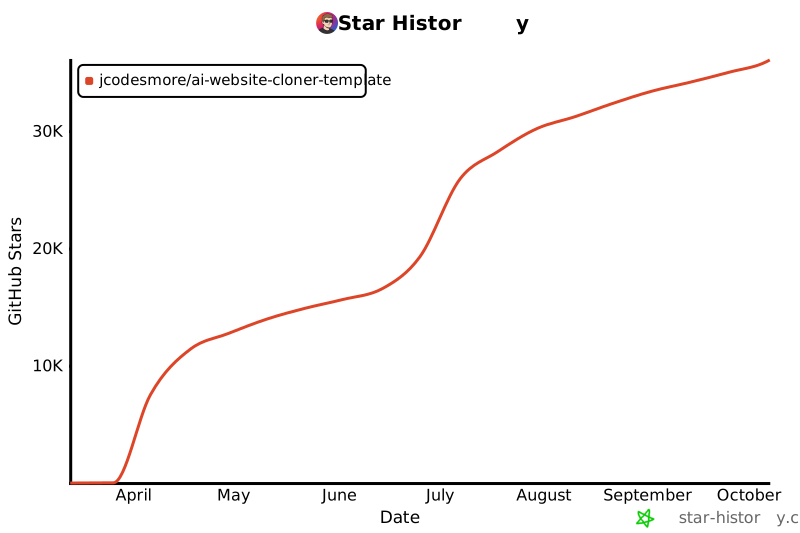](https://star-history.com/#JCodesMore/ai-website-cloner-template&Date)
|
||
|
||
## 许可证
|
||
|
||
MIT
|