evermind-ai--everos
 wehub-resource-sync
6c9c7fe7f3
wehub-resource-sync
6c9c7fe7f3
CI / lint (push) Failing after 1s
CI / unit tests (push) Failing after 1s
CI / unit tests (3.13) (push) Failing after 1s
CI / integration tests (push) Failing after 1s
CI / integration tests (3.13) (push) Failing after 1s
CI / package build (push) Failing after 1s
Commit lint / pull request title (push) Has been skipped
Commit lint / commit messages (push) Failing after 1s
Docs / links (push) Failing after 1s
782 行
26 KiB
Markdown
782 行
26 KiB
Markdown
<div align="center" id="readme-top">
|
||
|
||

|
||
|
||
<p align="center">
|
||
<a href="https://x.com/evermind"><img src="https://img.shields.io/badge/EverMind-000000?labelColor=gray&style=for-the-badge&logo=x&logoColor=white" alt="X"></a>
|
||
<a href="https://huggingface.co/EverMind-AI"><img src="https://img.shields.io/badge/🤗_HuggingFace-EverMind-F5C842?labelColor=gray&style=for-the-badge" alt="HuggingFace"></a>
|
||
<a href="https://discord.gg/gYep5nQRZJ"><img src="https://img.shields.io/badge/dynamic/json?url=https%3A%2F%2Fdiscord.com%2Fapi%2Fv10%2Finvites%2FgYep5nQRZJ%3Fwith_counts%3Dtrue&query=%24.approximate_presence_count&suffix=%20online&label=Discord&color=404EED&labelColor=gray&style=for-the-badge&logo=discord&logoColor=white" alt="Discord"></a>
|
||
<a href="https://github.com/EverMind-AI/EverOS/discussions/67"><img src="https://img.shields.io/badge/WeCom-EverMind_社区-07C160?labelColor=gray&style=for-the-badge&logo=wechat&logoColor=white" alt="WeChat"></a>
|
||
</p>
|
||
|
||
[官网](https://evermind.ai) · [文档](https://docs.evermind.ai) · [博客](https://evermind.ai/blogs) · [English](README.md)
|
||
|
||
</div>
|
||
|
||
|
||
<br>
|
||
|
||
<details>
|
||
<summary><kbd>目录</kbd></summary>
|
||
|
||
<br>
|
||
|
||
- [为什么选择 EverOS](#为什么选择-everos)
|
||
- [快速开始](#快速开始)
|
||
- [使用场景](#使用场景)
|
||
- [文档](#文档)
|
||
- [Star 支持](#star-支持)
|
||
- [EverMind 生态](#evermind-生态)
|
||
- [参与贡献](#参与贡献)
|
||
|
||
<br>
|
||
|
||
</details>
|
||
|
||
|
||
## 为什么选择 EverOS
|
||
|
||
EverOS 是面向 agents 和 makers 的 Python library 与 local-first memory
|
||
runtime。它从 day one 开始就提供一层可携带的记忆层,让记忆穿过 coding
|
||
assistants、apps、devices 和 workflows。它会把 conversations、files 和
|
||
agent trajectories 保存为可读 Markdown,并同步本地 SQLite 与 LanceDB
|
||
索引,用于快速检索和自进化复用。
|
||
|
||
<table>
|
||
<tr>
|
||
<th width="28%">Title</th>
|
||
<th width="36%">EverOS</th>
|
||
<th width="36%">Other Agent Memory Libraries</th>
|
||
</tr>
|
||
<tr>
|
||
<td><strong>Markdown source of truth</strong></td>
|
||
<td>✅ 标准 <code>.md</code> 文件:可读、可编辑、可 diff、可 Git 版本化</td>
|
||
<td>❌ 通常是 API、vector、graph、dashboard 或 database state</td>
|
||
</tr>
|
||
<tr>
|
||
<td><strong>直接文件编辑</strong></td>
|
||
<td>✅ 编辑 <code>.md</code>;cascade watcher 同步</td>
|
||
<td>❌ 通常需要 SDK、API、dashboard 或 backend update path</td>
|
||
</tr>
|
||
<tr>
|
||
<td><strong>本地三件套</strong></td>
|
||
<td>✅ Markdown + SQLite + LanceDB;不需要 MongoDB、Elasticsearch 或 Redis</td>
|
||
<td>❌ 常依赖 managed service、vector DB、graph DB 或 server stack</td>
|
||
</tr>
|
||
<tr>
|
||
<td><strong>用户 + Agent 双轨</strong></td>
|
||
<td>✅ 用户 <code>episodes/profile</code> 与 Agent <code>cases/skills</code> 是分离的一等记忆表面</td>
|
||
<td>❌ 通常围绕 chat history、profiles、entities、facts 或 retrieval records</td>
|
||
</tr>
|
||
<tr>
|
||
<td><strong>正交检索作用域</strong></td>
|
||
<td>✅ 按 <code>user_id</code>、<code>agent_id</code>、<code>app_id</code>、<code>project_id</code> 和 <code>session_id</code> 检索</td>
|
||
<td>❌ 通常按 app、namespace、tenant、thread 或 graph 来组织</td>
|
||
</tr>
|
||
<tr>
|
||
<td><strong>Knowledge Wiki</strong></td>
|
||
<td>✅ 可编辑、可溯源的 Markdown 知识页,支持 taxonomy、CRUD APIs 和 topic search</td>
|
||
<td>❌ 通常和 memory 分离,被锁在 dashboard 里,或者无法回溯到源文件</td>
|
||
</tr>
|
||
<tr>
|
||
<td><strong>Reflection</strong></td>
|
||
<td>✅ 离线记忆进化:在 session 之间合并 episode clusters,并持续改进 profiles 和 skills</td>
|
||
<td>❌ 通常只是 retrieval-only memory,缺少后台 consolidation 和长周期改进</td>
|
||
</tr>
|
||
</table>
|
||
|
||
<br>
|
||
|
||
## 快速开始
|
||
|
||
> 目标:先体验 memory visualizer,然后启动 EverOS,写入一条真实记忆,
|
||
> 再把它搜索回来。
|
||
|
||
### 0. 前置条件
|
||
|
||
- Python 3.12+
|
||
- `everos demo` 不需要 API keys。
|
||
- 如果要运行真正的 server-backed memory flow,中文默认推荐先在
|
||
[阿里云百炼控制台](https://bailian.console.aliyun.com/) 创建一个
|
||
DashScope API Key:
|
||
|
||
| 能力 | 默认 Provider | 用途 | 填入这些 `.env` 字段 |
|
||
| --- | --- | --- | --- |
|
||
| Chat / extraction | [阿里云百炼 / DashScope](https://bailian.console.aliyun.com/) | `LLM` | `EVEROS_LLM__API_KEY` |
|
||
| Embedding | [阿里云百炼 / DashScope](https://bailian.console.aliyun.com/) | `EMBEDDING` | `EVEROS_EMBEDDING__API_KEY` |
|
||
| Re-rank | [阿里云百炼 / DashScope](https://bailian.console.aliyun.com/) | `RERANK` | `EVEROS_RERANK__API_KEY` |
|
||
|
||
同一个 DashScope API Key 可以填到这三个 slot。多模态文件摄取仍通过
|
||
`EVEROS_MULTIMODAL__*` 单独配置;如果只跑下面的文本记忆闭环,不需要先配置它。
|
||
|
||
### 1. 安装
|
||
|
||
```bash
|
||
uv pip install everos
|
||
# or: pip install everos
|
||
```
|
||
|
||
### 2. 体验 Demo
|
||
|
||
在配置 API keys 或启动 server 之前,先运行:
|
||
|
||
```bash
|
||
everos demo
|
||
```
|
||
|
||
这个命令会询问一条记忆和一个召回问题,然后打开一个全屏 terminal UI。
|
||
这是一个 educational visualizer:它是 hardcoded 的,只在 CLI 本地运行,
|
||
不会连接 EverOS server。它的作用是把 memory lifecycle 变成可感知的过程:
|
||
conversation -> memory sphere -> recall -> source proof -> confetti。Demo
|
||
范围和 TUI 代码结构见 [docs/everos-demo.md](docs/everos-demo.md)。
|
||
|
||
Sphere 会经历 ingest、extraction、indexing、recall、source reveal,
|
||
并在第一条记忆落地后进入 confetti successful moment。按 `r` 可以 replay,
|
||
按 `q` 可以退出。
|
||
|
||
<p align="center">
|
||
<img src="https://gist.githubusercontent.com/cyfyifanchen/afa2cf40bf138a3ec96d917e8f2791a2/raw/d4ce82a6ddd7b3ebaf221e4825af993aeca5a7ce/everos-demo-tui-animation.svg" alt="Animated EverOS demo preview showing the memory sphere moving through recall and confetti states" width="720">
|
||
</p>
|
||
|
||
README 媒体使用的循环 showroom view 可以这样运行:
|
||
|
||
```bash
|
||
everos demo --cinematic
|
||
```
|
||
|
||
如果 shell 不是 interactive,或者你只想看一个可复制的静态预览:
|
||
|
||
```bash
|
||
everos demo --plain
|
||
```
|
||
|
||
### 3. 配置
|
||
|
||
生成一个 starter `.env` 文件,然后根据生成的注释填入对应的 API key 字段。
|
||
中文 quick start 默认推荐使用
|
||
[阿里云百炼控制台](https://bailian.console.aliyun.com/) 的 DashScope API Key
|
||
配置 `LLM` / `EMBEDDING` / `RERANK` 三个核心能力。
|
||
|
||
```bash
|
||
everos init
|
||
# or, from a source checkout:
|
||
cp .env.example .env
|
||
```
|
||
|
||
`everos init` 默认写入 `./.env`。也可以使用 `everos init --xdg`
|
||
写入 `${XDG_CONFIG_HOME:-~/.config}/everos/.env`。
|
||
|
||
百炼三件套示例:
|
||
|
||
```env
|
||
EVEROS_LLM__MODEL=qwen-plus
|
||
EVEROS_LLM__API_KEY=<DASHSCOPE_API_KEY>
|
||
EVEROS_LLM__BASE_URL=https://dashscope.aliyuncs.com/compatible-mode/v1
|
||
|
||
EVEROS_EMBEDDING__MODEL=text-embedding-v4
|
||
EVEROS_EMBEDDING__API_KEY=<DASHSCOPE_API_KEY>
|
||
EVEROS_EMBEDDING__BASE_URL=https://dashscope.aliyuncs.com/compatible-mode/v1
|
||
|
||
EVEROS_RERANK__MODEL=gte-rerank-v2
|
||
EVEROS_RERANK__API_KEY=<DASHSCOPE_API_KEY>
|
||
EVEROS_RERANK__BASE_URL=https://dashscope.aliyuncs.com
|
||
```
|
||
|
||
### 4. 启动 EverOS
|
||
|
||
```bash
|
||
everos server start
|
||
```
|
||
|
||
保持服务运行,然后打开第二个 terminal 检查:
|
||
|
||
```bash
|
||
curl http://127.0.0.1:8000/health
|
||
```
|
||
|
||
预期响应:
|
||
|
||
```json
|
||
{"status":"ok"}
|
||
```
|
||
|
||
`everos server start` 会按以下顺序查找 `.env`:`--env-file <path>` →
|
||
`./.env`(当前目录)→ `${XDG_CONFIG_HOME:-~/.config}/everos/.env` →
|
||
`~/.everos/.env`。端点栈兼容 OpenAI protocol(OpenAI / OpenRouter /
|
||
vLLM / Ollama / DeepInfra)。你可以覆盖生成的 `.env` 中的 `*__BASE_URL`
|
||
来指向任意这些模型服务。
|
||
|
||
现在可以把 demo 跑成真实 server flow。在第二个 terminal 里运行:
|
||
|
||
```bash
|
||
everos demo --live
|
||
```
|
||
|
||
Live demo mode 会连接正在运行的 server,并在打开同一个 memory sphere UI
|
||
之前真实执行 `/health` -> `/api/v1/memory/add` -> `/api/v1/memory/flush` ->
|
||
`/api/v1/memory/search`。如果 server 不在 `http://127.0.0.1:8000`,可以使用
|
||
`--server-url <url>`。
|
||
|
||
### 5. 试写第一条记忆
|
||
|
||
添加一个很小的 conversation:
|
||
|
||
```bash
|
||
TS=$(($(date +%s)*1000))
|
||
|
||
curl -X POST http://127.0.0.1:8000/api/v1/memory/add \
|
||
-H 'Content-Type: application/json' \
|
||
-d "{
|
||
\"session_id\": \"demo-001\",
|
||
\"app_id\": \"default\",
|
||
\"project_id\": \"default\",
|
||
\"messages\": [
|
||
{\"sender_id\": \"alice\", \"role\": \"user\", \"timestamp\": $TS, \"content\": \"I love climbing in Yosemite every spring.\"},
|
||
{\"sender_id\": \"alice\", \"role\": \"user\", \"timestamp\": $((TS+10000)), \"content\": \"My favorite coffee shop is Blue Bottle in SOMA.\"}
|
||
]
|
||
}"
|
||
```
|
||
|
||
为了本地 demo,手动触发一次 extraction:
|
||
|
||
```bash
|
||
curl -X POST http://127.0.0.1:8000/api/v1/memory/flush \
|
||
-H 'Content-Type: application/json' \
|
||
-d '{"session_id":"demo-001","app_id":"default","project_id":"default"}'
|
||
```
|
||
|
||
再把这条记忆搜索回来:
|
||
|
||
```bash
|
||
curl -X POST http://127.0.0.1:8000/api/v1/memory/search \
|
||
-H 'Content-Type: application/json' \
|
||
-d '{
|
||
"user_id": "alice",
|
||
"app_id": "default",
|
||
"project_id": "default",
|
||
"query": "Where do I like to climb?",
|
||
"top_k": 5
|
||
}'
|
||
```
|
||
|
||
响应里应该能看到 Yosemite 相关记忆。如果第一次搜索为空,稍等片刻再试;
|
||
Markdown 会同步写入,本地索引会在后台追上。
|
||
|
||
> [!TIP]
|
||
> **第一条记忆已经写入。**
|
||
> 你刚刚把一个事实交给 EverOS,把它整理进可持久化的 Markdown-backed memory,
|
||
> 并通过本地索引把它搜索回来。这就是 EverOS 的核心闭环。
|
||
> 想看看 source of truth?打开 `~/.everos`,直接检查生成的 Markdown 文件。
|
||
|
||
带完整响应和 Markdown 文件说明的 walkthrough 见 [QUICKSTART.md](QUICKSTART.md)。
|
||
|
||
### 可选:摄取多模态文件
|
||
|
||
如果要通过 `/api/v1/memory/add` 的 `content` items 摄取非文本内容
|
||
(image / pdf / audio / office documents),安装可选 extra:
|
||
|
||
```bash
|
||
uv pip install 'everos[multimodal]' # or: pip install 'everos[multimodal]'
|
||
```
|
||
|
||
这会引入 `everalgo-parser`(包含用于 SVG 支持的 `[svg]` bundle,通过
|
||
cairosvg)并接入多模态 LLM client(`.env` 中的 `EVEROS_MULTIMODAL__*`
|
||
字段,默认通过 OpenRouter 使用 `google/gemini-3-flash-preview`)。
|
||
|
||
**Office 文档支持需要 LibreOffice 作为系统依赖。** parser 会调用
|
||
`soffice`(LibreOffice 的 headless renderer),先把 `.doc` / `.docx` /
|
||
`.ppt` / `.pptx` / `.xls` / `.xlsx` 转换为 PDF,再交给多模态 LLM。
|
||
如果没有 LibreOffice,office 上传会返回 HTTP 415,并带有明确错误信息;
|
||
PDF / image / audio / HTML / email 解析不受影响。
|
||
|
||
在提供 office 文档服务前,请先在宿主机安装:
|
||
|
||
```bash
|
||
brew install --cask libreoffice # macOS
|
||
sudo apt-get install -y libreoffice # Debian / Ubuntu
|
||
```
|
||
|
||
### 贡献者开发
|
||
|
||
```bash
|
||
git clone https://github.com/EverMind-AI/EverOS.git
|
||
cd EverOS
|
||
uv sync # creates ./.venv and installs deps
|
||
source .venv/bin/activate # or prefix commands with `uv run`
|
||
everos demo --plain # 先体验本地 educational demo;不需要 API keys
|
||
everos init # 把百炼 DashScope API Key 填进 .env
|
||
|
||
everos --help
|
||
make test
|
||
```
|
||
|
||
<br>
|
||
<div align="right">
|
||
|
||
[](#readme-top)
|
||
|
||
</div>
|
||
|
||
## 使用场景
|
||
|
||
现在你已经完成了第一个成功的 EverOS moment,可以继续看看大家如何把持久记忆
|
||
用在 agents、apps 和社区集成里。
|
||
|
||
这些使用场景展示了持久记忆可以在真实产品和工作流中带来什么能力。
|
||
有些示例已经打包在本仓库中,另一些则指向外部 demo 或集成,你可以研究并复用。
|
||
|
||
<table>
|
||
<tr>
|
||
<td width="50%" valign="top">
|
||
|
||
[](https://evermind.ai/usecase_reunite)
|
||
|
||
#### Reunite - 用 EverOS 找回连接
|
||
|
||
父母描述他们记得的线索,孩子描述他们残留的回忆。Reunite 使用语义记忆来浮现这些连接。
|
||
|
||
[了解更多](https://evermind.ai/usecase_reunite)
|
||
|
||
</td>
|
||
<td width="50%" valign="top">
|
||
|
||
[](https://github.com/tt-a1i/hive)
|
||
|
||
#### Hive Orchestrator
|
||
|
||
面向 CLI coding agents 的 browser-native hive-mind。Claude Code、Codex、Gemini 和 OpenCode 作为真实 PTY 进程,通过团队协议协作。
|
||
|
||
[代码](https://github.com/tt-a1i/hive)
|
||
|
||
</td>
|
||
</tr>
|
||
|
||
<tr>
|
||
<td width="50%" valign="top">
|
||
|
||
[](https://github.com/tt-a1i/evermemos-mcp)
|
||
|
||
#### 接入 EverOS 的 AI 编程助手
|
||
|
||
由 EverOS 驱动的通用长期记忆层,面向 AI coding assistants。
|
||
|
||
[代码](https://github.com/tt-a1i/evermemos-mcp)
|
||
|
||
</td>
|
||
<td width="50%" valign="top">
|
||
|
||
[](https://github.com/yuansui123/AI-Data-Technician-EverMemOS)
|
||
|
||
#### AI Data Technician
|
||
|
||
一个 agentic AI 系统,可以从科学家的交互中学习,用于检查、分析和分类高维时间序列数据,并通过跨 session 改进的持久记忆持续变强。
|
||
|
||
[代码](https://github.com/yuansui123/AI-Data-Technician-EverMemOS)
|
||
|
||
</td>
|
||
</tr>
|
||
|
||
<tr>
|
||
<td width="50%" valign="top">
|
||
|
||

|
||
|
||
#### 接入 EverOS 的 Rokid AI 助手
|
||
|
||
在 Rokid Glasses 中连接 EverOS,为你的智能活动启用长期记忆。
|
||
|
||
即将推出
|
||
|
||
</td>
|
||
<td width="50%" valign="top">
|
||
|
||

|
||
|
||
#### 带长期记忆的创意助手
|
||
|
||
拥有长期记忆的创意助手,让你的创作上下文可以跨 session 持续可用。
|
||
|
||
即将推出
|
||
|
||
</td>
|
||
</tr>
|
||
|
||
<tr>
|
||
<td colspan="2" align="right">
|
||
<a href="#readme-top"><img src="https://img.shields.io/badge/-Back_to_top-gray?style=flat-square" alt="Back to top"></a>
|
||
</td>
|
||
</tr>
|
||
|
||
<tr>
|
||
<td width="50%" valign="top">
|
||
|
||
[](https://github.com/xunyud/Earth-Online)
|
||
|
||
#### Earth Online 记忆游戏
|
||
|
||
Earth Online 是一款 memory-aware productivity game,把日常计划变成一个持续生长的 quest log。
|
||
|
||
[代码](https://github.com/xunyud/Earth-Online)
|
||
|
||
</td>
|
||
<td width="50%" valign="top">
|
||
|
||
[](https://github.com/golutra/golutra)
|
||
|
||
#### 多 Agent 编排平台
|
||
|
||
Golutra 为工程团队提供 multi-agent workforce,把 IDE 从单一 assistant 扩展为协同 agents。
|
||
|
||
[代码](https://github.com/golutra/golutra)
|
||
|
||
</td>
|
||
</tr>
|
||
<tr>
|
||
<td width="50%" valign="top">
|
||
|
||
[](https://github.com/Yangtze-Seventh/taste-verse)
|
||
|
||
#### 你的个人品鉴宇宙
|
||
|
||
通过沉浸式 3D 星图记录、可视化并探索你的 tasting journey。
|
||
|
||
[代码](https://github.com/Yangtze-Seventh/taste-verse)
|
||
|
||
</td>
|
||
<td width="50%" valign="top">
|
||
|
||
[](https://github.com/kellyvv/OpenHer)
|
||
|
||
#### EverOS Open Her
|
||
|
||
构建有感受的 AI。开源 persona engine,让 personality 从 neural drives 中涌现,而不是来自 prompts。灵感来自 Her。
|
||
|
||
[代码](https://github.com/kellyvv/OpenHer)
|
||
|
||
</td>
|
||
</tr>
|
||
|
||
<tr>
|
||
<td width="50%" valign="top">
|
||
|
||
[](https://chromewebstore.google.com/detail/ruminer-browser-agent/lbccjohfpdpimbhpckljimgolndfmfif)
|
||
|
||
#### 面向个人记忆的浏览器 Agent
|
||
|
||
Ruminer 为 browser agent 带来持久记忆,让它能在不同网页任务之间携带个人上下文。
|
||
|
||
[插件](https://chromewebstore.google.com/detail/ruminer-browser-agent/lbccjohfpdpimbhpckljimgolndfmfif)
|
||
|
||
</td>
|
||
<td width="50%" valign="top">
|
||
|
||
[](https://github.com/nanxingw/EverMem)
|
||
|
||
#### EverMem 与 EverOS 同步
|
||
|
||
一条命令,把任意 AI coding CLI 连接到 EverMemOS 长期记忆。
|
||
|
||
[代码](https://github.com/nanxingw/EverMem)
|
||
|
||
</td>
|
||
</tr>
|
||
|
||
<tr>
|
||
<td colspan="2" align="right">
|
||
<a href="#readme-top"><img src="https://img.shields.io/badge/-Back_to_top-gray?style=flat-square" alt="Back to top"></a>
|
||
</td>
|
||
</tr>
|
||
|
||
<tr>
|
||
<td width="50%" valign="top">
|
||
|
||
[](https://github.com/mco-org/mco)
|
||
|
||
#### MCO - 编排 AI Coding Agents
|
||
|
||
MCO 为你的主 Agent 配备一个 agent team,让它们可以一起处理复杂任务。
|
||
|
||
[代码](https://github.com/mco-org/mco)
|
||
|
||
</td>
|
||
<td width="50%" valign="top">
|
||
|
||
[](https://github.com/onenewborn/StudyBuddy-public)
|
||
|
||
#### 带自进化记忆的 Study Buddy
|
||
|
||
使用拥有 self-evolving memory 的 Agent,主动辅助学习。
|
||
|
||
[代码](https://github.com/onenewborn/StudyBuddy-public)
|
||
|
||
</td>
|
||
</tr>
|
||
|
||
<tr>
|
||
<td width="50%" valign="top">
|
||
|
||
[](https://github.com/TonyLiangDesign/MemoCare)
|
||
|
||
#### 阿尔茨海默症记忆助手
|
||
|
||
通过高级记忆支持和日常辅助,帮助有需要的人更好地生活。
|
||
|
||
[代码](https://github.com/TonyLiangDesign/MemoCare)
|
||
|
||
</td>
|
||
<td width="50%" valign="top">
|
||
|
||
[](https://github.com/AlexL1024/NeuralConnect)
|
||
|
||
#### 记忆驱动的 Multi-Agent NPC 体验
|
||
|
||
一款 iOS 科幻悬疑游戏,玩家可以探索世界并揭开真相。
|
||
|
||
[代码](https://github.com/AlexL1024/NeuralConnect)
|
||
|
||
</td>
|
||
</tr>
|
||
|
||
<tr>
|
||
<td width="50%" valign="top">
|
||
|
||
[](https://github.com/elontusk5219-prog/Mobi)
|
||
|
||
#### Mobi Companion
|
||
|
||
一款 iOS app,用户可以创建、养成并与名为 Mobi 的个性化 AI companion 一起生活。
|
||
|
||
[代码](https://github.com/elontusk5219-prog/Mobi)
|
||
|
||
</td>
|
||
<td width="50%" valign="top">
|
||
|
||
[](https://github.com/JaMesLiMers/EvermemCompetition-Spiro)
|
||
|
||
#### 带记忆的 AI 可穿戴设备
|
||
|
||
一个 context-native AI wearable,聆听日常生活,并把对话转换为记忆。
|
||
|
||
[代码](https://github.com/JaMesLiMers/EvermemCompetition-Spiro)
|
||
|
||
</td>
|
||
</tr>
|
||
|
||
<tr>
|
||
<td colspan="2" align="right">
|
||
<a href="#readme-top"><img src="https://img.shields.io/badge/-Back_to_top-gray?style=flat-square" alt="Back to top"></a>
|
||
</td>
|
||
</tr>
|
||
<tr>
|
||
<td width="50%" valign="top">
|
||
|
||
[](docs/migration-to-1.0.0.md)
|
||
|
||
#### Legacy OpenClaw Agent 记忆
|
||
|
||
已归档的 pre-1.0.0 plugin reference。新的集成应使用当前 EverOS API。
|
||
|
||
[了解更多](docs/migration-to-1.0.0.md)
|
||
|
||
</td>
|
||
<td width="50%" valign="top">
|
||
|
||
[](https://github.com/TEN-framework/ten-framework/tree/04cb80601374fa9e35b4e544b2dbd23286ca7763/ai_agents/agents/examples/voice-assistant-with-EverMemOS)
|
||
|
||
#### 带记忆的 Live2D 角色
|
||
|
||
为实时 Live2D character 添加长期记忆,由 [TEN Framework](https://github.com/TEN-framework/ten-framework) 驱动。
|
||
|
||
[代码](https://github.com/TEN-framework/ten-framework/tree/04cb80601374fa9e35b4e544b2dbd23286ca7763/ai_agents/agents/examples/voice-assistant-with-EverMemOS)
|
||
|
||
</td>
|
||
</tr>
|
||
<tr>
|
||
<td width="50%" valign="top">
|
||
|
||
[](https://screenshot-analysis-vercel.vercel.app/)
|
||
|
||
#### 带记忆的 Computer-Use
|
||
|
||
运行基于截图的分析任务,并把结果存入记忆。
|
||
|
||
[在线演示](https://screenshot-analysis-vercel.vercel.app/)
|
||
|
||
</td>
|
||
<td width="50%" valign="top">
|
||
|
||
[](use-cases/game-of-throne-demo)
|
||
|
||
#### Game Of Thrones Memories
|
||
|
||
通过与 *A Game of Thrones* 互动问答体验,展示 AI 记忆基础设施。
|
||
|
||
[代码](use-cases/game-of-throne-demo)
|
||
|
||
</td>
|
||
</tr>
|
||
<tr>
|
||
<td width="50%" valign="top">
|
||
|
||
[](use-cases/claude-code-plugin)
|
||
|
||
#### Claude Code Plugin
|
||
|
||
Claude Code 的持久记忆插件。自动保存并回忆过去 coding sessions 的上下文。
|
||
|
||
[代码](use-cases/claude-code-plugin)
|
||
|
||
</td>
|
||
<td width="50%" valign="top">
|
||
|
||
[](https://main.d2j21qxnymu6wl.amplifyapp.com/graph.html)
|
||
|
||
#### 记忆图谱可视化
|
||
|
||
在图界面中探索已存储的 entities 和 relationships。前端 demo 已可用;后端集成仍在进行中。
|
||
|
||
[在线演示](https://main.d2j21qxnymu6wl.amplifyapp.com/graph.html)
|
||
|
||
</td>
|
||
</tr>
|
||
</table>
|
||
|
||
<br>
|
||
<div align="right">
|
||
|
||
[](#readme-top)
|
||
|
||
</div>
|
||
|
||
## 文档
|
||
|
||
- [docs/everos-demo.md](docs/everos-demo.md) - Demo 范围与 TUI 源码布局
|
||
- [docs/how-memory-works.md](docs/how-memory-works.md) - Markdown、SQLite、LanceDB 与 recall flow
|
||
- [docs/use-cases.md](docs/use-cases.md) - 完整使用场景 gallery 和集成示例
|
||
- [docs/engineering.md](docs/engineering.md) - 贡献者工程参考:构建、测试、CI 与规范
|
||
- [docs/migration-to-1.0.0.md](docs/migration-to-1.0.0.md) - Legacy API 迁移说明
|
||
- [CHANGELOG.md](CHANGELOG.md) - 发布记录
|
||
- [CONTRIBUTING.md](CONTRIBUTING.md) - 如何贡献
|
||
|
||
<br>
|
||
<div align="right">
|
||
|
||
[](#readme-top)
|
||
|
||
</div>
|
||
|
||
## Star 支持
|
||
|
||
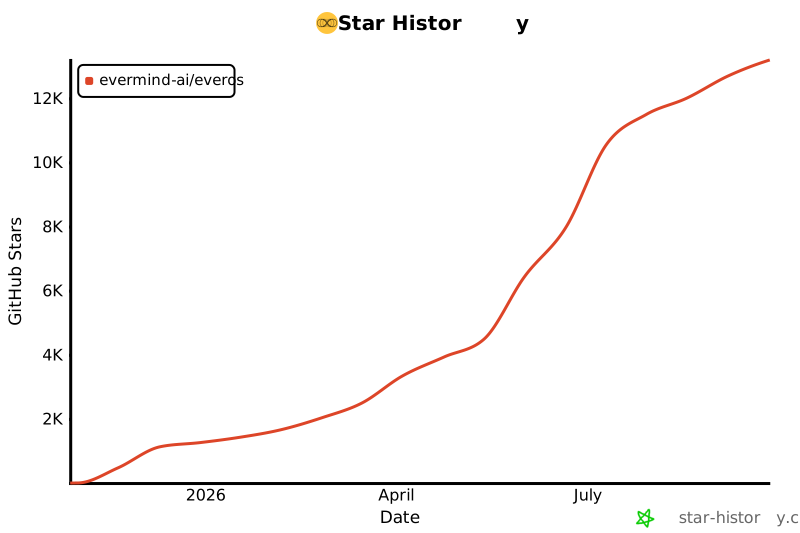
如果 EverOS 对你的 Agent stack 有帮助,请 Star 这个仓库。它会帮助更多
|
||
builders 发现这个项目,也会给 memory ecosystem 一个更强的信号,让它持续改进。
|
||
|
||
### Star 趋势
|
||
|
||
[](https://www.star-history.com/#EverMind-AI/EverOS&Date)
|
||
|
||
<br>
|
||
<div align="right">
|
||
|
||
[](#readme-top)
|
||
|
||
</div>
|
||
|
||
## EverMind 生态
|
||
|
||
EverMind 是一个面向长期记忆、自进化 Agent、AI-native interfaces 和记忆评测的开源生态。
|
||
|
||
<table>
|
||
<tr>
|
||
<th colspan="2">EverMind 开源生态</th>
|
||
</tr>
|
||
<tr>
|
||
<td><strong>Memory Runtime</strong></td>
|
||
<td><a href="https://github.com/EverMind-AI/EverOS">EverOS</a> - 本地记忆操作系统,以及有研究支撑的 Agent 和用户记忆 runtime。</td>
|
||
</tr>
|
||
<tr>
|
||
<td><strong>Self-Improving Agent Harness</strong></td>
|
||
<td><a href="https://github.com/EverMind-AI/Raven">Raven</a> - The Self-Improving Agent Harness,把记忆、主动性、上下文控制和 skill evolution 带进终端原生 Agent。</td>
|
||
</tr>
|
||
<tr>
|
||
<td><strong>算法引擎</strong></td>
|
||
<td><a href="https://github.com/EverMind-AI/EverAlgo">EverAlgo</a> - stateless extraction、ranking、parsing 和 memory operators,为 EverOS 提供算法能力。</td>
|
||
</tr>
|
||
<tr>
|
||
<td><strong>Hypergraph Memory</strong></td>
|
||
<td><a href="https://github.com/EverMind-AI/HyperMem">HyperMem</a> - 面向长期对话的 hypergraph memory,拥有独立的 benchmark-backed topic -> episode -> fact 检索方法。</td>
|
||
</tr>
|
||
<tr>
|
||
<td><strong>Benchmarks</strong></td>
|
||
<td><a href="https://github.com/EverMind-AI/EverMemBench">EverMemBench</a> · <a href="https://github.com/EverMind-AI/EvoAgentBench">EvoAgentBench</a> - conversational memory 和 Agent self-evolution 的评测套件。</td>
|
||
</tr>
|
||
<tr>
|
||
<td><strong>Long-Context Research</strong></td>
|
||
<td><a href="https://github.com/EverMind-AI/MSA">MSA</a> - Memory Sparse Attention,用于可扩展 latent memory 和 100M-token contexts。</td>
|
||
</tr>
|
||
<tr>
|
||
<td><strong>个人记忆层</strong></td>
|
||
<td><a href="https://github.com/EverMind-AI/EverMe">EverMe</a> - CLI 和 Agent plugin suite,用于跨设备、跨 Agent 的个人记忆。</td>
|
||
</tr>
|
||
<tr>
|
||
<td><strong>开发者集成</strong></td>
|
||
<td><a href="https://github.com/EverMind-AI/evermem-claude-code">evermem-claude-code</a> · <a href="https://github.com/EverMind-AI/everos-plugins">everos-plugins</a> - AI coding agents 的 plugins、skills 和 migration tooling。</td>
|
||
</tr>
|
||
</table>
|
||
|
||
这些仓库共同构成 EverMind 的 research-to-runtime stack:新的记忆方法、
|
||
可复用算法、benchmark evidence,以及可落地的 Agent 集成。
|
||
|
||
<br>
|
||
<div align="right">
|
||
|
||
[](#readme-top)
|
||
|
||
</div>
|
||
|
||
<br>
|
||
|
||
## 参与贡献
|
||
|
||
欢迎为整个仓库贡献:架构方法、benchmark coverage、use-case examples、文档和 bug fixes。
|
||
浏览 [Issues](https://github.com/EverMind-AI/EverOS/issues) 找到适合的切入点,
|
||
准备好后即可提交 PR。
|
||
|
||
<br>
|
||
|
||
> [!TIP]
|
||
>
|
||
> **欢迎各种形式的贡献** 🎉
|
||
>
|
||
> 一起让 EverOS 变得更好。代码、文档、benchmark reports、use-case write-ups
|
||
> 和 integration examples 都很有价值。也欢迎在社交媒体上分享你的项目,启发更多人。
|
||
>
|
||
> 你可以在 𝕏 上联系 EverOS maintainer [@elliotchen200](https://x.com/elliotchen200),
|
||
> 或在 GitHub 上联系 [@cyfyifanchen](https://github.com/cyfyifanchen),获取项目更新、
|
||
> 讨论和协作机会。
|
||
|
||

|
||

|
||
|
||
### 代码贡献者
|
||
|
||
[](https://github.com/EverMind-AI/EverOS/graphs/contributors)
|
||
|
||

|
||

|
||
|
||
### 许可证
|
||
|
||
[Apache License 2.0](LICENSE) - 第三方归属说明请见 [NOTICE](NOTICE)。
|
||
|
||
### 引用
|
||
|
||
如果你在研究中使用 EverOS,请参考 [CITATION.md](CITATION.md)。
|
||
|
||
<br>
|
||
|
||
<div align="right">
|
||
|
||
[](#readme-top)
|
||
|
||
</div>
|