aleju--imgaug
 wehub-resource-sync
1241 行
82 KiB
Markdown
1241 行
82 KiB
Markdown
<!-- WEHUB_ZH_README -->
|
||
> [!NOTE]
|
||
> 本文档由 WeHub 基于上游 README 翻译整理,属于社区翻译,非官方中文文档。
|
||
> [English](./README.en.md) · [原始项目](https://github.com/aleju/imgaug) · [上游 README](https://github.com/aleju/imgaug/blob/HEAD/README.md)
|
||
> 原作者、版权与许可证归属以原始项目及本仓库 LICENSE 文件为准。
|
||
|
||
# imgaug
|
||
|
||
本 Python 库可帮助你在机器学习项目中对图像进行增强(augmentation)。
|
||
它将一组输入图像转换为一套新的、规模大得多的、经过轻微修改的图像。
|
||
|
||
[](https://travis-ci.org/aleju/imgaug)
|
||
[](https://codecov.io/gh/aleju/imgaug)
|
||
[](https://www.codacy.com/app/aleju/imgaug?utm_source=github.com&utm_medium=referral&utm_content=aleju/imgaug&utm_campaign=Badge_Grade)
|
||
|
||
<table>
|
||
|
||
<tr>
|
||
<th> </th>
|
||
<th>图像</th>
|
||
<th>热图 (Heatmaps)</th>
|
||
<th>分割图 (Seg. Maps)</th>
|
||
<th>关键点 (Keypoints)</th>
|
||
<th>边界框、<br>多边形 (Bounding Boxes,<br>Polygons)</th>
|
||
</tr>
|
||
|
||
<!-- 第 1 行:原始输入 -->
|
||
<tr>
|
||
<td><em>原始输入</em></td>
|
||
<td><img src="https://raw.githubusercontent.com/aleju/imgaug-doc/master/readme_images/small_overview/noop_image.jpg?raw=true" height="83" width="124" alt="输入图像"></td>
|
||
<td><img src="https://raw.githubusercontent.com/aleju/imgaug-doc/master/readme_images/small_overview/noop_heatmap.jpg?raw=true" height="83" width="124" alt="输入热图"></td>
|
||
<td><img src="https://raw.githubusercontent.com/aleju/imgaug-doc/master/readme_images/small_overview/noop_segmap.jpg?raw=true" height="83" width="124" alt="输入分割图"></td>
|
||
<td><img src="https://raw.githubusercontent.com/aleju/imgaug-doc/master/readme_images/small_overview/noop_kps.jpg?raw=true" height="83" width="124" alt="输入关键点"></td>
|
||
<td><img src="https://raw.githubusercontent.com/aleju/imgaug-doc/master/readme_images/small_overview/noop_bbs.jpg?raw=true" height="83" width="124" alt="输入边界框"></td>
|
||
</tr>
|
||
|
||
<!-- 第 2 行:高斯噪声 + 对比度 + 锐化 -->
|
||
<tr>
|
||
<td>高斯噪声<br>+ 对比度<br>+ 锐化</td>
|
||
<td><img src="https://raw.githubusercontent.com/aleju/imgaug-doc/master/readme_images/small_overview/non_geometric_image.jpg?raw=true" height="83" width="124" alt="应用于图像的非几何增强"></td>
|
||
<td><img src="https://raw.githubusercontent.com/aleju/imgaug-doc/master/readme_images/small_overview/non_geometric_heatmap.jpg?raw=true" height="83" width="124" alt="应用于热图的非几何增强"></td>
|
||
<td><img src="https://raw.githubusercontent.com/aleju/imgaug-doc/master/readme_images/small_overview/non_geometric_segmap.jpg?raw=true" height="83" width="124" alt="应用于分割图的非几何增强"></td>
|
||
<td><img src="https://raw.githubusercontent.com/aleju/imgaug-doc/master/readme_images/small_overview/non_geometric_kps.jpg?raw=true" height="83" width="124" alt="应用于关键点的非几何增强"></td>
|
||
<td><img src="https://raw.githubusercontent.com/aleju/imgaug-doc/master/readme_images/small_overview/non_geometric_bbs.jpg?raw=true" height="83" width="124" alt="应用于边界框的非几何增强"></td>
|
||
</tr>
|
||
|
||
<!-- 第 3 行:仿射 -->
|
||
<tr>
|
||
<td>仿射 (Affine)</td>
|
||
<td><img src="https://raw.githubusercontent.com/aleju/imgaug-doc/master/readme_images/small_overview/affine_image.jpg?raw=true" height="83" width="124" alt="应用于图像的仿射增强"></td>
|
||
<td><img src="https://raw.githubusercontent.com/aleju/imgaug-doc/master/readme_images/small_overview/affine_heatmap.jpg?raw=true" height="83" width="124" alt="应用于热图的仿射增强"></td>
|
||
<td><img src="https://raw.githubusercontent.com/aleju/imgaug-doc/master/readme_images/small_overview/affine_segmap.jpg?raw=true" height="83" width="124" alt="应用于分割图的仿射增强"></td>
|
||
<td><img src="https://raw.githubusercontent.com/aleju/imgaug-doc/master/readme_images/small_overview/affine_kps.jpg?raw=true" height="83" width="124" alt="应用于关键点的仿射增强"></td>
|
||
<td><img src="https://raw.githubusercontent.com/aleju/imgaug-doc/master/readme_images/small_overview/affine_bbs.jpg?raw=true" height="83" width="124" alt="应用于边界框的仿射增强"></td>
|
||
</tr>
|
||
|
||
<!-- 第 4 行:裁剪 + 填充 -->
|
||
<tr>
|
||
<td>裁剪<br>+ 填充</td>
|
||
<td><img src="https://raw.githubusercontent.com/aleju/imgaug-doc/master/readme_images/small_overview/cropandpad_image.jpg?raw=true" height="83" width="124" alt="应用于图像的裁剪与填充增强"></td>
|
||
<td><img src="https://raw.githubusercontent.com/aleju/imgaug-doc/master/readme_images/small_overview/cropandpad_heatmap.jpg?raw=true" height="83" width="124" alt="应用于热图的裁剪与填充增强"></td>
|
||
<td><img src="https://raw.githubusercontent.com/aleju/imgaug-doc/master/readme_images/small_overview/cropandpad_segmap.jpg?raw=true" height="83" width="124" alt="应用于分割图的裁剪与填充增强"></td>
|
||
<td><img src="https://raw.githubusercontent.com/aleju/imgaug-doc/master/readme_images/small_overview/cropandpad_kps.jpg?raw=true" height="83" width="124" alt="应用于关键点的裁剪与填充增强"></td>
|
||
<td><img src="https://raw.githubusercontent.com/aleju/imgaug-doc/master/readme_images/small_overview/cropandpad_bbs.jpg?raw=true" height="83" width="124" alt="应用于边界框的裁剪与填充增强"></td>
|
||
</tr>
|
||
|
||
<!-- 第 5 行:水平翻转 + 透视 -->
|
||
<tr>
|
||
<td>水平翻转 (Fliplr)<br>+ 透视 (Perspective)</td>
|
||
<td><img src="https://raw.githubusercontent.com/aleju/imgaug-doc/master/readme_images/small_overview/fliplr_perspective_image.jpg" height="83" width="124" alt="应用于图像的水平翻转与透视变换增强"></td>
|
||
<td><img src="https://raw.githubusercontent.com/aleju/imgaug-doc/master/readme_images/small_overview/fliplr_perspective_heatmap.jpg?raw=true" height="83" width="124" alt="应用于热图的水平翻转与透视变换增强"></td>
|
||
<td><img src="https://raw.githubusercontent.com/aleju/imgaug-doc/master/readme_images/small_overview/fliplr_perspective_segmap.jpg?raw=true" height="83" width="124" alt="应用于分割图的水平翻转与透视变换增强"></td>
|
||
<td><img src="https://raw.githubusercontent.com/aleju/imgaug-doc/master/readme_images/small_overview/fliplr_perspective_kps.jpg?raw=true" height="83" width="124" alt="应用于关键点的水平翻转与透视变换增强"></td>
|
||
<td><img src="https://raw.githubusercontent.com/aleju/imgaug-doc/master/readme_images/small_overview/fliplr_perspective_bbs.jpg?raw=true" height="83" width="124" alt="应用于边界框的水平翻转与透视变换增强"></td>
|
||
</tr>
|
||
|
||
</table>
|
||
|
||
|
||
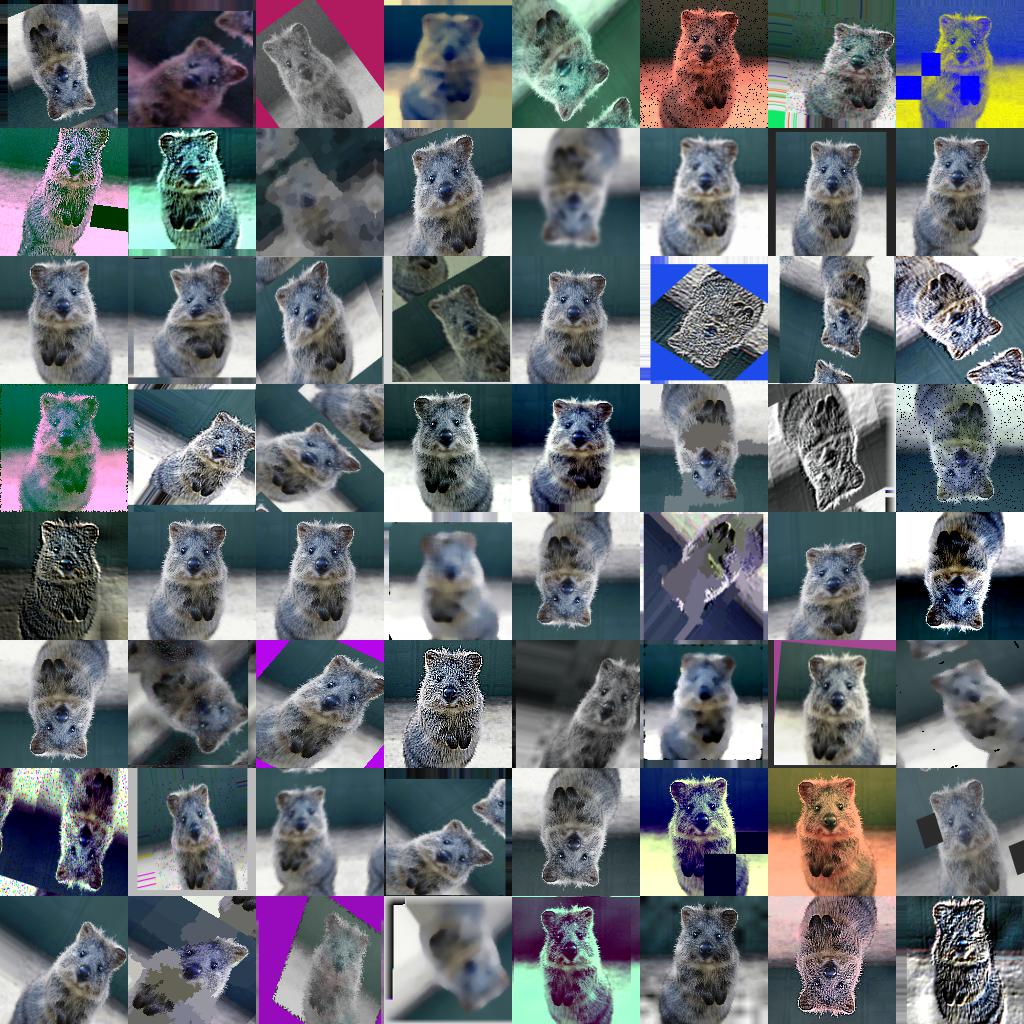
**更多(强力)单张输入图像的增强示例:**
|
||
|
||
|
||
|
||
|
||
## 目录
|
||
|
||
1. [特性](#features)
|
||
2. [安装](#installation)
|
||
3. [文档](#documentation)
|
||
4. [近期变更](#recent_changes)
|
||
5. [示例图像](#example_images)
|
||
6. [代码示例](#code_examples)
|
||
7. [引用](#citation)
|
||
|
||
|
||
<a name="features"/>
|
||
|
||
## 特性
|
||
|
||
* 多种增强技术
|
||
* 例如:仿射变换、透视变换、对比度变化、高斯噪声、区域 dropout、色相/饱和度变化、裁剪/填充、模糊……
|
||
* 针对高性能进行了优化
|
||
* 可轻松仅对部分图像应用增强
|
||
* 可轻松以随机顺序应用增强
|
||
* 支持
|
||
* 图像(完整支持 uint8,其他 dtype 请参阅[文档](https://imgaug.readthedocs.io/en/latest/source/dtype_support.html))
|
||
* 热图 (Heatmaps, float32)、分割图 (Segmentation Maps, int)、掩码 (Masks, bool)
|
||
* 可大于或小于对应图像。*无需*为例如裁剪等操作额外编写代码。
|
||
* 关键点/地标 (Keypoints/Landmarks, int/float 坐标)
|
||
* 边界框 (Bounding Boxes, int/float 坐标)
|
||
* 多边形 (Polygons, int/float 坐标)
|
||
* 折线 (Line Strings, int/float 坐标)
|
||
* 自动对齐采样的随机值
|
||
* 示例:将图像及其分割图按从 `uniform(-10°, 45°)` 采样的同一数值旋转。(0 行额外代码。)
|
||
* 以概率分布作为参数
|
||
* 示例:按从 `uniform(-10°, 45°)` 采样的数值旋转图像。
|
||
* 示例:按从 `ABS(N(0, 20.0))*(1+B(1.0, 1.0))` 采样的数值旋转图像,其中 `ABS(.)` 为绝对值函数,`N(.)` 为高斯分布 (gaussian distribution),`B(.)` 为 beta 分布。
|
||
* 众多辅助函数
|
||
* 示例:绘制热图、分割图、关键点、边界框……
|
||
* 示例:缩放分割图、对图像/图进行平均/最大池化、按宽高比填充图像(例如变为正方形)
|
||
* 示例:将关键点转换为距离图、从图像中提取边界框内的像素、将多边形裁剪到图像平面……
|
||
* 支持在多 CPU 核心上进行增强
|
||
|
||
<a name="installation"/>
|
||
|
||
## 安装
|
||
|
||
该库支持 Python 2.7 和 3.4+。
|
||
|
||
### 安装:Anaconda
|
||
|
||
要在 Anaconda 中安装该库,请执行以下命令:
|
||
```bash
|
||
conda config --add channels conda-forge
|
||
conda install imgaug
|
||
```
|
||
|
||
你可以通过 `conda remove imgaug` 再次卸载该库。
|
||
|
||
### 安装:pip
|
||
|
||
然后通过 pypi 安装 imgaug(可能落后于 GitHub 版本):
|
||
```bash
|
||
pip install imgaug
|
||
```
|
||
|
||
或直接从 GitHub 安装最新版本:
|
||
```bash
|
||
pip install git+https://github.com/aleju/imgaug.git
|
||
```
|
||
|
||
更多详情,请参阅[安装指南](https://imgaug.readthedocs.io/en/latest/source/installation.html)
|
||
|
||
要卸载该库,只需执行 `pip uninstall imgaug`。
|
||
|
||
|
||
<a name="documentation"/>
|
||
|
||
## 文档
|
||
|
||
示例 Jupyter notebook:
|
||
* [加载并增强图像](https://nbviewer.jupyter.org/github/aleju/imgaug-doc/blob/master/notebooks/A01%20-%20Load%20and%20Augment%20an%20Image.ipynb)
|
||
* [多核增强](https://nbviewer.jupyter.org/github/aleju/imgaug-doc/blob/master/notebooks/A03%20-%20Multicore%20Augmentation.ipynb)
|
||
* 增强并处理:[关键点/地标](https://nbviewer.jupyter.org/github/aleju/imgaug-doc/blob/master/notebooks/B01%20-%20Augment%20Keypoints.ipynb),
|
||
[边界框](https://nbviewer.jupyter.org/github/aleju/imgaug-doc/blob/master/notebooks/B02%20-%20Augment%20Bounding%20Boxes.ipynb),
|
||
[多边形](https://nbviewer.jupyter.org/github/aleju/imgaug-doc/blob/master/notebooks/B03%20-%20Augment%20Polygons.ipynb),
|
||
[线串](https://nbviewer.jupyter.org/github/aleju/imgaug-doc/blob/master/notebooks/B06%20-%20Augment%20Line%20Strings.ipynb),
|
||
[热力图](https://nbviewer.jupyter.org/github/aleju/imgaug-doc/blob/master/notebooks/B04%20-%20Augment%20Heatmaps.ipynb),
|
||
[分割图](https://nbviewer.jupyter.org/github/aleju/imgaug-doc/blob/master/notebooks/B05%20-%20Augment%20Segmentation%20Maps.ipynb)
|
||
|
||
更多 notebook:[imgaug-doc/notebooks](https://github.com/aleju/imgaug-doc/tree/master/notebooks).
|
||
|
||
ReadTheDocs 示例页面:
|
||
* [快速示例代码:如何使用该库](http://imgaug.readthedocs.io/en/latest/source/examples_basics.html)
|
||
* [所有 Augmenter 概览](https://imgaug.readthedocs.io/en/latest/source/overview_of_augmenters.html)
|
||
* [API](http://imgaug.readthedocs.io/en/latest/source/api.html)
|
||
|
||
更多 RTD 文档:[imgaug.readthedocs.io](http://imgaug.readthedocs.io/en/latest/source/examples_basics.html).
|
||
|
||
本项目所有文档相关文件均托管在
|
||
仓库 [imgaug-doc](https://github.com/aleju/imgaug-doc).
|
||
|
||
|
||
<a name="recent_changes"/>
|
||
|
||
## 近期变更
|
||
|
||
* **0.4.0**:新增 augmenter,后端改为批量增强(batchwise augmentation),
|
||
支持 numpy 1.18 和 Python 3.8。
|
||
* **0.3.0**:重构分割图增强,适配 numpy 1.17+
|
||
随机数采样 API,新增多个 augmenter。
|
||
* **0.2.9**:新增多边形增强、线串增强,
|
||
简化增强接口。
|
||
* **0.2.8**:改进性能、dtype 支持和多核增强。
|
||
|
||
更多详情请参阅 [changelogs/](changelogs/)。
|
||
|
||
|
||
<a name="example_images"/>
|
||
|
||
## 示例图像
|
||
|
||
下图展示了大多数增强技术的示例。
|
||
|
||
以 `(a, b)` 形式书写的值表示均匀分布(uniform distribution),
|
||
即该值从区间 `[a, b]` 中随机选取。
|
||
(几乎)所有 augmenter 均支持线串,但此处未显式可视化。
|
||
|
||
<table>
|
||
|
||
<tr><td colspan="5"><strong>meta</strong></td></tr>
|
||
<tr>
|
||
<td colspan="1"><sub><a href="https://imgaug.readthedocs.io/en/latest/source/overview/meta.html#identity">Identity</a></sub></td>
|
||
<td colspan="1"><sub><a href="https://imgaug.readthedocs.io/en/latest/source/overview/meta.html#channelshuffle">ChannelShuffle</a></sub></td>
|
||
<td> </td>
|
||
<td> </td>
|
||
<td> </td>
|
||
</tr>
|
||
<tr>
|
||
<td colspan="1"><img src="https://raw.githubusercontent.com/aleju/imgaug-doc/master/readme_images/augmenter_videos/meta/identity.gif" height="148" width="100" alt="Identity"></td>
|
||
<td colspan="1"><img src="https://raw.githubusercontent.com/aleju/imgaug-doc/master/readme_images/augmenter_videos/meta/channelshuffle.gif" height="148" width="100" alt="ChannelShuffle"></td>
|
||
<td> </td>
|
||
<td> </td>
|
||
<td> </td>
|
||
</tr>
|
||
<tr>
|
||
|
||
</tr>
|
||
<tr>
|
||
<td colspan="5">另请参阅:<a href="https://imgaug.readthedocs.io/en/latest/source/overview/meta.html#sequential">Sequential</a>、<a href="https://imgaug.readthedocs.io/en/latest/source/overview/meta.html#someof">SomeOf</a>、<a href="https://imgaug.readthedocs.io/en/latest/source/overview/meta.html#oneof">OneOf</a>、<a href="https://imgaug.readthedocs.io/en/latest/source/overview/meta.html#sometimes">Sometimes</a>、<a href="https://imgaug.readthedocs.io/en/latest/source/overview/meta.html#withchannels">WithChannels</a>、<a href="https://imgaug.readthedocs.io/en/latest/source/overview/meta.html#lambda">Lambda</a>、<a href="https://imgaug.readthedocs.io/en/latest/source/overview/meta.html#assertlambda">AssertLambda</a>、<a href="https://imgaug.readthedocs.io/en/latest/source/overview/meta.html#assertshape">AssertShape</a>、<a href="https://imgaug.readthedocs.io/en/latest/source/overview/meta.html#removecbasbyoutofimagefraction">RemoveCBAsByOutOfImageFraction</a>、<a href="https://imgaug.readthedocs.io/en/latest/source/overview/meta.html#clipcbastoimageplanes">ClipCBAsToImagePlanes</a></td>
|
||
</tr>
|
||
<tr><td colspan="5"><strong>arithmetic</strong></td></tr>
|
||
<tr>
|
||
<td colspan="1"><sub><a href="https://imgaug.readthedocs.io/en/latest/source/overview/arithmetic.html#add">Add</a></sub></td>
|
||
<td colspan="1"><sub><a href="https://imgaug.readthedocs.io/en/latest/source/overview/arithmetic.html#add">Add</a><br/>(per_channel=True)</sub></td>
|
||
<td colspan="1"><sub><a href="https://imgaug.readthedocs.io/en/latest/source/overview/arithmetic.html#additivegaussiannoise">AdditiveGaussianNoise</a></sub></td>
|
||
<td colspan="1"><sub><a href="https://imgaug.readthedocs.io/en/latest/source/overview/arithmetic.html#additivegaussiannoise">AdditiveGaussianNoise</a><br/>(per_channel=True)</sub></td>
|
||
<td colspan="1"><sub><a href="https://imgaug.readthedocs.io/en/latest/source/overview/arithmetic.html#multiply">Multiply</a></sub></td>
|
||
</tr>
|
||
<tr>
|
||
<td colspan="1"><img src="https://raw.githubusercontent.com/aleju/imgaug-doc/master/readme_images/augmenter_videos/arithmetic/add.gif" height="148" width="100" alt="Add"></td>
|
||
<td colspan="1"><img src="https://raw.githubusercontent.com/aleju/imgaug-doc/master/readme_images/augmenter_videos/arithmetic/add_per_channel_true.gif" height="148" width="100" alt="Add per_channel=True"></td>
|
||
<td colspan="1"><img src="https://raw.githubusercontent.com/aleju/imgaug-doc/master/readme_images/augmenter_videos/arithmetic/additivegaussiannoise.gif" height="148" width="100" alt="AdditiveGaussianNoise"></td>
|
||
<td colspan="1"><img src="https://raw.githubusercontent.com/aleju/imgaug-doc/master/readme_images/augmenter_videos/arithmetic/additivegaussiannoise_per_channel_true.gif" height="148" width="100" alt="AdditiveGaussianNoise per_channel=True"></td>
|
||
<td colspan="1"><img src="https://raw.githubusercontent.com/aleju/imgaug-doc/master/readme_images/augmenter_videos/arithmetic/multiply.gif" height="148" width="100" alt="Multiply"></td>
|
||
</tr>
|
||
<tr>
|
||
<td colspan="1"><sub><a href="https://imgaug.readthedocs.io/en/latest/source/overview/arithmetic.html#cutout">Cutout</a></sub></td>
|
||
<td colspan="1"><sub><a href="https://imgaug.readthedocs.io/en/latest/source/overview/arithmetic.html#dropout">Dropout</a></sub></td>
|
||
<td colspan="1"><sub><a href="https://imgaug.readthedocs.io/en/latest/source/overview/arithmetic.html#coarsedropout">CoarseDropout</a><br/>(p=0.2)</sub></td>
|
||
<td colspan="1"><sub><a href="https://imgaug.readthedocs.io/en/latest/source/overview/arithmetic.html#coarsedropout">CoarseDropout</a><br/>(p=0.2, per_channel=True)</sub></td>
|
||
<td colspan="1"><sub><a href="https://imgaug.readthedocs.io/en/latest/source/overview/arithmetic.html#dropout2d">Dropout2d</a></sub></td>
|
||
</tr>
|
||
<tr>
|
||
<td colspan="1"><img src="https://raw.githubusercontent.com/aleju/imgaug-doc/master/readme_images/augmenter_videos/arithmetic/cutout.gif" height="148" width="100" alt="Cutout"></td>
|
||
<td colspan="1"><img src="https://raw.githubusercontent.com/aleju/imgaug-doc/master/readme_images/augmenter_videos/arithmetic/dropout.gif" height="148" width="100" alt="Dropout"></td>
|
||
<td colspan="1"><img src="https://raw.githubusercontent.com/aleju/imgaug-doc/master/readme_images/augmenter_videos/arithmetic/coarsedropout_p_0_2.gif" height="148" width="100" alt="CoarseDropout p=0.2"></td>
|
||
<td colspan="1"><img src="https://raw.githubusercontent.com/aleju/imgaug-doc/master/readme_images/augmenter_videos/arithmetic/coarsedropout_p_0_2_per_channel_true.gif" height="148" width="100" alt="CoarseDropout p=0.2, per_channel=True"></td>
|
||
<td colspan="1"><img src="https://raw.githubusercontent.com/aleju/imgaug-doc/master/readme_images/augmenter_videos/arithmetic/dropout2d.gif" height="148" width="100" alt="Dropout2d"></td>
|
||
</tr>
|
||
<tr>
|
||
<td colspan="1"><sub><a href="https://imgaug.readthedocs.io/en/latest/source/overview/arithmetic.html#saltandpepper">SaltAndPepper</a></sub></td>
|
||
<td colspan="1"><sub><a href="https://imgaug.readthedocs.io/en/latest/source/overview/arithmetic.html#coarsesaltandpepper">CoarseSaltAndPepper</a><br/>(p=0.2)</sub></td>
|
||
<td colspan="1"><sub><a href="https://imgaug.readthedocs.io/en/latest/source/overview/arithmetic.html#invert">Invert</a></sub></td>
|
||
<td colspan="1"><sub><a href="https://imgaug.readthedocs.io/en/latest/source/overview/arithmetic.html#solarize">Solarize</a></sub></td>
|
||
<td colspan="1"><sub><a href="https://imgaug.readthedocs.io/en/latest/source/overview/arithmetic.html#jpegcompression">JpegCompression</a></sub></td>
|
||
</tr>
|
||
<tr>
|
||
<td colspan="1"><img src="https://raw.githubusercontent.com/aleju/imgaug-doc/master/readme_images/augmenter_videos/arithmetic/saltandpepper.gif" height="148" width="100" alt="SaltAndPepper"></td>
|
||
<td colspan="1"><img src="https://raw.githubusercontent.com/aleju/imgaug-doc/master/readme_images/augmenter_videos/arithmetic/coarsesaltandpepper_p_0_2.gif" height="148" width="100" alt="CoarseSaltAndPepper p=0.2"></td>
|
||
<td colspan="1"><img src="https://raw.githubusercontent.com/aleju/imgaug-doc/master/readme_images/augmenter_videos/arithmetic/invert.gif" height="148" width="100" alt="Invert"></td>
|
||
<td colspan="1"><img src="https://raw.githubusercontent.com/aleju/imgaug-doc/master/readme_images/augmenter_videos/arithmetic/solarize.gif" height="148" width="100" alt="Solarize"></td>
|
||
<td colspan="1"><img src="https://raw.githubusercontent.com/aleju/imgaug-doc/master/readme_images/augmenter_videos/arithmetic/jpegcompression.gif" height="148" width="100" alt="JpegCompression"></td>
|
||
</tr>
|
||
<tr>
|
||
|
||
</tr>
|
||
<tr>
|
||
<td colspan="5">另请参阅:<a href="https://imgaug.readthedocs.io/en/latest/source/overview/arithmetic.html#addelementwise">AddElementwise</a>、<a href="https://imgaug.readthedocs.io/en/latest/source/overview/arithmetic.html#additivelaplacenoise">AdditiveLaplaceNoise</a>、<a href="https://imgaug.readthedocs.io/en/latest/source/overview/arithmetic.html#additivepoissonnoise">AdditivePoissonNoise</a>、<a href="https://imgaug.readthedocs.io/en/latest/source/overview/arithmetic.html#multiplyelementwise">MultiplyElementwise</a>、<a href="https://imgaug.readthedocs.io/en/latest/source/overview/arithmetic.html#totaldropout">TotalDropout</a>、<a href="https://imgaug.readthedocs.io/en/latest/source/overview/arithmetic.html#replaceelementwise">ReplaceElementwise</a>、<a href="https://imgaug.readthedocs.io/en/latest/source/overview/arithmetic.html#impulsenoise">ImpulseNoise</a>、<a href="https://imgaug.readthedocs.io/en/latest/source/overview/arithmetic.html#salt">Salt</a>、<a href="https://imgaug.readthedocs.io/en/latest/source/overview/arithmetic.html#pepper">Pepper</a>、<a href="https://imgaug.readthedocs.io/en/latest/source/overview/arithmetic.html#coarsesalt">CoarseSalt</a>、<a href="https://imgaug.readthedocs.io/en/latest/source/overview/arithmetic.html#coarsepepper">CoarsePepper</a>、<a href="https://imgaug.readthedocs.io/en/latest/source/overview/arithmetic.html#solarize">Solarize</a></td>
|
||
</tr>
|
||
<tr><td colspan="5"><strong>艺术风格(artistic)</strong></td></tr>
|
||
<tr>
|
||
<td colspan="1"><sub><a href="https://imgaug.readthedocs.io/en/latest/source/overview/artistic.html#cartoon">Cartoon</a></sub></td>
|
||
<td> </td>
|
||
<td> </td>
|
||
<td> </td>
|
||
<td> </td>
|
||
</tr>
|
||
<tr>
|
||
<td colspan="1"><img src="https://raw.githubusercontent.com/aleju/imgaug-doc/master/readme_images/augmenter_videos/artistic/cartoon.gif" height="144" width="128" alt="Cartoon"></td>
|
||
<td> </td>
|
||
<td> </td>
|
||
<td> </td>
|
||
<td> </td>
|
||
</tr>
|
||
<tr><td colspan="5"><strong>混合(blend)</strong></td></tr>
|
||
<tr>
|
||
<td colspan="1"><sub><a href="https://imgaug.readthedocs.io/en/latest/source/overview/blend.html#blendalpha">BlendAlpha</a><br/>配合 EdgeDetect(1.0)</sub></td>
|
||
<td colspan="1"><sub><a href="https://imgaug.readthedocs.io/en/latest/source/overview/blend.html#blendalphasimplexnoise">BlendAlphaSimplexNoise</a><br/>配合 EdgeDetect(1.0)</sub></td>
|
||
<td colspan="1"><sub><a href="https://imgaug.readthedocs.io/en/latest/source/overview/blend.html#blendalphafrequencynoise">BlendAlphaFrequencyNoise</a><br/>配合 EdgeDetect(1.0)</sub></td>
|
||
<td colspan="1"><sub><a href="https://imgaug.readthedocs.io/en/latest/source/overview/blend.html#blendalphasomecolors">BlendAlphaSomeColors</a><br/>配合 RemoveSaturation(1.0)</sub></td>
|
||
<td colspan="1"><sub><a href="https://imgaug.readthedocs.io/en/latest/source/overview/blend.html#blendalpharegulargrid">BlendAlphaRegularGrid</a><br/>配合 Multiply((0.0, 0.5))</sub></td>
|
||
</tr>
|
||
<tr>
|
||
<td colspan="1"><img src="https://raw.githubusercontent.com/aleju/imgaug-doc/master/readme_images/augmenter_videos/blend/blendalpha_with_edgedetect_1_0.gif" height="148" width="100" alt="BlendAlpha with EdgeDetect1.0"></td>
|
||
<td colspan="1"><img src="https://raw.githubusercontent.com/aleju/imgaug-doc/master/readme_images/augmenter_videos/blend/blendalphasimplexnoise_with_edgedetect_1_0.gif" height="148" width="100" alt="BlendAlphaSimplexNoise with EdgeDetect1.0"></td>
|
||
<td colspan="1"><img src="https://raw.githubusercontent.com/aleju/imgaug-doc/master/readme_images/augmenter_videos/blend/blendalphafrequencynoise_with_edgedetect_1_0.gif" height="148" width="100" alt="BlendAlphaFrequencyNoise with EdgeDetect1.0"></td>
|
||
<td colspan="1"><img src="https://raw.githubusercontent.com/aleju/imgaug-doc/master/readme_images/augmenter_videos/blend/blendalphasomecolors_with_removesaturation_1_0.gif" height="144" width="128" alt="BlendAlphaSomeColors with RemoveSaturation1.0"></td>
|
||
<td colspan="1"><img src="https://raw.githubusercontent.com/aleju/imgaug-doc/master/readme_images/augmenter_videos/blend/blendalpharegulargrid_with_multiply_0_0_0_5.gif" height="148" width="100" alt="BlendAlphaRegularGrid with Multiply0.0, 0.5"></td>
|
||
</tr>
|
||
<tr>
|
||
|
||
</tr>
|
||
<tr>
|
||
<td colspan="5">另请参阅:<a href="https://imgaug.readthedocs.io/en/latest/source/overview/blend.html#blendalphamask">BlendAlphaMask</a>、<a href="https://imgaug.readthedocs.io/en/latest/source/overview/blend.html#blendalphaelementwise">BlendAlphaElementwise</a>、<a href="https://imgaug.readthedocs.io/en/latest/source/overview/blend.html#blendalphaverticallineargradient">BlendAlphaVerticalLinearGradient</a>、<a href="https://imgaug.readthedocs.io/en/latest/source/overview/blend.html#blendalphahorizontallineargradient">BlendAlphaHorizontalLinearGradient</a>、<a href="https://imgaug.readthedocs.io/en/latest/source/overview/blend.html#blendalphasegmapclassids">BlendAlphaSegMapClassIds</a>、<a href="https://imgaug.readthedocs.io/en/latest/source/overview/blend.html#blendalphaboundingboxes">BlendAlphaBoundingBoxes</a>、<a href="https://imgaug.readthedocs.io/en/latest/source/overview/blend.html#blendalphacheckerboard">BlendAlphaCheckerboard</a>、<a href="https://imgaug.readthedocs.io/en/latest/source/api_augmenters_blend.html#imgaug.augmenters.blend.SomeColorsMaskGen">SomeColorsMaskGen</a>、<a href="https://imgaug.readthedocs.io/en/latest/source/api_augmenters_blend.html#imgaug.augmenters.blend.HorizontalLinearGradientMaskGen">HorizontalLinearGradientMaskGen</a>、<a href="https://imgaug.readthedocs.io/en/latest/source/api_augmenters_blend.html#imgaug.augmenters.blend.VerticalLinearGradientMaskGen">VerticalLinearGradientMaskGen</a>、<a href="https://imgaug.readthedocs.io/en/latest/source/api_augmenters_blend.html#imgaug.augmenters.blend.RegularGridMaskGen">RegularGridMaskGen</a>、<a href="https://imgaug.readthedocs.io/en/latest/source/api_augmenters_blend.html#imgaug.augmenters.blend.CheckerboardMaskGen">CheckerboardMaskGen</a>、<a href="https://imgaug.readthedocs.io/en/latest/source/api_augmenters_blend.html#imgaug.augmenters.blend.SegMapClassIdsMaskGen">SegMapClassIdsMaskGen</a>、<a href="https://imgaug.readthedocs.io/en/latest/source/api_augmenters_blend.html#imgaug.augmenters.blend.BoundingBoxesMaskGen">BoundingBoxesMaskGen</a>、<a href="https://imgaug.readthedocs.io/en/latest/source/api_augmenters_blend.html#imgaug.augmenters.blend.InvertMaskGen">InvertMaskGen</a></td>
|
||
</tr>
|
||
<tr><td colspan="5"><strong>模糊(blur)</strong></td></tr>
|
||
<tr>
|
||
<td colspan="1"><sub><a href="https://imgaug.readthedocs.io/en/latest/source/overview/blur.html#gaussianblur">GaussianBlur</a></sub></td>
|
||
<td colspan="1"><sub><a href="https://imgaug.readthedocs.io/en/latest/source/overview/blur.html#averageblur">AverageBlur</a></sub></td>
|
||
<td colspan="1"><sub><a href="https://imgaug.readthedocs.io/en/latest/source/overview/blur.html#medianblur">MedianBlur</a></sub></td>
|
||
<td colspan="1"><sub><a href="https://imgaug.readthedocs.io/en/latest/source/overview/blur.html#bilateralblur">BilateralBlur</a><br/>(sigma_color=250,<br/>sigma_space=250)</sub></td>
|
||
<td colspan="1"><sub><a href="https://imgaug.readthedocs.io/en/latest/source/overview/blur.html#motionblur">MotionBlur</a><br/>(angle=0)</sub></td>
|
||
</tr>
|
||
<tr>
|
||
<td colspan="1"><img src="https://raw.githubusercontent.com/aleju/imgaug-doc/master/readme_images/augmenter_videos/blur/gaussianblur.gif" height="148" width="100" alt="GaussianBlur"></td>
|
||
<td colspan="1"><img src="https://raw.githubusercontent.com/aleju/imgaug-doc/master/readme_images/augmenter_videos/blur/averageblur.gif" height="148" width="100" alt="AverageBlur"></td>
|
||
<td colspan="1"><img src="https://raw.githubusercontent.com/aleju/imgaug-doc/master/readme_images/augmenter_videos/blur/medianblur.gif" height="148" width="100" alt="MedianBlur"></td>
|
||
<td colspan="1"><img src="https://raw.githubusercontent.com/aleju/imgaug-doc/master/readme_images/augmenter_videos/blur/bilateralblur_sigma_color_250_sigma_space_250.gif" height="148" width="100" alt="BilateralBlur sigma_color=250, sigma_space=250"></td>
|
||
<td colspan="1"><img src="https://raw.githubusercontent.com/aleju/imgaug-doc/master/readme_images/augmenter_videos/blur/motionblur_angle_0.gif" height="148" width="100" alt="MotionBlur angle=0"></td>
|
||
</tr>
|
||
<tr>
|
||
<td colspan="1"><sub><a href="https://imgaug.readthedocs.io/en/latest/source/overview/blur.html#motionblur">MotionBlur</a><br/>(k=5)</sub></td>
|
||
<td colspan="1"><sub><a href="https://imgaug.readthedocs.io/en/latest/source/overview/blur.html#meanshiftblur">MeanShiftBlur</a></sub></td>
|
||
<td> </td>
|
||
<td> </td>
|
||
<td> </td>
|
||
</tr>
|
||
<tr>
|
||
<td colspan="1"><img src="https://raw.githubusercontent.com/aleju/imgaug-doc/master/readme_images/augmenter_videos/blur/motionblur_k_5.gif" height="148" width="100" alt="MotionBlur k=5"></td>
|
||
<td colspan="1"><img src="https://raw.githubusercontent.com/aleju/imgaug-doc/master/readme_images/augmenter_videos/blur/meanshiftblur.gif" height="148" width="100" alt="MeanShiftBlur"></td>
|
||
<td> </td>
|
||
<td> </td>
|
||
<td> </td>
|
||
</tr>
|
||
<tr><td colspan="5"><strong>组合(collections)</strong></td></tr>
|
||
<tr>
|
||
<td colspan="1"><sub><a href="https://imgaug.readthedocs.io/en/latest/source/overview/collections.html#randaugment">RandAugment</a></sub></td>
|
||
<td> </td>
|
||
<td> </td>
|
||
<td> </td>
|
||
<td> </td>
|
||
</tr>
|
||
<tr>
|
||
<td colspan="1"><img src="https://raw.githubusercontent.com/aleju/imgaug-doc/master/readme_images/augmenter_videos/collections/randaugment.gif" height="148" width="100" alt="RandAugment"></td>
|
||
<td> </td>
|
||
<td> </td>
|
||
<td> </td>
|
||
<td> </td>
|
||
</tr>
|
||
<tr><td colspan="5"><strong>颜色(color)</strong></td></tr>
|
||
<tr>
|
||
<td colspan="1"><sub><a href="https://imgaug.readthedocs.io/en/latest/source/overview/color.html#multiplyandaddtobrightness">MultiplyAndAddToBrightness</a></sub></td>
|
||
<td colspan="1"><sub><a href="https://imgaug.readthedocs.io/en/latest/source/overview/color.html#multiplyhueandsaturation">MultiplyHueAndSaturation</a></sub></td>
|
||
<td colspan="1"><sub><a href="https://imgaug.readthedocs.io/en/latest/source/overview/color.html#multiplyhue">MultiplyHue</a></sub></td>
|
||
<td colspan="1"><sub><a href="https://imgaug.readthedocs.io/en/latest/source/overview/color.html#multiplysaturation">MultiplySaturation</a></sub></td>
|
||
<td colspan="1"><sub><a href="https://imgaug.readthedocs.io/en/latest/source/overview/color.html#addtohueandsaturation">AddToHueAndSaturation</a></sub></td>
|
||
</tr>
|
||
<tr>
|
||
<td colspan="1"><img src="https://raw.githubusercontent.com/aleju/imgaug-doc/master/readme_images/augmenter_videos/color/multiplyandaddtobrightness.gif" height="148" width="100" alt="MultiplyAndAddToBrightness"></td>
|
||
<td colspan="1"><img src="https://raw.githubusercontent.com/aleju/imgaug-doc/master/readme_images/augmenter_videos/color/multiplyhueandsaturation.gif" height="148" width="100" alt="MultiplyHueAndSaturation"></td>
|
||
<td colspan="1"><img src="https://raw.githubusercontent.com/aleju/imgaug-doc/master/readme_images/augmenter_videos/color/multiplyhue.gif" height="148" width="100" alt="MultiplyHue"></td>
|
||
<td colspan="1"><img src="https://raw.githubusercontent.com/aleju/imgaug-doc/master/readme_images/augmenter_videos/color/multiplysaturation.gif" height="148" width="100" alt="MultiplySaturation"></td>
|
||
<td colspan="1"><img src="https://raw.githubusercontent.com/aleju/imgaug-doc/master/readme_images/augmenter_videos/color/addtohueandsaturation.gif" height="148" width="100" alt="AddToHueAndSaturation"></td>
|
||
</tr>
|
||
<tr>
|
||
<td colspan="1"><sub><a href="https://imgaug.readthedocs.io/en/latest/source/overview/color.html#grayscale">Grayscale</a></sub></td>
|
||
<td colspan="1"><sub><a href="https://imgaug.readthedocs.io/en/latest/source/overview/color.html#removesaturation">RemoveSaturation</a></sub></td>
|
||
<td colspan="1"><sub><a href="https://imgaug.readthedocs.io/en/latest/source/overview/color.html#changecolortemperature">ChangeColorTemperature</a></sub></td>
|
||
<td colspan="1"><sub><a href="https://imgaug.readthedocs.io/en/latest/source/overview/color.html#kmeanscolorquantization">KMeansColorQuantization</a><br/>(to_colorspace=RGB)</sub></td>
|
||
<td colspan="1"><sub><a href="https://imgaug.readthedocs.io/en/latest/source/overview/color.html#uniformcolorquantization">UniformColorQuantization</a><br/>(to_colorspace=RGB)</sub></td>
|
||
</tr>
|
||
<tr>
|
||
<td colspan="1"><img src="https://raw.githubusercontent.com/aleju/imgaug-doc/master/readme_images/augmenter_videos/color/grayscale.gif" height="148" width="100" alt="Grayscale"></td>
|
||
<td colspan="1"><img src="https://raw.githubusercontent.com/aleju/imgaug-doc/master/readme_images/augmenter_videos/color/removesaturation.gif" height="148" width="100" alt="RemoveSaturation"></td>
|
||
<td colspan="1"><img src="https://raw.githubusercontent.com/aleju/imgaug-doc/master/readme_images/augmenter_videos/color/changecolortemperature.gif" height="148" width="100" alt="ChangeColorTemperature"></td>
|
||
<td colspan="1"><img src="https://raw.githubusercontent.com/aleju/imgaug-doc/master/readme_images/augmenter_videos/color/kmeanscolorquantization_to_colorspace_rgb.gif" height="148" width="100" alt="KMeansColorQuantization to_colorspace=RGB"></td>
|
||
<td colspan="1"><img src="https://raw.githubusercontent.com/aleju/imgaug-doc/master/readme_images/augmenter_videos/color/uniformcolorquantization_to_colorspace_rgb.gif" height="148" width="100" alt="UniformColorQuantization to_colorspace=RGB"></td>
|
||
</tr>
|
||
<tr>
|
||
|
||
</tr>
|
||
<tr>
|
||
<td colspan="5">另请参阅:<a href="https://imgaug.readthedocs.io/en/latest/source/overview/color.html#withcolorspace">WithColorspace</a>、<a href="https://imgaug.readthedocs.io/en/latest/source/overview/color.html#withbrightnesschannels">WithBrightnessChannels</a>、<a href="https://imgaug.readthedocs.io/en/latest/source/overview/color.html#multiplybrightness">MultiplyBrightness</a>、<a href="https://imgaug.readthedocs.io/en/latest/source/overview/color.html#addtobrightness">AddToBrightness</a>、<a href="https://imgaug.readthedocs.io/en/latest/source/overview/color.html#withhueandsaturation">WithHueAndSaturation</a>、<a href="https://imgaug.readthedocs.io/en/latest/source/overview/color.html#addtohue">AddToHue</a>、<a href="https://imgaug.readthedocs.io/en/latest/source/overview/color.html#addtosaturation">AddToSaturation</a>、<a href="https://imgaug.readthedocs.io/en/latest/source/overview/color.html#changecolorspace">ChangeColorspace</a>、<a href="https://imgaug.readthedocs.io/en/latest/source/overview/color.html#posterize">Posterize</a></td>
|
||
</tr>
|
||
<tr><td colspan="5"><strong>对比度(contrast)</strong></td></tr>
|
||
<tr>
|
||
<td colspan="1"><sub><a href="https://imgaug.readthedocs.io/en/latest/source/overview/contrast.html#gammacontrast">GammaContrast</a></sub></td>
|
||
<td colspan="1"><sub><a href="https://imgaug.readthedocs.io/en/latest/source/overview/contrast.html#gammacontrast">GammaContrast</a><br/>(per_channel=True)</sub></td>
|
||
<td colspan="1"><sub><a href="https://imgaug.readthedocs.io/en/latest/source/overview/contrast.html#sigmoidcontrast">SigmoidContrast</a><br/>(cutoff=0.5)</sub></td>
|
||
<td colspan="1"><sub><a href="https://imgaug.readthedocs.io/en/latest/source/overview/contrast.html#sigmoidcontrast">SigmoidContrast</a><br/>(gain=10)</sub></td>
|
||
<td colspan="1"><sub><a href="https://imgaug.readthedocs.io/en/latest/source/overview/contrast.html#logcontrast">LogContrast</a></sub></td>
|
||
</tr>
|
||
<tr>
|
||
<td colspan="1"><img src="https://raw.githubusercontent.com/aleju/imgaug-doc/master/readme_images/augmenter_videos/contrast/gammacontrast.gif" height="148" width="100" alt="GammaContrast"></td>
|
||
<td colspan="1"><img src="https://raw.githubusercontent.com/aleju/imgaug-doc/master/readme_images/augmenter_videos/contrast/gammacontrast_per_channel_true.gif" height="148" width="100" alt="GammaContrast per_channel=True"></td>
|
||
<td colspan="1"><img src="https://raw.githubusercontent.com/aleju/imgaug-doc/master/readme_images/augmenter_videos/contrast/sigmoidcontrast_cutoff_0_5.gif" height="148" width="100" alt="SigmoidContrast cutoff=0.5"></td>
|
||
<td colspan="1"><img src="https://raw.githubusercontent.com/aleju/imgaug-doc/master/readme_images/augmenter_videos/contrast/sigmoidcontrast_gain_10.gif" height="148" width="100" alt="SigmoidContrast gain=10"></td>
|
||
<td colspan="1"><img src="https://raw.githubusercontent.com/aleju/imgaug-doc/master/readme_images/augmenter_videos/contrast/logcontrast.gif" height="148" width="100" alt="LogContrast"></td>
|
||
</tr>
|
||
<tr>
|
||
<td colspan="1"><sub><a href="https://imgaug.readthedocs.io/en/latest/source/overview/contrast.html#linearcontrast">LinearContrast</a></sub></td>
|
||
<td colspan="1"><sub><a href="https://imgaug.readthedocs.io/en/latest/source/overview/contrast.html#allchannelshistogramequalization">AllChannels-</a><br/>HistogramEqualization</sub></td>
|
||
<td colspan="1"><sub><a href="https://imgaug.readthedocs.io/en/latest/source/overview/contrast.html#histogramequalization">HistogramEqualization</a></sub></td>
|
||
<td colspan="1"><sub><a href="https://imgaug.readthedocs.io/en/latest/source/overview/contrast.html#allchannelsclahe">AllChannelsCLAHE</a></sub></td>
|
||
<td colspan="1"><sub><a href="https://imgaug.readthedocs.io/en/latest/source/overview/contrast.html#clahe">CLAHE</a></sub></td>
|
||
</tr>
|
||
<tr>
|
||
<td colspan="1"><img src="https://raw.githubusercontent.com/aleju/imgaug-doc/master/readme_images/augmenter_videos/contrast/linearcontrast.gif" height="148" width="100" alt="LinearContrast"></td>
|
||
<td colspan="1"><img src="https://raw.githubusercontent.com/aleju/imgaug-doc/master/readme_images/augmenter_videos/contrast/allchannels_histogramequalization.gif" height="148" width="100" alt="AllChannels- HistogramEqualization"></td>
|
||
<td colspan="1"><img src="https://raw.githubusercontent.com/aleju/imgaug-doc/master/readme_images/augmenter_videos/contrast/histogramequalization.gif" height="148" width="100" alt="HistogramEqualization"></td>
|
||
<td colspan="1"><img src="https://raw.githubusercontent.com/aleju/imgaug-doc/master/readme_images/augmenter_videos/contrast/allchannelsclahe.gif" height="148" width="100" alt="AllChannelsCLAHE"></td>
|
||
<td colspan="1"><img src="https://raw.githubusercontent.com/aleju/imgaug-doc/master/readme_images/augmenter_videos/contrast/clahe.gif" height="148" width="100" alt="CLAHE"></td>
|
||
</tr>
|
||
<tr>
|
||
|
||
</tr>
|
||
<tr>
|
||
<td colspan="5">另请参阅:<a href="https://imgaug.readthedocs.io/en/latest/source/overview/contrast.html#equalize">Equalize</a></td>
|
||
</tr>
|
||
<tr><td colspan="5"><strong>卷积(convolutional)</strong></td></tr>
|
||
<tr>
|
||
<td colspan="1"><sub><a href="https://imgaug.readthedocs.io/en/latest/source/overview/convolutional.html#sharpen">Sharpen</a><br/>(alpha=1)</sub></td>
|
||
<td colspan="1"><sub><a href="https://imgaug.readthedocs.io/en/latest/source/overview/convolutional.html#emboss">Emboss</a><br/>(alpha=1)</sub></td>
|
||
<td colspan="1"><sub><a href="https://imgaug.readthedocs.io/en/latest/source/overview/convolutional.html#edgedetect">EdgeDetect</a></sub></td>
|
||
<td colspan="1"><sub><a href="https://imgaug.readthedocs.io/en/latest/source/overview/convolutional.html#directededgedetect">DirectedEdgeDetect</a><br/>(alpha=1)</sub></td>
|
||
<td> </td>
|
||
</tr>
|
||
<tr>
|
||
<td colspan="1"><img src="https://raw.githubusercontent.com/aleju/imgaug-doc/master/readme_images/augmenter_videos/convolutional/sharpen_alpha_1.gif" height="148" width="100" alt="Sharpen alpha=1"></td>
|
||
<td colspan="1"><img src="https://raw.githubusercontent.com/aleju/imgaug-doc/master/readme_images/augmenter_videos/convolutional/emboss_alpha_1.gif" height="148" width="100" alt="Emboss alpha=1"></td>
|
||
<td colspan="1"><img src="https://raw.githubusercontent.com/aleju/imgaug-doc/master/readme_images/augmenter_videos/convolutional/edgedetect.gif" height="148" width="100" alt="EdgeDetect"></td>
|
||
<td colspan="1"><img src="https://raw.githubusercontent.com/aleju/imgaug-doc/master/readme_images/augmenter_videos/convolutional/directededgedetect_alpha_1.gif" height="148" width="100" alt="DirectedEdgeDetect alpha=1"></td>
|
||
<td> </td>
|
||
</tr>
|
||
<tr>
|
||
|
||
</tr>
|
||
<tr>
|
||
<td colspan="5">另请参阅:<a href="https://imgaug.readthedocs.io/en/latest/source/overview/convolutional.html#convolve">Convolve</a></td>
|
||
</tr>
|
||
<tr>
|
||
<td colspan="5"><strong>调试(debug)</strong></td></tr>
|
||
<tr>
|
||
<td colspan="5">另请参阅:<a href="https://imgaug.readthedocs.io/en/latest/source/overview/debug.html#savedebugimageeverynbatches">SaveDebugImageEveryNBatches</a></td>
|
||
</tr>
|
||
<tr><td colspan="5"><strong>边缘(edges)</strong></td></tr>
|
||
<tr>
|
||
<td colspan="1"><sub><a href="https://imgaug.readthedocs.io/en/latest/source/overview/edges.html#canny">Canny</a></sub></td>
|
||
<td> </td>
|
||
<td> </td>
|
||
<td> </td>
|
||
<td> </td>
|
||
</tr>
|
||
<tr>
|
||
<td colspan="1"><img src="https://raw.githubusercontent.com/aleju/imgaug-doc/master/readme_images/augmenter_videos/edges/canny.gif" height="148" width="100" alt="Canny"></td>
|
||
<td> </td>
|
||
<td> </td>
|
||
<td> </td>
|
||
<td> </td>
|
||
</tr>
|
||
<tr><td colspan="5"><strong>翻转(flip)</strong></td></tr>
|
||
<tr>
|
||
<td colspan="2"><sub><a href="https://imgaug.readthedocs.io/en/latest/source/overview/flip.html#fliplr">Fliplr</a></sub></td>
|
||
<td colspan="2"><sub><a href="https://imgaug.readthedocs.io/en/latest/source/overview/flip.html#flipud">Flipud</a></sub></td>
|
||
<td> </td>
|
||
</tr>
|
||
<tr>
|
||
<td colspan="2"><img src="https://raw.githubusercontent.com/aleju/imgaug-doc/master/readme_images/augmenter_videos/flip/fliplr.gif" height="148" width="300" alt="Fliplr"></td>
|
||
<td colspan="2"><img src="https://raw.githubusercontent.com/aleju/imgaug-doc/master/readme_images/augmenter_videos/flip/flipud.gif" height="148" width="300" alt="Flipud"></td>
|
||
<td> </td>
|
||
</tr>
|
||
<tr>
|
||
|
||
</tr>
|
||
<tr>
|
||
<td colspan="5">另请参阅:<a href="https://imgaug.readthedocs.io/en/latest/source/overview/color.html#horizontalflip">HorizontalFlip</a>、<a href="https://imgaug.readthedocs.io/en/latest/source/overview/color.html#verticalflip">VerticalFlip</a></td>
|
||
</tr>
|
||
<tr><td colspan="5"><strong>geometric</strong></td></tr>
|
||
<tr>
|
||
<td colspan="2"><sub><a href="https://imgaug.readthedocs.io/en/latest/source/overview/geometric.html#affine">Affine</a></sub></td>
|
||
<td colspan="2"><sub><a href="https://imgaug.readthedocs.io/en/latest/source/overview/geometric.html#affine">Affine: Modes</a></sub></td>
|
||
<td> </td>
|
||
</tr>
|
||
<tr>
|
||
<td colspan="2"><img src="https://raw.githubusercontent.com/aleju/imgaug-doc/master/readme_images/augmenter_videos/geometric/affine.gif" height="148" width="300" alt="Affine"></td>
|
||
<td colspan="2"><img src="https://raw.githubusercontent.com/aleju/imgaug-doc/master/readme_images/augmenter_videos/geometric/affine_modes.gif" height="148" width="300" alt="Affine: Modes"></td>
|
||
<td> </td>
|
||
</tr>
|
||
<tr>
|
||
<td colspan="2"><sub><a href="https://imgaug.readthedocs.io/en/latest/source/overview/geometric.html#affine">Affine: cval</a></sub></td>
|
||
<td colspan="2"><sub><a href="https://imgaug.readthedocs.io/en/latest/source/overview/geometric.html#piecewiseaffine">PiecewiseAffine</a></sub></td>
|
||
<td> </td>
|
||
</tr>
|
||
<tr>
|
||
<td colspan="2"><img src="https://raw.githubusercontent.com/aleju/imgaug-doc/master/readme_images/augmenter_videos/geometric/affine_cval.gif" height="148" width="300" alt="Affine: cval"></td>
|
||
<td colspan="2"><img src="https://raw.githubusercontent.com/aleju/imgaug-doc/master/readme_images/augmenter_videos/geometric/piecewiseaffine.gif" height="148" width="300" alt="PiecewiseAffine"></td>
|
||
<td> </td>
|
||
</tr>
|
||
<tr>
|
||
<td colspan="2"><sub><a href="https://imgaug.readthedocs.io/en/latest/source/overview/geometric.html#perspectivetransform">PerspectiveTransform</a></sub></td>
|
||
<td colspan="2"><sub><a href="https://imgaug.readthedocs.io/en/latest/source/overview/geometric.html#elastictransformation">ElasticTransformation</a><br/>(sigma=1.0)</sub></td>
|
||
<td> </td>
|
||
</tr>
|
||
<tr>
|
||
<td colspan="2"><img src="https://raw.githubusercontent.com/aleju/imgaug-doc/master/readme_images/augmenter_videos/geometric/perspectivetransform.gif" height="148" width="300" alt="PerspectiveTransform"></td>
|
||
<td colspan="2"><img src="https://raw.githubusercontent.com/aleju/imgaug-doc/master/readme_images/augmenter_videos/geometric/elastictransformation_sigma_1_0.gif" height="148" width="300" alt="ElasticTransformation sigma=1.0"></td>
|
||
<td> </td>
|
||
</tr>
|
||
<tr>
|
||
<td colspan="2"><sub><a href="https://imgaug.readthedocs.io/en/latest/source/overview/geometric.html#elastictransformation">ElasticTransformation</a><br/>(sigma=4.0)</sub></td>
|
||
<td colspan="2"><sub><a href="https://imgaug.readthedocs.io/en/latest/source/overview/geometric.html#rot90">Rot90</a></sub></td>
|
||
<td> </td>
|
||
</tr>
|
||
<tr>
|
||
<td colspan="2"><img src="https://raw.githubusercontent.com/aleju/imgaug-doc/master/readme_images/augmenter_videos/geometric/elastictransformation_sigma_4_0.gif" height="148" width="300" alt="ElasticTransformation sigma=4.0"></td>
|
||
<td colspan="2"><img src="https://raw.githubusercontent.com/aleju/imgaug-doc/master/readme_images/augmenter_videos/geometric/rot90.gif" height="148" width="300" alt="Rot90"></td>
|
||
<td> </td>
|
||
</tr>
|
||
<tr>
|
||
<td colspan="2"><sub><a href="https://imgaug.readthedocs.io/en/latest/source/overview/geometric.html#withpolarwarping">WithPolarWarping</a><br/>+Affine</sub></td>
|
||
<td colspan="2"><sub><a href="https://imgaug.readthedocs.io/en/latest/source/overview/geometric.html#jigsaw">Jigsaw</a><br/>(5x5 grid)</sub></td>
|
||
<td> </td>
|
||
</tr>
|
||
<tr>
|
||
<td colspan="2"><img src="https://raw.githubusercontent.com/aleju/imgaug-doc/master/readme_images/augmenter_videos/geometric/withpolarwarping_affine.gif" height="148" width="300" alt="WithPolarWarping +Affine"></td>
|
||
<td colspan="2"><img src="https://raw.githubusercontent.com/aleju/imgaug-doc/master/readme_images/augmenter_videos/geometric/jigsaw_5x5_grid.gif" height="148" width="300" alt="Jigsaw 5x5 grid"></td>
|
||
<td> </td>
|
||
</tr>
|
||
<tr>
|
||
|
||
</tr>
|
||
<tr>
|
||
<td colspan="5">另请参阅:<a href="https://imgaug.readthedocs.io/en/latest/source/overview/geometric.html#scalex">ScaleX</a>、<a href="https://imgaug.readthedocs.io/en/latest/source/overview/geometric.html#scaley">ScaleY</a>、<a href="https://imgaug.readthedocs.io/en/latest/source/overview/geometric.html#translatex">TranslateX</a>、<a href="https://imgaug.readthedocs.io/en/latest/source/overview/geometric.html#translatey">TranslateY</a>、<a href="https://imgaug.readthedocs.io/en/latest/source/overview/geometric.html#rotate">Rotate</a></td>
|
||
</tr>
|
||
<tr><td colspan="5"><strong>imgcorruptlike</strong></td></tr>
|
||
<tr>
|
||
<td colspan="1"><sub><a href="https://imgaug.readthedocs.io/en/latest/source/overview/imgcorruptlike.html#glassblur">GlassBlur</a></sub></td>
|
||
<td colspan="1"><sub><a href="https://imgaug.readthedocs.io/en/latest/source/overview/imgcorruptlike.html#defocusblur">DefocusBlur</a></sub></td>
|
||
<td colspan="1"><sub><a href="https://imgaug.readthedocs.io/en/latest/source/overview/imgcorruptlike.html#zoomblur">ZoomBlur</a></sub></td>
|
||
<td colspan="1"><sub><a href="https://imgaug.readthedocs.io/en/latest/source/overview/imgcorruptlike.html#snow">Snow</a></sub></td>
|
||
<td colspan="1"><sub><a href="https://imgaug.readthedocs.io/en/latest/source/overview/imgcorruptlike.html#spatter">Spatter</a></sub></td>
|
||
</tr>
|
||
<tr>
|
||
<td colspan="1"><img src="https://raw.githubusercontent.com/aleju/imgaug-doc/master/readme_images/augmenter_videos/imgcorruptlike/glassblur.gif" height="148" width="100" alt="GlassBlur"></td>
|
||
<td colspan="1"><img src="https://raw.githubusercontent.com/aleju/imgaug-doc/master/readme_images/augmenter_videos/imgcorruptlike/defocusblur.gif" height="148" width="100" alt="DefocusBlur"></td>
|
||
<td colspan="1"><img src="https://raw.githubusercontent.com/aleju/imgaug-doc/master/readme_images/augmenter_videos/imgcorruptlike/zoomblur.gif" height="148" width="100" alt="ZoomBlur"></td>
|
||
<td colspan="1"><img src="https://raw.githubusercontent.com/aleju/imgaug-doc/master/readme_images/augmenter_videos/imgcorruptlike/snow.gif" height="148" width="100" alt="Snow"></td>
|
||
<td colspan="1"><img src="https://raw.githubusercontent.com/aleju/imgaug-doc/master/readme_images/augmenter_videos/imgcorruptlike/spatter.gif" height="148" width="100" alt="Spatter"></td>
|
||
</tr>
|
||
<tr>
|
||
|
||
</tr>
|
||
<tr>
|
||
<td colspan="5">另请参阅:<a href="https://imgaug.readthedocs.io/en/latest/source/overview/imgcorruptlike.html#gaussiannoise">GaussianNoise</a>、<a href="https://imgaug.readthedocs.io/en/latest/source/overview/imgcorruptlike.html#shotnoise">ShotNoise</a>、<a href="https://imgaug.readthedocs.io/en/latest/source/overview/imgcorruptlike.html#impulsenoise">ImpulseNoise</a>、<a href="https://imgaug.readthedocs.io/en/latest/source/overview/imgcorruptlike.html#specklenoise">SpeckleNoise</a>、<a href="https://imgaug.readthedocs.io/en/latest/source/overview/imgcorruptlike.html#gaussianblur">GaussianBlur</a>、<a href="https://imgaug.readthedocs.io/en/latest/source/overview/imgcorruptlike.html#motionblur">MotionBlur</a>、<a href="https://imgaug.readthedocs.io/en/latest/source/overview/imgcorruptlike.html#fog">Fog</a>、<a href="https://imgaug.readthedocs.io/en/latest/source/overview/imgcorruptlike.html#frost">Frost</a>、<a href="https://imgaug.readthedocs.io/en/latest/source/overview/imgcorruptlike.html#contrast">Contrast</a>、<a href="https://imgaug.readthedocs.io/en/latest/source/overview/imgcorruptlike.html#brightness">Brightness</a>、<a href="https://imgaug.readthedocs.io/en/latest/source/overview/imgcorruptlike.html#saturate">Saturate</a>、<a href="https://imgaug.readthedocs.io/en/latest/source/overview/imgcorruptlike.html#jpegcompression">JpegCompression</a>、<a href="https://imgaug.readthedocs.io/en/latest/source/overview/imgcorruptlike.html#pixelate">Pixelate</a>、<a href="https://imgaug.readthedocs.io/en/latest/source/overview/imgcorruptlike.html#elastictransform">ElasticTransform</a></td>
|
||
</tr>
|
||
<tr><td colspan="5"><strong>pillike</strong></td></tr>
|
||
<tr>
|
||
<td colspan="1"><sub><a href="https://imgaug.readthedocs.io/en/latest/source/overview/pillike.html#autocontrast">Autocontrast</a></sub></td>
|
||
<td colspan="1"><sub><a href="https://imgaug.readthedocs.io/en/latest/source/overview/pillike.html#enhancecolor">EnhanceColor</a></sub></td>
|
||
<td colspan="1"><sub><a href="https://imgaug.readthedocs.io/en/latest/source/overview/pillike.html#enhancesharpness">EnhanceSharpness</a></sub></td>
|
||
<td colspan="1"><sub><a href="https://imgaug.readthedocs.io/en/latest/source/overview/pillike.html#filteredgeenhancemore">FilterEdgeEnhanceMore</a></sub></td>
|
||
<td colspan="1"><sub><a href="https://imgaug.readthedocs.io/en/latest/source/overview/pillike.html#filtercontour">FilterContour</a></sub></td>
|
||
</tr>
|
||
<tr>
|
||
<td colspan="1"><img src="https://raw.githubusercontent.com/aleju/imgaug-doc/master/readme_images/augmenter_videos/pillike/autocontrast.gif" height="148" width="100" alt="Autocontrast"></td>
|
||
<td colspan="1"><img src="https://raw.githubusercontent.com/aleju/imgaug-doc/master/readme_images/augmenter_videos/pillike/enhancecolor.gif" height="148" width="100" alt="EnhanceColor"></td>
|
||
<td colspan="1"><img src="https://raw.githubusercontent.com/aleju/imgaug-doc/master/readme_images/augmenter_videos/pillike/enhancesharpness.gif" height="148" width="100" alt="EnhanceSharpness"></td>
|
||
<td colspan="1"><img src="https://raw.githubusercontent.com/aleju/imgaug-doc/master/readme_images/augmenter_videos/pillike/filteredgeenhancemore.gif" height="148" width="100" alt="FilterEdgeEnhanceMore"></td>
|
||
<td colspan="1"><img src="https://raw.githubusercontent.com/aleju/imgaug-doc/master/readme_images/augmenter_videos/pillike/filtercontour.gif" height="148" width="100" alt="FilterContour"></td>
|
||
</tr>
|
||
<tr>
|
||
|
||
</tr>
|
||
<tr>
|
||
<td colspan="5">另请参阅:<a href="https://imgaug.readthedocs.io/en/latest/source/overview/pillike.html#solarize">Solarize</a>、<a href="https://imgaug.readthedocs.io/en/latest/source/overview/pillike.html#posterize">Posterize</a>、<a href="https://imgaug.readthedocs.io/en/latest/source/overview/pillike.html#equalize">Equalize</a>、<a href="https://imgaug.readthedocs.io/en/latest/source/overview/pillike.html#enhancecontrast">EnhanceContrast</a>、<a href="https://imgaug.readthedocs.io/en/latest/source/overview/pillike.html#enhancebrightness">EnhanceBrightness</a>、<a href="https://imgaug.readthedocs.io/en/latest/source/overview/pillike.html#filterblur">FilterBlur</a>、<a href="https://imgaug.readthedocs.io/en/latest/source/overview/pillike.html#filtersmooth">FilterSmooth</a>、<a href="https://imgaug.readthedocs.io/en/latest/source/overview/pillike.html#filtersmoothmore">FilterSmoothMore</a>、<a href="https://imgaug.readthedocs.io/en/latest/source/overview/pillike.html#filteredgeenhance">FilterEdgeEnhance</a>、<a href="https://imgaug.readthedocs.io/en/latest/source/overview/pillike.html#filterfindedges">FilterFindEdges</a>、<a href="https://imgaug.readthedocs.io/en/latest/source/overview/pillike.html#filteremboss">FilterEmboss</a>、<a href="https://imgaug.readthedocs.io/en/latest/source/overview/pillike.html#filtersharpen">FilterSharpen</a>、<a href="https://imgaug.readthedocs.io/en/latest/source/overview/pillike.html#filterdetail">FilterDetail</a>、<a href="https://imgaug.readthedocs.io/en/latest/source/overview/pillike.html#affine">Affine</a></td>
|
||
</tr>
|
||
<tr><td colspan="5"><strong>池化(pooling)</strong></td></tr>
|
||
<tr>
|
||
<td colspan="1"><sub><a href="https://imgaug.readthedocs.io/en/latest/source/overview/pooling.html#averagepooling">AveragePooling</a></sub></td>
|
||
<td colspan="1"><sub><a href="https://imgaug.readthedocs.io/en/latest/source/overview/pooling.html#maxpooling">MaxPooling</a></sub></td>
|
||
<td colspan="1"><sub><a href="https://imgaug.readthedocs.io/en/latest/source/overview/pooling.html#minpooling">MinPooling</a></sub></td>
|
||
<td colspan="1"><sub><a href="https://imgaug.readthedocs.io/en/latest/source/overview/pooling.html#medianpooling">MedianPooling</a></sub></td>
|
||
<td> </td>
|
||
</tr>
|
||
<tr>
|
||
<td colspan="1"><img src="https://raw.githubusercontent.com/aleju/imgaug-doc/master/readme_images/augmenter_videos/pooling/averagepooling.gif" height="148" width="100" alt="AveragePooling"></td>
|
||
<td colspan="1"><img src="https://raw.githubusercontent.com/aleju/imgaug-doc/master/readme_images/augmenter_videos/pooling/maxpooling.gif" height="148" width="100" alt="MaxPooling"></td>
|
||
<td colspan="1"><img src="https://raw.githubusercontent.com/aleju/imgaug-doc/master/readme_images/augmenter_videos/pooling/minpooling.gif" height="148" width="100" alt="MinPooling"></td>
|
||
<td colspan="1"><img src="https://raw.githubusercontent.com/aleju/imgaug-doc/master/readme_images/augmenter_videos/pooling/medianpooling.gif" height="148" width="100" alt="MedianPooling"></td>
|
||
<td> </td>
|
||
</tr>
|
||
<tr><td colspan="5"><strong>分割(segmentation)</strong></td></tr>
|
||
<tr>
|
||
<td colspan="1"><sub><a href="https://imgaug.readthedocs.io/en/latest/source/overview/segmentation.html#superpixels">Superpixels</a><br/>(p_replace=1)</sub></td>
|
||
<td colspan="1"><sub><a href="https://imgaug.readthedocs.io/en/latest/source/overview/segmentation.html#superpixels">Superpixels</a><br/>(n_segments=100)</sub></td>
|
||
<td colspan="1"><sub><a href="https://imgaug.readthedocs.io/en/latest/source/overview/segmentation.html#uniformvoronoi">UniformVoronoi</a></sub></td>
|
||
<td colspan="1"><sub><a href="https://imgaug.readthedocs.io/en/latest/source/overview/segmentation.html#regulargridvoronoi">RegularGridVoronoi: rows/cols</a><br/>(p_drop_points=0)</sub></td>
|
||
<td colspan="1"><sub><a href="https://imgaug.readthedocs.io/en/latest/source/overview/segmentation.html#regulargridvoronoi">RegularGridVoronoi: p_drop_points</a><br/>(n_rows=n_cols=30)</sub></td>
|
||
</tr>
|
||
<tr>
|
||
<td colspan="1"><img src="https://raw.githubusercontent.com/aleju/imgaug-doc/master/readme_images/augmenter_videos/segmentation/superpixels_p_replace_1.gif" height="148" width="100" alt="Superpixels p_replace=1"></td>
|
||
<td colspan="1"><img src="https://raw.githubusercontent.com/aleju/imgaug-doc/master/readme_images/augmenter_videos/segmentation/superpixels_n_segments_100.gif" height="148" width="100" alt="Superpixels n_segments=100"></td>
|
||
<td colspan="1"><img src="https://raw.githubusercontent.com/aleju/imgaug-doc/master/readme_images/augmenter_videos/segmentation/uniformvoronoi.gif" height="148" width="100" alt="UniformVoronoi"></td>
|
||
<td colspan="1"><img src="https://raw.githubusercontent.com/aleju/imgaug-doc/master/readme_images/augmenter_videos/segmentation/regulargridvoronoi_rows_cols_p_drop_points_0.gif" height="148" width="100" alt="RegularGridVoronoi: rows/cols p_drop_points=0"></td>
|
||
<td colspan="1"><img src="https://raw.githubusercontent.com/aleju/imgaug-doc/master/readme_images/augmenter_videos/segmentation/regulargridvoronoi_p_drop_points_n_rows_n_cols_30.gif" height="148" width="100" alt="RegularGridVoronoi: p_drop_points n_rows=n_cols=30"></td>
|
||
</tr>
|
||
<tr>
|
||
<td colspan="1"><sub><a href="https://imgaug.readthedocs.io/en/latest/source/overview/segmentation.html#regulargridvoronoi">RegularGridVoronoi: p_replace</a><br/>(n_rows=n_cols=16)</sub></td>
|
||
<td> </td>
|
||
<td> </td>
|
||
<td> </td>
|
||
<td> </td>
|
||
</tr>
|
||
<tr>
|
||
<td colspan="1"><img src="https://raw.githubusercontent.com/aleju/imgaug-doc/master/readme_images/augmenter_videos/segmentation/regulargridvoronoi_p_replace_n_rows_n_cols_16.gif" height="148" width="100" alt="RegularGridVoronoi: p_replace n_rows=n_cols=16"></td>
|
||
<td> </td>
|
||
<td> </td>
|
||
<td> </td>
|
||
<td> </td>
|
||
</tr>
|
||
<tr>
|
||
|
||
</tr>
|
||
<tr>
|
||
<td colspan="5">另请参阅:<a href="https://imgaug.readthedocs.io/en/latest/source/overview/segmentation.html#voronoi">Voronoi</a>、<a href="https://imgaug.readthedocs.io/en/latest/source/overview/segmentation.html#relativeregulargridvoronoi">RelativeRegularGridVoronoi</a>、<a href="https://imgaug.readthedocs.io/en/latest/source/api_augmenters_segmentation.html#imgaug.augmenters.segmentation.RegularGridPointsSampler">RegularGridPointsSampler</a>、<a href="https://imgaug.readthedocs.io/en/latest/source/api_augmenters_segmentation.html#imgaug.augmenters.segmentation.RelativeRegularGridPointsSampler">RelativeRegularGridPointsSampler</a>、<a href="https://imgaug.readthedocs.io/en/latest/source/api_augmenters_segmentation.html#imgaug.augmenters.segmentation.DropoutPointsSampler">DropoutPointsSampler</a>、<a href="https://imgaug.readthedocs.io/en/latest/source/api_augmenters_segmentation.html#imgaug.augmenters.segmentation.UniformPointsSampler">UniformPointsSampler</a>、<a href="https://imgaug.readthedocs.io/en/latest/source/api_augmenters_segmentation.html#imgaug.augmenters.segmentation.SubsamplingPointsSampler">SubsamplingPointsSampler</a></td>
|
||
</tr>
|
||
<tr><td colspan="5"><strong>尺寸(size)</strong></td></tr>
|
||
<tr>
|
||
<td colspan="2"><sub><a href="https://imgaug.readthedocs.io/en/latest/source/overview/size.html#cropandpad">CropAndPad</a></sub></td>
|
||
<td colspan="2"><sub><a href="https://imgaug.readthedocs.io/en/latest/source/overview/size.html#crop">Crop</a></sub></td>
|
||
<td> </td>
|
||
</tr>
|
||
<tr>
|
||
<td colspan="2"><img src="https://raw.githubusercontent.com/aleju/imgaug-doc/master/readme_images/augmenter_videos/size/cropandpad.gif" height="148" width="300" alt="CropAndPad"></td>
|
||
<td colspan="2"><img src="https://raw.githubusercontent.com/aleju/imgaug-doc/master/readme_images/augmenter_videos/size/crop.gif" height="148" width="300" alt="Crop"></td>
|
||
<td> </td>
|
||
</tr>
|
||
<tr>
|
||
<td colspan="2"><sub><a href="https://imgaug.readthedocs.io/en/latest/source/overview/size.html#pad">Pad</a></sub></td>
|
||
<td colspan="2"><sub><a href="https://imgaug.readthedocs.io/en/latest/source/overview/size.html#padtofixedsize">PadToFixedSize</a><br/>(height'=height+32,<br/>width'=width+32)</sub></td>
|
||
<td> </td>
|
||
</tr>
|
||
<tr>
|
||
<td colspan="2"><img src="https://raw.githubusercontent.com/aleju/imgaug-doc/master/readme_images/augmenter_videos/size/pad.gif" height="148" width="300" alt="Pad"></td>
|
||
<td colspan="2"><img src="https://raw.githubusercontent.com/aleju/imgaug-doc/master/readme_images/augmenter_videos/size/padtofixedsize_height_height_32_width_width_32.gif" height="148" width="300" alt="PadToFixedSize height'=height+32, width'=width+32"></td>
|
||
<td> </td>
|
||
</tr>
|
||
<tr>
|
||
<td colspan="2"><sub><a href="https://imgaug.readthedocs.io/en/latest/source/overview/size.html#croptofixedsize">CropToFixedSize</a><br/>(height'=height-32,<br/>width'=width-32)</sub></td>
|
||
<td> </td>
|
||
<td> </td>
|
||
<td> </td>
|
||
</tr>
|
||
<tr>
|
||
<td colspan="2"><img src="https://raw.githubusercontent.com/aleju/imgaug-doc/master/readme_images/augmenter_videos/size/croptofixedsize_height_height_32_width_width_32.gif" height="148" width="300" alt="CropToFixedSize height'=height-32, width'=width-32"></td>
|
||
<td> </td>
|
||
<td> </td>
|
||
<td> </td>
|
||
</tr>
|
||
<tr>
|
||
|
||
</tr>
|
||
<tr>
|
||
<td colspan="5">另请参阅:<a href="https://imgaug.readthedocs.io/en/latest/source/overview/size.html#resize">Resize</a>、<a href="https://imgaug.readthedocs.io/en/latest/source/overview/size.html#croptomultiplesof">CropToMultiplesOf</a>、<a href="https://imgaug.readthedocs.io/en/latest/source/overview/size.html#padtomultiplesof">PadToMultiplesOf</a>、<a href="https://imgaug.readthedocs.io/en/latest/source/overview/size.html#croptopowersof">CropToPowersOf</a>、<a href="https://imgaug.readthedocs.io/en/latest/source/overview/size.html#padtopowersof">PadToPowersOf</a>、<a href="https://imgaug.readthedocs.io/en/latest/source/overview/size.html#croptoaspectratio">CropToAspectRatio</a>、<a href="https://imgaug.readthedocs.io/en/latest/source/overview/size.html#padtoaspectratio">PadToAspectRatio</a>、<a href="https://imgaug.readthedocs.io/en/latest/source/overview/size.html#croptosquare">CropToSquare</a>、<a href="https://imgaug.readthedocs.io/en/latest/source/overview/size.html#padtosquare">PadToSquare</a>、<a href="https://imgaug.readthedocs.io/en/latest/source/overview/size.html#centercroptofixedsize">CenterCropToFixedSize</a>、<a href="https://imgaug.readthedocs.io/en/latest/source/overview/size.html#centerpadtofixedsize">CenterPadToFixedSize</a>、<a href="https://imgaug.readthedocs.io/en/latest/source/overview/size.html#centercroptomultiplesof">CenterCropToMultiplesOf</a>、<a href="https://imgaug.readthedocs.io/en/latest/source/overview/size.html#centerpadtomultiplesof">CenterPadToMultiplesOf</a>、<a href="https://imgaug.readthedocs.io/en/latest/source/overview/size.html#centercroptopowersof">CenterCropToPowersOf</a>、<a href="https://imgaug.readthedocs.io/en/latest/source/overview/size.html#centerpadtopowersof">CenterPadToPowersOf</a>、<a href="https://imgaug.readthedocs.io/en/latest/source/overview/size.html#centercroptoaspectratio">CenterCropToAspectRatio</a>、<a href="https://imgaug.readthedocs.io/en/latest/source/overview/size.html#centerpadtoaspectratio">CenterPadToAspectRatio</a>、<a href="https://imgaug.readthedocs.io/en/latest/source/overview/size.html#centercroptosquare">CenterCropToSquare</a>、<a href="https://imgaug.readthedocs.io/en/latest/source/overview/size.html#centerpadtosquare">CenterPadToSquare</a>、<a href="https://imgaug.readthedocs.io/en/latest/source/overview/size.html#keepsizebyresize">KeepSizeByResize</a></td>
|
||
</tr>
|
||
<tr><td colspan="5"><strong>weather</strong></td></tr>
|
||
<tr>
|
||
<td colspan="1"><sub><a href="https://imgaug.readthedocs.io/en/latest/source/overview/weather.html#fastsnowylandscape">FastSnowyLandscape</a><br/>(lightness_multiplier=2.0)</sub></td>
|
||
<td colspan="1"><sub><a href="https://imgaug.readthedocs.io/en/latest/source/overview/weather.html#clouds">Clouds</a></sub></td>
|
||
<td colspan="1"><sub><a href="https://imgaug.readthedocs.io/en/latest/source/overview/weather.html#fog">Fog</a></sub></td>
|
||
<td colspan="1"><sub><a href="https://imgaug.readthedocs.io/en/latest/source/overview/weather.html#snowflakes">Snowflakes</a></sub></td>
|
||
<td colspan="1"><sub><a href="https://imgaug.readthedocs.io/en/latest/source/overview/weather.html#rain">Rain</a></sub></td>
|
||
</tr>
|
||
<tr>
|
||
<td colspan="1"><img src="https://raw.githubusercontent.com/aleju/imgaug-doc/master/readme_images/augmenter_videos/weather/fastsnowylandscape_lightness_multiplier_2_0.gif" height="144" width="128" alt="FastSnowyLandscape lightness_multiplier=2.0"></td>
|
||
<td colspan="1"><img src="https://raw.githubusercontent.com/aleju/imgaug-doc/master/readme_images/augmenter_videos/weather/clouds.gif" height="144" width="128" alt="Clouds"></td>
|
||
<td colspan="1"><img src="https://raw.githubusercontent.com/aleju/imgaug-doc/master/readme_images/augmenter_videos/weather/fog.gif" height="144" width="128" alt="Fog"></td>
|
||
<td colspan="1"><img src="https://raw.githubusercontent.com/aleju/imgaug-doc/master/readme_images/augmenter_videos/weather/snowflakes.gif" height="144" width="128" alt="Snowflakes"></td>
|
||
<td colspan="1"><img src="https://raw.githubusercontent.com/aleju/imgaug-doc/master/readme_images/augmenter_videos/weather/rain.gif" height="144" width="128" alt="Rain"></td>
|
||
</tr>
|
||
<tr>
|
||
|
||
</tr>
|
||
<tr>
|
||
<td colspan="5">另请参阅:<a href="https://imgaug.readthedocs.io/en/latest/source/overview/weather.html#cloudlayer">CloudLayer</a>、<a href="https://imgaug.readthedocs.io/en/latest/source/overview/weather.html#snowflakeslayer">SnowflakesLayer</a>、<a href="https://imgaug.readthedocs.io/en/latest/source/overview/weather.html#rainlayer">RainLayer</a></td>
|
||
</tr>
|
||
|
||
</table>
|
||
|
||
|
||
|
||
<a name="code_examples"/>
|
||
|
||
|
||
## 代码示例
|
||
|
||
### 示例:简单训练设置
|
||
|
||
一种标准的机器学习场景。
|
||
按图像批次进行训练,并通过裁剪、水平翻转("Fliplr")与高斯模糊(gaussian blur)对每个批次进行增强:
|
||
```python
|
||
import numpy as np
|
||
import imgaug.augmenters as iaa
|
||
|
||
def load_batch(batch_idx):
|
||
# dummy function, implement this
|
||
# Return a numpy array of shape (N, height, width, #channels)
|
||
# or a list of (height, width, #channels) arrays (may have different image
|
||
# sizes).
|
||
# Images should be in RGB for colorspace augmentations.
|
||
# (cv2.imread() returns BGR!)
|
||
# Images should usually be in uint8 with values from 0-255.
|
||
return np.zeros((128, 32, 32, 3), dtype=np.uint8) + (batch_idx % 255)
|
||
|
||
def train_on_images(images):
|
||
# dummy function, implement this
|
||
pass
|
||
|
||
# Pipeline:
|
||
# (1) Crop images from each side by 1-16px, do not resize the results
|
||
# images back to the input size. Keep them at the cropped size.
|
||
# (2) Horizontally flip 50% of the images.
|
||
# (3) Blur images using a gaussian kernel with sigma between 0.0 and 3.0.
|
||
seq = iaa.Sequential([
|
||
iaa.Crop(px=(1, 16), keep_size=False),
|
||
iaa.Fliplr(0.5),
|
||
iaa.GaussianBlur(sigma=(0, 3.0))
|
||
])
|
||
|
||
for batch_idx in range(100):
|
||
images = load_batch(batch_idx)
|
||
images_aug = seq(images=images) # done by the library
|
||
train_on_images(images_aug)
|
||
```
|
||
|
||
|
||
### 示例:非常复杂的增强流水线
|
||
|
||
对图像应用非常重的增强流水线(用于生成本 README 最顶部的图像):
|
||
```python
|
||
import numpy as np
|
||
import imgaug as ia
|
||
import imgaug.augmenters as iaa
|
||
|
||
# random example images
|
||
images = np.random.randint(0, 255, (16, 128, 128, 3), dtype=np.uint8)
|
||
|
||
# Sometimes(0.5, ...) applies the given augmenter in 50% of all cases,
|
||
# e.g. Sometimes(0.5, GaussianBlur(0.3)) would blur roughly every second image.
|
||
sometimes = lambda aug: iaa.Sometimes(0.5, aug)
|
||
|
||
# Define our sequence of augmentation steps that will be applied to every image
|
||
# All augmenters with per_channel=0.5 will sample one value _per image_
|
||
# in 50% of all cases. In all other cases they will sample new values
|
||
# _per channel_.
|
||
|
||
seq = iaa.Sequential(
|
||
[
|
||
# apply the following augmenters to most images
|
||
iaa.Fliplr(0.5), # horizontally flip 50% of all images
|
||
iaa.Flipud(0.2), # vertically flip 20% of all images
|
||
# crop images by -5% to 10% of their height/width
|
||
sometimes(iaa.CropAndPad(
|
||
percent=(-0.05, 0.1),
|
||
pad_mode=ia.ALL,
|
||
pad_cval=(0, 255)
|
||
)),
|
||
sometimes(iaa.Affine(
|
||
scale={"x": (0.8, 1.2), "y": (0.8, 1.2)}, # scale images to 80-120% of their size, individually per axis
|
||
translate_percent={"x": (-0.2, 0.2), "y": (-0.2, 0.2)}, # translate by -20 to +20 percent (per axis)
|
||
rotate=(-45, 45), # rotate by -45 to +45 degrees
|
||
shear=(-16, 16), # shear by -16 to +16 degrees
|
||
order=[0, 1], # use nearest neighbour or bilinear interpolation (fast)
|
||
cval=(0, 255), # if mode is constant, use a cval between 0 and 255
|
||
mode=ia.ALL # use any of scikit-image's warping modes (see 2nd image from the top for examples)
|
||
)),
|
||
# execute 0 to 5 of the following (less important) augmenters per image
|
||
# don't execute all of them, as that would often be way too strong
|
||
iaa.SomeOf((0, 5),
|
||
[
|
||
sometimes(iaa.Superpixels(p_replace=(0, 1.0), n_segments=(20, 200))), # convert images into their superpixel representation
|
||
iaa.OneOf([
|
||
iaa.GaussianBlur((0, 3.0)), # blur images with a sigma between 0 and 3.0
|
||
iaa.AverageBlur(k=(2, 7)), # blur image using local means with kernel sizes between 2 and 7
|
||
iaa.MedianBlur(k=(3, 11)), # blur image using local medians with kernel sizes between 2 and 7
|
||
]),
|
||
iaa.Sharpen(alpha=(0, 1.0), lightness=(0.75, 1.5)), # sharpen images
|
||
iaa.Emboss(alpha=(0, 1.0), strength=(0, 2.0)), # emboss images
|
||
# search either for all edges or for directed edges,
|
||
# blend the result with the original image using a blobby mask
|
||
iaa.SimplexNoiseAlpha(iaa.OneOf([
|
||
iaa.EdgeDetect(alpha=(0.5, 1.0)),
|
||
iaa.DirectedEdgeDetect(alpha=(0.5, 1.0), direction=(0.0, 1.0)),
|
||
])),
|
||
iaa.AdditiveGaussianNoise(loc=0, scale=(0.0, 0.05*255), per_channel=0.5), # add gaussian noise to images
|
||
iaa.OneOf([
|
||
iaa.Dropout((0.01, 0.1), per_channel=0.5), # randomly remove up to 10% of the pixels
|
||
iaa.CoarseDropout((0.03, 0.15), size_percent=(0.02, 0.05), per_channel=0.2),
|
||
]),
|
||
iaa.Invert(0.05, per_channel=True), # invert color channels
|
||
iaa.Add((-10, 10), per_channel=0.5), # change brightness of images (by -10 to 10 of original value)
|
||
iaa.AddToHueAndSaturation((-20, 20)), # change hue and saturation
|
||
# either change the brightness of the whole image (sometimes
|
||
# per channel) or change the brightness of subareas
|
||
iaa.OneOf([
|
||
iaa.Multiply((0.5, 1.5), per_channel=0.5),
|
||
iaa.FrequencyNoiseAlpha(
|
||
exponent=(-4, 0),
|
||
first=iaa.Multiply((0.5, 1.5), per_channel=True),
|
||
second=iaa.LinearContrast((0.5, 2.0))
|
||
)
|
||
]),
|
||
iaa.LinearContrast((0.5, 2.0), per_channel=0.5), # improve or worsen the contrast
|
||
iaa.Grayscale(alpha=(0.0, 1.0)),
|
||
sometimes(iaa.ElasticTransformation(alpha=(0.5, 3.5), sigma=0.25)), # move pixels locally around (with random strengths)
|
||
sometimes(iaa.PiecewiseAffine(scale=(0.01, 0.05))), # sometimes move parts of the image around
|
||
sometimes(iaa.PerspectiveTransform(scale=(0.01, 0.1)))
|
||
],
|
||
random_order=True
|
||
)
|
||
],
|
||
random_order=True
|
||
)
|
||
images_aug = seq(images=images)
|
||
```
|
||
|
||
### 示例:增强图像与关键点
|
||
|
||
在同一图像上增强图像与关键点/地标(landmarks):
|
||
```python
|
||
import numpy as np
|
||
import imgaug.augmenters as iaa
|
||
|
||
images = np.zeros((2, 128, 128, 3), dtype=np.uint8) # two example images
|
||
images[:, 64, 64, :] = 255
|
||
points = [
|
||
[(10.5, 20.5)], # points on first image
|
||
[(50.5, 50.5), (60.5, 60.5), (70.5, 70.5)] # points on second image
|
||
]
|
||
|
||
seq = iaa.Sequential([
|
||
iaa.AdditiveGaussianNoise(scale=0.05*255),
|
||
iaa.Affine(translate_px={"x": (1, 5)})
|
||
])
|
||
|
||
# augment keypoints and images
|
||
images_aug, points_aug = seq(images=images, keypoints=points)
|
||
|
||
print("Image 1 center", np.argmax(images_aug[0, 64, 64:64+6, 0]))
|
||
print("Image 2 center", np.argmax(images_aug[1, 64, 64:64+6, 0]))
|
||
print("Points 1", points_aug[0])
|
||
print("Points 2", points_aug[1])
|
||
```
|
||
请注意,`imgaug` 中的所有坐标均为亚像素(subpixel)精度,这也是
|
||
`x=0.5, y=0.5` 表示左上角像素中心的原因。
|
||
|
||
|
||
### 示例:增强图像与边界框
|
||
|
||
```python
|
||
import numpy as np
|
||
import imgaug as ia
|
||
import imgaug.augmenters as iaa
|
||
|
||
images = np.zeros((2, 128, 128, 3), dtype=np.uint8) # two example images
|
||
images[:, 64, 64, :] = 255
|
||
bbs = [
|
||
[ia.BoundingBox(x1=10.5, y1=15.5, x2=30.5, y2=50.5)],
|
||
[ia.BoundingBox(x1=10.5, y1=20.5, x2=50.5, y2=50.5),
|
||
ia.BoundingBox(x1=40.5, y1=75.5, x2=70.5, y2=100.5)]
|
||
]
|
||
|
||
seq = iaa.Sequential([
|
||
iaa.AdditiveGaussianNoise(scale=0.05*255),
|
||
iaa.Affine(translate_px={"x": (1, 5)})
|
||
])
|
||
|
||
images_aug, bbs_aug = seq(images=images, bounding_boxes=bbs)
|
||
```
|
||
|
||
|
||
### 示例:增强图像与多边形
|
||
|
||
```python
|
||
import numpy as np
|
||
import imgaug as ia
|
||
import imgaug.augmenters as iaa
|
||
|
||
images = np.zeros((2, 128, 128, 3), dtype=np.uint8) # two example images
|
||
images[:, 64, 64, :] = 255
|
||
polygons = [
|
||
[ia.Polygon([(10.5, 10.5), (50.5, 10.5), (50.5, 50.5)])],
|
||
[ia.Polygon([(0.0, 64.5), (64.5, 0.0), (128.0, 128.0), (64.5, 128.0)])]
|
||
]
|
||
|
||
seq = iaa.Sequential([
|
||
iaa.AdditiveGaussianNoise(scale=0.05*255),
|
||
iaa.Affine(translate_px={"x": (1, 5)})
|
||
])
|
||
|
||
images_aug, polygons_aug = seq(images=images, polygons=polygons)
|
||
```
|
||
|
||
|
||
### 示例:增强图像与 LineString
|
||
|
||
LineString 与多边形类似,但不闭合,可能与自身相交,且没有内部区域。
|
||
```python
|
||
import numpy as np
|
||
import imgaug as ia
|
||
import imgaug.augmenters as iaa
|
||
|
||
images = np.zeros((2, 128, 128, 3), dtype=np.uint8) # two example images
|
||
images[:, 64, 64, :] = 255
|
||
ls = [
|
||
[ia.LineString([(10.5, 10.5), (50.5, 10.5), (50.5, 50.5)])],
|
||
[ia.LineString([(0.0, 64.5), (64.5, 0.0), (128.0, 128.0), (64.5, 128.0),
|
||
(128.0, 0.0)])]
|
||
]
|
||
|
||
seq = iaa.Sequential([
|
||
iaa.AdditiveGaussianNoise(scale=0.05*255),
|
||
iaa.Affine(translate_px={"x": (1, 5)})
|
||
])
|
||
|
||
images_aug, ls_aug = seq(images=images, line_strings=ls)
|
||
```
|
||
|
||
|
||
### 示例:增强图像与热力图
|
||
|
||
热力图是稠密的浮点数组,取值在 `0.0` 与 `1.0` 之间。
|
||
例如,可在训练模型预测面部关键点位置时使用。请注意,此处的热力图高度和宽度均小于
|
||
图像。`imgaug` 会自动处理这种情况。裁剪的像素量会
|
||
对热力图减半。
|
||
|
||
```python
|
||
import numpy as np
|
||
import imgaug.augmenters as iaa
|
||
|
||
# Standard scenario: You have N RGB-images and additionally 21 heatmaps per
|
||
# image. You want to augment each image and its heatmaps identically.
|
||
images = np.random.randint(0, 255, (16, 128, 128, 3), dtype=np.uint8)
|
||
heatmaps = np.random.random(size=(16, 64, 64, 1)).astype(np.float32)
|
||
|
||
seq = iaa.Sequential([
|
||
iaa.GaussianBlur((0, 3.0)),
|
||
iaa.Affine(translate_px={"x": (-40, 40)}),
|
||
iaa.Crop(px=(0, 10))
|
||
])
|
||
|
||
images_aug, heatmaps_aug = seq(images=images, heatmaps=heatmaps)
|
||
```
|
||
|
||
|
||
### 示例:增强图像与分割图
|
||
|
||
这与热力图类似,但稠密数组的数据类型(dtype)为 `int32`。
|
||
缩放等操作会自动使用最近邻(nearest neighbour)插值。
|
||
|
||
```python
|
||
import numpy as np
|
||
import imgaug.augmenters as iaa
|
||
|
||
# Standard scenario: You have N=16 RGB-images and additionally one segmentation
|
||
# map per image. You want to augment each image and its heatmaps identically.
|
||
images = np.random.randint(0, 255, (16, 128, 128, 3), dtype=np.uint8)
|
||
segmaps = np.random.randint(0, 10, size=(16, 64, 64, 1), dtype=np.int32)
|
||
|
||
seq = iaa.Sequential([
|
||
iaa.GaussianBlur((0, 3.0)),
|
||
iaa.Affine(translate_px={"x": (-40, 40)}),
|
||
iaa.Crop(px=(0, 10))
|
||
])
|
||
|
||
images_aug, segmaps_aug = seq(images=images, segmentation_maps=segmaps)
|
||
```
|
||
|
||
|
||
### 示例:可视化增强后的图像
|
||
|
||
快速展示数据增强序列的示例结果:
|
||
```python
|
||
import numpy as np
|
||
import imgaug.augmenters as iaa
|
||
|
||
images = np.random.randint(0, 255, (16, 128, 128, 3), dtype=np.uint8)
|
||
seq = iaa.Sequential([iaa.Fliplr(0.5), iaa.GaussianBlur((0, 3.0))])
|
||
|
||
# Show an image with 8*8 augmented versions of image 0 and 8*8 augmented
|
||
# versions of image 1. Identical augmentations will be applied to
|
||
# image 0 and 1.
|
||
seq.show_grid([images[0], images[1]], cols=8, rows=8)
|
||
```
|
||
|
||
|
||
### 示例:可视化增强后的非图像数据
|
||
|
||
`imgaug` 包含许多辅助函数,其中包括用于快速
|
||
可视化增强后非图像结果(如边界框或热力图)的函数。
|
||
|
||
```python
|
||
import numpy as np
|
||
import imgaug as ia
|
||
|
||
image = np.zeros((64, 64, 3), dtype=np.uint8)
|
||
|
||
# points
|
||
kps = [ia.Keypoint(x=10.5, y=20.5), ia.Keypoint(x=60.5, y=60.5)]
|
||
kpsoi = ia.KeypointsOnImage(kps, shape=image.shape)
|
||
image_with_kps = kpsoi.draw_on_image(image, size=7, color=(0, 0, 255))
|
||
ia.imshow(image_with_kps)
|
||
|
||
# bbs
|
||
bbsoi = ia.BoundingBoxesOnImage([
|
||
ia.BoundingBox(x1=10.5, y1=20.5, x2=50.5, y2=30.5)
|
||
], shape=image.shape)
|
||
image_with_bbs = bbsoi.draw_on_image(image)
|
||
image_with_bbs = ia.BoundingBox(
|
||
x1=50.5, y1=10.5, x2=100.5, y2=16.5
|
||
).draw_on_image(image_with_bbs, color=(255, 0, 0), size=3)
|
||
ia.imshow(image_with_bbs)
|
||
|
||
# polygons
|
||
psoi = ia.PolygonsOnImage([
|
||
ia.Polygon([(10.5, 20.5), (50.5, 30.5), (10.5, 50.5)])
|
||
], shape=image.shape)
|
||
image_with_polys = psoi.draw_on_image(
|
||
image, alpha_points=0, alpha_face=0.5, color_lines=(255, 0, 0))
|
||
ia.imshow(image_with_polys)
|
||
|
||
# heatmaps
|
||
hms = ia.HeatmapsOnImage(np.random.random(size=(32, 32, 1)).astype(np.float32),
|
||
shape=image.shape)
|
||
image_with_hms = hms.draw_on_image(image)
|
||
ia.imshow(image_with_hms)
|
||
```
|
||
|
||
LineString 与分割图支持类似于上文所示的方法。
|
||
|
||
|
||
### 示例:仅使用一次增强器
|
||
|
||
尽管该接口面向多次复用增强器实例,你也可以只使用一次。每次实例化增强器的开销通常可以忽略不计。
|
||
|
||
```python
|
||
from imgaug import augmenters as iaa
|
||
import numpy as np
|
||
|
||
images = np.random.randint(0, 255, (16, 128, 128, 3), dtype=np.uint8)
|
||
|
||
# always horizontally flip each input image
|
||
images_aug = iaa.Fliplr(1.0)(images=images)
|
||
|
||
# vertically flip each input image with 90% probability
|
||
images_aug = iaa.Flipud(0.9)(images=images)
|
||
|
||
# blur 50% of all images using a gaussian kernel with a sigma of 3.0
|
||
images_aug = iaa.Sometimes(0.5, iaa.GaussianBlur(3.0))(images=images)
|
||
```
|
||
|
||
|
||
### 示例:多核增强
|
||
|
||
可使用 **后台进程** 通过方法 `augment_batches(batches, background=True)` 增强图像,其中 `batches` 为
|
||
[imgaug.augmentables.batches.UnnormalizedBatch](https://imgaug.readthedocs.io/en/latest/_modules/imgaug/augmentables/batches.html#UnnormalizedBatch)
|
||
或
|
||
[imgaug.augmentables.batches.Batch](https://imgaug.readthedocs.io/en/latest/source/api_augmentables_batches.html#imgaug.augmentables.batches.Batch).
|
||
的列表/生成器。
|
||
以下示例在后台增强一批图像批次列表:
|
||
```python
|
||
import skimage.data
|
||
import imgaug as ia
|
||
import imgaug.augmenters as iaa
|
||
from imgaug.augmentables.batches import UnnormalizedBatch
|
||
|
||
# Number of batches and batch size for this example
|
||
nb_batches = 10
|
||
batch_size = 32
|
||
|
||
# Example augmentation sequence to run in the background
|
||
augseq = iaa.Sequential([
|
||
iaa.Fliplr(0.5),
|
||
iaa.CoarseDropout(p=0.1, size_percent=0.1)
|
||
])
|
||
|
||
# For simplicity, we use the same image here many times
|
||
astronaut = skimage.data.astronaut()
|
||
astronaut = ia.imresize_single_image(astronaut, (64, 64))
|
||
|
||
# Make batches out of the example image (here: 10 batches, each 32 times
|
||
# the example image)
|
||
batches = []
|
||
for _ in range(nb_batches):
|
||
batches.append(UnnormalizedBatch(images=[astronaut] * batch_size))
|
||
|
||
# Show the augmented images.
|
||
# Note that augment_batches() returns a generator.
|
||
for images_aug in augseq.augment_batches(batches, background=True):
|
||
ia.imshow(ia.draw_grid(images_aug.images_aug, cols=8))
|
||
```
|
||
|
||
如果你需要对后台数据增强(background augmentation)进行更精细的控制,例如设置随机种子(seeds)、控制使用的 CPU 核心数量或限制内存占用,请参阅相应的
|
||
[multicore augmentation notebook](https://nbviewer.jupyter.org/github/aleju/imgaug-doc/blob/master/notebooks/A03%20-%20Multicore%20Augmentation.ipynb)
|
||
或查阅关于
|
||
[Augmenter.pool()](https://imgaug.readthedocs.io/en/latest/source/api_augmenters_meta.html#imgaug.augmenters.meta.Augmenter.pool)
|
||
和
|
||
[imgaug.multicore.Pool](https://imgaug.readthedocs.io/en/latest/source/api_multicore.html#imgaug.multicore.Pool).
|
||
的 API。
|
||
|
||
|
||
### 示例:将概率分布作为参数
|
||
|
||
大多数增强器(augmenter)支持使用元组 `(a, b)` 作为简写方式来表示
|
||
`uniform(a, b)`,或使用列表 `[a, b, c]` 来表示一组允许值,并从中随机选取一个。如果你需要更复杂的概率分布(例如高斯分布、截断高斯分布或泊松分布),可以使用来自 `imgaug.parameters` 的随机参数(stochastic parameters):
|
||
|
||
```python
|
||
import numpy as np
|
||
from imgaug import augmenters as iaa
|
||
from imgaug import parameters as iap
|
||
|
||
images = np.random.randint(0, 255, (16, 128, 128, 3), dtype=np.uint8)
|
||
|
||
# Blur by a value sigma which is sampled from a uniform distribution
|
||
# of range 10.1 <= x < 13.0.
|
||
# The convenience shortcut for this is: GaussianBlur((10.1, 13.0))
|
||
blurer = iaa.GaussianBlur(10 + iap.Uniform(0.1, 3.0))
|
||
images_aug = blurer(images=images)
|
||
|
||
# Blur by a value sigma which is sampled from a gaussian distribution
|
||
# N(1.0, 0.1), i.e. sample a value that is usually around 1.0.
|
||
# Clip the resulting value so that it never gets below 0.1 or above 3.0.
|
||
blurer = iaa.GaussianBlur(iap.Clip(iap.Normal(1.0, 0.1), 0.1, 3.0))
|
||
images_aug = blurer(images=images)
|
||
```
|
||
|
||
该库中还有许多其他概率分布,例如截断高斯分布、泊松分布或 Beta 分布。
|
||
|
||
|
||
### 示例:WithChannels
|
||
|
||
仅对特定图像通道应用增强器:
|
||
```python
|
||
import numpy as np
|
||
import imgaug.augmenters as iaa
|
||
|
||
# fake RGB images
|
||
images = np.random.randint(0, 255, (16, 128, 128, 3), dtype=np.uint8)
|
||
|
||
# add a random value from the range (-30, 30) to the first two channels of
|
||
# input images (e.g. to the R and G channels)
|
||
aug = iaa.WithChannels(
|
||
channels=[0, 1],
|
||
children=iaa.Add((-30, 30))
|
||
)
|
||
|
||
images_aug = aug(images=images)
|
||
```
|
||
|
||
|
||
<a name="citation"/>
|
||
|
||
## 引用
|
||
|
||
<!--
|
||
Note: the table only lists people who have their real names (publicly)
|
||
set in their github
|
||
|
||
List of username-realname matching based on
|
||
https://github.com/aleju/imgaug/graphs/contributors ordered by commits:
|
||
|
||
wkentaro Wada, Kentaro
|
||
Erotemic Crall, Jon
|
||
stnk20 Tanaka, Satoshi
|
||
jgraving Graving, Jake
|
||
creinders Reinders, Christoph (lastname not public on github, guessed from username)
|
||
SarthakYadav Yadav, Sarthak
|
||
nektor211 ?
|
||
joybanerjee08 Banerjee, Joy
|
||
gaborvecsei Vecsei, Gábor
|
||
adamwkraft Kraft, Adam
|
||
ZhengRui Rui, Zheng
|
||
Borda Borovec, Jirka
|
||
vallentin Vallentin, Christian
|
||
ss18 Zhydenko, Semen
|
||
kilsenp Pfeiffer, Kilian
|
||
kacper1095 ?
|
||
ismaelfm Fernández, Ismael
|
||
fmder De Rainville, François-Michel
|
||
fchouteau ?
|
||
chi-hung Weng, Chi-Hung
|
||
apatsekin ?
|
||
abnera Ayala-Acevedo, Abner
|
||
RephaelMeudec Meudec, Raphael
|
||
Petemir Laporte, Matias
|
||
|
||
-->
|
||
如果本库对你的研究有所帮助,欢迎引用:
|
||
```latex
|
||
@misc{imgaug,
|
||
author = {Jung, Alexander B.
|
||
and Wada, Kentaro
|
||
and Crall, Jon
|
||
and Tanaka, Satoshi
|
||
and Graving, Jake
|
||
and Reinders, Christoph
|
||
and Yadav, Sarthak
|
||
and Banerjee, Joy
|
||
and Vecsei, Gábor
|
||
and Kraft, Adam
|
||
and Rui, Zheng
|
||
and Borovec, Jirka
|
||
and Vallentin, Christian
|
||
and Zhydenko, Semen
|
||
and Pfeiffer, Kilian
|
||
and Cook, Ben
|
||
and Fernández, Ismael
|
||
and De Rainville, François-Michel
|
||
and Weng, Chi-Hung
|
||
and Ayala-Acevedo, Abner
|
||
and Meudec, Raphael
|
||
and Laporte, Matias
|
||
and others},
|
||
title = {{imgaug}},
|
||
howpublished = {\url{https://github.com/aleju/imgaug}},
|
||
year = {2020},
|
||
note = {Online; accessed 01-Feb-2020}
|
||
}
|
||
```
|