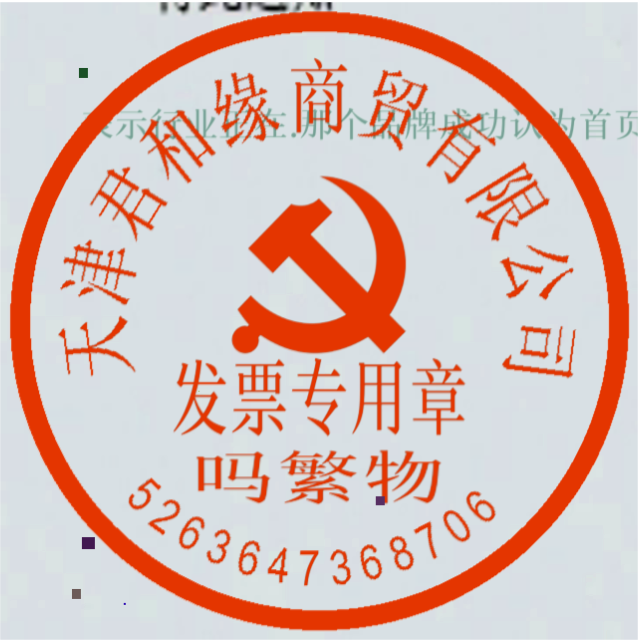
The seal text recognition pipeline includes a seal text detection module and a text recognition module, as well as optional layout detection module, document image orientation classification module, and text image correction module.
- [Seal Text Detection Module](../module_usage/seal_text_detection.en.md)
- [Text Recognition Module](../module_usage/text_recognition.en.md)
- [Layout Detection Module](../module_usage/layout_detection.en.md) (Optional)
- [Document Image Orientation Classification Module](../module_usage/doc_img_orientation_classification.en.md) (Optional)
- [Text Image Unwarping Module](../module_usage/text_image_unwarping.en.md) (Optional)
In this pipeline, you can choose the model to use based on the benchmark data below.
> The inference time only includes the model inference time and does not include the time for pre- or post-processing.
> In the inference time columns labeled [Regular Mode / High-Performance Mode], the Regular Mode values correspond to the local `paddle_static` inference engine.
The seal text recognition pipeline includes a seal text detection module and a text recognition module, as well as optional layout detection module, document image orientation classification module, and text image correction module.
- [Seal Text Detection Module](../module_usage/seal_text_detection.en.md)
- [Text Recognition Module](../module_usage/text_recognition.en.md)
- [Layout Detection Module](../module_usage/layout_detection.en.md) (Optional)
- [Document Image Orientation Classification Module](../module_usage/doc_img_orientation_classification.en.md) (Optional)
- [Text Image Unwarping Module](../module_usage/text_image_unwarping.en.md) (Optional)
In this pipeline, you can choose the model to use based on the benchmark data below.
> The inference time only includes the model inference time and does not include the time for pre- or post-processing.
> In the inference time columns labeled [Regular Mode / High-Performance Mode], the Regular Mode values correspond to the local `paddle_static` inference engine.
| Model | Model Download Link | mAP(0.5) (%) | GPU Inference Time (ms) [Regular Mode / High-Performance Mode] |
CPU Inference Time (ms) [Regular Mode / High-Performance Mode] |
Model Storage Size (MB) | Description |
|---|---|---|---|---|---|---|
| PP-DocLayout_plus-L | Inference Model/Training Model | 83.2 | 53.03 / 17.23 | 634.62 / 378.32 | 126.01 | A higher precision layout region localization model based on RT-DETR-L trained on a self-built dataset including Chinese and English papers, multi-column magazines, newspapers, PPTs, contracts, books, exam papers, research reports, ancient books, Japanese documents, and vertical text documents |
| Model | Model Download Link | mAP(0.5) (%) | GPU Inference Time (ms) [Regular Mode / High-Performance Mode] |
CPU Inference Time (ms) [Regular Mode / High-Performance Mode] |
Model Storage Size (MB) | Description |
|---|---|---|---|---|---|---|
| PP-DocLayout-L | Inference Model/Training Model | 90.4 | 33.59 / 33.59 | 503.01 / 251.08 | 123.76 | A high precision layout region localization model based on RT-DETR-L trained on a self-built dataset including Chinese and English papers, magazines, contracts, books, exam papers, and research reports |
| PP-DocLayout-M | Inference Model/Training Model | 75.2 | 13.03 / 4.72 | 43.39 / 24.44 | 22.578 | A balanced model of accuracy and efficiency based on PicoDet-L trained on a self-built dataset including Chinese and English papers, magazines, contracts, books, exam papers, and research reports |
| PP-DocLayout-S | Inference Model/Training Model | 70.9 | 11.54 / 3.86 | 18.53 / 6.29 | 4.834 | A highly efficient layout region localization model based on PicoDet-S trained on a self-built dataset including Chinese and English papers, magazines, contracts, books, exam papers, and research reports |
| Model | Model Download Link | mAP(0.5) (%) | GPU Inference Time (ms) [Regular Mode / High-Performance Mode] |
CPU Inference Time (ms) [Regular Mode / High-Performance Mode] |
Model Storage Size (MB) | Description |
|---|---|---|---|---|---|---|
| PicoDet-S_layout_3cls | Inference Model/Training Model | 88.2 | 8.43 / 3.44 | 17.60 / 6.51 | 4.8 | A highly efficient layout region localization model based on the lightweight PicoDet-S model trained on a self-built dataset including Chinese and English papers, magazines, and research reports |
| PicoDet-L_layout_3cls | Inference Model/Training Model | 89.0 | 12.80 / 9.57 | 45.04 / 23.86 | 22.6 | An efficiency-accuracy balanced layout region localization model based on PicoDet-L trained on a self-built dataset including Chinese and English papers, magazines, and research reports |
| RT-DETR-H_layout_3cls | Inference Model/Training Model | 95.8 | 114.80 / 25.65 | 924.38 / 924.38 | 470.1 | A high precision layout region localization model based on RT-DETR-H trained on a self-built dataset including Chinese and English papers, magazines, and research reports |
| Model | Model Download Link | mAP(0.5) (%) | GPU Inference Time (ms) [Regular Mode / High-Performance Mode] |
CPU Inference Time (ms) [Regular Mode / High-Performance Mode] |
Model Storage Size (MB) | Description |
|---|---|---|---|---|---|---|
| PicoDet-S_layout_17cls | Inference Model/Training Model | 87.4 | 8.80 / 3.62 | 17.51 / 6.35 | 4.8 | A highly efficient layout region localization model based on the lightweight PicoDet-S model trained on a self-built dataset including Chinese and English papers, magazines, and research reports |
| PicoDet-L_layout_17cls | Inference Model/Training Model | 89.0 | 12.60 / 10.27 | 43.70 / 24.42 | 22.6 | An efficiency-accuracy balanced layout region localization model based on PicoDet-L trained on a self-built dataset including Chinese and English papers, magazines, and research reports |
| RT-DETR-H_layout_17cls | Inference Model/Training Model | 98.3 | 115.29 / 101.18 | 964.75 / 964.75 | 470.2 | A high precision layout region localization model based on RT-DETR-H trained on a self-built dataset including Chinese and English papers, magazines, and research reports |
| Model | Model Download Link | Top-1 Acc (%) | GPU Inference Time (ms) [Regular Mode / High-Performance Mode] |
CPU Inference Time (ms) [Regular Mode / High-Performance Mode] |
Model Storage Size (MB) | Description |
|---|---|---|---|---|---|---|
| PP-LCNet_x1_0_doc_ori | Inference Model/Training Model | 99.06 | 2.62 / 0.59 | 3.24 / 1.19 | 7 | A document image classification model based on PP-LCNet_x1_0, containing four categories: 0 degrees, 90 degrees, 180 degrees, and 270 degrees |
| Model | Model Download Link | CER | GPU Inference Time (ms) [Normal Mode / High-Performance Mode] |
CPU Inference Time (ms) [Normal Mode / High-Performance Mode] |
Model Storage Size (MB) | Description |
|---|---|---|---|---|---|---|
| UVDoc | Inference Model/Training Model | 0.179 | 19.05 / 19.05 | - / 869.82 | 30.3 | A high precision text image correction model |
| Model | Model Download Link | Detection Hmean (%) | GPU Inference Time (ms) [Regular Mode / High-Performance Mode] |
CPU Inference Time (ms) [Regular Mode / High-Performance Mode] |
Model Storage Size (MB) | Description |
|---|---|---|---|---|---|---|
| PP-OCRv4_server_seal_det | Inference Model/Training Model | 98.40 | 124.64 / 91.57 | 545.68 / 439.86 | 109 | PP-OCRv4 server-side seal text detection model, with higher accuracy, suitable for deployment on better servers |
| PP-OCRv4_mobile_seal_det | Inference Model/Training Model | 96.36 | 9.70 / 3.56 | 50.38 / 19.64 | 4.7 | PP-OCRv4 mobile-side seal text detection model, with higher efficiency, suitable for deployment on the edge |
| Model | Model Download Link | Recognition Avg Accuracy(%) | GPU Inference Time (ms) [Regular Mode / High-Performance Mode] |
CPU Inference Time (ms) [Regular Mode / High-Performance Mode] |
Model Storage Size (MB) | Description |
|---|---|---|---|---|---|---|
| PP-OCRv5_server_rec | Inference Model/Training Model | 86.38 | 8.46 / 2.36 | 31.21 / 31.21 | 81 | PP-OCRv5_rec is a new generation text recognition model. This model aims to efficiently and accurately support the recognition of four major languages: Simplified Chinese, Traditional Chinese, English, and Japanese, as well as complex text scenes like handwriting, vertical text, pinyin, and rare characters with a single model. It balances recognition effectiveness, inference speed, and model robustness, providing efficient and accurate technical support for document understanding in various scenarios. |
| PP-OCRv5_mobile_rec | Inference Model/Training Model | 81.29 | 5.43 / 1.46 | 21.20 / 5.32 | 16 | |
| PP-OCRv4_server_rec_doc | Inference Model/Training Model | 86.58 | 8.69 / 2.78 | 37.93 / 37.93 | 182 | PP-OCRv4_server_rec_doc is trained on a mix of more Chinese document data and PP-OCR training data based on PP-OCRv4_server_rec, enhancing recognition capabilities for some traditional Chinese characters, Japanese, and special characters, supporting over 15,000+ characters. Besides improving document-related text recognition, it also enhances general text recognition capabilities |
| PP-OCRv4_mobile_rec | Inference Model/Training Model | 78.74 | 5.26 / 1.12 | 17.48 / 3.61 | 10.5 | PP-OCRv4 lightweight recognition model, with high inference efficiency, can be deployed on multiple hardware devices, including edge devices |
| PP-OCRv4_server_rec | Inference Model/Training Model | 85.19 | 8.75 / 2.49 | 36.93 / 36.93 | 173 | PP-OCRv4 server-side model, with high inference accuracy, can be deployed on various servers |
| en_PP-OCRv4_mobile_rec | Inference Model/Training Model | 70.39 | 4.81 / 1.23 | 17.20 / 4.18 | 7.5 | An ultra-lightweight English recognition model trained based on the PP-OCRv4 recognition model, supporting English and number recognition |
| Model | Model Download Link | Chinese Recognition Avg Accuracy(%) | English Recognition Avg Accuracy(%) | Traditional Chinese Recognition Avg Accuracy(%) | Japanese Recognition Avg Accuracy(%) | GPU Inference Time (ms) [Regular Mode / High-Performance Mode] |
CPU Inference Time (ms) [Regular Mode / High-Performance Mode] |
Model Storage Size (MB) | Description |
|---|---|---|---|---|---|---|---|---|---|
| PP-OCRv5_server_rec | Inference Model/Training Model | 86.38 | 64.70 | 93.29 | 60.35 | 8.46 / 2.36 | 31.21 / 31.21 | 81 | PP-OCRv5_rec is a new generation text recognition model. This model aims to efficiently and accurately support the recognition of four major languages: Simplified Chinese, Traditional Chinese, English, and Japanese, as well as complex text scenes like handwriting, vertical text, pinyin, and rare characters with a single model. It balances recognition effectiveness, inference speed, and model robustness, providing efficient and accurate technical support for document understanding in various scenarios. |
| PP-OCRv5_mobile_rec | Inference Model/Training Model | 81.29 | 66.00 | 83.55 | 54.65 | 5.43 / 1.46 | 21.20 / 5.32 | 16 |
| Model | Model Download Link | Recognition Avg Accuracy(%) | GPU Inference Time (ms) [Regular Mode / High-Performance Mode] |
CPU Inference Time (ms) [Regular Mode / High-Performance Mode] |
Model Storage Size (MB) | Description |
|---|---|---|---|---|---|---|
| PP-OCRv4_server_rec_doc | Inference Model/Training Model | 86.58 | 8.69 / 2.78 | 37.93 / 37.93 | 182 | PP-OCRv4_server_rec_doc is trained on a mix of more Chinese document data and PP-OCR training data based on PP-OCRv4_server_rec, enhancing recognition capabilities for some traditional Chinese characters, Japanese, and special characters, supporting over 15,000+ characters. Besides improving document-related text recognition, it also enhances general text recognition capabilities |
| PP-OCRv4_mobile_rec | Inference Model/Training Model | 78.74 | 5.26 / 1.12 | 17.48 / 3.61 | 10.5 | PP-OCRv4 lightweight recognition model, with high inference efficiency, can be deployed on multiple hardware devices, including edge devices |
| PP-OCRv4_server_rec | Inference Model/Training Model | 85.19 | 8.75 / 2.49 | 36.93 / 36.93 | 173 | PP-OCRv4 server-side model, with high inference accuracy, can be deployed on various servers |
| PP-OCRv3_mobile_rec | Inference Model/Training Model | 72.96 | 3.89 / 1.16 | 8.72 / 3.56 | 10.3 | PP-OCRv3 lightweight recognition model, with high inference efficiency, can be deployed on multiple hardware devices, including edge devices |
| Model | Model Download Link | Recognition Avg Accuracy(%) | GPU Inference Time (ms) [Regular Mode / High-Performance Mode] |
CPU Inference Time (ms) [Regular Mode / High-Performance Mode] |
Model Storage Size (MB) | Description |
|---|---|---|---|---|---|---|
| ch_SVTRv2_rec | Inference Model/Training Model | 68.81 | 10.38 / 8.31 | 66.52 / 30.83 | 80.5 | SVTRv2 is a server-side text recognition model developed by the OpenOCR team from Fudan University's Visual and Learning Lab (FVL), which won first place in the PaddleOCR Algorithm Model Challenge - Task 1: OCR End-to-End Recognition, improving the end-to-end recognition accuracy on the A leaderboard by 6% compared to PP-OCRv4. |
| Model | Model Download Link | Recognition Avg Accuracy(%) | GPU Inference Time (ms) [Regular Mode / High-Performance Mode] |
CPU Inference Time (ms) [Regular Mode / High-Performance Mode] |
Model Storage Size (MB) | Description |
|---|---|---|---|---|---|---|
| ch_RepSVTR_rec | Inference Model/Training Model | 65.07 | 6.29 / 1.57 | 20.64 / 5.40 | 48.8 | RepSVTR text recognition model is a mobile-side text recognition model based on SVTRv2, which won first place in the PaddleOCR Algorithm Model Challenge - Task 1: OCR End-to-End Recognition, improving the end-to-end recognition accuracy on the B leaderboard by 2.5% compared to PP-OCRv4, with comparable inference speed. |
| Model | Model Download Link | Recognition Avg Accuracy(%) | GPU Inference Time (ms) [Regular Mode / High-Performance Mode] |
CPU Inference Time (ms) [Regular Mode / High-Performance Mode] |
Model Storage Size (MB) | Description |
|---|---|---|---|---|---|---|
| en_PP-OCRv4_mobile_rec | Inference Model/Training Model | 70.39 | 4.81 / 1.23 | 17.20 / 4.18 | 7.5 | An ultra-lightweight English recognition model trained based on the PP-OCRv4 recognition model, supporting English and number recognition |
| en_PP-OCRv3_mobile_rec | Inference Model/Training Model | 70.69 | 3.56 / 0.78 | 8.44 / 5.78 | 17.3 | An ultra-lightweight English recognition model trained based on the PP-OCRv3 recognition model, supporting English and number recognition |
| Model | Model Download Link | Recognition Avg Accuracy(%) | GPU Inference Time (ms) [Regular Mode / High-Performance Mode] |
CPU Inference Time (ms) [Regular Mode / High-Performance Mode] |
Model Storage Size (MB) | Description |
|---|---|---|---|---|---|---|
| korean_PP-OCRv3_mobile_rec | Inference Model/Training Model | 60.21 | 3.73 / 0.98 | 8.76 / 2.91 | 9.6 | An ultra-lightweight Korean recognition model trained based on the PP-OCRv3 recognition model, supporting Korean and number recognition |
| japan_PP-OCRv3_mobile_rec | Inference Model/Training Model | 45.69 | 3.86 / 1.01 | 8.62 / 2.92 | 9.8 | An ultra-lightweight Japanese recognition model trained based on the PP-OCRv3 recognition model, supporting Japanese and number recognition |
| chinese_cht_PP-OCRv3_mobile_rec | Inference Model/Training Model | 82.06 | 3.90 / 1.16 | 9.24 / 3.18 | 10.8 | An ultra-lightweight Traditional Chinese recognition model trained based on the PP-OCRv3 recognition model, supporting Traditional Chinese and number recognition |
| te_PP-OCRv3_mobile_rec | Inference Model/Training Model | 95.88 | 3.59 / 0.81 | 8.28 / 6.21 | 8.7 | An ultra-lightweight Telugu recognition model trained based on the PP-OCRv3 recognition model, supporting Telugu and number recognition |
| ka_PP-OCRv3_mobile_rec | Inference Model/Training Model | 96.96 | 3.49 / 0.89 | 8.63 / 2.77 | 17.4 | An ultra-lightweight Kannada recognition model trained based on the PP-OCRv3 recognition model, supporting Kannada and number recognition |
| ta_PP-OCRv3_mobile_rec | Inference Model/Training Model | 76.83 | 3.49 / 0.86 | 8.35 / 3.41 | 8.7 | An ultra-lightweight Tamil recognition model trained based on the PP-OCRv3 recognition model, supporting Tamil and number recognition |
| latin_PP-OCRv3_mobile_rec | Inference Model/Training Model | 76.93 | 3.53 / 0.78 | 8.50 / 6.83 | 8.7 | An ultra-lightweight Latin recognition model trained based on the PP-OCRv3 recognition model, supporting Latin and number recognition |
| arabic_PP-OCRv3_mobile_rec | Inference Model/Training Model | 73.55 | 3.60 / 0.83 | 8.44 / 4.69 | 17.3 | An ultra-lightweight Arabic letter recognition model trained based on the PP-OCRv3 recognition model, supporting Arabic letters and number recognition |
| cyrillic_PP-OCRv3_mobile_rec | Inference Model/Training Model | 94.28 | 3.56 / 0.79 | 8.22 / 2.76 | 8.7 | An ultra-lightweight Cyrillic letter recognition model trained based on the PP-OCRv3 recognition model, supporting Cyrillic letters and number recognition |
| devanagari_PP-OCRv3_mobile_rec | Inference Model/Training Model | 96.44 | 3.60 / 0.78 | 6.95 / 2.87 | 8.7 | An ultra-lightweight Devanagari letter recognition model trained based on the PP-OCRv3 recognition model, supporting Devanagari letters and number recognition |
| Mode | GPU Configuration | CPU Configuration | Acceleration Technology Combination |
|---|---|---|---|
| Regular Mode | FP32 Precision / No TRT Acceleration | FP32 Precision / 8 Threads | paddle_static |
| High-Performance Mode | Optimal combination of prior precision type and acceleration strategy | FP32 Precision / 8 Threads | Select optimal prior backend (Paddle/OpenVINO/TRT, etc.) |
| Parameter | Description | Parameter Type | Default Value |
|---|---|---|---|
input |
Meaning:Data to be predicted, required. Description: Local path of image or PDF file, e.g., /root/data/img.jpg; URL link, e.g., network URL of image or PDF file: Example; Local directory, the directory should contain images to be predicted, e.g., local path: /root/data/ (currently does not support prediction of PDF files in directories; PDF files must be specified with a specific file path).
|
str |
|
save_path |
Meaning:Specify the path to save the inference results file. Description: If not set, the inference results will not be saved locally. |
str |
|
doc_orientation_classify_model_name |
Meaning:The name of the document orientation classification model. Description: If not set, the default model in pipeline will be used. |
str |
|
doc_orientation_classify_model_dir |
Meaning:The directory path of the document orientation classification model. Description: If not set, the official model will be downloaded. |
str |
|
doc_unwarping_model_name |
Meaning:The name of the text image unwarping model. Description: If not set, the default model in pipeline will be used. |
str |
|
doc_unwarping_model_dir |
Meaning:The directory path of the text image unwarping model. Description: If not set, the official model will be downloaded. |
str |
|
layout_detection_model_name |
Meaning:The name of the layout detection model. Description: If not set, the default model in pipeline will be used. |
str |
|
layout_detection_model_dir |
Meaning:The directory path of the layout detection model. Description: If not set, the official model will be downloaded. |
str |
|
seal_text_detection_model_name |
Meaning:The name of the seal text detection model. Description: If not set, the pipeline's default model will be used. |
str |
|
seal_text_detection_model_dir |
Meaning:The directory path of the seal text detection model. Description: If not set, the official model will be downloaded. |
str |
|
text_recognition_model_name |
Meaning:Name of the text recognition model. Description: If not set, the default pipeline model is used. |
str |
|
text_recognition_model_dir |
Meaning:Directory path of the text recognition model. Description: If not set, the official model will be downloaded. |
str |
|
text_recognition_batch_size |
Meaning:Batch size for the text recognition model. Description: If not set, defaults to 1. |
int |
|
use_doc_orientation_classify |
Meaning:Whether to load and use document orientation classification module. Description: If not set, defaults to pipeline initialization value ( True). |
bool |
|
use_doc_unwarping |
Meaning:Whether to load and use text image correction module. Description: If not set, defaults to pipeline initialization value ( True). |
bool |
|
use_layout_detection |
Meaning:Whether to load and use the layout detection module. Description: If not set, the parameter will be set to the value initialized in the pipeline, which is True by default. |
bool |
|
layout_threshold |
Meaning:Score threshold for the layout model. Description: Any value between 0-1. If not set, the default value is used, which is 0.5.
|
float |
|
layout_nms |
Meaning:Whether to use Non-Maximum Suppression (NMS) as post-processing for layout detection. Description: If not set, the parameter will be set to the value initialized in the pipeline, which is set to True by default. |
bool |
|
layout_unclip_ratio |
Meaning:Unclip ratio for detected boxes in layout detection model. Description: Any float > 0. If not set, the default is 1.0.
|
float |
|
layout_merge_bboxes_mode |
Meaning:The merging mode for the detection boxes output by the model in layout region detection. Description:
large.
|
str |
|
seal_det_limit_side_len |
Meaning:Image side length limit for seal text detection. Description: Any integer > 0. If not set, the default is 736.
|
int |
|
seal_det_limit_type |
Meaning:Limit type for image side in seal text detection. Description: Supports min and max; min ensures shortest side ≥ det_limit_side_len, max ensures longest side ≤ limit_side_len. If not set, the default is min.
|
str |
|
seal_det_thresh |
Meaning:Pixel threshold. Pixels with scores above this value in the probability map are considered text. Description: Any float > 0. If not set, the default is 0.2.
|
float |
|
seal_det_box_thresh |
Meaning:Box threshold. Boxes with average pixel scores above this value are considered text regions. Description: Any float > 0. If not set, the default is 0.6.
|
float |
|
seal_det_unclip_ratio |
Meaning:Expansion ratio for seal text detection. Higher value means larger expansion area. Description: Any float > 0. If not set, the default is 0.5.
|
float |
|
seal_rec_score_thresh |
Meaning:Recognition score threshold. Text results above this value will be kept. Description: Any float > 0. If not set, the default is 0.0 (no threshold).
|
float |
|
device |
Meaning:The device used for inference. Description: Support for specifying specific card numbers:
|
str |
|
engine |
Meaning: Inference engine. Description: Supports None (the default), paddle, paddle_static, paddle_dynamic, and transformers. When left as None, PaddleOCR preserves the behavior of earlier versions, which in most configurations is equivalent to paddle. For detailed descriptions, supported values, compatibility rules, and examples, see Inference Engine and Configuration. |
str|None |
None |
enable_hpi |
Meaning: Whether to enable high-performance inference. | bool |
None |
use_tensorrt |
Meaning: Whether to enable the TensorRT subgraph engine of Paddle Inference. Description: If the model does not support TensorRT acceleration, acceleration will not be used even if this flag is set. For CUDA 11.8 versions of PaddlePaddle, the compatible TensorRT version is 8.x (x>=6). TensorRT 8.6.1.6 is recommended. |
bool |
False |
precision |
Meaning: Computation precision, such as fp32 or fp16. |
str |
fp32 |
enable_mkldnn |
Meaning: Whether to enable MKL-DNN accelerated inference. Description: If MKL-DNN is unavailable or the model does not support MKL-DNN acceleration, acceleration will not be used even if this flag is set. |
bool |
True |
mkldnn_cache_capacity |
Meaning: MKL-DNN cache capacity. | int |
10 |
cpu_threads |
Meaning: Number of threads used for inference on CPU. | int |
10 |
paddlex_config |
Meaning: Path to the PaddleX pipeline configuration file. | str |
 ### 2.2 Python Script Integration
* The above command line is for quickly experiencing and viewing the effect. Generally, in a project, you often need to integrate through code. You can complete the quick inference of the pipeline with just a few lines of code. The inference code is as follows:
```python
from paddleocr import SealRecognition
pipeline = SealRecognition(
use_doc_orientation_classify=False, # Set whether to use document orientation classification model
use_doc_unwarping=False, # Set whether to use document image unwarping module
)
# ocr = SealRecognition(device="gpu") # Specify GPU for model inference
output = pipeline.predict("./seal_text_det.png")
for res in output:
res.print() ## Print structured prediction results
res.save_to_img("./output/")
res.save_to_json("./output/")
```
The example above uses the local `paddle_static` inference engine by default. To run it, first install PaddlePaddle by following [PaddlePaddle Framework Installation](../paddlepaddle_installation.en.md).
If you choose `transformers` as the inference engine, make sure the Transformers environment is configured by following [Inference Engine and Configuration](../inference_deployment/local_inference/inference_engine.en.md), and then run the following code:
```python
from paddleocr import SealRecognition
pipeline = SealRecognition(
engine="transformers",
)
# ocr = SealRecognition(device="gpu") # Specify GPU for model inference
output = pipeline.predict("./seal_text_det.png")
for res in output:
res.print() ## Print structured prediction results
res.save_to_img("./output/")
res.save_to_json("./output/")
```
In most scenarios, the default `paddle_static` inference engine delivers better inference performance and is the recommended first choice.
In the above Python script, the following steps were executed:
(1) Instantiate a pipeline object for seal text recognition using the SealRecognition() class, with specific parameter descriptions as follows:
### 2.2 Python Script Integration
* The above command line is for quickly experiencing and viewing the effect. Generally, in a project, you often need to integrate through code. You can complete the quick inference of the pipeline with just a few lines of code. The inference code is as follows:
```python
from paddleocr import SealRecognition
pipeline = SealRecognition(
use_doc_orientation_classify=False, # Set whether to use document orientation classification model
use_doc_unwarping=False, # Set whether to use document image unwarping module
)
# ocr = SealRecognition(device="gpu") # Specify GPU for model inference
output = pipeline.predict("./seal_text_det.png")
for res in output:
res.print() ## Print structured prediction results
res.save_to_img("./output/")
res.save_to_json("./output/")
```
The example above uses the local `paddle_static` inference engine by default. To run it, first install PaddlePaddle by following [PaddlePaddle Framework Installation](../paddlepaddle_installation.en.md).
If you choose `transformers` as the inference engine, make sure the Transformers environment is configured by following [Inference Engine and Configuration](../inference_deployment/local_inference/inference_engine.en.md), and then run the following code:
```python
from paddleocr import SealRecognition
pipeline = SealRecognition(
engine="transformers",
)
# ocr = SealRecognition(device="gpu") # Specify GPU for model inference
output = pipeline.predict("./seal_text_det.png")
for res in output:
res.print() ## Print structured prediction results
res.save_to_img("./output/")
res.save_to_json("./output/")
```
In most scenarios, the default `paddle_static` inference engine delivers better inference performance and is the recommended first choice.
In the above Python script, the following steps were executed:
(1) Instantiate a pipeline object for seal text recognition using the SealRecognition() class, with specific parameter descriptions as follows:
| Parameter | Description | Type | Default Value |
|---|---|---|---|
doc_orientation_classify_model_name |
Meaning:Name of the document orientation classification model. Description: If set to None, the pipeline default model is used. |
str|None |
None |
doc_orientation_classify_model_dir |
Meaning:Directory path of the document orientation classification model. Description: If set to None, the official model will be downloaded. |
str|None |
None |
doc_unwarping_model_name |
Meaning:Name of the document unwarping model. Description: If set to None, the pipeline default model is used. |
str|None |
None |
doc_unwarping_model_dir |
Meaning:Directory path of the document unwarping model. Description: If set to None, the official model will be downloaded. |
str|None |
None |
layout_detection_model_name |
Meaning:Name of the layout detection model. Description: If set to None, the pipeline default model is used. |
str|None |
None |
layout_detection_model_dir |
Meaning:Directory path of the layout detection model. Description: If set to None, the official model will be downloaded. |
str|None |
None |
seal_text_detection_model_name |
Meaning:Name of the seal text detection model. Description: If set to None, the default model will be used. |
str |
|
seal_text_detection_model_dir |
Meaning:Directory of the seal text detection model. Description: If set to None, the official model will be downloaded. |
str |
|
text_recognition_model_name |
Meaning:Name of the text recognition model. Description: If set to None, the pipeline default model is used. |
str|None |
None |
text_recognition_model_dir |
Meaning:Directory path of the text recognition model. Description: If set to None, the official model will be downloaded. |
str|None |
None |
text_recognition_batch_size |
Meaning:Batch size for the text recognition model. Description: If set to None, the default batch size is 1. |
int|None |
None |
use_doc_orientation_classify |
Meaning:Whether to enable the document orientation classification module. Description: If set to None, the default value is True. |
bool|None |
None |
use_doc_unwarping |
Meaning:Whether to enable the document image unwarping module. Description: If set to None, the default value is True. |
bool|None |
None |
use_layout_detection |
Meaning:Whether to load and use the layout detection module. Description: If set to None, the parameter will be set to the value initialized in the pipeline, which is True by default. |
bool|None |
None |
layout_threshold |
Meaning:Score threshold for the layout model. Description:
|
float|dict|None |
None |
layout_nms |
Meaning:Whether to use Non-Maximum Suppression (NMS) as post-processing for layout detection. Description: If set to None, the parameter will be set to the value initialized in the pipeline, which is set to True by default. |
bool|None |
None |
layout_unclip_ratio |
Meaning:Expansion ratio for the bounding boxes from the layout detection model. Description:
|
float|Tuple[float,float]|dict|None |
None |
layout_merge_bboxes_mode |
Meaning:Filtering method for overlapping boxes in layout detection. Description:
|
str|dict|None |
None |
seal_det_limit_side_len |
Meaning:Image side length limit for seal text detection. Description:
|
int|None |
None |
seal_det_limit_type |
Meaning:Limit type for seal text detection image side length. Description:
|
str|None |
None |
seal_det_thresh |
Meaning:Pixel threshold for detection. Pixels with scores greater than this value in the probability map are considered text pixels. Description:
|
float|None |
None |
seal_det_box_thresh |
Meaning:Bounding box threshold. If the average score of all pixels inside a detection box exceeds this threshold, it is considered a text region. Description:
|
float|None |
None |
seal_det_unclip_ratio |
Meaning:Expansion ratio for seal text detection. The larger the value, the larger the expanded area. Description:
|
float|None |
None |
seal_rec_score_thresh |
Meaning:Score threshold for seal text recognition. Text results with scores above this threshold will be retained. Description:
|
float|None |
None |
device |
Meaning:Device used for inference. Description: Supports specifying device ID:
|
str|None |
None |
engine |
Meaning: Inference engine. Description: Supports None (the default), paddle, paddle_static, paddle_dynamic, and transformers. When left as None, PaddleOCR preserves the behavior of earlier versions, which in most configurations is equivalent to paddle. For detailed descriptions, supported values, compatibility rules, and examples, see Inference Engine and Configuration. |
str|None |
None |
engine_config |
Meaning: Inference-engine configuration. Description: Recommended together with engine. For supported fields, compatibility rules, and examples, see Inference Engine and Configuration. |
dict|None |
None |
enable_hpi |
Meaning: Whether to enable high-performance inference. | bool |
None |
use_tensorrt |
Meaning: Whether to enable the TensorRT subgraph engine of Paddle Inference. Description: If the model does not support TensorRT acceleration, acceleration will not be used even if this flag is set. For CUDA 11.8 versions of PaddlePaddle, the compatible TensorRT version is 8.x (x>=6). TensorRT 8.6.1.6 is recommended. |
bool |
False |
precision |
Meaning: Computation precision, such as "fp32" or "fp16". |
str |
"fp32" |
enable_mkldnn |
Meaning: Whether to enable MKL-DNN accelerated inference. Description: If MKL-DNN is unavailable or the model does not support MKL-DNN acceleration, acceleration will not be used even if this flag is set. |
bool |
True |
mkldnn_cache_capacity |
Meaning: MKL-DNN cache capacity. | int |
10 |
cpu_threads |
Meaning: Number of threads used for inference on CPU. | int |
10 |
paddlex_config |
Meaning: Path to the PaddleX pipeline configuration file. | str|None |
None |
predict() method of the Seal Text Recognition pipeline object for inference prediction. This method will return a generator. Below are the parameters and their descriptions for the predict() method:
| Parameter | Parameter Description | Parameter Type | Default Value |
|---|---|---|---|
input |
Meaning:Input data to be predicted. Required. Description: Supports multiple types:
|
Python Var|str|list |
|
use_doc_orientation_classify |
Meaning:Whether to use the document orientation classification module during inference. | bool|None |
None |
use_doc_unwarping |
Meaning:Whether to use the text image correction module during inference. | bool|None |
None |
use_layout_detection |
Meaning:Whether to use the layout detection module during inference. | bool|None |
None |
layout_threshold |
Meaning:Same meaning as the instantiation parameters. Description: If set to None, the instantiation value is used; otherwise, this parameter takes precedence. |
float|dict|None |
None |
layout_nms |
Meaning:Same meaning as the instantiation parameters. Description: If set to None, the instantiation value is used; otherwise, this parameter takes precedence. |
bool|None |
None |
layout_unclip_ratio |
Meaning:Same meaning as the instantiation parameters. Description: If set to None, the instantiation value is used; otherwise, this parameter takes precedence. |
float|Tuple[float,float]|dict|None |
None |
layout_merge_bboxes_mode |
Meaning:Same meaning as the instantiation parameters. Description: If set to None, the instantiation value is used; otherwise, this parameter takes precedence. |
str|dict|None |
None |
seal_det_limit_side_len |
Same meaning as the instantiation parameters.
If set to None, the instantiation value is used; otherwise, this parameter takes precedence. |
int|None |
None |
seal_det_limit_type |
Meaning:Same meaning as the instantiation parameters. Description: If set to None, the instantiation value is used; otherwise, this parameter takes precedence. |
str|None |
None |
seal_det_thresh |
Meaning:Same meaning as the instantiation parameters. Description: If set to None, the instantiation value is used; otherwise, this parameter takes precedence. |
float|None |
None |
seal_det_box_thresh |
Meaning:Same meaning as the instantiation parameters. Description: If set to None, the instantiation value is used; otherwise, this parameter takes precedence. |
float|None |
None |
seal_det_unclip_ratio |
Meaning:Same meaning as the instantiation parameters. Description: If set to None, the instantiation value is used; otherwise, this parameter takes precedence. |
float|None |
None |
seal_rec_score_thresh |
Meaning:Same meaning as the instantiation parameters. Description: If set to None, the instantiation value is used; otherwise, this parameter takes precedence. |
float|None |
None |
dict type and supports operations such as printing, saving as an image, and saving as a json file:
| Method | Description | Parameter | Parameter Type | Parameter Description | Default Value |
|---|---|---|---|---|---|
print() |
Print results to the terminal | format_json |
bool |
Whether to format the output content using JSON indentation. |
True |
indent |
int |
Specify the indentation level to beautify the output JSON data for better readability, effective only when format_json is True. |
4 | ||
ensure_ascii |
bool |
Control whether to escape non-ASCII characters to Unicode. When set to True, all non-ASCII characters will be escaped; False will retain the original characters, effective only when format_json is True. |
False |
||
save_to_json() |
Save results as a json file | save_path |
str |
The file path to save the results. When it is a directory, the saved file name will be consistent with the input file type. | None |
indent |
int |
Specify the indentation level to beautify the output JSON data for better readability, effective only when format_json is True. |
4 | ||
ensure_ascii |
bool |
Control whether to escape non-ASCII characters to Unicode. When set to True, all non-ASCII characters will be escaped; False will retain the original characters, effective only when format_json is True. |
False |
||
save_to_img() |
Save results as an image file | save_path |
str |
The file path to save the results, supports directory or file path. | None |
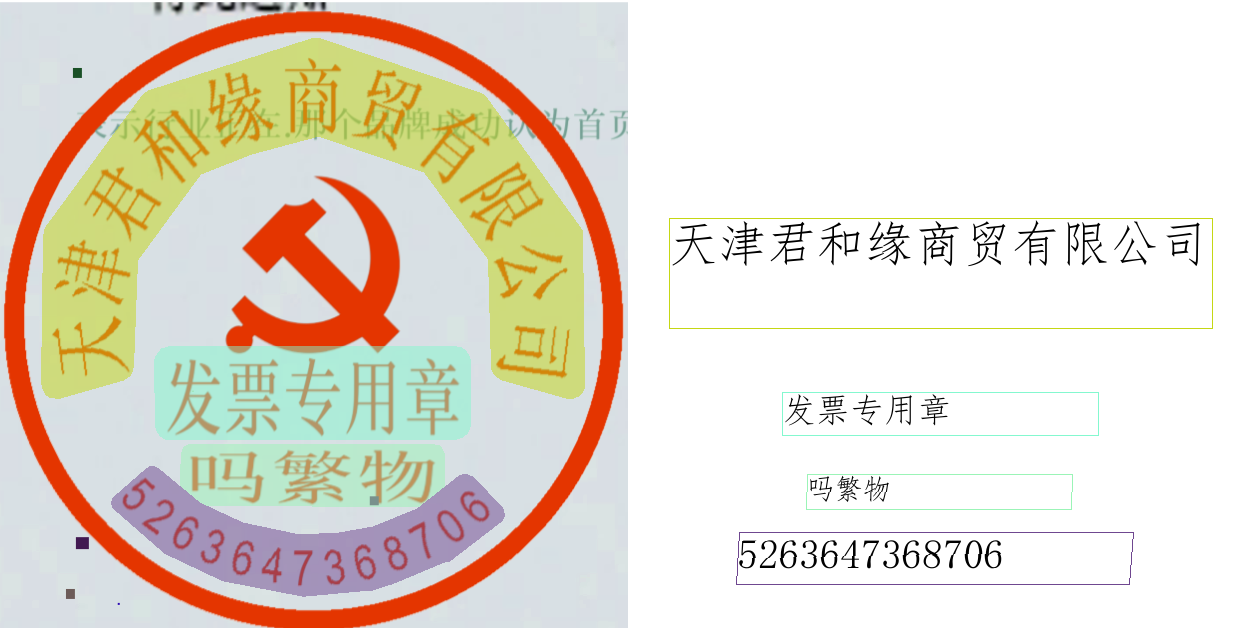
print() method will print the results to the terminal, and the explanations of the printed content are as follows:
input_path: (str) The input path of the image to be predicted.model_settings: (Dict[str, bool]) The model parameters required for pipeline configuration.
use_doc_preprocessor: (bool) Controls whether to enable the document preprocessing sub-pipeline.use_layout_detection: (bool) Controls whether to enable the layout detection sub-module.layout_det_res: (Dict[str, Union[List[numpy.ndarray], List[float]]]) The output result of the layout detection sub-module. Only exists when use_layout_detection=True
input_path: (Union[str, None]) The image path accepted by the layout detection module. Saved as None when the input is a numpy.ndarray.page_index: (Union[int, None]) Indicates the current page number of the PDF if the input is a PDF file; otherwise, it isNone.boxes: (List[Dict]) A list of detected layout seal regions, with each element containing the following fields:cls_id: (int) The class ID of the detected seal region.score: (float) The confidence score of the detected region.coordinate: (List[float]) The coordinates of the four corners of the detection box, in the order of x1, y1, x2, y2, representing the x-coordinate of the top-left corner, the y-coordinate of the top-left corner, the x-coordinate of the bottom-right corner, and the y-coordinate of the bottom-right corner.seal_res_list: List[Dict] A list of seal text recognition results, with each element containing the following fields:
input_path: (Union[str, None]) The image path accepted by the seal text recognition pipeline. Saved as None when the input is a numpy.ndarray.page_index: (Union[int, None]) Indicates the current page number of the PDF if the input is a PDF file; otherwise, it is None.model_settings: (Dict[str, bool]) The model configuration parameters for the seal text recognition pipeline.use_doc_preprocessor: (bool) Controls whether to enable the document preprocessing sub-pipeline.use_textline_orientation: (bool) Controls whether to enable the text line orientation classification sub-module.doc_preprocessor_res: (Dict[str, Union[str, Dict[str, bool], int]]) The output result of the document preprocessing sub-pipeline. Only exists when use_doc_preprocessor=True.
input_path: (Union[str, None]) The image path accepted by the document preprocessing sub-pipeline. Saved as None when the input is a numpy.ndarray.model_settings: (Dict[str, bool]) The model configuration parameters for the preprocessing sub-pipeline.use_doc_orientation_classify: (bool) Controls whether to enable the document orientation classification sub-module.use_doc_unwarping: (bool) Controls whether to enable the document unwarping sub-module.angle: (int) The predicted result of document orientation classification. When enabled, it takes values [0, 1, 2, 3], corresponding to [0°, 90°, 180°, 270°]; when disabled, it is -1.dt_polys: (List[numpy.ndarray]) A list of polygon boxes for text detection. Each box is represented by a numpy array of shape (n, 2), where n is the number of vertices.dt_scores: (List[float]) A list of confidence scores for text detection boxes.dt_scores: (List[float]) A list of confidence scores for text detection boxes.text_det_params: (Dict[str, Dict[str, int, float]]) Configuration parameters for the text detection module.
limit_side_len: (int) The side length limit value during image preprocessing.limit_type: (str) The type of side length limit, which can be "min" or "max".thresh: (float) The confidence threshold for text pixel classification.box_thresh: (float) The confidence threshold for text detection boxes.unclip_ratio: (float) The expansion ratio for text detection boxes.text_type: (str) The type of text to be detected, which is fixed as "seal" for seal text detection.text_rec_score_thresh: (float) The filtering threshold for text recognition results.rec_texts: (List[str]) A list of text recognition results, containing only texts with confidence scores above text_rec_score_thresh.rec_scores: (List[float]) A list of confidence scores for text recognition, filtered by text_rec_score_thresh.rec_polys: (List[numpy.ndarray]) A list of text detection boxes filtered by confidence score, in the same format as dt_polys.rec_boxes: (numpy.ndarray) 检An array of rectangular bounding boxes for detection boxes; the seal recognition pipeline returns an empty array.save_to_json() method will save the above content to the specified save_path. If a directory is specified, the saved path will be save_path/{your_img_basename}_res.json. If a file is specified, it will be saved directly to that file. Since JSON files do not support saving numpy arrays, numpy.array types will be converted to list format.save_to_img() method will save the visualization results to the specified save_path. If a directory is specified, the saved path will be save_path/{your_img_basename}_seal_res_region1.{your_img_extension}. If a file is specified, it will be saved directly to that file. (The pipeline usually contains multiple result images, so it is not recommended to specify a specific file path directly, as multiple images will be overwritten, and only the last image will be retained.)| Attribute | Description |
|---|---|
json |
Get the prediction results in json format. |
img |
Get the visualization results in dict format. |
json attribute are of dict type, with content consistent with what is saved by calling the save_to_json() method.img attribute are of dict type. The keys are layout_det_res, seal_res_region1, and preprocessed_img, corresponding to three Image.Image objects: one for visualizing layout detection, one for visualizing seal text recognition results, and one for visualizing image preprocessing. If the image preprocessing sub-module is not used, preprocessed_img will not be included in the dictionary. If the layout region detection module is not used, layout_det_res will not be included.For the main operations provided by the service:
200, and the attributes of the response body are as follows:| Name | Type | Description |
|---|---|---|
logId |
string |
The UUID of the request. |
errorCode |
integer |
Error code. Fixed as 0. |
errorMsg |
string |
Error message. Fixed as "Success". |
result |
object |
The result of the operation. |
| Name | Type | Description |
|---|---|---|
logId |
string |
The UUID of the request. |
errorCode |
integer |
Error code. Same as the response status code. |
errorMsg |
string |
Error message. |
The main operations provided by the service are as follows:
inferObtain the seal text recognition result.
POST /seal-recognition
| Name | Type | Description | Required |
|---|---|---|---|
file |
string |
The URL of image files (including TIFF; multi-page TIFF is processed page by page) or PDF file accessible by the server, or the Base64-encoded content of the file. By default, for PDF or multi-page TIFF files exceeding 10 pages, only the first 10 pages will be processed. To remove the page limit, please add the following configuration to the pipeline configuration file: |
Yes |
fileType |
integer | null |
The type of file. 0 indicates a PDF file, 1 indicates an image file. If this attribute is not present in the request body, the file type will be inferred from the URL. |
No |
useDocOrientationClassify |
boolean | null |
Please refer to the description of the use_doc_orientation_classify parameter of the pipeline object's predict method. |
No |
useDocUnwarping |
boolean | null |
Please refer to the description of the use_doc_unwarping parameter of the pipeline object's predict method. |
No |
useLayoutDetection |
boolean | null |
Please refer to the description of the use_layout_detection parameter of the pipeline object's predict method. |
No |
layoutThreshold |
number | null |
Please refer to the description of the layout_threshold parameter of the pipeline object's predict method. |
No |
layoutNms |
boolean | null |
Please refer to the description of the layout_nms parameter of the pipeline object's predict method. |
No |
layoutUnclipRatio |
number | array | null |
Please refer to the description of the layout_unclip_ratio parameter of the pipeline object's predict method. |
No |
layoutMergeBboxesMode |
string | null |
Please refer to the description of the layout_merge_bboxes_mode parameter of the pipeline object's predict method. |
No |
sealDetLimitSideLen |
integer | null |
Please refer to the description of the seal_det_limit_side_len parameter of the pipeline object's predict method. |
No |
sealDetLimitType |
string | null |
Please refer to the description of the seal_det_limit_type parameter of the pipeline object's predict method. |
No |
sealDetThresh |
number | null |
Please refer to the description of the seal_det_thresh parameter of the pipeline object's predict method. |
No |
sealDetBoxThresh |
number | null |
Please refer to the description of the seal_det_box_thresh parameter of the pipeline object's predict method. |
No |
sealDetUnclipRatio |
number | null |
Please refer to the description of the seal_det_unclip_ratio parameter of the pipeline object's predict method. |
No |
sealRecScoreThresh |
number | null |
Please refer to the description of the seal_rec_score_thresh parameter of the pipeline object's predict method. |
No |
visualize |
boolean | null |
Whether to return the final visualization image and intermediate images during the processing.
For example, adding the following setting to the pipeline config file: visualize parameter in the request.If neither the request body nor the configuration file is set (If visualize is set to null in the request and not defined in the configuration file), the image is returned by default.
|
No |
result in the response body has the following properties:| Name | Type | Meaning |
|---|---|---|
sealRecResults |
object |
The seal text recognition result. The array length is 1 (for image input) or the actual number of document pages processed (for PDF input). For PDF input, each element in the array represents the result of each page actually processed in the PDF file. |
dataInfo |
object |
Information about the input data. |
Image fields in the element schema below (e.g. outputImages, inputImage) are returned inline as Base64 strings by default; when the server is configured to return URLs, those values become pre-signed URLs while the field types remain unchanged. See the "Returning Binary Content as URLs" section of the Serving Deployment Guide for configuration.
Each element in sealRecResults is an object with the following properties:
| Name | Type | Meaning |
|---|---|---|
prunedResult |
object |
A simplified version of the res field in the JSON representation generated by the predict method of the production object, where the input_path and the page_index fields are removed. |
outputImages |
object | null |
See the description of the img attribute of the result of the pipeline prediction. The images are in JPEG format and encoded in Base64 by default; returned as pre-signed URLs when URL-return mode is enabled. |
inputImage |
string | null |
The input image. The image is in JPEG format and encoded in Base64 by default; returned as a pre-signed URL when URL-return mode is enabled. |
import base64
import requests

API_URL = "http://localhost:8080/seal-recognition"
file_path = "./demo.jpg"

with open(file_path, "rb") as file:
    file_bytes = file.read()
    file_data = base64.b64encode(file_bytes).decode("ascii")

payload = {"file": file_data, "fileType": 1}

response = requests.post(API_URL, json=payload)

assert response.status_code == 200
result = response.json()["result"]
for i, res in enumerate(result["sealRecResults"]):
    print(res["prunedResult"])
    for img_name, img in res["outputImages"].items():
        img_path = f"{img_name}_{i}.jpg"
        with open(img_path, "wb") as f:
            f.write(base64.b64decode(img))
        print(f"Output image saved at {img_path}")
#include <iostream>
#include <fstream>
#include <vector>
#include <string>
#include "cpp-httplib/httplib.h" // https://github.com/Huiyicc/cpp-httplib
#include "nlohmann/json.hpp" // https://github.com/nlohmann/json
#include "base64.hpp" // https://github.com/tobiaslocker/base64

int main() {
    httplib::Client client("localhost", 8080);

    const std::string filePath = "./demo.jpg";

    std::ifstream file(filePath, std::ios::binary | std::ios::ate);
    if (!file) {
        std::cerr << "Error opening file: " << filePath << std::endl;
        return 1;
    }

    std::streamsize size = file.tellg();
    file.seekg(0, std::ios::beg);
    std::vector buffer(size);
    if (!file.read(buffer.data(), size)) {
        std::cerr << "Error reading file." << std::endl;
        return 1;
    }

    std::string bufferStr(buffer.data(), static_cast(size));
    std::string encodedFile = base64::to_base64(bufferStr);

    nlohmann::json jsonObj;
    jsonObj["file"] = encodedFile;
    jsonObj["fileType"] = 1;

    auto response = client.Post("/seal-recognition", jsonObj.dump(), "application/json");

    if (response && response->status == 200) {
        nlohmann::json jsonResponse = nlohmann::json::parse(response->body);
        auto result = jsonResponse["result"];

        if (!result.is_object() || !result["sealRecResults"].is_array()) {
            std::cerr << "Unexpected response format." << std::endl;
            return 1;
        }

        for (size_t i = 0; i < result["sealRecResults"].size(); ++i) {
            auto res = result["sealRecResults"][i];

            if (res.contains("prunedResult")) {
                std::cout << "Recognized seal result: " << res["prunedResult"].dump() << std::endl;
            }

            if (res.contains("outputImages") && res["outputImages"].is_object()) {
                for (auto& [imgName, imgData] : res["outputImages"].items()) {
                    std::string outputPath = imgName + "_" + std::to_string(i) + ".jpg";
                    std::string decodedImage = base64::from_base64(imgData.get());

                    std::ofstream outFile(outputPath, std::ios::binary);
                    if (outFile.is_open()) {
                        outFile.write(decodedImage.c_str(), decodedImage.size());
                        outFile.close();
                        std::cout << "Saved image: " << outputPath << std::endl;
                    } else {
                        std::cerr << "Failed to write image: " << outputPath << std::endl;
                    }
                }
            }
        }
    } else {
        std::cerr << "Request failed." << std::endl;
        if (response) {
            std::cerr << "HTTP status: " << response->status << std::endl;
            std::cerr << "Response body: " << response->body << std::endl;
        }
        return 1;
    }

    return 0;
}
import okhttp3.*;
import com.fasterxml.jackson.databind.ObjectMapper;
import com.fasterxml.jackson.databind.JsonNode;
import com.fasterxml.jackson.databind.node.ObjectNode;

import java.io.File;
import java.io.FileOutputStream;
import java.io.IOException;
import java.util.Base64;

public class Main {
    public static void main(String[] args) throws IOException {
        String API_URL = "http://localhost:8080/seal-recognition";
        String imagePath = "./demo.jpg";

        File file = new File(imagePath);
        byte[] fileContent = java.nio.file.Files.readAllBytes(file.toPath());
        String base64Image = Base64.getEncoder().encodeToString(fileContent);

        ObjectMapper objectMapper = new ObjectMapper();
        ObjectNode payload = objectMapper.createObjectNode();
        payload.put("file", base64Image);
        payload.put("fileType", 1);

        OkHttpClient client = new OkHttpClient();
        MediaType JSON = MediaType.get("application/json; charset=utf-8");
        RequestBody body = RequestBody.create(JSON, payload.toString());

        Request request = new Request.Builder()
                .url(API_URL)
                .post(body)
                .build();

        try (Response response = client.newCall(request).execute()) {
            if (response.isSuccessful()) {
                String responseBody = response.body().string();
                JsonNode root = objectMapper.readTree(responseBody);
                JsonNode result = root.get("result");

                JsonNode sealRecResults = result.get("sealRecResults");
                for (int i = 0; i < sealRecResults.size(); i++) {
                    JsonNode item = sealRecResults.get(i);
                    int finalI = i;

                    JsonNode prunedResult = item.get("prunedResult");
                    System.out.println("Pruned Result [" + i + "]: " + prunedResult.toString());

                    JsonNode outputImages = item.get("outputImages");
                    if (outputImages != null && outputImages.isObject()) {
                        outputImages.fieldNames().forEachRemaining(imgName -> {
                            try {
                                String imgBase64 = outputImages.get(imgName).asText();
                                byte[] imgBytes = Base64.getDecoder().decode(imgBase64);
                                String imgPath = imgName + "_" + finalI + ".jpg";
                                try (FileOutputStream fos = new FileOutputStream(imgPath)) {
                                    fos.write(imgBytes);
                                    System.out.println("Saved image: " + imgPath);
                                }
                            } catch (IOException e) {
                                System.err.println("Failed to save image: " + e.getMessage());
                            }
                        });
                    }
                }
            } else {
                System.err.println("Request failed with HTTP code: " + response.code());
            }
        }
    }
}
package main

import (
	"bytes"
	"encoding/base64"
	"encoding/json"
	"fmt"
	"io/ioutil"
	"net/http"
)

func main() {
	API_URL := "http://localhost:8080/seal-recognition"
	filePath := "./demo.jpg"

	fileBytes, err := ioutil.ReadFile(filePath)
	if err != nil {
		fmt.Printf("Error reading file: %v\n", err)
		return
	}
	fileData := base64.StdEncoding.EncodeToString(fileBytes)

	payload := map[string]interface{}{
		"file":     fileData,
		"fileType": 1,
	}
	payloadBytes, err := json.Marshal(payload)
	if err != nil {
		fmt.Printf("Error marshaling payload: %v\n", err)
		return
	}

	client := &http.Client{}
	req, err := http.NewRequest("POST", API_URL, bytes.NewBuffer(payloadBytes))
	if err != nil {
		fmt.Printf("Error creating request: %v\n", err)
		return
	}
	req.Header.Set("Content-Type", "application/json")

	resp, err := client.Do(req)
	if err != nil {
		fmt.Printf("Error sending request: %v\n", err)
		return
	}
	defer resp.Body.Close()

	if resp.StatusCode != http.StatusOK {
		fmt.Printf("Unexpected status code: %d\n", resp.StatusCode)
		return
	}

	body, err := ioutil.ReadAll(resp.Body)
	if err != nil {
		fmt.Printf("Error reading response body: %v\n", err)
		return
	}

	type SealResult struct {
		PrunedResult map[string]interface{}   `json:"prunedResult"`
		OutputImages map[string]string        `json:"outputImages"`
		InputImage   *string                  `json:"inputImage"`
	}

	type Response struct {
		Result struct {
			SealRecResults []SealResult  `json:"sealRecResults"`
			DataInfo       interface{}   `json:"dataInfo"`
		} `json:"result"`
	}

	var respData Response
	if err := json.Unmarshal(body, &respData); err != nil {
		fmt.Printf("Error unmarshaling response: %v\n", err)
		return
	}

	for i, res := range respData.Result.SealRecResults {
		fmt.Printf("Pruned Result %d: %+v\n", i, res.PrunedResult)

		for name, imgBase64 := range res.OutputImages {
			imgBytes, err := base64.StdEncoding.DecodeString(imgBase64)
			if err != nil {
				fmt.Printf("Error decoding image %s: %v\n", name, err)
				continue
			}

			filename := fmt.Sprintf("%s_%d.jpg", name, i)
			if err := ioutil.WriteFile(filename, imgBytes, 0644); err != nil {
				fmt.Printf("Error saving image %s: %v\n", filename, err)
				continue
			}
			fmt.Printf("Output image saved at %s\n", filename)
		}
	}
}
using System;
using System.IO;
using System.Net.Http;
using System.Text;
using System.Threading.Tasks;
using Newtonsoft.Json.Linq;

class Program
{
    static readonly string API_URL = "http://localhost:8080/seal-recognition";
    static readonly string inputFilePath = "./demo.jpg";

    static async Task Main(string[] args)
    {
        var httpClient = new HttpClient();

        byte[] fileBytes = File.ReadAllBytes(inputFilePath);
        string fileData = Convert.ToBase64String(fileBytes);

        var payload = new JObject
        {
            { "file", fileData },
            { "fileType", 1 }
        };
        var content = new StringContent(payload.ToString(), Encoding.UTF8, "application/json");

        HttpResponseMessage response = await httpClient.PostAsync(API_URL, content);
        response.EnsureSuccessStatusCode();

        string responseBody = await response.Content.ReadAsStringAsync();
        JObject jsonResponse = JObject.Parse(responseBody);

        JArray sealRecResults = (JArray)jsonResponse["result"]["sealRecResults"];
        for (int i = 0; i < sealRecResults.Count; i++)
        {
            var res = sealRecResults[i];
            Console.WriteLine($"[{i}] prunedResult:\n{res["prunedResult"]}");

            JObject outputImages = res["outputImages"] as JObject;
            if (outputImages != null)
            {
                foreach (var img in outputImages)
                {
                    string imgName = img.Key;
                    string base64Img = img.Value?.ToString();
                    if (!string.IsNullOrEmpty(base64Img))
                    {
                        string imgPath = $"{imgName}_{i}.jpg";
                        byte[] imageBytes = Convert.FromBase64String(base64Img);
                        File.WriteAllBytes(imgPath, imageBytes);
                        Console.WriteLine($"Output image saved at {imgPath}");
                    }
                }
            }
        }
    }
}
const axios = require('axios');
const fs = require('fs');
const path = require('path');

const API_URL = 'http://localhost:8080/seal-recognition';
const imagePath = './demo.jpg';

function encodeImageToBase64(filePath) {
  const bitmap = fs.readFileSync(filePath);
  return Buffer.from(bitmap).toString('base64');
}

const payload = {
  file: encodeImageToBase64(imagePath),
  fileType: 1
};

axios.post(API_URL, payload)
  .then((response) => {
    const result = response.data["result"];
    const sealRecResults = result["sealRecResults"];

    sealRecResults.forEach((res, i) => {
      console.log(`\n[${i}] prunedResult:\n`, res["prunedResult"]);

      const outputImages = res["outputImages"];
      if (outputImages) {
        for (const [imgName, base64Img] of Object.entries(outputImages)) {
          const imgBuffer = Buffer.from(base64Img, 'base64');
          const fileName = `${imgName}_${i}.jpg`;
          fs.writeFileSync(fileName, imgBuffer);
          console.log(`Output image saved at ${fileName}`);
        }
      } else {
        console.log(`[${i}] No outputImages found.`);
      }
    });
  })
  .catch((error) => {
    console.error('Error occurred while calling the API:', error.message);
  });
<?php

$API_URL = "http://localhost:8080/seal-recognition";
$image_path = "./demo.jpg";

$image_data = base64_encode(file_get_contents($image_path));
$payload = array("file" => $image_data, "fileType" => 1);

$ch = curl_init($API_URL);
curl_setopt($ch, CURLOPT_POST, true);
curl_setopt($ch, CURLOPT_POSTFIELDS, json_encode($payload));
curl_setopt($ch, CURLOPT_HTTPHEADER, array('Content-Type: application/json'));
curl_setopt($ch, CURLOPT_RETURNTRANSFER, true);
$response = curl_exec($ch);
curl_close($ch);

$result = json_decode($response, true)["result"]["sealRecResults"];

foreach ($result as $i => $item) {
    echo "[$i] prunedResult:\n";
    print_r($item["prunedResult"]);

    if (!empty($item["outputImages"])) {
        foreach ($item["outputImages"] as $img_name => $base64_img) {
            if (!empty($base64_img)) {
                $output_path = "{$img_name}_{$i}.jpg";
                file_put_contents($output_path, base64_decode($base64_img));
                echo "Output image saved at $output_path\n";
            }
        }
    } else {
        echo "No outputImages found for item $i\n";
    }
}
?>
| Scenario | Fine-Tuning Module | Fine-Tuning Reference Link |
|---|---|---|
| Inaccurate or missing seal position detection | Layout Detection Module | Link |
| Missing text detection | Text Detection Module | Link |
| Inaccurate text content | Text Recognition Module | Link |
| Inaccurate full-image rotation correction | Document Image Orientation Classification Module | Link |
| Inaccurate image distortion correction | Text Image Correction Module | Not supported for fine-tuning |