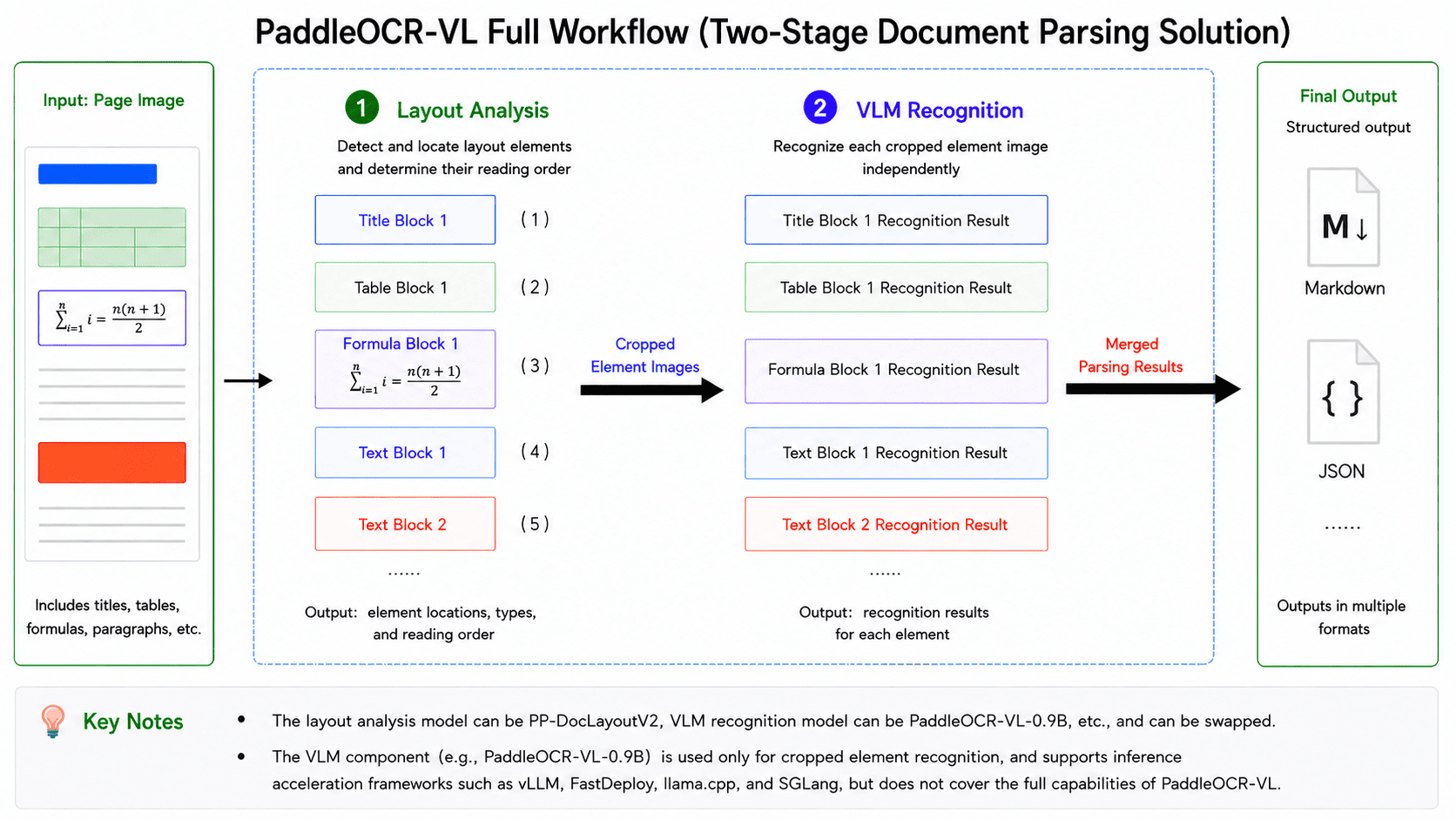
 In this pipeline, the first stage is layout analysis: the model takes the entire image as input, detects and localizes various layout elements (e.g., tables and formulas), determines their reading order, and crops the corresponding element-level sub-images based on the detection results. The second stage is VLM-based recognition: each sub-image is independently fed into the VLM to produce its recognition result (e.g., Markdown text), after which all element-level outputs are merged according to the reading order determined in the layout analysis stage to form the complete parsing result of the entire image. Therefore, **to fully leverage the capabilities of PaddleOCR-VL, it is necessary to adopt the complete pipeline that integrates layout analysis and VLM-based recognition, rather than using the VLM component alone.** This distinction will be referenced multiple times in the following sections, so it is important to clearly differentiate between the full PaddleOCR-VL pipeline and its VLM component. Taking PaddleOCR-VL v1 as an example, the layout analysis model is PP-DocLayoutV2, and the VLM component is PaddleOCR-VL-0.9B. It is important to note that “PaddleOCR-VL-0.9B” does not represent a standalone variant of PaddleOCR-VL, but rather refers specifically to the VLM component within the complete PaddleOCR-VL v1 pipeline. This differs from common naming conventions of LLMs/VLMs—for instance, Qwen2-72B typically denotes a specific model variant within the Qwen2 series.
**If issues arise during usage—such as failure to reproduce the performance reported in the paper or on the PaddleOCR official website, or the generation of excessive hallucinated text—the first step is to verify whether the complete PaddleOCR-VL pipeline is being used, rather than only the VLM component.** For example, directly running the PaddleOCR-VL-0.9B model locally via Transformers, or sending requests to services such as vLLM, SGLang, or FastDeploy, is not equivalent to executing the full PaddleOCR-VL pipeline.
## Start Here
Choose the guide that matches your hardware first.
| Hardware | Read this guide |
| -------------------------------| --------------------------------------------------------------------------------------------------------------------------|
| x64 CPU | Continue with this tutorial. Use the manual installation path in Section 1.2; the NVIDIA-only Docker steps do not apply. |
| NVIDIA GPU (except Blackwell) | Continue with this tutorial. |
| NVIDIA Blackwell GPU | Read [PaddleOCR-VL NVIDIA Blackwell-Architecture GPUs Usage Tutorial](./PaddleOCR-VL-NVIDIA-Blackwell.en.md). |
| Apple Silicon | Read [PaddleOCR-VL Apple Silicon Usage Tutorial](./PaddleOCR-VL-Apple-Silicon.en.md). |
| Kunlunxin XPU | Read [PaddleOCR-VL Kunlunxin XPU Usage Tutorial](./PaddleOCR-VL-Kunlunxin-XPU.en.md). |
| Hygon DCU | Read [PaddleOCR-VL Hygon DCU Usage Tutorial](./PaddleOCR-VL-Hygon-DCU.en.md). |
| MetaX GPU | Read [PaddleOCR-VL MetaX GPU Usage Tutorial](./PaddleOCR-VL-MetaX-GPU.en.md). |
| Iluvatar GPU | Read [PaddleOCR-VL Iluvatar GPU Usage Tutorial](./PaddleOCR-VL-Iluvatar-GPU.en.md). |
| Huawei Ascend NPU | Read [PaddleOCR-VL Huawei Ascend NPU Usage Tutorial](./PaddleOCR-VL-Huawei-Ascend-NPU.en.md). |
| AMD GPU | Read [PaddleOCR-VL AMD GPU Usage Tutorial](./PaddleOCR-VL-AMD-GPU.en.md). |
| Intel Arc GPU | Read [PaddleOCR-VL Intel Arc GPU Usage Tutorial](./PaddleOCR-VL-Intel-Arc-GPU.en.md). |
If you just want to first confirm which hardware PaddleOCR-VL can be deployed on, or which inference methods are supported by specific hardware, read the [PaddleOCR-VL Inference Method and Hardware Support Matrix](#inference-device-support-for-paddleocr-vl) before continuing.
## PaddleOCR-VL Inference Method and Hardware Support Matrix {#inference-device-support-for-paddleocr-vl}
In this pipeline, the first stage is layout analysis: the model takes the entire image as input, detects and localizes various layout elements (e.g., tables and formulas), determines their reading order, and crops the corresponding element-level sub-images based on the detection results. The second stage is VLM-based recognition: each sub-image is independently fed into the VLM to produce its recognition result (e.g., Markdown text), after which all element-level outputs are merged according to the reading order determined in the layout analysis stage to form the complete parsing result of the entire image. Therefore, **to fully leverage the capabilities of PaddleOCR-VL, it is necessary to adopt the complete pipeline that integrates layout analysis and VLM-based recognition, rather than using the VLM component alone.** This distinction will be referenced multiple times in the following sections, so it is important to clearly differentiate between the full PaddleOCR-VL pipeline and its VLM component. Taking PaddleOCR-VL v1 as an example, the layout analysis model is PP-DocLayoutV2, and the VLM component is PaddleOCR-VL-0.9B. It is important to note that “PaddleOCR-VL-0.9B” does not represent a standalone variant of PaddleOCR-VL, but rather refers specifically to the VLM component within the complete PaddleOCR-VL v1 pipeline. This differs from common naming conventions of LLMs/VLMs—for instance, Qwen2-72B typically denotes a specific model variant within the Qwen2 series.
**If issues arise during usage—such as failure to reproduce the performance reported in the paper or on the PaddleOCR official website, or the generation of excessive hallucinated text—the first step is to verify whether the complete PaddleOCR-VL pipeline is being used, rather than only the VLM component.** For example, directly running the PaddleOCR-VL-0.9B model locally via Transformers, or sending requests to services such as vLLM, SGLang, or FastDeploy, is not equivalent to executing the full PaddleOCR-VL pipeline.
## Start Here
Choose the guide that matches your hardware first.
| Hardware | Read this guide |
| -------------------------------| --------------------------------------------------------------------------------------------------------------------------|
| x64 CPU | Continue with this tutorial. Use the manual installation path in Section 1.2; the NVIDIA-only Docker steps do not apply. |
| NVIDIA GPU (except Blackwell) | Continue with this tutorial. |
| NVIDIA Blackwell GPU | Read [PaddleOCR-VL NVIDIA Blackwell-Architecture GPUs Usage Tutorial](./PaddleOCR-VL-NVIDIA-Blackwell.en.md). |
| Apple Silicon | Read [PaddleOCR-VL Apple Silicon Usage Tutorial](./PaddleOCR-VL-Apple-Silicon.en.md). |
| Kunlunxin XPU | Read [PaddleOCR-VL Kunlunxin XPU Usage Tutorial](./PaddleOCR-VL-Kunlunxin-XPU.en.md). |
| Hygon DCU | Read [PaddleOCR-VL Hygon DCU Usage Tutorial](./PaddleOCR-VL-Hygon-DCU.en.md). |
| MetaX GPU | Read [PaddleOCR-VL MetaX GPU Usage Tutorial](./PaddleOCR-VL-MetaX-GPU.en.md). |
| Iluvatar GPU | Read [PaddleOCR-VL Iluvatar GPU Usage Tutorial](./PaddleOCR-VL-Iluvatar-GPU.en.md). |
| Huawei Ascend NPU | Read [PaddleOCR-VL Huawei Ascend NPU Usage Tutorial](./PaddleOCR-VL-Huawei-Ascend-NPU.en.md). |
| AMD GPU | Read [PaddleOCR-VL AMD GPU Usage Tutorial](./PaddleOCR-VL-AMD-GPU.en.md). |
| Intel Arc GPU | Read [PaddleOCR-VL Intel Arc GPU Usage Tutorial](./PaddleOCR-VL-Intel-Arc-GPU.en.md). |
If you just want to first confirm which hardware PaddleOCR-VL can be deployed on, or which inference methods are supported by specific hardware, read the [PaddleOCR-VL Inference Method and Hardware Support Matrix](#inference-device-support-for-paddleocr-vl) before continuing.
## PaddleOCR-VL Inference Method and Hardware Support Matrix {#inference-device-support-for-paddleocr-vl}
| Inference Method | NVIDIA GPU | Kunlunxin XPU | Hygon DCU | MetaX GPU | Iluvatar GPU | Huawei Ascend NPU | x64 CPU | Apple Silicon | AMD GPU | Intel Arc GPU |
|---|---|---|---|---|---|---|---|---|---|---|
| PaddlePaddle | ✅ | ✅ | ✅ | ✅ | ✅ | 🚧 | ✅ | ✅ | ✅ | 🚧 |
| Transformers | ✅ | 🚧 | 🚧 | 🚧 | 🚧 | 🚧 | ✅ | 🚧 | 🚧 | 🚧 |
| PaddlePaddle + vLLM | ✅ | 🚧 | ✅ | 🚧 | 🚧 | ✅ | ❌ | ❌ | ✅ | ✅ |
| PaddlePaddle + SGLang | ✅ | 🚧 | 🚧 | 🚧 | 🚧 | 🚧 | ❌ | ❌ | 🚧 | 🚧 |
| PaddlePaddle + FastDeploy | ✅ | ✅ | 🚧 | ✅ | ✅ | 🚧 | ❌ | ❌ | 🚧 | 🚧 |
| PaddlePaddle + MLX-VLM | ❌ | ❌ | ❌ | ❌ | ❌ | ❌ | ❌ | ✅ | ❌ | ❌ |
| PaddlePaddle + llama.cpp | ✅ | 🚧 | 🚧 | 🚧 | 🚧 | 🚧 | ✅ | 🚧 | 🚧 | 🚧 |
| Transformers + vLLM | ✅ | 🚧 | 🚧 | 🚧 | 🚧 | 🚧 | ❌ | ❌ | 🚧 | 🚧 |
| Transformers + SGLang | ✅ | 🚧 | 🚧 | 🚧 | 🚧 | 🚧 | ❌ | ❌ | 🚧 | 🚧 |
| Transformers + FastDeploy | ✅ | 🚧 | 🚧 | 🚧 | 🚧 | 🚧 | ❌ | ❌ | 🚧 | 🚧 |
| Transformers + MLX-VLM | ❌ | ❌ | ❌ | ❌ | ❌ | ❌ | ❌ | ✅ | ❌ | ❌ |
| Transformers + llama.cpp | ✅ | 🚧 | 🚧 | 🚧 | 🚧 | 🚧 | ✅ | 🚧 | 🚧 | 🚧 |
| Parameter | Description | Type | Default |
|---|---|---|---|
input |
Meaning:Data to be predicted, required. Description: For example, the local path of an image file or PDF file: /root/data/img.jpg;Such as a URL link, for example, the network URL of an image file or PDF file:Example;Such as a local directory, which should contain the images to be predicted, for example, the local path: /root/data/(Currently, prediction for directories containing PDF files is not supported. PDF files need to be specified with a specific file path). |
str |
|
save_path |
Meaning:Specify the path where the inference result file will be saved. Description: If not set, the inference results will not be saved locally. |
str |
|
pipeline_version |
Meaning: Specifies the pipeline version. Description: The currently available values are "v1", "v1.5", and "v1.6".
|
str |
"v1.6" |
layout_detection_model_name |
Meaning:Name of the layout analysis model. Description: If not set, the default model of the production line will be used. |
str |
|
layout_detection_model_dir |
Meaning:Directory path of the layout analysis model. Description: If not set, the official model will be downloaded. |
str |
|
layout_threshold |
Meaning:Score threshold for the layout model. Description: Any value between 0-1. If not set, the default value is used, which is 0.5.
| float |
|
layout_nms |
Meaning:Whether to use post-processing NMS for layout analysis. Description: If not set, the initialized default value will be used. |
bool |
|
layout_unclip_ratio |
Meaning:Expansion coefficient for the detection boxes of the layout area detection model. Description: Any floating-point number greater than 0. If not set, the initialized default value will be used. |
float |
|
layout_merge_bboxes_mode |
Meaning:Merging mode for the detection boxes output by the model in layout analysis. Description:
|
str |
|
vl_rec_model_name |
Meaning:Name of the multimodal recognition model. Description: If not set, the default model will be used. |
str |
|
vl_rec_model_dir |
Meaning:Directory path of the multimodal recognition model. Description: If not set, the official model will be downloaded. |
str |
|
vl_rec_backend |
Meaning:Inference backend used by the multimodal recognition model. | str |
|
vl_rec_server_url |
Description:If the multimodal recognition model uses an inference service, this parameter is used to specify the server URL. | str |
|
vl_rec_max_concurrency |
Meaning:If the multimodal recognition model uses an inference service, this parameter is used to specify the maximum number of concurrent requests. | int |
|
vl_rec_api_model_name |
Meaning:If the multimodal recognition model uses an inference service, this parameter is used to specify the model name of the service. | str |
|
vl_rec_api_key |
Meaning:If the multimodal recognition model uses an inference service, this parameter is used to specify the API key of the service. | str |
|
doc_orientation_classify_model_name |
Meaning:Name of the document orientation classification model. Description: If not set, the initialized default value will be used. |
str |
|
doc_orientation_classify_model_dir |
Meaning:Directory path of the document orientation classification model. Description: If not set, the official model will be downloaded. |
str |
|
doc_unwarping_model_name |
Meaning:Name of the text image rectification model. Description: If not set, the initialized default value will be used. |
str |
|
doc_unwarping_model_dir |
Meaning:Directory path of the text image rectification model. Description: If not set, the official model will be downloaded. |
str |
|
use_doc_orientation_classify |
Meaning:Whether to load and use the document orientation classification module. Description: If not set, the initialized default value will be used, which is initialized to False. |
bool |
|
use_doc_unwarping |
Meaning:Whether to load and use the text image rectification module. Description: If not set, the initialized default value will be used, which is initialized to False. |
bool |
|
use_layout_detection |
Meaning:Whether to load and use the layout analysis module. Description: If not set, the initialized default value will be used, which is initialized to True. |
bool |
|
use_chart_recognition |
Meaning:Whether to use the chart parsing function. Description: If not set, the initialized default value will be used, which is initialized to False. |
bool |
|
use_seal_recognition |
Meaning:Whether to use the seal recognition function. Description: If not set, the initialized default value will be used, which defaults to initialization as False. |
bool |
|
use_ocr_for_image_block |
Meaning:Whether to perform OCR on text within image blocks. Description: If not set, the initialized default value will be used, which defaults to initialization as False. |
bool |
|
format_block_content |
Meaning:Controls whether to format the block_content content within as Markdown. Description: If not set, the initialized default value will be used, which defaults to initialization as False. |
bool |
|
merge_layout_blocks |
Meaning:Control whether to merge the layout detection boxes for cross-column or staggered top and bottom columns. Description: If not set, the initialized default value will be used, which defaults to initialization as True. |
bool |
|
markdown_ignore_labels |
Meaning:Layout labels that need to be ignored in Markdown. Description: If not set, the initialized default value will be used, which defaults to initialization as ['number','footnote','header','header_image','footer','footer_image','aside_text']. |
str |
|
layout_shape_mode |
Meaning:Specifies the geometric representation mode for layout analysis results. It defines how the boundaries of detected regions (e.g., text blocks, images, tables) are calculated and displayed. Description: Value descriptions:
|
str |
"auto" |
use_queues |
Meaning:Used to control whether to enable internal queues. Description: When set to True, data loading (such as rendering PDF pages as images), layout analysis model processing, and VLM inference will be executed asynchronously in separate threads, with data passed through queues, thereby improving efficiency. This approach is particularly efficient for PDF documents with a large number of pages or directories containing a large number of images or PDF files. If not set, the initialized default value will be used, which defaults to initialization as True. |
bool |
|
prompt_label |
Meaning:The prompt type setting for the VL model, which takes effect if and only if use_layout_detection=False. |
str |
|
repetition_penalty |
Meaning:The repetition penalty parameter used in VL model sampling. | float |
|
temperature |
Meaning:The temperature parameter used in VL model sampling. | float |
|
top_p |
Meaning:The top-p parameter used in VL model sampling. | float |
|
min_pixels |
Meaning:The minimum number of pixels allowed when the VL model preprocesses images. | int |
|
max_pixels |
Meaning:The maximum number of pixels allowed when the VL model preprocesses images. | int |
|
device |
Meaning:The device used for inference. Description: Supports specifying specific card numbers:
|
str |
|
engine |
Meaning: Inference engine. Description: Supports None (the default), paddle, paddle_static, paddle_dynamic, and transformers. When left as None, PaddleOCR preserves the behavior of earlier versions, which in most configurations is equivalent to paddle. For detailed descriptions, supported values, compatibility rules, and examples, see Inference Engine and Configuration. |
str|None |
None |
enable_hpi |
Meaning: Whether to enable high-performance inference. | bool |
None |
use_tensorrt |
Meaning: Whether to enable the TensorRT subgraph engine of Paddle Inference. Description: If the model does not support TensorRT acceleration, acceleration will not be used even if this flag is set. For CUDA 11.8 versions of PaddlePaddle, the compatible TensorRT version is 8.x (x>=6). TensorRT 8.6.1.6 is recommended. |
bool |
False |
precision |
Meaning: Computation precision, such as fp32 or fp16. |
str |
fp32 |
enable_mkldnn |
Meaning: Whether to enable MKL-DNN accelerated inference. Description: If MKL-DNN is unavailable or the model does not support MKL-DNN acceleration, acceleration will not be used even if this flag is set. |
bool |
True |
mkldnn_cache_capacity |
Meaning: MKL-DNN cache capacity. | int |
10 |
cpu_threads |
Meaning: Number of threads used for inference on CPU. | int |
10 |
paddlex_config |
Meaning: Path to the PaddleX pipeline configuration file. | str |
{'res': {'input_path': 'paddleocr_vl_demo.png', 'page_index': None, 'model_settings': {'use_doc_preprocessor': False, 'use_layout_detection': True, 'use_chart_recognition': False, 'format_block_content': False}, 'layout_det_res': {'input_path': None, 'page_index': None, 'boxes': [{'cls_id': 6, 'label': 'doc_title', 'score': 0.9636914134025574, 'coordinate': [np.float32(131.31366), np.float32(36.450516), np.float32(1384.522), np.float32(127.984665)]}, {'cls_id': 22, 'label': 'text', 'score': 0.9281806349754333, 'coordinate': [np.float32(585.39465), np.float32(158.438), np.float32(930.2184), np.float32(182.57469)]}, {'cls_id': 22, 'label': 'text', 'score': 0.9840355515480042, 'coordinate': [np.float32(9.023666), np.float32(200.86115), np.float32(361.41583), np.float32(343.8828)]}, {'cls_id': 14, 'label': 'image', 'score': 0.9871416091918945, 'coordinate': [np.float32(775.50574), np.float32(200.66502), np.float32(1503.3807), np.float32(684.9304)]}, {'cls_id': 22, 'label': 'text', 'score': 0.9801855087280273, 'coordinate': [np.float32(9.532196), np.float32(344.90594), np.float32(361.4413), np.float32(440.8244)]}, {'cls_id': 17, 'label': 'paragraph_title', 'score': 0.9708921313285828, 'coordinate': [np.float32(28.040405), np.float32(455.87976), np.float32(341.7215), np.float32(520.7117)]}, {'cls_id': 24, 'label': 'vision_footnote', 'score': 0.9002962708473206, 'coordinate': [np.float32(809.0692), np.float32(703.70044), np.float32(1488.3016), np.float32(750.5238)]}, {'cls_id': 22, 'label': 'text', 'score': 0.9825374484062195, 'coordinate': [np.float32(8.896561), np.float32(536.54895), np.float32(361.05237), np.float32(655.8058)]}, {'cls_id': 22, 'label': 'text', 'score': 0.9822263717651367, 'coordinate': [np.float32(8.971573), np.float32(657.4949), np.float32(362.01715), np.float32(774.625)]}, {'cls_id': 22, 'label': 'text', 'score': 0.9767460823059082, 'coordinate': [np.float32(9.407074), np.float32(776.5216), np.float32(361.31067), np.float32(846.82874)]}, {'cls_id': 22, 'label': 'text', 'score': 0.9868153929710388, 'coordinate': [np.float32(8.669495), np.float32(848.2543), np.float32(361.64703), np.float32(1062.8568)]}, {'cls_id': 22, 'label': 'text', 'score': 0.9826608300209045, 'coordinate': [np.float32(8.8025055), np.float32(1063.8615), np.float32(361.46588), np.float32(1182.8524)]}, {'cls_id': 22, 'label': 'text', 'score': 0.982555627822876, 'coordinate': [np.float32(8.820602), np.float32(1184.4663), np.float32(361.66394), np.float32(1302.4507)]}, {'cls_id': 22, 'label': 'text', 'score': 0.9584776759147644, 'coordinate': [np.float32(9.170288), np.float32(1304.2161), np.float32(361.48898), np.float32(1351.7483)]}, {'cls_id': 22, 'label': 'text', 'score': 0.9782056212425232, 'coordinate': [np.float32(389.1618), np.float32(200.38202), np.float32(742.7591), np.float32(295.65146)]}, {'cls_id': 22, 'label': 'text', 'score': 0.9844875931739807, 'coordinate': [np.float32(388.73303), np.float32(297.18463), np.float32(744.00024), np.float32(441.3034)]}, {'cls_id': 17, 'label': 'paragraph_title', 'score': 0.9680547714233398, 'coordinate': [np.float32(409.39468), np.float32(455.89386), np.float32(721.7174), np.float32(520.9387)]}, {'cls_id': 22, 'label': 'text', 'score': 0.9741666913032532, 'coordinate': [np.float32(389.71606), np.float32(536.8138), np.float32(742.7112), np.float32(608.00165)]}, {'cls_id': 22, 'label': 'text', 'score': 0.9840384721755981, 'coordinate': [np.float32(389.30988), np.float32(609.39636), np.float32(743.09247), np.float32(750.3231)]}, {'cls_id': 22, 'label': 'text', 'score': 0.9845995306968689, 'coordinate': [np.float32(389.13272), np.float32(751.7772), np.float32(743.058), np.float32(894.8815)]}, {'cls_id': 22, 'label': 'text', 'score': 0.984852135181427, 'coordinate': [np.float32(388.83267), np.float32(896.0371), np.float32(743.58215), np.float32(1038.7345)]}, {'cls_id': 22, 'label': 'text', 'score': 0.9804865717887878, 'coordinate': [np.float32(389.08478), np.float32(1039.9119), np.float32(742.7585), np.float32(1134.4897)]}, {'cls_id': 22, 'label': 'text', 'score': 0.986461341381073, 'coordinate': [np.float32(388.52643), np.float32(1135.8137), np.float32(743.451), np.float32(1352.0085)]}, {'cls_id': 22, 'label': 'text', 'score': 0.9869391918182373, 'coordinate': [np.float32(769.8341), np.float32(775.66235), np.float32(1124.9813), np.float32(1063.207)]}, {'cls_id': 22, 'label': 'text', 'score': 0.9822869896888733, 'coordinate': [np.float32(770.30383), np.float32(1063.938), np.float32(1124.8295), np.float32(1184.2192)]}, {'cls_id': 17, 'label': 'paragraph_title', 'score': 0.9689218997955322, 'coordinate': [np.float32(791.3042), np.float32(1199.3169), np.float32(1104.4521), np.float32(1264.6985)]}, {'cls_id': 22, 'label': 'text', 'score': 0.9713128209114075, 'coordinate': [np.float32(770.4253), np.float32(1279.6072), np.float32(1124.6917), np.float32(1351.8672)]}, {'cls_id': 22, 'label': 'text', 'score': 0.9236552119255066, 'coordinate': [np.float32(1153.9058), np.float32(775.5814), np.float32(1334.0654), np.float32(798.1581)]}, {'cls_id': 22, 'label': 'text', 'score': 0.9857938885688782, 'coordinate': [np.float32(1151.5197), np.float32(799.28015), np.float32(1506.3619), np.float32(991.1156)]}, {'cls_id': 22, 'label': 'text', 'score': 0.9820687174797058, 'coordinate': [np.float32(1151.5686), np.float32(991.91095), np.float32(1506.6023), np.float32(1110.8875)]}, {'cls_id': 22, 'label': 'text', 'score': 0.9866049885749817, 'coordinate': [np.float32(1151.6919), np.float32(1112.1301), np.float32(1507.1611), np.float32(1351.9504)]}]}}}
| Parameter | Parameter Description | Parameter Type | Default Value | |
|---|---|---|---|---|
pipeline_version |
Meaning: Specifies the pipeline version. Description: The currently available values are "v1", "v1.5", and "v1.6".
|
str |
"v1.6" | |
layout_detection_model_name |
Meaning:Name of the layout analysis model. Description: If set to None, the default model of the production line will be used. |
str|None |
None |
|
layout_detection_model_dir |
Meaning:Directory path of the layout analysis model. Description: If set to None, the official model will be downloaded. |
str|None |
None |
|
layout_threshold |
Meaning:Score threshold for the layout model. Description:
| float|dict|None |
None |
|
layout_nms |
Meaning:Whether to use post-processing NMS for layout analysis. Description: If set to None, the parameter value initialized by the production line will be used. |
bool|None |
None |
|
layout_unclip_ratio |
Meaning:Expansion coefficient for the detection box of the layout area detection model. Description:
| float|Tuple[float,float]|dict|None |
None |
|
layout_merge_bboxes_mode
Meaning:Merging mode for the detection boxes output by the model in layout analysis. |
Description: None, the initialized parameter value will be used.
str|dict|NoneNone | |||
vl_rec_model_name |
Meaning:Name of the multimodal recognition model. Description: If set to None, the default model will be used. |
str|None |
None |
|
vl_rec_model_dir |
Meaning:Directory path of the multimodal recognition model. Description: If set to None, the official model will be downloaded. |
str|None |
None |
|
vl_rec_backend |
Meaning:Inference backend used by the multimodal recognition model. | str|None |
None |
|
vl_rec_server_url |
Meaning:If the multimodal recognition model uses an inference service, this parameter is used to specify the server URL. | str|None |
None |
|
vl_rec_max_concurrency |
Meaning:If the multimodal recognition model uses an inference service, this parameter is used to specify the maximum number of concurrent requests. | int|None |
None |
|
vl_rec_api_model_name |
Meaning:If the multimodal recognition model uses an inference service, this parameter is used to specify the model name of the service. | str|None |
None |
|
vl_rec_api_key |
Meaning:If the multimodal recognition model uses an inference service, this parameter is used to specify the API key of the service. | str|None |
None |
|
doc_orientation_classify_model_name |
Meaning:Name of the document orientation classification model. Description: If set to None, the initialized default value will be used. |
str|None |
None |
|
doc_orientation_classify_model_dir |
Meaning:Directory path of the document orientation classification model. Description: If set to None, the official model will be downloaded. |
str|None |
None |
|
doc_unwarping_model_name |
Meaning:Name of the text image rectification model. Description: If set to None, the initialized default value will be used. |
str|None |
None |
|
doc_unwarping_model_dir |
Meaning:Directory path of the text image rectification model. Description: If set to None, the official model will be downloaded. |
str|None |
None |
|
use_doc_orientation_classify |
Meaning:Whether to load and use the document orientation classification module. Description: If set to None, the initialized default value will be used, which is initialized toFalse. |
bool|None |
None |
|
use_doc_unwarping |
Meaning:Whether to load and use the text image rectification module. Description: If set to None, the initialized default value will be used, which is initialized to False. |
bool|None |
None |
|
use_layout_detection |
Meaning:Whether to load and use the layout analysis module. Description: If set to None, the initialized default value will be used, which is initialized to True. |
bool|None |
None |
|
use_chart_recognition |
Meaning:Whether to use the chart parsing function. Description: If set to None, the initialized default value will be used, which is initialized to False. |
bool|None |
None |
|
use_seal_recognition |
Meaning:Whether to use the seal recognition function. Description: If set to None, the initialized default value will be used, which is initialized to False. |
bool|None |
||
use_ocr_for_image_block |
Meaning:Whether to perform OCR on text within image blocks. Description: If set to None, the initialized default value will be used, which is initialized to False. |
bool|None |
||
format_block_content |
Meaning:Controls whether to format the block_content content within as Markdown. Description: If set to None, the initialized default value will be used, which defaults to initialization asFalse. |
bool|None |
None |
|
merge_layout_blocks |
Meaning:Control whether to merge the layout detection boxes for cross-column or staggered top and bottom columns. Description: If set to None, the initialized default value will be used, which defaults to initialization asTrue. |
bool|None |
||
markdown_ignore_labels |
Meaning:Layout labels that need to be ignored in Markdown. Description: If set to None, the initialized default value will be used, which defaults to initialization as ['number','footnote','header','header_image','footer','footer_image','aside_text']. |
list|None |
||
use_queues |
Meaning:Used to control whether to enable internal queues. Description: When set to True, data loading (such as rendering PDF pages as images), layout analysis model processing, and VLM inference will be executed asynchronously in separate threads, with data passed through queues, thereby improving efficiency. This approach is particularly efficient for PDF documents with many pages or directories containing a large number of images or PDF files. If set to None, the initialized default value will be used, which defaults to initialization as True. |
bool|None |
None |
|
device |
Meaning:The device used for inference. Description: Supports specifying specific card numbers:
|
str|None |
None |
|
engine |
Meaning: Inference engine. Description: Supports None (the default), paddle, paddle_static, paddle_dynamic, and transformers. When left as None, PaddleOCR preserves the behavior of earlier versions, which in most configurations is equivalent to paddle. For detailed descriptions, supported values, compatibility rules, and examples, see Inference Engine and Configuration. |
str|None |
None |
|
engine_config |
Meaning: Inference-engine configuration. Description: Recommended together with engine. For supported fields, compatibility rules, and examples, see Inference Engine and Configuration. |
dict|None |
None |
|
enable_hpi |
Meaning: Whether to enable high-performance inference. | bool |
None |
|
use_tensorrt |
Meaning: Whether to enable the TensorRT subgraph engine of Paddle Inference. Description: If the model does not support TensorRT acceleration, acceleration will not be used even if this flag is set. For CUDA 11.8 versions of PaddlePaddle, the compatible TensorRT version is 8.x (x>=6). TensorRT 8.6.1.6 is recommended. |
bool |
False |
|
precision |
Meaning: Computation precision, such as "fp32" or "fp16". |
str |
"fp32" |
|
enable_mkldnn |
Meaning: Whether to enable MKL-DNN accelerated inference. Description: If MKL-DNN is unavailable or the model does not support MKL-DNN acceleration, acceleration will not be used even if this flag is set. |
bool |
True |
|
mkldnn_cache_capacity |
Meaning: MKL-DNN cache capacity. | int |
10 |
|
cpu_threads |
Meaning: Number of threads used for inference on CPU. | int |
10 |
|
paddlex_config |
Meaning: Path to the PaddleX pipeline configuration file. | str |
None |
predict()method of the PaddleOCR-VL pipeline object for inference prediction. This method will return a list of results. Additionally, the pipeline also provides the predict_iter()Method. The two are completely consistent in terms of parameter acceptance and result return. The difference lies in that predict_iter()returns a generator, which can process and obtain prediction results step by step. It is suitable for scenarios involving large datasets or where memory conservation is desired. You can choose either of these two methods based on actual needs. Below are the parameters of the predict()method and their descriptions:| Parameter | Parameter Description | Parameter Type | Default Value |
|---|---|---|---|
input |
Meaning:Data to be predicted, supporting multiple input types. Required. Description:
|
Python Var|str|list |
|
use_doc_orientation_classify |
Meaning:Whether to use the document orientation classification module during inference. Description: Setting it to None means using the instantiation parameter; otherwise, this parameter takes precedence. |
bool|None |
None |
use_doc_unwarping |
Meaning:Whether to use the text image rectification module during inference. Description: Setting it to None means using the instantiation parameter; otherwise, this parameter takes precedence. |
bool|None |
None |
use_layout_detection |
Meaning:Whether to use the layout region detection and sorting module during inference. Description: Setting it to None means using the instantiation parameter; otherwise, this parameter takes precedence. |
bool|None |
None |
use_chart_recognition |
Meaning:Whether to use the chart parsing function. Setting it to None means using the instantiation parameter; otherwise, this parameter takes precedence. |
bool|None |
None |
use_seal_recognition |
Meaning:Whether to use the seal recognition function. Setting it to None means using the instantiation parameter; otherwise, this parameter takes precedence. |
bool|None |
None |
use_ocr_for_image_block |
Meaning:Whether to perform OCR on text within image blocks. Setting it to None means using the instantiation parameter; otherwise, this parameter takes precedence. |
bool|None |
None |
layout_threshold |
Meaning:The parameter meaning is basically the same as the instantiation parameter. Description: Setting it to None means using the instantiation parameter; otherwise, this parameter takes precedence. |
float|dict|None |
None |
layout_nms |
Meaning:The parameter meaning is basically the same as the instantiation parameter. Description: Setting it to None means using the instantiation parameter; otherwise, this parameter takes precedence. |
bool|None |
None |
layout_unclip_ratio |
Meaning:The parameter meaning is basically the same as the instantiation parameter. Description: Setting it to None means using the instantiation parameter; otherwise, this parameter takes precedence. |
float|Tuple[float,float]|dict|None |
None |
layout_merge_bboxes_mode |
Meaning:The parameter meaning is basically the same as the instantiation parameter. Description: Setting it to None means using the instantiation parameter; otherwise, this parameter takes precedence. |
str|dict|None |
None |
layout_shape_mode |
Meaning:Specifies the geometric representation mode for layout analysis results. It defines how the boundaries of detected regions (e.g., text blocks, images, tables) are calculated and displayed. Description: Value descriptions:
|
str |
"auto" |
use_queues |
Meaning:The parameter meaning is basically the same as the instantiation parameter. Description: Setting it to None means using the instantiation parameter; otherwise, this parameter takes precedence. |
bool|None |
None |
prompt_label |
Meaning:The prompt type setting for the VL model, which takes effect only when use_layout_detection=False. |
str|None |
None |
format_block_content |
Meaning:The parameter meaning is basically the same as the instantiation parameter. Description: Setting it to None means using the instantiation parameter; otherwise, this parameter takes precedence. |
bool|None |
None |
repetition_penalty |
Meaning:The repetition penalty parameter used for VL model sampling. | float|None |
None |
temperature |
Meaning:Temperature parameter used for VL model sampling. | float|None |
None |
top_p |
Meaning:Top-p parameter used for VL model sampling. | float|None |
None |
min_pixels |
Meaning:The minimum number of pixels allowed when the VL model preprocesses images. | int|None |
None |
max_pixels |
Meaning:The maximum number of pixels allowed when the VL model preprocesses images. | int|None |
None |
max_new_tokens |
Meaning:The maximum number of tokens generated by the VL model. | int|None |
None |
merge_layout_blocks |
Meaning:Control whether to merge the layout detection boxes for cross-column or staggered top and bottom columns. | bool|None |
|
markdown_ignore_labels |
Meaning:Layout labels that need to be ignored in Markdown. | list|None |
|
vlm_extra_args |
Meaning:Additional configuration parameters for the VLM. The currently supported custom parameters are as follows:
|
dict|None |
None |
restructure_pages() method of the PaddleOCR-VL object to reconstruct pages from the multi-page results list of inference predictions. This method will return a reconstructed multi-page result or a merged single-page result. Below are the parameters of the restructure_pages() method and their descriptions:| Parameter | Description | Type | Default Value |
|---|---|---|---|
res_list |
Meaning: The list of results predicted from a multi-page PDF inference. | list|None |
None |
merge_tables |
Meaning: Controls whether to merge tables across pages. | Bool |
True |
relevel_titles |
Meaning: Controls whether to parse multi-level headings. | Bool |
True |
concatenate_pages |
Meaning: Controls whether to concatenate multi-page results into one page. | Bool |
False |
json file:| Method | Method Description | Parameter | Parameter Type | Parameter Description | Default Value |
|---|---|---|---|---|---|
print() |
Print results to the terminal | format_json |
bool |
Whether to format the output content using JSON indentation. |
True |
indent |
int |
Specify the indentation level to beautify the output JSON data, making it more readable. Only valid when format_json is True. |
4 |
||
ensure_ascii |
bool |
Control whether non- ASCII characters are escaped as Unicode. When set to True, all non- ASCII characters will be escaped; False retains the original characters. Only valid when format_json is True. |
False |
||
save_to_json() |
Save the results as a json format file | save_path |
str |
The file path for saving. When it is a directory, the saved file name will be consistent with the input file type naming. | None |
indent |
int |
Specify the indentation level to beautify the output JSONdata, making it more readable. Only valid when format_jsonis True. |
4 |
||
ensure_ascii |
bool |
Control whether non- ASCII characters are escaped as Unicode. When set to True, all non- ASCII characters will be escaped; False retains the original characters. Only valid when format_json is True. |
False |
||
save_to_img() |
Save the visualized images of each intermediate module in png format | save_path |
str |
The file path for saving, supporting directory or file paths. | None |
save_to_markdown() |
Save each page in an image or PDF file as a markdown format file separately | save_path |
str |
The file path for saving. When it is a directory, the saved file name will be consistent with the input file type naming | None |
pretty |
bool |
Whether to beautify the markdown output results, centering charts, etc., to make the markdown rendering more aesthetically pleasing. |
True |
||
show_formula_number |
bool |
Control whether to retain formula numbers in markdown. When set to True, all formula numbers are retained; False retains only the formulas |
False |
||
save_to_html() |
Save the tables in the file as html format files | save_path |
str |
The file path for saving, supporting directory or file paths. | None |
save_to_xlsx() |
Save the tables in the file as xlsx format files | save_path |
str |
The file path for saving, supporting directory or file paths. | None |
save_to_word() |
Save the layout parsing results as a Word (.docx) format file | save_path |
str |
The file path for saving, supporting directory or file paths. | None |
| Attribute | Attribute Description |
|---|---|
json |
Obtain the prediction jsonresult in the format |
img |
Obtain visualized images in dict format |
markdown |
Obtain markdown results in dict format |
json attribute is data of dict type, with relevant content consistent with that saved by calling the save_to_json() method.img attribute is data of dict type. The keys are layout_det_res, overall_ocr_res, text_paragraphs_ocr_res, formula_res_region1, table_cell_img, and seal_res_region1, with corresponding values being Image.Image objects: used to display visualized images of layout region detection, OCR, OCR text paragraphs, formulas, tables, and seal results, respectively. If optional modules are not used, the dict only contains layout_det_res.markdown attribute is data of dict type. The keys are markdown_texts, markdown_images, and page_continuation_flags, with corresponding values being markdown text, images displayed in Markdown (Image.Image objects), and a bool tuple used to identify whether the first element on the current page is the start of a paragraph and whether the last element is the end of a paragraph, respectively.paddleocr-vl-api.ports in the compose.yaml file to change the port. For example, if you need to change the service port to 8111, make the following modifications:
```diff
paddleocr-vl-api:
...
ports:
- - 8080:8080
+ - 8111:8080
...
```
device_ids in the compose.yaml file to change the GPU used. For example, if you need to use GPU card 1 for deployment, make the following modifications:
```diff
paddleocr-vl-api:
...
deploy:
resources:
reservations:
devices:
- driver: nvidia
- device_ids: ["0"]
+ device_ids: ["1"]
capabilities: [gpu]
...
paddleocr-vlm-server:
...
deploy:
resources:
reservations:
devices:
- driver: nvidia
- device_ids: ["0"]
+ device_ids: ["1"]
capabilities: [gpu]
...
```
paddleocr-vlm-server.volumes and paddleocr-vlm-server.command fields to your compose.yaml. Please replace /path/to/your_config.yaml with your actual configuration file path.
```yaml
paddleocr-vlm-server:
...
volumes:
- /path/to/your_config.yaml:/home/paddleocr/vlm_server_config.yaml
command: paddleocr genai_server --model_name PaddleOCR-VL-1.6-0.9B --host 0.0.0.0 --port 8118 --backend vllm --backend_config /home/paddleocr/vlm_server_config.yaml
...
```
VLM_BACKEND in the .env file, for example, to change the VLM inference backend to fastdeploy:
```diff
API_IMAGE_TAG_SUFFIX=latest-nvidia-gpu-offline
- VLM_BACKEND=vllm
+ VLM_BACKEND=fastdeploy
VLM_IMAGE_TAG_SUFFIX=latest-nvidia-gpu-offline
```
| Name | Description |
|---|---|
--pipeline |
PaddleX pipeline registration name or pipeline configuration file path. |
--device |
Deployment device for the pipeline. By default, a GPU will be used if available; otherwise, a CPU will be used." |
--host |
Hostname or IP address to which the server is bound. Defaults to 0.0.0.0. |
--port |
Port number on which the server listens. Defaults to 8080. |
--use_hpip |
If specified, uses high-performance inference. Refer to the High-Performance Inference documentation for more information. |
--hpi_config |
High-performance inference configuration. Refer to the High-Performance Inference documentation for more information. |
Main operations provided by the service:
200, and the properties of the response body are as follows:| Name | Type | Meaning |
|---|---|---|
logId |
string |
The UUID of the request. |
errorCode |
integer |
Error code. Fixed as 0. |
errorMsg |
string |
Error description. Fixed as "Success". |
result |
object |
Operation result. |
| Name | Type | Meaning |
|---|---|---|
logId |
string |
The UUID of the request. |
errorCode |
integer |
Error code. Same as the response status code. |
errorMsg |
string |
Error description. |
The main operations provided by the service are as follows:
inferPerform layout parsing.
POST /layout-parsing
| Name | Type | Meaning | Required |
|---|---|---|---|
file |
string |
The URL of image files (including TIFF; multi-page TIFF is processed page by page) or PDF file accessible to the server, or the Base64-encoded result of the content of the aforementioned file types. | Yes |
fileType |
integer|null |
File type. 0 represents a PDF file, 1 represents an image file (including TIFF). If this property is not present in the request body, the file type will be inferred from the URL. |
No |
useDocOrientationClassify |
boolean | null |
Please refer to the description of the use_doc_orientation_classify parameter in the predict method of the PaddleOCR-VL object. |
No |
useDocUnwarping |
boolean|null |
Please refer to the description of the use_doc_unwarping parameter in the predict method of the PaddleOCR-VL object. |
No |
useLayoutDetection |
boolean|null |
Please refer to the description of the use_layout_detection parameter in the predict method of the PaddleOCR-VL object. |
No |
useChartRecognition |
boolean|null |
Please refer to the description of the use_chart_recognition parameter in the predict method of the PaddleOCR-VL object. |
No |
useSealRecognition |
boolean|null |
Please refer to the description of the use_seal_recognition parameter in the predict method of the PaddleOCR-VL object. |
No |
useOcrForImageBlock |
boolean|null |
Please refer to the description of the use_ocr_for_image_block parameter in the predict method of the PaddleOCR-VL object. |
No |
layoutThreshold |
number|object|null |
Please refer to the description of the layout_threshold parameter in the predict method of the PaddleOCR-VL object. |
No |
layoutNms |
boolean|null |
Please refer to the description of the layout_nms parameter in the predict method of the PaddleOCR-VL object. |
No |
layoutUnclipRatio |
number|array|object|null |
Please refer to the description of the layout_unclip_ratio parameter in the predict method of the PaddleOCR-VL object. |
No |
layoutMergeBboxesMode |
string|object|null |
Please refer to the description of the layout_merge_bboxes_mode parameter in the predict method of the PaddleOCR-VL object. |
No |
layoutShapeMode |
string |
Please refer to the description of the layout_shape_mode parameter in the predict method of the PaddleOCR-VL object. |
No |
promptLabel |
string|null |
Please refer to the description of the prompt_label parameter in the predict method of the PaddleOCR-VL object. |
No |
formatBlockContent |
boolean|null |
Please refer to the description of the format_block_content parameter in the predict method of the PaddleOCR-VL object. |
No |
repetitionPenalty |
number|null |
Please refer to the description of the repetition_penalty parameter in the predict method of the PaddleOCR-VL object. |
No |
temperature |
number|null |
Please refer to the description of the temperature parameter in the predict method of the PaddleOCR-VL object. |
No |
topP |
number|null |
Please refer to the description of the top_p parameter in the predict method of the PaddleOCR-VL object. |
No |
minPixels |
number|null |
Please refer to the description of the min_pixels parameter in the predict method of the PaddleOCR-VL object. |
No |
maxPixels |
number|null |
Please refer to the description of the max_pixels parameter in the predict method of the PaddleOCR-VL object. |
No |
maxNewTokens |
number|null |
Please refer to the description of the max_new_tokens parameter in the predict method of the PaddleOCR-VL object. |
No |
mergeLayoutBlocks |
boolean|null |
Please refer to the description of the merge_layout_blocks parameter in the predict method of the PaddleOCR-VL object. |
No |
markdownIgnoreLabels |
array|null |
Please refer to the description of the markdown_ignore_labels parameter in the predict method of the PaddleOCR-VL object. |
No |
vlmExtraArgs |
object|null |
Please refer to the description of the vlm_extra_args parameter in the predict method of the PaddleOCR-VL object. |
No |
prettifyMarkdown |
boolean |
Whether to output beautified Markdown text. The default is true. |
No |
showFormulaNumber |
boolean |
Whether to include formula numbers in the output Markdown text. The default is false. |
No |
restructurePages |
boolean |
Whether to restructure results across multiple pages. The default is false. |
No |
mergeTables |
boolean |
Please refer to the description of the merge_tables parameter in the restructure_pages method of the PaddleOCR-VL object. Valid only when restructurePages is true. |
No |
relevelTitles |
boolean |
Please refer to the description of the relevel_titles parameter in the restructure_pages method of the PaddleOCR-VL object. Valid only when restructurePages is true. |
No |
returnMarkdownImages |
boolean |
Whether to return the images referenced in the Markdown. Default true; when set to false, markdown.images is null or omitted and the server skips image encoding / URL upload. |
No |
outputFormats |
array | null |
Optional. List of extra document formats to return. By default, no extra formats are returned. Currently only "docx" is supported. |
No |
visualize |
boolean|null |
Whether to return visualization result images and intermediate images during the processing.
For example, add the following field in the configuration file: visualize parameter in the request body. If this parameter is not set in either the request body or the configuration file (or null is passed in the request body and the configuration file is not set), images will be returned by default. |
No |
result in the response body has the following attributes:| Name | Type | Meaning |
|---|---|---|
layoutParsingResults |
array |
Layout parsing results. The array length is 1 (for image input) or the actual number of document pages processed (for PDF input). For PDF input, each element in the array represents the result of each actual page processed in the PDF file. |
dataInfo |
object |
Input data information. |
Image and other binary file fields in the element schema below (e.g. outputImages, inputImage, markdown.images, exports) are returned inline as Base64 strings by default; when the server is configured to return URLs, those values become pre-signed URLs while the field types remain unchanged. See the "Returning Binary Content as URLs" section of the Serving Deployment Guide for configuration.
Each element in layoutParsingResults is an object with the following attributes:
| Name | Type | Meaning |
|---|---|---|
prunedResult |
object |
A simplified version of the res field in the JSON representation of the results generated by the predict method of the object, with the input_path and page_index fields removed. |
markdown |
object |
Markdown results. |
outputImages |
object|null |
Refer to the img property description of the prediction results. The image is in JPEG format, Base64-encoded by default; returned as a pre-signed URL when URL-return mode is enabled. |
inputImage |
string|null |
Input image. The image is in JPEG format, Base64-encoded by default; returned as a pre-signed URL when URL-return mode is enabled. |
exports |
object | null |
Optional additional exports. Present only when outputFormats is set. Example: {"docx": {"content": "..."}}, where content is the Base64-encoded file content by default, or a pre-signed URL when URL-return mode is enabled. |
markdown is an object with the following properties:
| Name | Type | Meaning |
|---|---|---|
text |
string |
Markdown text. |
images |
object | null |
Key-value pairs of relative paths to Markdown images and their image data. Values are Base64-encoded by default; returned as pre-signed URLs when URL-return mode is enabled. The field is null or omitted when returnMarkdownImages is false in the request. |
restructurePagesRestructure results across multiple pages.
POST /restructure-pages
| Name | Type | Description | Required |
|---|---|---|---|
pages |
array |
An array of pages. | Yes |
mergeTables |
boolean |
Please refer to the description of the merge_tables parameter in the restructure_pages method of the PaddleOCR-VL object. |
No |
relevelTitles |
boolean |
Please refer to the description of the relevel_titles parameter in the restructure_pages method of the PaddleOCR-VL object. |
No |
concatenatePages |
boolean |
Please refer to the description of the concatenate_pages parameter in the restructure_pages method of the PaddleOCR-VL object. |
No |
prettifyMarkdown |
boolean |
Whether to output beautified Markdown text. The default is true. |
No |
showFormulaNumber |
boolean |
Whether to include formula numbers in the output Markdown text. The default is false. |
No |
returnMarkdownImages |
boolean |
Whether to return the images referenced in the Markdown. Default true; when set to false, markdown.images is null or omitted and the server skips image encoding / URL upload. |
No |
outputFormats |
array | null |
Optional extra export formats; same meaning as outputFormats on infer. Only "docx" is supported. |
No |
Each element in pages is an object with the following properties:
| Name | Type | Description |
|---|---|---|
prunedResult |
object |
The prunedResult object returned by the infer operation. |
markdownImages |
object|null |
The images property of the markdown object returned by the infer operation. |
result field in the response body has the following properties:| Name | Type | Description |
|---|---|---|
layoutParsingResults |
array |
The restructured layout parsing results. For the fields that every element contains, please refer to the description of the result returned by the infer operation (excluding visualization result images and intermediate images). |
import base64
import requests
import pathlib

BASE_URL = "http://localhost:8080"

image_path = "./demo.jpg"

# Encode the local image in Base64
with open(image_path, "rb") as file:
    image_bytes = file.read()
    image_data = base64.b64encode(image_bytes).decode("ascii")

payload = {
    "file": image_data, # Base64-encoded file content or file URL
    "fileType": 1, # File type, 1 indicates an image file
}

response = requests.post(BASE_URL + "/layout-parsing", json=payload)
assert response.status_code == 200, (response.status_code, response.text)

result = response.json()["result"]
pages = []
for i, res in enumerate(result["layoutParsingResults"]):
    pages.append({"prunedResult": res["prunedResult"], "markdownImages": res["markdown"].get("images")})
    for img_name, img in res["outputImages"].items():
        img_path = f"{img_name}_{i}.jpg"
        pathlib.Path(img_path).parent.mkdir(exist_ok=True)
        with open(img_path, "wb") as f:
            f.write(base64.b64decode(img))
        print(f"Output image saved at {img_path}")

payload = {
    "pages": pages,
    "concatenatePages": True,
}

response = requests.post(BASE_URL + "/restructure-pages", json=payload)
assert response.status_code == 200, (response.status_code, response.text)

result = response.json()["result"]
res = result["layoutParsingResults"][0]
print(res["prunedResult"])
md_dir = pathlib.Path("markdown")
md_dir.mkdir(exist_ok=True)
(md_dir / "doc.md").write_text(res["markdown"]["text"])
for img_path, img in res["markdown"]["images"].items():
    img_path = md_dir / img_path
    img_path.parent.mkdir(parents=True, exist_ok=True)
    img_path.write_bytes(base64.b64decode(img))
print(f"Markdown document saved at {md_dir / 'doc.md'}")
#include <iostream>
#include <filesystem>
#include <fstream>
#include <vector>
#include <string>
#include "cpp-httplib/httplib.h" // https://github.com/Huiyicc/cpp-httplib
#include "nlohmann/json.hpp" // https://github.com/nlohmann/json
#include "base64.hpp" // https://github.com/tobiaslocker/base64

namespace fs = std::filesystem;

int main() {
    httplib::Client client("localhost", 8080);

    const std::string filePath = "./demo.jpg";

    std::ifstream file(filePath, std::ios::binary | std::ios::ate);
    if (!file) {
        std::cerr << "Error opening file: " << filePath << std::endl;
        return 1;
    }

    std::streamsize size = file.tellg();
    file.seekg(0, std::ios::beg);
    std::vector buffer(size);
    if (!file.read(buffer.data(), size)) {
        std::cerr << "Error reading file." << std::endl;
        return 1;
    }

    std::string bufferStr(buffer.data(), static_cast(size));
    std::string encodedFile = base64::to_base64(bufferStr);

    nlohmann::json jsonObj;
    jsonObj["file"] = encodedFile;
    jsonObj["fileType"] = 1;

    auto response = client.Post("/layout-parsing", jsonObj.dump(), "application/json");

    if (response && response->status == 200) {
        nlohmann::json jsonResponse = nlohmann::json::parse(response->body);
        auto result = jsonResponse["result"];

        if (!result.is_object() || !result.contains("layoutParsingResults")) {
            std::cerr << "Unexpected response format." << std::endl;
            return 1;
        }

        const auto& results = result["layoutParsingResults"];
        for (size_t i = 0; i < results.size(); ++i) {
            const auto& res = results[i];

            if (res.contains("prunedResult")) {
                std::cout << "Layout result [" << i << "]: " << res["prunedResult"].dump() << std::endl;
            }

            if (res.contains("outputImages") && res["outputImages"].is_object()) {
                for (auto& [imgName, imgBase64] : res["outputImages"].items()) {
                    std::string outputPath = imgName + "_" + std::to_string(i) + ".jpg";
                    fs::path pathObj(outputPath);
                    fs::path parentDir = pathObj.parent_path();
                    if (!parentDir.empty() && !fs::exists(parentDir)) {
                        fs::create_directories(parentDir);
                    }

                    std::string decodedImage = base64::from_base64(imgBase64.get());

                    std::ofstream outFile(outputPath, std::ios::binary);
                    if (outFile.is_open()) {
                        outFile.write(decodedImage.c_str(), decodedImage.size());
                        outFile.close();
                        std::cout << "Saved image: " << outputPath << std::endl;
                    } else {
                        std::cerr << "Failed to save image: " << outputPath << std::endl;
                    }
                }
            }
        }
    } else {
        std::cerr << "Request failed." << std::endl;
        if (response) {
            std::cerr << "HTTP status: " << response->status << std::endl;
            std::cerr << "Response body: " << response->body << std::endl;
        }
        return 1;
    }

    return 0;
}
import okhttp3.*;
import com.fasterxml.jackson.databind.ObjectMapper;
import com.fasterxml.jackson.databind.JsonNode;
import com.fasterxml.jackson.databind.node.ObjectNode;

import java.io.File;
import java.io.FileOutputStream;
import java.io.IOException;
import java.util.Base64;
import java.nio.file.Paths;
import java.nio.file.Files;

public class Main {
    public static void main(String[] args) throws IOException {
        String API_URL = "http://localhost:8080/layout-parsing";
        String imagePath = "./demo.jpg";

        File file = new File(imagePath);
        byte[] fileContent = java.nio.file.Files.readAllBytes(file.toPath());
        String base64Image = Base64.getEncoder().encodeToString(fileContent);

        ObjectMapper objectMapper = new ObjectMapper();
        ObjectNode payload = objectMapper.createObjectNode();
        payload.put("file", base64Image);
        payload.put("fileType", 1);

        OkHttpClient client = new OkHttpClient();
        MediaType JSON = MediaType.get("application/json; charset=utf-8");

        RequestBody body = RequestBody.create(JSON, payload.toString());

        Request request = new Request.Builder()
                .url(API_URL)
                .post(body)
                .build();

        try (Response response = client.newCall(request).execute()) {
            if (response.isSuccessful()) {
                String responseBody = response.body().string();
                JsonNode root = objectMapper.readTree(responseBody);
                JsonNode result = root.get("result");

                JsonNode layoutParsingResults = result.get("layoutParsingResults");
                for (int i = 0; i < layoutParsingResults.size(); i++) {
                    JsonNode item = layoutParsingResults.get(i);
                    int finalI = i;
                    JsonNode prunedResult = item.get("prunedResult");
                    System.out.println("Pruned Result [" + i + "]: " + prunedResult.toString());

                    JsonNode outputImages = item.get("outputImages");
                    outputImages.fieldNames().forEachRemaining(imgName -> {
                        try {
                            String imgBase64 = outputImages.get(imgName).asText();
                            byte[] imgBytes = Base64.getDecoder().decode(imgBase64);
                            String imgPath = imgName + "_" + finalI + ".jpg";

                            File outputFile = new File(imgPath);
                            File parentDir = outputFile.getParentFile();
                            if (parentDir != null && !parentDir.exists()) {
                                parentDir.mkdirs();
                                System.out.println("Created directory: " + parentDir.getAbsolutePath());
                            }

                            try (FileOutputStream fos = new FileOutputStream(outputFile)) {
                                fos.write(imgBytes);
                                System.out.println("Saved image: " + imgPath);
                            }
                        } catch (IOException e) {
                            System.err.println("Failed to save image: " + e.getMessage());
                        }
                    });
                }
            } else {
                System.err.println("Request failed with HTTP code: " + response.code());
            }
        }
    }
}
package main

import (
    "bytes"
    "encoding/base64"
    "encoding/json"
    "fmt"
    "io/ioutil"
    "net/http"
    "os"
    "path/filepath"
)

func main() {
    API_URL := "http://localhost:8080/layout-parsing"
    filePath := "./demo.jpg"

    fileBytes, err := ioutil.ReadFile(filePath)
    if err != nil {
        fmt.Printf("Error reading file: %v\n", err)
        return
    }
    fileData := base64.StdEncoding.EncodeToString(fileBytes)

    payload := map[string]interface{}{
        "file":     fileData,
        "fileType": 1,
    }
    payloadBytes, err := json.Marshal(payload)
    if err != nil {
        fmt.Printf("Error marshaling payload: %v\n", err)
        return
    }

    client := &http.Client{}
    req, err := http.NewRequest("POST", API_URL, bytes.NewBuffer(payloadBytes))
    if err != nil {
        fmt.Printf("Error creating request: %v\n", err)
        return
    }
    req.Header.Set("Content-Type", "application/json")

    res, err := client.Do(req)
    if err != nil {
        fmt.Printf("Error sending request: %v\n", err)
        return
    }
    defer res.Body.Close()

    if res.StatusCode != http.StatusOK {
        fmt.Printf("Unexpected status code: %d\n", res.StatusCode)
        return
    }

    body, err := ioutil.ReadAll(res.Body)
    if err != nil {
        fmt.Printf("Error reading response: %v\n", err)
        return
    }

    type Markdown struct {
        Text   string            `json:"text"`
        Images map[string]string `json:"images"`
    }

    type LayoutResult struct {
        PrunedResult map[string]interface{} `json:"prunedResult"`
        Markdown     Markdown               `json:"markdown"`
        OutputImages map[string]string      `json:"outputImages"`
        InputImage   *string                `json:"inputImage"`
    }

    type Response struct {
        Result struct {
            LayoutParsingResults []LayoutResult `json:"layoutParsingResults"`
            DataInfo             interface{}    `json:"dataInfo"`
        } `json:"result"`
    }

    var respData Response
    if err := json.Unmarshal(body, &respData); err != nil {
        fmt.Printf("Error parsing response: %v\n", err)
        return
    }

    for i, res := range respData.Result.LayoutParsingResults {
        fmt.Printf("Result %d - prunedResult: %+v\n", i, res.PrunedResult)

        mdDir := fmt.Sprintf("markdown_%d", i)
        os.MkdirAll(mdDir, 0755)
        mdFile := filepath.Join(mdDir, "doc.md")
        if err := os.WriteFile(mdFile, []byte(res.Markdown.Text), 0644); err != nil {
            fmt.Printf("Error writing markdown file: %v\n", err)
        } else {
            fmt.Printf("Markdown document saved at %s\n", mdFile)
        }

        for path, imgBase64 := range res.Markdown.Images {
            fullPath := filepath.Join(mdDir, path)
            if err := os.MkdirAll(filepath.Dir(fullPath), 0755); err != nil {
                fmt.Printf("Error creating directory for markdown image: %v\n", err)
                continue
            }
            imgBytes, err := base64.StdEncoding.DecodeString(imgBase64)
            if err != nil {
                fmt.Printf("Error decoding markdown image: %v\n", err)
                continue
            }
            if err := os.WriteFile(fullPath, imgBytes, 0644); err != nil {
                fmt.Printf("Error saving markdown image: %v\n", err)
            }
        }

        for name, imgBase64 := range res.OutputImages {
            imgBytes, err := base64.StdEncoding.DecodeString(imgBase64)
            if err != nil {
                fmt.Printf("Error decoding output image %s: %v\n", name, err)
                continue
            }
            filename := fmt.Sprintf("%s_%d.jpg", name, i)

            if err := os.MkdirAll(filepath.Dir(filename), 0755); err != nil {
                fmt.Printf("Error creating directory for output image: %v\n", err)
                continue
            }

            if err := os.WriteFile(filename, imgBytes, 0644); err != nil {
                fmt.Printf("Error saving output image %s: %v\n", filename, err)
            } else {
                fmt.Printf("Output image saved at %s\n", filename)
            }
        }
    }
}
using System;
using System.IO;
using System.Net.Http;
using System.Text;
using System.Threading.Tasks;
using Newtonsoft.Json.Linq;

class Program
{
    static readonly string API_URL = "http://localhost:8080/layout-parsing";
    static readonly string inputFilePath = "./demo.jpg";

    static async Task Main(string[] args)
    {
        var httpClient = new HttpClient();

        byte[] fileBytes = File.ReadAllBytes(inputFilePath);
        string fileData = Convert.ToBase64String(fileBytes);

        var payload = new JObject
        {
            { "file", fileData },
            { "fileType", 1 }
        };
        var content = new StringContent(payload.ToString(), Encoding.UTF8, "application/json");

        HttpResponseMessage response = await httpClient.PostAsync(API_URL, content);
        response.EnsureSuccessStatusCode();

        string responseBody = await response.Content.ReadAsStringAsync();
        JObject jsonResponse = JObject.Parse(responseBody);

        JArray layoutParsingResults = (JArray)jsonResponse["result"]["layoutParsingResults"];
        for (int i = 0; i < layoutParsingResults.Count; i++)
        {
            var res = layoutParsingResults[i];
            Console.WriteLine($"[{i}] prunedResult:\n{res["prunedResult"]}");

            JObject outputImages = res["outputImages"] as JObject;
            if (outputImages != null)
            {
                foreach (var img in outputImages)
                {
                    string imgName = img.Key;
                    string base64Img = img.Value?.ToString();
                    if (!string.IsNullOrEmpty(base64Img))
                    {
                        string imgPath = $"{imgName}_{i}.jpg";
                        byte[] imageBytes = Convert.FromBase64String(base64Img);

                        string directory = Path.GetDirectoryName(imgPath);
                        if (!string.IsNullOrEmpty(directory) && !Directory.Exists(directory))
                        {
                            Directory.CreateDirectory(directory);
                            Console.WriteLine($"Created directory: {directory}");
                        }

                        File.WriteAllBytes(imgPath, imageBytes);
                        Console.WriteLine($"Output image saved at {imgPath}");
                    }
                }
            }
        }
    }
}
const axios = require('axios');
const fs = require('fs');
const path = require('path');

const API_URL = 'http://localhost:8080/layout-parsing';
const imagePath = './demo.jpg';
const fileType = 1;

function encodeImageToBase64(filePath) {
  const bitmap = fs.readFileSync(filePath);
  return Buffer.from(bitmap).toString('base64');
}

const payload = {
  file: encodeImageToBase64(imagePath),
  fileType: fileType
};

axios.post(API_URL, payload)
  .then(response => {
    const results = response.data.result.layoutParsingResults;
    results.forEach((res, index) => {
      console.log(`\n[${index}] prunedResult:`);
      console.log(res.prunedResult);

      const outputImages = res.outputImages;
      if (outputImages) {
        Object.entries(outputImages).forEach(([imgName, base64Img]) => {
          const imgPath = `${imgName}_${index}.jpg`;

          const directory = path.dirname(imgPath);
          if (!fs.existsSync(directory)) {
            fs.mkdirSync(directory, { recursive: true });
            console.log(`Created directory: ${directory}`);
          }

          fs.writeFileSync(imgPath, Buffer.from(base64Img, 'base64'));
          console.log(`Output image saved at ${imgPath}`);
        });
      } else {
        console.log(`[${index}] No outputImages.`);
      }
    });
  })
  .catch(error => {
    console.error('Error during API request:', error.message || error);
  });
<?php

$API_URL = "http://localhost:8080/layout-parsing";
$image_path = "./demo.jpg";

$image_data = base64_encode(file_get_contents($image_path));
$payload = array("file" => $image_data, "fileType" => 1);

$ch = curl_init($API_URL);
curl_setopt($ch, CURLOPT_POST, true);
curl_setopt($ch, CURLOPT_POSTFIELDS, json_encode($payload));
curl_setopt($ch, CURLOPT_HTTPHEADER, array('Content-Type: application/json'));
curl_setopt($ch, CURLOPT_RETURNTRANSFER, true);
$response = curl_exec($ch);
curl_close($ch);

$result = json_decode($response, true)["result"]["layoutParsingResults"];

foreach ($result as $i => $item) {
    echo "[$i] prunedResult:\n";
    print_r($item["prunedResult"]);

    if (!empty($item["outputImages"])) {
        foreach ($item["outputImages"] as $img_name => $img_base64) {
            $output_image_path = "{$img_name}_{$i}.jpg";

            $directory = dirname($output_image_path);
            if (!is_dir($directory)) {
                mkdir($directory, 0777, true);
                echo "Created directory: $directory\n";
            }

            file_put_contents($output_image_path, base64_decode($img_base64));
            echo "Output image saved at $output_image_path\n";
        }
    } else {
        echo "No outputImages found for item $i\n";
    }
}
?>