> [!NOTE]
> 本文档由 WeHub 基于上游 README 翻译整理,属于社区翻译,非官方中文文档。
> [English](./README.en.md) · [原始项目](https://github.com/DrewThomasson/ebook2audiobook) · [上游 README](https://github.com/DrewThomasson/ebook2audiobook/blob/HEAD/README.md)
> 原作者、版权与许可证归属以原始项目及本仓库 LICENSE 文件为准。
# 📚 ebook2audiobook (E2A)
CPU/GPU 电子书转有声书转换器,支持章节与元数据
采用先进的 TTS 引擎及更多功能。
支持声音克隆和 1158 种语言!
> [!IMPORTANT]
**本工具仅适用于无 DRM、合法获取的电子书。**
作者不对本软件的任何滥用行为或由此产生的法律后果负责。
请负责任地使用本工具,并遵守所有适用法律。
[](https://discord.gg/63Tv3F65k6)
### 感谢支持 ebook2audiobook 开发者!
[](https://ko-fi.com/athomasson2)
### 本地运行
[](#instructions)
[](https://github.com/DrewThomasson/ebook2audiobook/actions/workflows/Docker-Build.yml) [](https://github.com/DrewThomasson/ebook2audiobook/releases/latest)

 ### 远程运行
[](https://huggingface.co/spaces/drewThomasson/ebook2audiobook)
[](https://colab.research.google.com/github/DrewThomasson/ebook2audiobook/blob/main/Notebooks/colab_ebook2audiobook.ipynb) [](https://github.com/Rihcus/ebook2audiobookXTTS/blob/main/Notebooks/kaggle-ebook2audiobook.ipynb)
#### GUI 界面
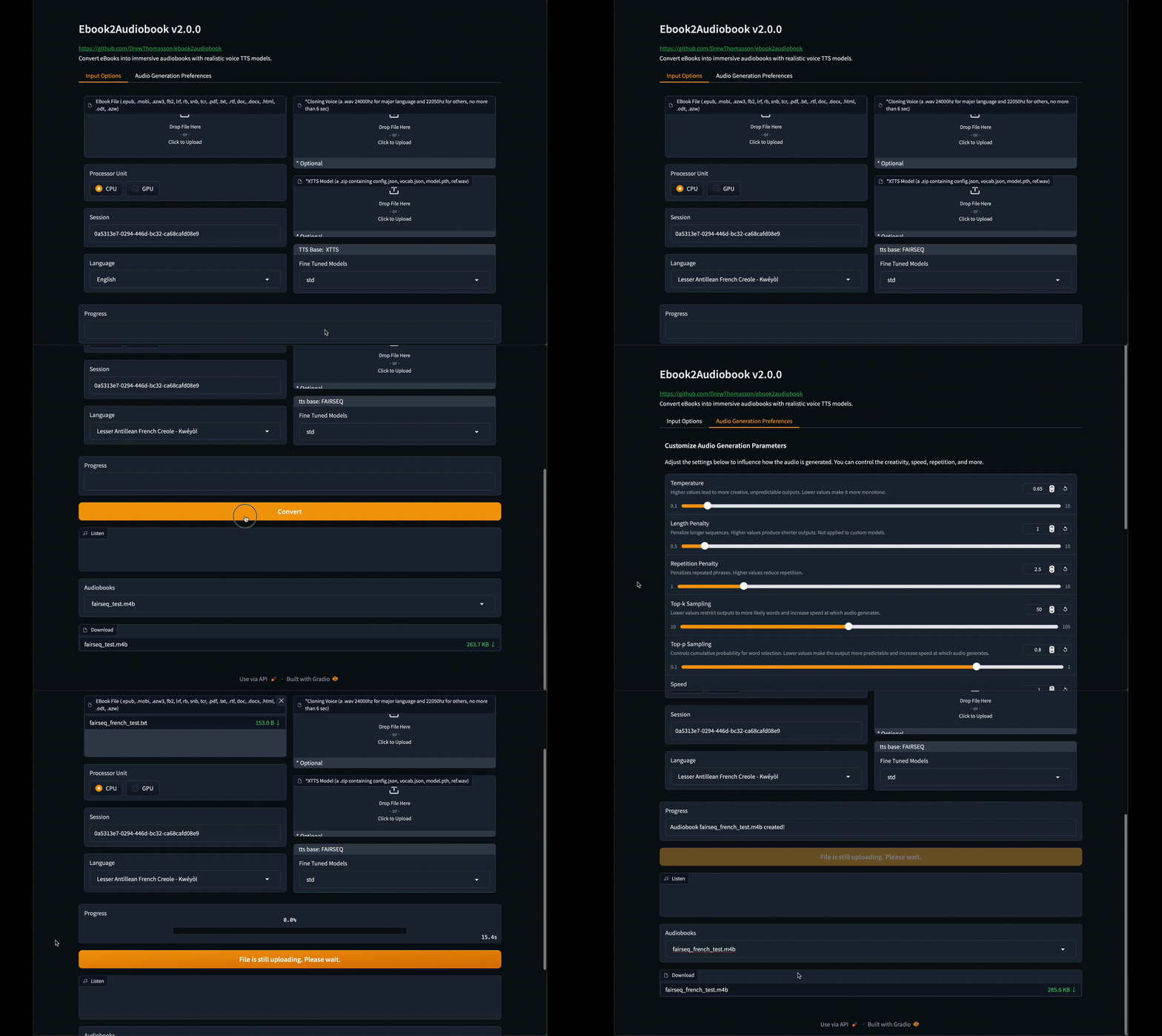
### 远程运行
[](https://huggingface.co/spaces/drewThomasson/ebook2audiobook)
[](https://colab.research.google.com/github/DrewThomasson/ebook2audiobook/blob/main/Notebooks/colab_ebook2audiobook.ipynb) [](https://github.com/Rihcus/ebook2audiobookXTTS/blob/main/Notebooks/kaggle-ebook2audiobook.ipynb)
#### GUI 界面

点击查看 Web GUI 截图
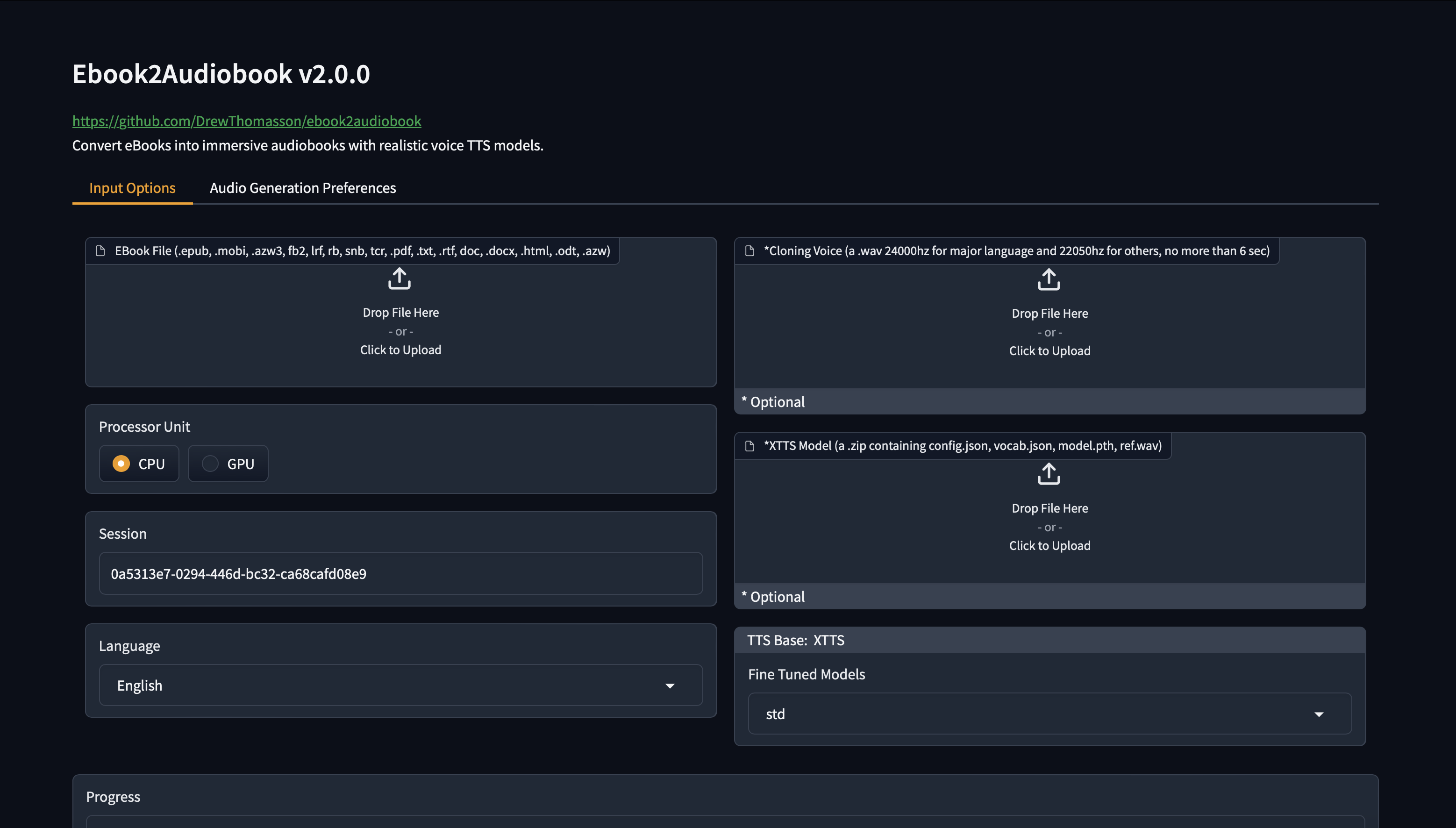
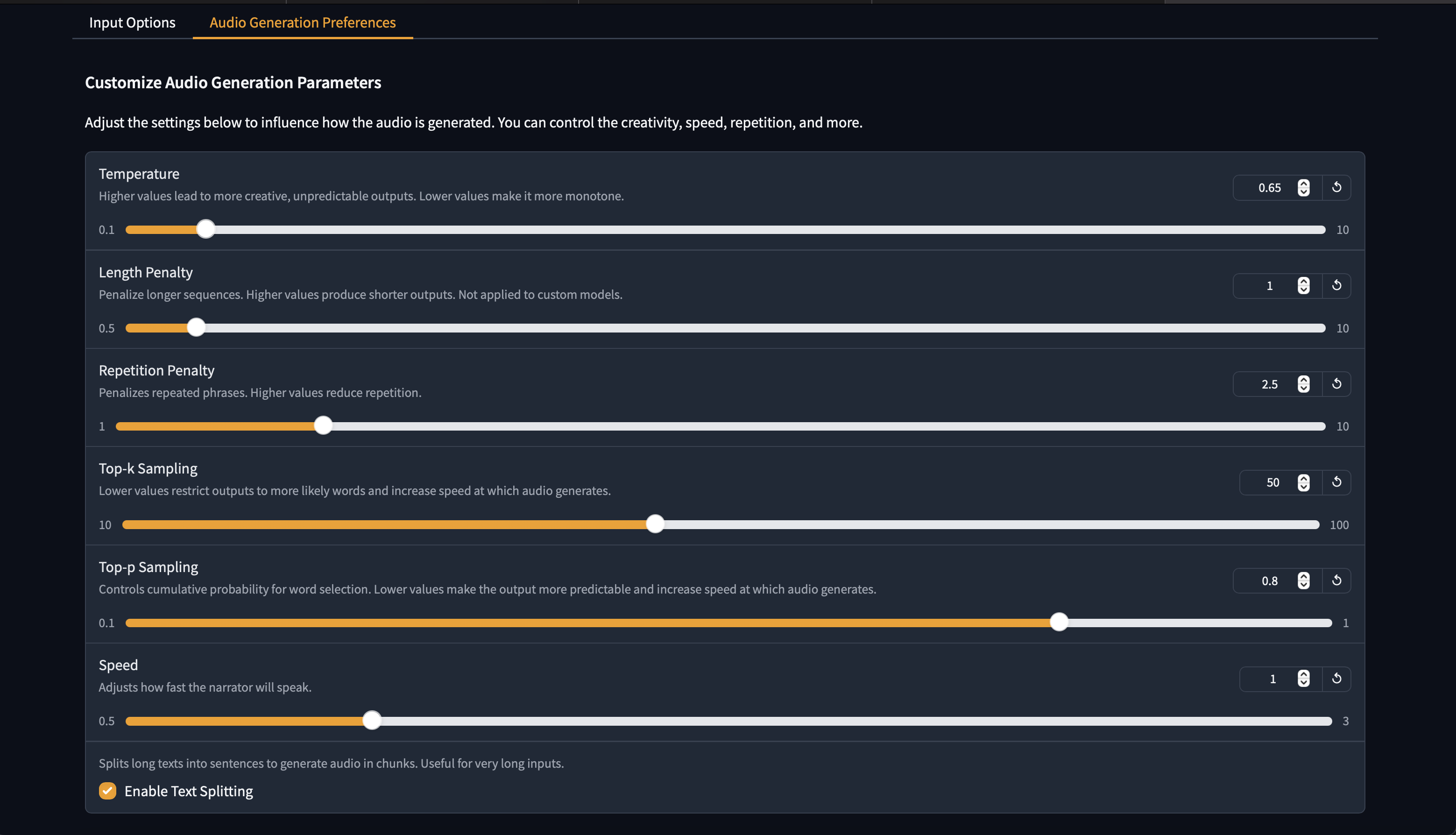
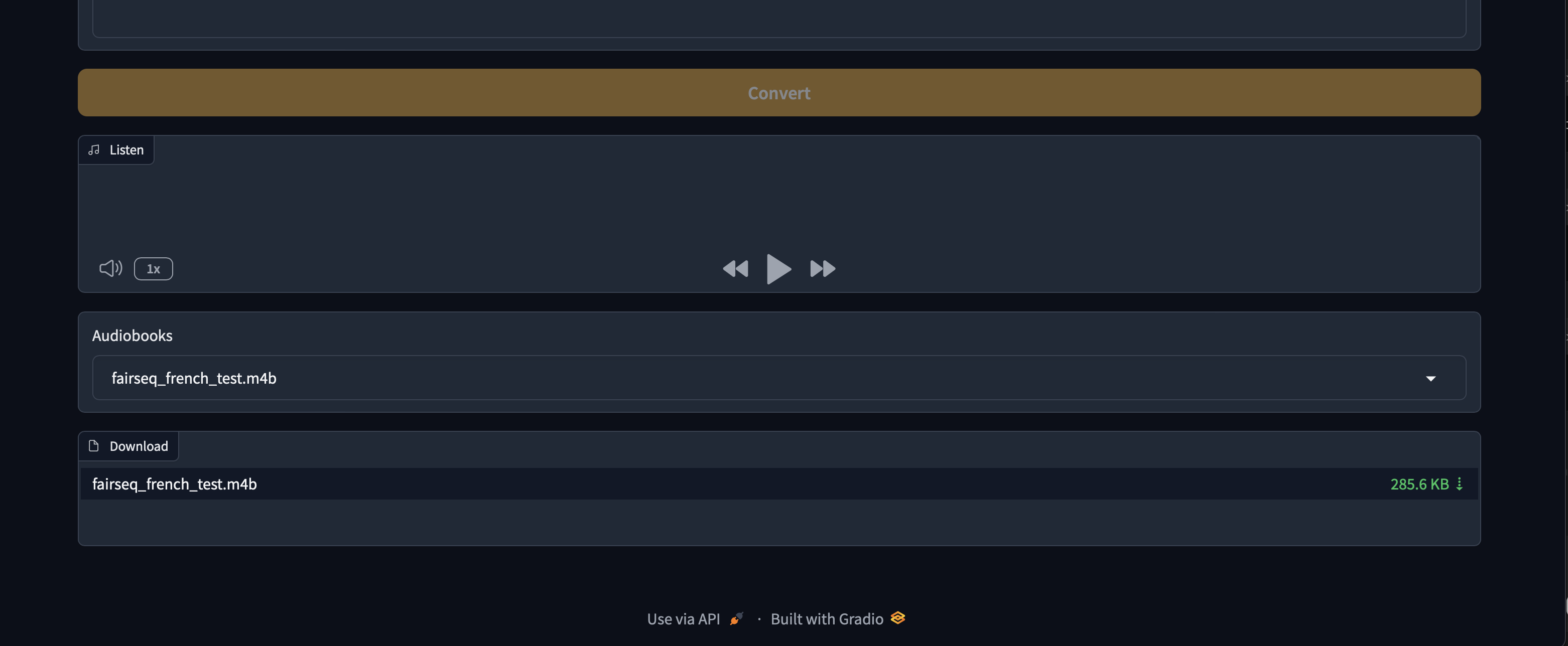
## 演示
**新默认语音演示**
https://github.com/user-attachments/assets/750035dc-e355-46f1-9286-05c1d9e88cea
更多演示
**ASMR 语音**
https://github.com/user-attachments/assets/68eee9a1-6f71-4903-aacd-47397e47e422
**雨天语音**
https://github.com/user-attachments/assets/d25034d9-c77f-43a9-8f14-0d167172b080
**Scarlett 语音**
https://github.com/user-attachments/assets/b12009ee-ec0d-45ce-a1ef-b3a52b9f8693
**David Attenborough 语音**
https://github.com/user-attachments/assets/81c4baad-117e-4db5-ac86-efc2b7fea921
**示例**

## README.md
## 目录
- [ebook2audiobook](#-ebook2audiobook)
- [功能](#features)
- [GUI 界面](#gui-interface)
- [演示](#demos)
- [支持的语言](#supported-languages)
- [最低要求](#hardware-requirements)
- [用法](#instructions)
- [本地运行](#instructions)
- [启动 Gradio Web 界面](#instructions)
- [基本无头模式用法](#basic-usage)
- [无头模式自定义 XTTS 模型用法](#example-of-custom-model-zip-upload)
- [帮助命令输出](#help-command-output)
- [远程运行](#run-remotely)
- [Docker](#docker)
- [运行步骤](#docker)
- [克隆语音](#cloned-voices)
- [微调 TTS 模型](#fine-tuned-tts-models)
- [微调 TTS 模型合集](#fine-tuned-tts-collection)
- [训练 XTTSv2](#fine-tune-your-own-xttsv2-model)
- [支持的电子书格式](#supported-ebook-formats)
- [输出格式](#output-and-process-formats)
- [回退到旧版本](#reverting-to-older-versions)
- [常见问题](#common-issues)
- [特别感谢](#special-thanks)
- [目录](#table-of-contents)
## 功能
- 🔧 **支持的 TTS 引擎**:`XTTSv2`, `Bark`, `Fairseq`, `VITS`, `Tacotron2`, `Tortoise`, `GlowTTS`, `YourTTS`
- 📚 **转换多种文件格式**:`.epub`, `.mobi`, `.azw3`, `.fb2`, `.lrf`, `.rb`, `.snb`, `.tcr`, `.pdf`, `.txt`, `.rtf`, `.doc`, `.docx`, `.html`, `.odt`, `.azw`, `.tiff`, `.tif`, `.png`, `.jpg`, `.jpeg`, `.bmp`, `.zip`
- 💻 **TextArea** 可直接将短文本转换为音频
- 🔍 对以图像形式呈现文本页面的文件进行 **OCR 扫描**
- 🔊 **高质量文本转语音**,从近实时到接近真人语音
- 🗣️ **可选声音克隆**,使用你自己的语音文件
- 🌐 **支持 1158 种语言**([支持语言列表](https://dl.fbaipublicfiles.com/mms/tts/all-tts-languages.html))
- 💻 **低资源友好** — 最低可在 **2 GB RAM / 1 GB VRAM** 上运行
- 🎵 **有声书输出格式**:单声道或立体声 `aac`, `flac`, `mp3`, `m4b`, `m4a`, `mp4`, `mov`, `ogg`, `wav`, `webm`
- 🧠 **支持 SML 标签** — 精细控制停顿、暂停、语音切换等([见下文](#sml-tags-available))
- 🧩 **可选自定义模型**,使用你自己训练的模型(XTTSv2、VITS、FAIRSEQ、PIPER,其他可按需支持)
- 🎛️ **微调预设模型**,由 E2A 团队训练
(如需更多微调模型,或希望将你的模型分享到官方预设列表,请联系我们)
## 硬件要求
- 最低 2GB RAM,建议 8GB。
- 最低 1GB VRAM,建议 4GB。
- 在 Windows 上运行时需启用虚拟化(仅 Docker)。
- CPU、XPU(Intel、AMD、ARM)*。
- CUDA、ROCm、JETSON
- MPS(Apple Silicon CPU)
*现代 TTS 引擎在 CPU 上非常慢,因此请使用较低质量的 TTS,如 YourTTS、Tacotron2 等。
## 支持的语言
| **Arabic (ar)** | **Chinese (zh)** | **English (en)** | **Spanish (es)** |
|:------------------:|:------------------:|:------------------:|:------------------:|
| **French (fr)** | **German (de)** | **Italian (it)** | **Portuguese (pt)** |
| **Polish (pl)** | **Turkish (tr)** | **Russian (ru)** | **Dutch (nl)** |
| **Czech (cs)** | **Japanese (ja)** | **Hindi (hi)** | **Bengali (bn)** |
| **Hungarian (hu)** | **Korean (ko)** | **Vietnamese (vi)**| **Swedish (sv)** |
| **Persian (fa)** | **Yoruba (yo)** | **Swahili (sw)** | **Indonesian (id)**|
| **Slovak (sk)** | **Croatian (hr)** | **Tamil (ta)** | **Danish (da)** |
- [**此处另有 +1130 种语言和方言**](https://dl.fbaipublicfiles.com/mms/tts/all-tts-languages.html)
## 支持的电子书格式
- `.epub`, `.pdf`, `.mobi`, `.txt`, `.html`, `.rtf`, `.chm`, `.lit`,
`.pdb`, `.fb2`, `.odt`, `.cbr`, `.cbz`, `.prc`, `.lrf`, `.pml`,
`.snb`, `.cbc`, `.rb`, `.tcr`
- **最佳效果**:使用 `.epub` 或 `.mobi` 可自动检测章节
## 输出与处理格式
- `.m4b`, `.m4a`, `.mp4`, `.webm`, `.mov`, `.mp3`, `.flac`, `.wav`, `.ogg`, `.aac`
- 处理格式可在 lib/conf.py 中修改
## 可用的 SML 标签
- `[break]` — 静音(随机范围 **0.3–0.6 秒**)
- `[pause]` — 静音(随机范围 **1.0–1.6 秒**)
- `[pause:N]` — 固定暂停(**N 秒**)
- `[voice:/path/to/voice/file]...[/voice]` — 从默认或 GUI/CLI 所选语音切换语音
**查看我们专门用于自动向电子书添加 SML 的其他仓库 -> [E2A-SML](./components/E2A-SML)**
> [!IMPORTANT]
**在提交安装或 bug 问题之前,请仔细搜索已打开和已关闭的 issues 标签页
以确保你的问题尚未存在。**
>[!NOTE]
**EPUB 格式缺乏任何标准结构,例如章节、段落、前言等。
因此你应首先手动删除任何不想转换为音频的文本。**
### 使用说明
1. **克隆仓库**
```bash
git clone https://github.com/DrewThomasson/ebook2audiobook.git
cd ebook2audiobook
```
2. **安装 / 运行 ebook2audiobook**:
- **Linux/MacOS**
```bash
./ebook2audiobook.command
```
MacOS 用户请注意:将安装 homebrew 以安装缺失的程序。
- **Mac 启动器**
双击 `Mac Ebook2Audiobook Launcher.command`
- **Windows**
```bash
ebook2audiobook.cmd
```
或
双击 `ebook2audiobook.cmd`
Windows 用户请注意:将安装 scoop,以便在没有管理员权限的情况下安装缺失的程序。
1. **打开 Web 应用**:点击终端中提供的 URL 以访问 Web 应用并转换 eBook。`http://localhost:7860/`
2. **公开链接**:
`./ebook2audiobook.command --share` (Linux/MacOS)
`ebook2audiobook.cmd --share` (Windows)
`python app.py --share` (all OS)
> [!IMPORTANT]
**如果脚本停止后再次运行,你需要刷新 gradio GUI 界面
以便网页重新连接到新的连接 socket。**
### 基本用法
- **Linux/MacOS**:
```bash
./ebook2audiobook.command --headless --ebook --voice --language
```
- **Windows**
```bash
ebook2audiobook.cmd --headless --ebook --voice --language
```
- **[--ebook]**:你的 eBook 文件路径
- **[--voice]**:语音克隆文件路径(可选)
- **[--language]**:ISO-639-3 语言代码(例如:ita 表示意大利语,eng 表示英语,deu 表示德语……)。
默认语言为 eng,对于在 ./lib/lang.py 中设置的默认语言,--language 为可选参数。
也支持 ISO-639-1 双字母代码。
### 自定义模型 Zip 上传示例
(必须是包含必需模型文件的 .zip 文件。以 XTTSv2 为例:config.json、model.pth、vocab.json 和 ref.wav)
- **Linux/MacOS**
```bash
./ebook2audiobook.command --headless --ebook --language --custom_model
```
- **Windows**
```bash
ebook2audiobook.cmd --headless --ebook --language --custom_model
```
注意:自定义模型的 ref.wav 始终是用于转换时所选的语音
- ****:`model_name.zip` 文件的路径,
该文件必须(根据 TTS 引擎)包含所有必需文件
(参见 ./lib/models.py)。
### 详细指南及全部可用参数列表
- **Linux/MacOS**
```bash
./ebook2audiobook.command --help
```
- **Windows**
```bash
ebook2audiobook.cmd --help
```
- **或适用于所有操作系统**
```python
app.py --help
```
```bash
usage: app.py [-h] [--session SESSION] [--share] [--headless] [--ebook EBOOK] [--ebooks_dir EBOOKS_DIR]
[--language LANGUAGE] [--voice VOICE] [--voice_map VOICE_MAP] [--device {CPU,CUDA,MPS,ROCM,XPU,JETSON}]
[--tts_engine {XTTS,BARK,VITS,FAIRSEQ,TACOTRON,YOURTTS,xtts,bark,vits,fairseq,tacotron,yourtts}]
[--custom_model CUSTOM_MODEL] [--fine_tuned FINE_TUNED] [--output_format OUTPUT_FORMAT]
[--output_channel OUTPUT_CHANNEL] [--temperature TEMPERATURE] [--length_penalty LENGTH_PENALTY]
[--num_beams NUM_BEAMS] [--repetition_penalty REPETITION_PENALTY] [--top_k TOP_K] [--top_p TOP_P]
[--speed SPEED] [--enable_text_splitting] [--text_temp TEXT_TEMP] [--waveform_temp WAVEFORM_TEMP]
[--output_dir OUTPUT_DIR] [--version]
Convert eBooks to Audiobooks using a Text-to-Speech model. You can either launch the Gradio interface or run the script in headless mode for direct conversion.
options:
-h, --help show this help message and exit
--session SESSION Session to resume the conversion in case of interruption, crash,
or reuse of custom models and custom cloning voices.
**** The following option is for gradio/gui mode only:
--share (Optional) Enable a public shareable Gradio link.
**** The following options are for --headless mode only:
--headless Run the script in headless mode
--ebook EBOOK Path to the ebook file for conversion. Cannot be used when --ebooks_dir is present.
--ebooks_dir EBOOKS_DIR
Relative or absolute path of the directory containing the files to convert.
Cannot be used when --ebook is present.
--text TEXT Raw text for conversion. Cannot be used when --ebook or --ebooks_dir is present.
--language LANGUAGE Language of the e-book. Default language is set
in ./lib/lang.py sed as default if not present. All compatible language codes are in ./lib/lang.py
optional parameters:
--translate ISO3 (Optional) Translate ebook to a target language (ISO 639-3 code, e.g. eng, fra, deu) before TTS synthesis.
Uses argostranslate. The target language becomes the effective TTS language for the run.
A copy of the source ebook is made with the _ suffix so translated and non-translated
outputs stay isolated (independent process folder, audio chunks, and final file).
--voice VOICE (Optional) Path to the voice cloning file for TTS engine.
Uses the default voice if not present.
--voice_map VOICE_MAP
(Optional, --ebooks_dir only) Path to a JSON file mapping ebook path -> voice path.
Each entry overrides --voice for that specific ebook. Missing/null entries fall back to --voice.
Keys may be absolute paths or basenames. Example:
{"book1.epub": "/voices/eng/adult/female/alice.wav", "/abs/path/book2.epub": null}
--device {CPU,CUDA,MPS,ROCM,XPU,JETSON}
(Optional) Processor unit type for the conversion.
Default is set in ./lib/conf.py if not present. Fall back to CPU if CUDA or MPS is not available.
--tts_engine {XTTS,BARK,VITS,FAIRSEQ,TACOTRON,YOURTTS,xtts,bark,vits,fairseq,tacotron,yourtts}
(Optional) Preferred TTS engine (available are: ['XTTS', 'BARK', 'VITS', 'FAIRSEQ', 'TACOTRON', 'YOURTTS', 'xtts', 'bark', 'vits', 'fairseq', 'tacotron', 'yourtts'].
Default depends on the selected language. The tts engine should be compatible with the chosen language
--custom_model CUSTOM_MODEL
(Optional) Path to the custom model zip file cntaining mandatory model files.
Please refer to ./lib/models.py
--fine_tuned FINE_TUNED
(Optional) Fine tuned model path. Default is builtin model.
--output_format OUTPUT_FORMAT
(Optional) Output audio format. Default is m4b set in ./lib/conf.py
--output_channel OUTPUT_CHANNEL
(Optional) Output audio channel. Default is mono set in ./lib/conf.py
--temperature TEMPERATURE
(xtts only, optional) Temperature for the model.
Default to config.json model. Higher temperatures lead to more creative outputs.
--length_penalty LENGTH_PENALTY
(xtts only, optional) A length penalty applied to the autoregressive decoder.
Default to config.json model. Not applied to custom models.
--num_beams NUM_BEAMS
(xtts only, optional) Controls how many alternative sequences the model explores. Must be equal or greater than length penalty.
Default to config.json model.
--repetition_penalty REPETITION_PENALTY
(xtts only, optional) A penalty that prevents the autoregressive decoder from repeating itself.
Default to config.json model.
--top_k TOP_K (xtts only, optional) Top-k sampling.
Lower values mean more likely outputs and increased audio generation speed.
Default to config.json model.
--top_p TOP_P (xtts only, optional) Top-p sampling.
Lower values mean more likely outputs and increased audio generation speed. Default to config.json model.
--speed SPEED (xtts only, optional) Speed factor for the speech generation.
Default to config.json model.
--enable_text_splitting
(xtts only, optional) Enable TTS text splitting. This option is known to not be very efficient.
Default to config.json model.
--text_temp TEXT_TEMP
(bark only, optional) Text Temperature for the model.
Default to config.json model.
--waveform_temp WAVEFORM_TEMP
(bark only, optional) Waveform Temperature for the model.
Default to config.json model.
--output_dir OUTPUT_DIR
(Optional) Path to the output directory. Default is set in ./lib/conf.py
--version Show the version of the script and exit
Example usage:
Windows:
Gradio/GUI:
ebook2audiobook.cmd
Headless mode:
ebook2audiobook.cmd --headless --ebook '/path/to/file' --language eng
Linux/Mac:
Gradio/GUI:
./ebook2audiobook.command
Headless mode:
./ebook2audiobook.command --headless --ebook '/path/to/file' --language eng
SML tags available:
[break] — silence (random range **0.3–0.6 sec.**)
[pause] — silence (random range **1.0–1.6 sec.**)
[pause:N] — fixed pause (**N sec.**)
[voice:/path/to/voice/file]...[/voice] — switch voice from default or selected voice from GUI/CLI
```
注意:在 gradio/gui 模式下,要取消正在进行的转换,只需点击电子书上传组件上的 [X]。
提示:如需更长停顿,可添加 '[pause:3]' 表示 3 秒等。
### Docker
1. **克隆仓库(Clone the Repository)**:
```bash
git clone https://github.com/DrewThomasson/ebook2audiobook.git
cd ebook2audiobook
```
2. **构建容器**
```bash
Windows:
Docker:
ebook2audiobook.cmd --script_mode build_docker
Docker Compose:
ebook2audiobook.cmd --script_mode build_docker --docker_mode compose
Podman Compose:
ebook2audiobook.cmd --script_mode build_docker --docker_mode podman
Linux/Mac
Docker:
./ebook2audiobook.command --script_mode build_docker
Docker Compose
./ebook2audiobook.command --script_mode build_docker --docker_mode compose
Podman Compose:
./ebook2audiobook.command --script_mode build_docker --docker_mode podman
```
4. **运行容器:**
```bash
Docker run image:
Gradio/GUI:
CPU:
docker run -v "./ebooks:/app/ebooks" -v "./audiobooks:/app/audiobooks" -v "./models:/app/models" -v "./voices:/app/voices" -v "./tmp:/app/tmp" --rm -it -p 7860:7860 athomasson2/ebook2audiobook:cpu
CUDA:
docker run -v "./ebooks:/app/ebooks" -v "./audiobooks:/app/audiobooks" -v "./models:/app/models" -v "./voices:/app/voices" -v "./tmp:/app/tmp" --gpus all --rm -it -p 7860:7860 athomasson2/ebook2audiobook:cu[118/122/124/126 etc..]
ROCM:
docker run -v "./ebooks:/app/ebooks" -v "./audiobooks:/app/audiobooks" -v "./models:/app/models" -v "./voices:/app/voices" -v "./tmp:/app/tmp" --device=/dev/kfd --device=/dev/dri --rm -it -p 7860:7860 athomasson2/ebook2audiobook:rocm[6.0/6.1/6.4 etc..]
XPU:
docker run -v "./ebooks:/app/ebooks" -v "./audiobooks:/app/audiobooks" -v "./models:/app/models" -v "./voices:/app/voices" -v "./tmp:/app/tmp" --device=/dev/dri --rm -it -p 7860:7860 athomasson2/ebook2audiobook:xpu
JETSON:
docker run -v "./ebooks:/app/ebooks" -v "./audiobooks:/app/audiobooks" -v "./models:/app/models" -v "./voices:/app/voices" -v "./tmp:/app/tmp" --runtime nvidia --rm -it -p 7860:7860 athomasson2/ebook2audiobook:jetson[51/60/61 etc...]
Headless mode:
CPU:
docker run -v "./ebooks:/app/ebooks" -v "./audiobooks:/app/audiobooks" -v "./models:/app/models" -v "./voices:/app/voices" -v "./tmp:/app/tmp" -v "/my/real/ebooks/folder/absolute/path:/app/another_ebook_folder" --rm -it -p 7860:7860 ebook2audiobook:cpu --headless --ebook "/app/another_ebook_folder/myfile.pdf" [--voice /app/my/voicepath/voice.mp3 etc..]
CUDA:
docker run -v "./ebooks:/app/ebooks" -v "./audiobooks:/app/audiobooks" -v "./models:/app/models" -v "./voices:/app/voices" -v "./tmp:/app/tmp" -v "/my/real/ebooks/folder/absolute/path:/app/another_ebook_folder" --gpus all --rm -it -p 7860:7860 ebook2audiobook:cu[118/122/124/126 etc..] --headless --ebook "/app/another_ebook_folder/myfile.pdf" [--voice /app/my/voicepath/voice.mp3 etc..]
ROCM:
docker run -v "./ebooks:/app/ebooks" -v "./audiobooks:/app/audiobooks" -v "./models:/app/models" -v "./voices:/app/voices" -v "./tmp:/app/tmp" -v "/my/real/ebooks/folder/absolute/path:/app/another_ebook_folder" --device=/dev/kfd --device=/dev/dri --rm -it -p 7860:7860 ebook2audiobook:rocm[6.0/6.1/6.4 etc.] --headless --ebook "/app/another_ebook_folder/myfile.pdf" [--voice /app/my/voicepath/voice.mp3 etc..]
XPU:
docker run -v "./ebooks:/app/ebooks" -v "./audiobooks:/app/audiobooks" -v "./models:/app/models" -v "./voices:/app/voices" -v "./tmp:/app/tmp" -v "/my/real/ebooks/folder/absolute/path:/app/another_ebook_folder" --device=/dev/dri --rm -it -p 7860:7860 ebook2audiobook:xpu --headless --ebook "/app/another_ebook_folder/myfile.pdf" [--voice /app/my/voicepath/voice.mp3 etc..]
JETSON:
docker run -v "./ebooks:/app/ebooks" -v "./audiobooks:/app/audiobooks" -v "./models:/app/models" -v "./voices:/app/voices" -v "./tmp:/app/tmp" -v "/my/real/ebooks/folder/absolute/path:/app/another_ebook_folder" --runtime nvidia --rm -it -p 7860:7860 ebook2audiobook:jetson[51/60/61 etc.] --headless --ebook "/app/another_ebook_folder/myfile.pdf" [--voice /app/my/voicepath/voice.mp3 etc..]
Docker Compose (i.e. cuda 12.8:
Run Gradio GUI:
DEVICE_TAG=cu128 docker compose --profile gpu up --no-log-prefix
Run Headless mode:
DEVICE_TAG=cu128 docker compose --profile gpu run --rm ebook2audiobook --headless --ebook "/app/ebooks/myfile.pdf" --voice /app/voices/eng/adult/female/some_voice.wav etc..
Podman Compose (i.e. cuda 12.8:
Run Gradio GUI:
DEVICE_TAG=cu128 podman-compose -f podman-compose.yml --profile gpu up
Run Headless mode:
DEVICE_TAG=cu128 podman-compose -f podman-compose.yml --profile gpu run --rm ebook2audiobook-gpu --headless --ebook "/app/ebooks/myfile.pdf" --voice /app/voices/eng/adult/female/some_voice.wav etc..
```
- 注意:Docker 中未暴露 MPS,因此必须使用 CPU
## 克隆音色(Cloned Voices)
你可以上传任意支持音频格式的语音音频,理想时长约为 1 至 5 分钟。
录音背景嘈杂或有背景音乐也没关系 —— E2A 会为你清理人声。
内置克隆音色列表主要为英语。如需将其他语言的音色正式
添加到列表中,请联系我们,审核通过后会添加。
## 微调 TTS 模型(Fine Tuned TTS models)
#### 微调你自己的 XTTSv2 模型
[Universal_TTS_Finetune](./components/Universal_TTS_Finetune) [](https://huggingface.co/spaces/drewThomasson/xtts-finetune-webui-gpu) [](https://github.com/DrewThomasson/ebook2audiobook/blob/v25/Notebooks/finetune/xtts/kaggle-xtts-finetune-webui-gradio-gui.ipynb) [](https://colab.research.google.com/github/DrewThomasson/ebook2audiobook/blob/v25/Notebooks/finetune/xtts/colab_xtts_finetune_webui.ipynb)
#### 训练数据降噪
[](https://huggingface.co/spaces/drewThomasson/DeepFilterNet2_no_limit) [](https://github.com/Rikorose/DeepFilterNet)
### 微调 TTS 合集
[](https://huggingface.co/drewThomasson/fineTunedTTSModels/tree/main)
对于 XTTSv2 自定义模型,必须提供参考音色的 ref 音频片段:
## 自定义你的 Ebook2Audiobook
你可以自由修改 libs/conf.py 以添加或移除所需设置。若打算这样做,请先
复制一份原始 conf.py,以便在每次 ebook2audiobook 更新时备份你修改过的 conf.py 并
换回原始文件。对 models.py 也应采用相同流程。若希望将自己的自定义模型
作为官方 ebook2audiobook 微调模型,请联系我们,我们会将其添加到预设列表。
## 回退到旧版本
发布版本见 -> [此处](https://github.com/DrewThomasson/ebook2audiobook/releases)
```bash
git checkout tags/VERSION_NUM # Locally/Compose -> Example: git checkout tags/v25.7.7
```
## 常见问题:
- 我的 NVIDIA/ROCm/XPU/MPS GPU 未被检测到?? -> [GPU ISSUES Wiki Page](https://github.com/DrewThomasson/ebook2audiobook/wiki/GPU-ISSUES)
- CPU 较慢(在多核服务器 CPU 上表现更好),而 GPU 可实现接近实时的转换。
[相关讨论](https://github.com/DrewThomasson/ebook2audiobook/discussions/19#discussioncomment-10879846)
(不过它不支持零样本音色克隆(zero-shot voice cloning),且是 Siri 级音质,但在 CPU 上快得多)。
- 「我遇到依赖问题」—— 直接使用 Docker,它完全自包含且有无头模式,
在 docker run 命令末尾添加 `--help` 参数可获取更多信息。
- 「我遇到音频被截断的问题!」—— 请务必为此提交 ISSUE,
我们并非精通所有语言,需要用户的建议来微调分句逻辑。😊
## ***** 路线图 *****
- 所有功能均开放公众贡献 ⭐
- 欢迎讲任何受支持语言的朋友帮助我们改进模型 ⭐
- [x] 在开始转换前预览区块/章节
- [ ] 按已转换的句子进行编辑,以实现精确文本修改
- [x] 集成 SML 标签,用于语音、停顿、break 及更多调整
- [x] 多语言的 -h -help 参数说明
- [x] 支持 PDF / JPG / BMP / PNG / TIFF 的 OCR 扫描
- [x] Notebooks 文件夹 [在此讨论](https://github.com/DrewThomasson/ebook2audiobookXTTS/issues/5#issuecomment-2408773254)
- [x] 使中文文本切分不拆分词语,并改进停顿时间 [在此讨论](https://github.com/DrewThomasson/ebook2audiobookXTTS/issues/18#issuecomment-2401154894)
- [x] Dockerfile
- [x] Docker compose
- [x] Podman compose
- [x] Kaggle Notebook
- [x] Google Colab Notebook
- [ ] Audiobookshelf 集成
- [ ] [开发 iOS 应用](https://github.com/DrewThomasson/ebook2audiobook/pull/35#issuecomment-2496495212)
- [ ] [开发 Android 应用](https://github.com/DrewThomasson/ebook2audiobook/pull/35#issuecomment-2496495212)
#### 额外选项
- [x] 电子书翻译选项
- [x] 输出格式选择
- [x] 批量电子书文件夹
- [x] 多进程转换
- [x] 批量电子书文件夹转换
- [x] GPU 设备检测
- [x] 对任意参考音频进行降噪,用于上传语音克隆,
- [x] 自定义模型上传(目前仅支持 XTTSv2,可按需扩展)
- [ ] 为 xttsv2、fairseq、vits、piper 等至少添加欧洲葡萄牙语语言模型(欢迎协助)
- [ ] 为 xttsv2、fairseq、vits、piper 等至少添加信德语语言模型(欢迎协助)
#### TTS 引擎
- [x] XTTSv2
- [x] Bark
- [x] Fairseq
- [x] VITS
- [x] Tacotron2
- [x] YourTTS
- [x] Tortoise
- [x] GlowTTS
- [x] Piper
- [ ] GPT-SoVITS (https://github.com/RVC-Boss/GPT-SoVITS)
- [ ] OpenVoice (https://github.com/myshell-ai/OpenVoice)
- [ ] fish-speech (https://github.com/fishaudio/fish-speech)
- [ ] ChatTTS (https://github.com/2noise/ChatTTS)
- [ ] CosyVoice (https://github.com/FunAudioLLM/CosyVoice)
- [ ] F5-TTS (https://github.com/swivid/f5-tts)
- [ ] chatterbox (https://github.com/resemble-ai/chatterbox)
- [ ] Supertonic (https://github.com/supertone-inc/supertonic)
- [ ] Spark-TTS (https://github.com/sparkaudio/spark-tts)
- [ ] index-tts (https://github.com/index-tts/index-tts)
- [ ] MeloTTS (https://github.com/myshell-ai/MeloTTS)
- [ ] Kokoro-TTS (https://github.com/hexgrad/kokoro)
- [ ] OmniVoice (https://github.com/k2-fsa/OmniVoice)
- [ ] Zonos (https://github.com/Zyphra/Zonos)
- [ ] Style-TTS2 (https://github.com/yl4579/StyleTTS2)
- [ ] Orpheus-TTS (https://github.com/canopyai/Orpheus-TTS)
- [ ] NewTTS (https://github.com/neuphonic/neutts?tab=readme-ov-file)
- [ ] VIbeVoice (https://github.com/vibevoice-community/VibeVoice)
- [ ] Qwen3-TTS (https://huggingface.co/spaces/Qwen/Qwen3-TTS)
#### README 翻译
- [x] Arabic (ara)
- [x] Chinese (zho)
- [x] English (eng)
- [x] Spanish (spa)
- [x] French (fra)
- [x] German (deu)
- [x] Italian (ita)
- [x] Portuguese (por)
- [x] Polish (pol)
- [x] Turkish (tur)
- [x] Russian (rus)
- [x] Dutch (nld)
- [x] Czech (ces)
- [x] Japanese (jpn)
- [x] Hindi (hin)
- [x] Bengali (ben)
- [x] Hungarian (hun)
- [x] Korean (kor)
- [x] Vietnamese (vie)
- [x] Swedish (swe)
- [x] Persian (fas)
- [x] Yoruba (yor)
- [x] Swahili (swa)
- [x] Indonesian (ind)
- [x] Slovak (slk)
- [x] Croatian (hrv)
#### 🐍 操作系统兼容性
- [x] 🍎 Mac Intel x86
- [x] 🪟 Windows x86
- [x] 🐧 Linux x86
- [x] 🖥️🍏 Apple Silicon Mac
- [x] 🪟💪 ARM Windows
- [x] 🐧💪 ARM Linux
**********
## 用于训练模型等的额外进阶功能(一条简单命令即可支持所有 Coqui-tts 模型和 piper-tts)
- 有关此功能的更多信息,请联系 @DrewThomasson,他目前正在开发此项工作,[进行中的仓库在此](https://github.com/DrewThomasson/Universal_TTS_Finetune)
- [ ] 为所有 coqui-tts 模型制作易于使用的训练 GUI,采用 ljspeech 格式训练方案 [coqui tts 提供的方案在此](https://github.com/coqui-ai/TTS/tree/dev/recipes/ljspeech)
## 供贡献者参考的 Python 代码规范化说明
- 代码之间不留空行,函数和类之间除外。
- 除 dict() 和 json 外,所有键均使用单引号。dict['key'] 始终使用单引号调用
- 4 空格缩进,绝不使用 tab
- 所有函数及其参数声明和返回值均需严格类型标注
- 参数与其类型标注之间不留空格,函数、“->” 与返回值之间不留空格
示例:
```python
import json
from typing import Optional
def get_user(user_id:int, users:list[dict])->Optional[dict]:
for user in users:
if user['id'] == user_id:
return user
return None
def summarize(user:dict)->str:
return f"User {user['name']} is {'active' if user['is_active'] else 'inactive'}."
def to_json(user:dict)->str:
return json.dumps({"id": user['id'], "name": user['name'], "email": user['email']})
users:list = [
dict(id=1, name="alice", email="alice@example.com", role="admin", is_active=True),
dict(id=2, name="bob", email="bob@example.com", role="editor", is_active=False),
dict(id=3, name="carol", email="carol@example.com", role="viewer", is_active=True),
]
config = {
"max_users": 100,
"default_role": "viewer",
"allow_signup": True,
}
roles = ['admin', 'editor', 'viewer']
found = get_user(1, users)
if found:
print(summarize(found))
print(found['email'])
print(to_json(found))
if config['default_role'] in roles:
print(config['default_role'])
```
## 征集用于 Beta 测试的硬件捐赠
我们接受各类硬件以测试我们的开发,例如:
- 支持 CUDA >= 11.8 的 Nvidia 显卡
- Intel XPU 显卡
- 支持 ROCm >=5.7 的 AMD ROCm 显卡
@DrewThomasson 如果你想提供任何帮助!😃
## 特别感谢
感谢所有资金和代码贡献者,每一份贡献与建议都有助于提升 E2A 的质量。